JDK vs JRE vs JVM Explained: What's the Difference?
Learn the difference between JDK, JRE, and JVM with diagrams, examples, architecture, interview questions, and practical use cases. A beginner-friendly Java guide.

Introduction
If you're learning Java, you've probably come across the terms JDK, JRE, and JVM. They sound similar, they're often mentioned together, and they're one of the most common sources of confusion for beginners.
The simplest way to remember them is this:
JDK is used to develop Java applications.
JRE provides everything needed to run Java applications.
JVM is the engine that executes Java bytecode.
Although these three components work together, they have completely different responsibilities. Understanding their relationship will make it much easier to learn how Java programs are compiled and executed.
If you're new to Java, start with our What Is Java? guide. It explains why Java became one of the world's most popular programming languages and introduces the "Write Once, Run Anywhere" philosophy that makes Java unique.
Quick Answer

JDK builds Java applications, JRE runs them, and JVM executes them.
Understanding the Relationship
A common misconception is that JDK, JRE, and JVM are three completely different software packages. In reality, they are nested inside one another.
JDK
│
├── JRE
│   ├── JVM
│   ├── Java Class Libraries
│   └── Runtime Files
│
├── Java Compiler (javac)
├── Javadoc
├── Debugger (jdb)
└── Other Development Tools
This means:
Every JDK contains a JRE.
Every JRE contains a JVM.
That's why developers usually install only the JDK. It already includes everything required to build, compile, and run Java applications.
What is JVM?
The Java Virtual Machine (JVM) is the heart of the Java platform. Its job is to execute Java bytecode and convert it into machine-specific instructions that your operating system can understand.
Unlike languages such as C++, Java doesn't compile directly into machine code. Instead, Java follows a two-step process.
The Java compiler converts source code into bytecode.
The JVM converts that bytecode into native machine code during execution.
This extra layer is what makes Java platform-independent.
For example, if you compile a Java program on Windows, the generated bytecode can also run on Linux or macOS without changing the source code. The only requirement is that the target system has a compatible JVM installed.
This concept is known as Write Once, Run Anywhere (WORA). If you'd like to know why Java was designed this way, check out our History of Java article.
What Does the JVM Do?
The JVM is much more than a program launcher. It handles several critical tasks behind the scenes, including:
Loading Java classes into memory
Verifying bytecode for security
Managing memory allocation
Performing Garbage Collection
Handling exceptions
Executing bytecode
Optimizing performance using the Just-In-Time (JIT) Compiler
Because the JVM automatically manages memory, developers don't need to manually allocate and free memory like they often do in C or C++.
Many of Java's strengths, such as portability, automatic memory management, and security, are possible because of the JVM. We cover these in more detail in our Features of Java guide.
What is JRE?
The Java Runtime Environment (JRE) provides everything required to run Java applications.
Think of it as the environment where your compiled Java program executes.
A JRE includes:
JVM
Java Class Libraries
Supporting runtime files
Configuration files
The JRE does not include development tools such as the Java compiler.
For example, suppose a company develops an inventory management application in Java. The developers use the JDK to write and compile the application, while the employees simply run the finished application using the runtime environment.
JRE
│
├── JVM
├── Java Libraries
└── Runtime Files
It's worth mentioning that modern Java releases no longer distribute the JRE as a separate download. When you install the latest JDK, it already includes everything needed to develop and run Java applications.
What is JDK?
The Java Development Kit (JDK) is the complete toolkit used for Java development.
If you're planning to build desktop applications, web applications, Spring Boot projects, or simply practice Java programming, this is what you should install.
The JDK contains the JRE along with several development tools.
Some of the most commonly used tools are:

If you haven't installed Java yet, follow our How to Install Java JDK on Windows guide. It walks you through downloading the latest JDK, configuring the JAVA_HOME environment variable, and verifying the installation.
Throughout this tutorial, we're referring to the Java SE Development Kit. If you're unsure about the different Java editions, read our Java Editions (SE, EE, and ME) guide to understand when each edition is used.
Here's a simple Java program:
public class HelloWorld {
    public static void main(String[] args) {
        System.out.println("Welcome to TheTechLane!");
    }
}
Save the file as:
HelloWorld.javaCompile it using the JDK:
javac HelloWorld.javaRun it:
java HelloWorldNotice what happened.
The javac compiler comes from the JDK, while the java command uses the JVM to execute the generated bytecode.
That's why every Java developer installs the JDK instead of only the JRE.
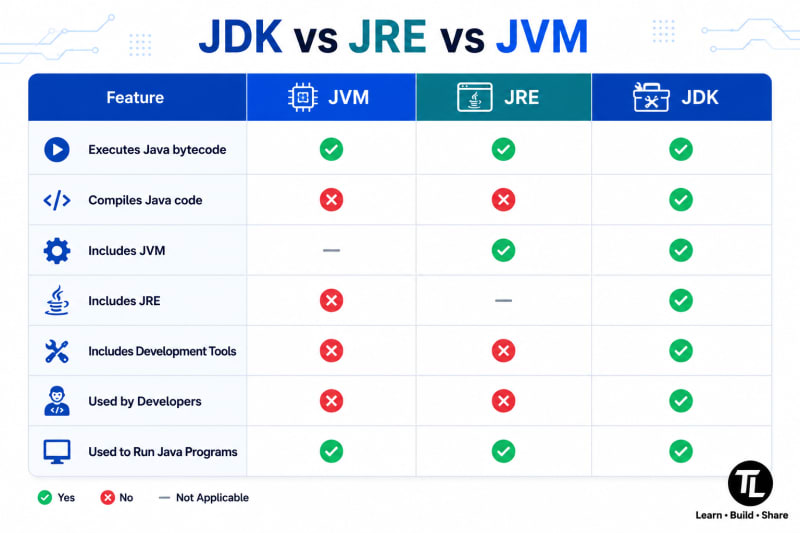
How JDK, JRE, and JVM Work Together
Now that you know the role of each component, let's see how they work together when you run a Java program.
Imagine you've written a simple Java application. The journey from source code to program output follows these steps:
HelloWorld.java
        │
        ▼
   javac (JDK)
        │
        ▼
HelloWorld.class (Bytecode)
        │
        ▼
      JVM
        │
        ▼
 Machine Code
        │
        ▼
 Program Output
Here's what happens at each stage:
You write your Java code in a
.javafile.The
javaccompiler, which is part of the JDK, compiles the source code into bytecode (.classfile).The JVM, available through the JRE, loads the bytecode into memory.
The JVM verifies the bytecode, allocates memory, performs garbage collection, and converts the bytecode into native machine code.
Finally, the operating system executes the machine code, and your program produces the expected output.
This extra compilation layer is why the same Java application can run on Windows, Linux, or macOS without changing the source code. Only the JVM implementation is different for each platform.
A Simple Real-World Analogy
One of the easiest ways to remember JDK, JRE, and JVM is to compare them to a restaurant.
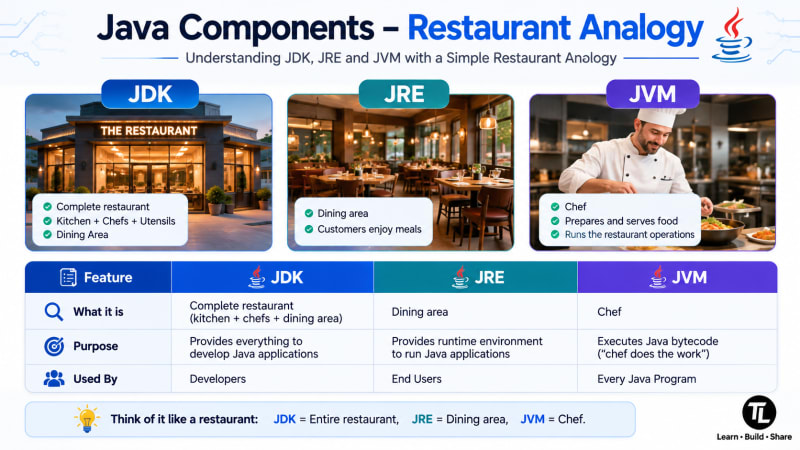
Here's how it works:
The restaurant (JDK) has everything needed to prepare and serve food.
The dining area (JRE) is where customers consume the finished meal.
The chef (JVM) does the actual cooking.
Without the chef, food can't be prepared. Without the dining area, customers can't enjoy it. Without the restaurant, neither of them exists.
The relationship between JDK, JRE, and JVM works in a similar way.
Common Beginner Mistakes
Many developers encounter these misconceptions when learning Java.
1. Thinking JVM Executes .java Files
The JVM never executes Java source code directly.
It only understands bytecode (.class files).
2. Installing Only the JRE
If you want to write Java programs, the JRE isn't enough.
You need the JDK, which includes the compiler and all development tools.
3. Believing JDK and JVM Are the Same
The JDK is a complete development toolkit.
The JVM is only one component inside the JDK.
4. Assuming Java Is Platform Independent by Itself
Java source code isn't magically portable.
Platform independence is achieved because the JVM converts platform-independent bytecode into platform-specific machine instructions.
Frequently Asked Questions
Which should I install: JDK or JRE?
If you're learning Java or building applications, install the JDK. It includes both the JRE and the JVM.
Is the JRE still available as a separate download?
For modern Java versions, Oracle no longer distributes the JRE separately. Installing the JDK is the recommended approach.
What is bytecode?
Bytecode is the intermediate code generated by the Java compiler (javac). It is platform-independent and executed by the JVM.
What is the JIT Compiler?
The Just-In-Time (JIT) Compiler is part of the JVM. It converts frequently executed bytecode into native machine code to improve application performance.
Can one Java program run on different operating systems?
Yes. As long as a compatible JVM is available, the same compiled bytecode can run on Windows, Linux, and macOS.
Conclusion
Understanding the difference between JDK, JRE, and JVM is one of the first milestones in learning Java.
While these terms are often used together, each has a distinct responsibility:
The JDK gives developers the tools to build Java applications.
The JRE provides the environment needed to run them.
The JVM executes Java bytecode and enables Java's platform independence.
Once these concepts are clear, the rest of the Java ecosystem becomes much easier to understand from compiling your first program to building enterprise applications with Spring Boot.
Key Takeaways
JDK = Develop Java applications
JRE = Run Java applications
JVM = Execute Java bytecode
JDK ⊃ JRE ⊃ JVM
Install the JDK if you're a Java developer.
Previous Lesson
Java Program Structure
🎁 Bonus Article (Recommended)
Before moving to the next lesson, learn what happens behind the scenes when a Java program is compiled and executed.
Java Compilation Process Explained: From Source Code to Bytecode
🚀 Next Lesson
Variables in Java
Learn how to declare, initialize, and use variables in Java—the building blocks for storing and manipulating data.
📚 Continue the Java Series
Java Fundamentals
Java Program Structure
Bonus Guides
What Is Java Bytecode?
Java Developer Roadmap (2026)
Core Java (Coming Next)
Variables in Java
Data Types
Type Casting
Operators
Literals
Keywords & Identifiers
Packages and Import Keyword
User Input with Scanner
Output Formatting
Math Class and Random Class
Decision Making (if, else, switch)
Loops
Methods
Arrays
Strings
Command Line Arguments
Wrapper Classes
Have a Question?
If you run into any issues while writing or running your first Java program, leave a comment below.
We'll help you troubleshoot the problem with clear explanations and practical solutions so you can continue your Java learning journey with confidence.
Happy Coding! ☕
Follow TheTechLane
Want more Java tutorials, programming tips, and developer resources?
Follow TheTechLane on LinkedIn, X, Instagram, Threads, Facebook, Medium, and Pinterest to stay updated whenever a new tutorial is published.
Learn. Build. Share.
— TheTechLane