Java Editions Explained: Java SE, EE, and ME
Java is available in different editions designed for different types of applications. The three editions you'll commonly hear about are Java SE, Java EE, and Java ME.
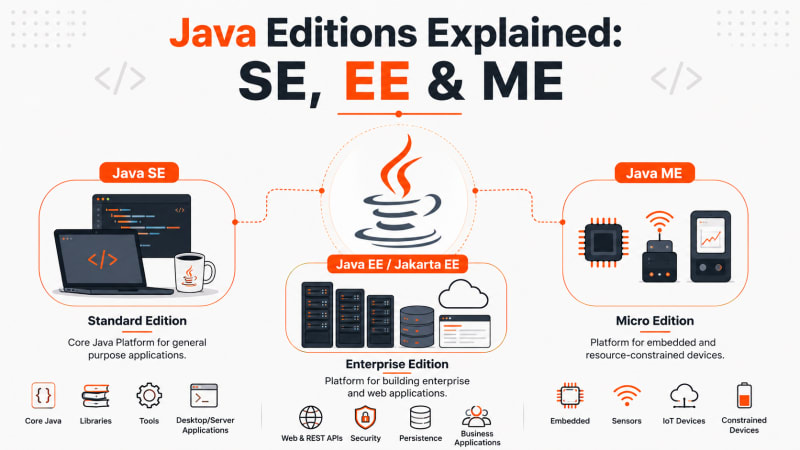
Java is available in different editions designed for different types of applications. The three editions you'll commonly hear about are Java SE, Java EE, and Java ME.
The easiest way to remember them is:
Java SE (Standard Edition) — core Java and general-purpose applications.
Java EE (Enterprise Edition) — enterprise and server-side applications. Today, Java EE continues as Jakarta EE.
Java ME (Micro Edition) — applications for embedded and resource-constrained devices.
If you're learning Java for the first time, Java SE is where you should start.
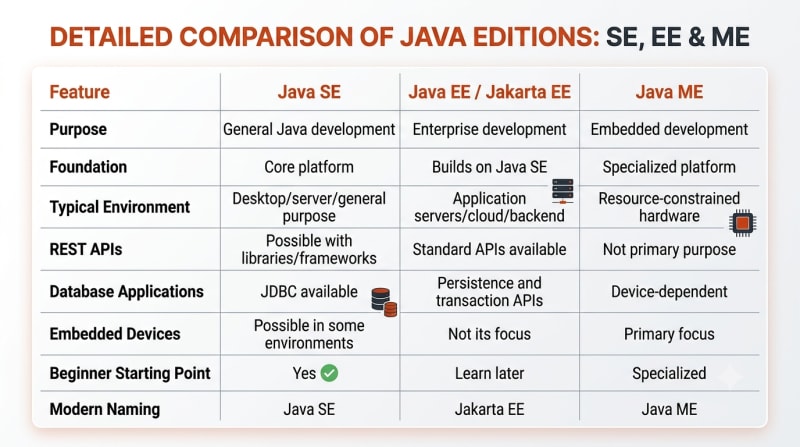
Quick Comparison: Java SE vs Java EE vs Java ME

One important detail: Java EE was transferred to the Eclipse Foundation and evolved into Jakarta EE. Modern enterprise Java development therefore uses the Jakarta EE name and jakarta.* APIs rather than treating Java EE as a new actively developed Oracle edition.
What Is Java SE?
Java SE (Java Platform, Standard Edition) is the foundation of Java development.
It provides the Java language, JVM-related platform capabilities, and the core APIs developers use to create general-purpose Java applications.
When you're learning concepts such as:
Variables
Data types
Classes and objects
Inheritance
Interfaces
Exception handling
Collections
Multithreading
File handling
you're primarily learning Java SE.
A simple Java SE program looks like this:
public class HelloJava {

    public static void main(String[] args) {
        System.out.println("Hello from Java SE!");
    }
}
Here, main() is the entry point of the application and System.out.println() prints text to the console.
Nothing enterprise-specific is required.
That's why Java SE should be your starting point before learning frameworks such as Spring Boot or enterprise Java technologies.
Where Is Java SE Used?
Java SE is commonly used for:
Learning Java programming
Command-line applications
Utility programs
Desktop applications
Server-side foundations
Libraries and frameworks
Modern Java SE releases also provide APIs for collections, concurrency, networking, HTTP communication, database connectivity, security, I/O, and much more.
Official Documentation:
Oracle — Java Platform, Standard Edition Documentation
What Is Java EE?
Java EE stands for Java Platform, Enterprise Edition.
It was created for building large-scale server-side and enterprise applications on top of Java SE.
Think about applications such as:
Banking platforms
E-commerce backends
Enterprise portals
REST APIs
Business management systems
Large distributed applications
These systems need more than classes, loops, and collections. They need technologies for HTTP requests, persistence, transactions, dependency injection, security, and other enterprise concerns.
That's where Java EE came in.
However, there's an important naming change every Java developer should understand.
Java EE Is Now Jakarta EE
Java EE was moved to the Eclipse Foundation and its modern continuation is called Jakarta EE.
For example, modern Jakarta EE applications use packages such as:
import jakarta.ws.rs.GET;
import jakarta.ws.rs.Path;

@Path("/hello")
public class HelloResource {

    @GET
    public String hello() {
        return "Hello from Jakarta EE!";
    }
}
This example defines a simple HTTP endpoint.
A request to:
/hellocan return:
Hello from Jakarta EE!Jakarta EE provides specifications covering areas such as RESTful web services, persistence, dependency injection, validation, security, transactions, WebSocket communication, and more.
As of 2026, Jakarta EE 11 is the current released platform while Jakarta EE 12 is under development.
Official Documentation:
Jakarta EE — Platform Specifications
What Is Java ME?
Java ME stands for Java Platform, Micro Edition.
It's designed for environments where hardware resources such as memory, processing power, storage, or battery capacity may be limited.
Java ME has historically been used with devices such as:
Embedded systems
Sensors
Mobile devices
Gateways
Set-top boxes
Printers
Industrial equipment
Internet of Things devices
Oracle describes Java ME as a platform intended for embedded and mobile environments, including microcontrollers, sensors, gateways, and other constrained devices.
A simplified Java ME-style MIDlet example looks like this:
import javax.microedition.midlet.MIDlet;

public class HelloMIDlet extends MIDlet {

    public void startApp() {
        System.out.println("Hello from Java ME!");
    }

    public void pauseApp() {
    }

    public void destroyApp(boolean unconditional) {
    }
}
You'll notice this doesn't look exactly like the Java SE program.
That's because Java ME applications can use APIs and lifecycle models designed specifically for constrained device environments.
For most developers starting Java today, Java ME won't be the first edition they need. But understanding what it is helps you see how broad the Java ecosystem became.
Official Documentation:
Oracle Java Platform, Micro Edition
How Java SE, EE, and ME Relate
Here's a simple mental model:
flowchart TD
    JAVA["Java Platform"]

    JAVA --> SE["Java SE<br/>Standard Edition"]
    JAVA --> EE["Java EE → Jakarta EE<br/>Enterprise Development"]
    JAVA --> ME["Java ME<br/>Micro Edition"]

    SE --> CORE["Core Java<br/>Collections • I/O • Concurrency • Networking"]
    EE --> ENTERPRISE["Enterprise Apps<br/>REST • Persistence • Security • Transactions"]
    ME --> EMBEDDED["Embedded Devices<br/>Sensors • IoT • Constrained Hardware"]
Java SE provides the core foundation.
Enterprise Java technologies build on that foundation to solve server-side and business application problems, while Java ME targets environments with tighter hardware constraints.

The Java platform editions target different application environments
Java SE vs Java EE vs Java ME
Which Java Edition Should You Learn?
If you're a beginner, start with Java SE.
You need a strong understanding of core Java before moving into frameworks and enterprise development.
A practical learning path looks like this:
Java SE
   ↓
Core Java
   ↓
OOP
   ↓
Collections
   ↓
Exception Handling
   ↓
Multithreading
   ↓
JDBC
   ↓
Spring / Spring Boot or Jakarta EE
If your goal is backend development, Java SE gives you the foundation you'll later use with technologies such as Spring Boot, Hibernate, REST APIs, microservices, and Jakarta EE.
Java ME is worth exploring when your work specifically involves compatible embedded or constrained-device environments.
Common Confusion: Java EE vs Jakarta EE
One mistake beginners make is assuming Java EE and Jakarta EE are completely separate technologies.
They're part of the same enterprise Java lineage.
A simplified timeline is:
Java EE
   ↓
Transferred to Eclipse Foundation
   ↓
Jakarta EE
So when you encounter older tutorials using terms such as Java EE, javax.servlet, or other javax.* enterprise APIs, remember that modern Jakarta EE development has moved many enterprise APIs to the jakarta.* namespace.
Key Takeaways
Java SE provides the core Java platform and should be learned first.
Java EE was designed for enterprise Java development.
Modern Java EE has evolved into Jakarta EE.
Java ME targets embedded and resource-constrained devices.
Backend developers normally learn Java SE before moving to Spring Boot or Jakarta EE.
You don't need to learn all three editions before building Java applications.
Official Documentation
For accurate API and platform details, use the official documentation:
Java SE Documentation:
Oracle Java Platform, Standard Edition Documentation
Jakarta EE Documentation:
Jakarta EE Platform Specifications
Java ME Documentation:
Oracle Java Platform, Micro Edition
Previous Lesson
← Features of Java: Why Java Is Popular
What's Next?
Now that you understand the major Java editions, the next step is understanding the tools that actually run and develop Java programs.
Next Lesson → Installing the JDK
Continue Learning
Explore more beginner-friendly Java tutorials:
Java Program Structure
JDK vs JRE vs JVM
Have a Question?
If something isn't clear or you get stuck while learning Java, leave a comment below.
We'll do our best to explain it with simple words, practical examples, and code you can actually understand.
Happy Coding! ☕
Follow TheTechLane
Want more developer tutorials, programming tips, and tech updates?
Follow TheTechLane on LinkedIn, X, Instagram, Threads, and Pinterest to stay connected and catch new tutorials when they go live.
Learn. Build. Share.
— TheTechLane