History of Java: From Oak to Modern Java
Learn the history of Java in simple words, from the Green Project and Oak to modern Java, OpenJDK, Oracle, and major Java versions.
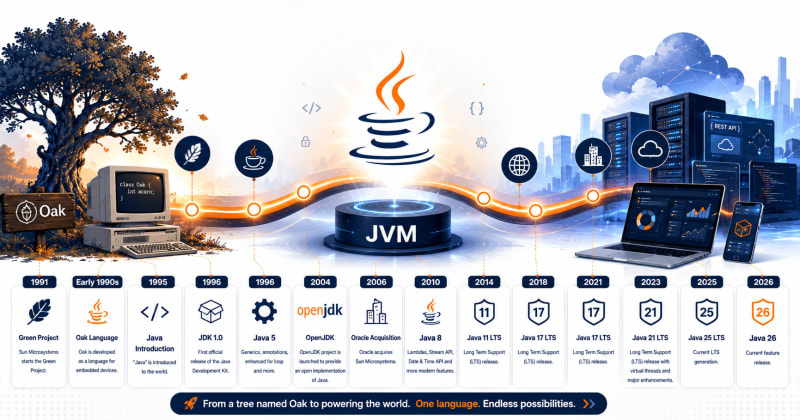
Java wasn't originally created for web applications, Android apps, or enterprise software.
It began as a project for consumer electronic devices.
The language was originally called Oak and was designed by James Gosling at Sun Microsystems. It was later redesigned for the Internet, renamed Java, and became one of the most widely used programming platforms in software development. Oracle's original Java Language Specification confirms that Oak was designed by Gosling for embedded consumer-electronic applications before being retargeted to the Internet and renamed Java.
Here's how that happened.
Quick Answer
Java was created by James Gosling and other engineers at Sun Microsystems in the early 1990s.
It was originally called Oak and was designed for consumer electronic devices.
The language was later redesigned for the Internet and renamed Java.
Over the following decades, Java evolved from a small experimental language into a major platform for:
Enterprise software
Banking systems
Backend development
Android applications
Cloud services
Distributed systems
Web applications
Java passed its 30th anniversary in 2025, and development continues today through Oracle, OpenJDK, and the wider Java community.
Who Created Java?
The name most closely associated with the creation of Java is:
James Gosling
Gosling worked at Sun Microsystems, where Java began.
But Java wasn't the work of one person alone.
The original Java Language Specification credits contributions from several engineers, including Patrick Naughton, Ed Frank, Jonathan Payne, and Chris Warth. The final language specification also involved Bill Joy, Guy Steele, Richard Tuck, Frank Yellin, Arthur van Hoff, and others.
So while James Gosling is commonly known as the father of Java, Java was built through a larger engineering effort.
The Green Project
Java's story begins with something called the Green Project.
The goal wasn't:
"Let's create a programming language that developers will use for the next 30 years."
The team was exploring software for a new generation of electronic devices.
Think about devices such as:
Televisions
    ↓
Set-top boxes
    ↓
Home appliances
    ↓
Other consumer electronics
There was a problem.
Different devices could use different processors and hardware.
Writing completely different software for every device would be difficult.
The team needed software that wasn't tightly tied to one particular machine.
That requirement helped shape one of Java's most important ideas:
Platform independence.
Why Platform Independence Mattered
Imagine writing the same application separately for three systems.
Application
   │
   ├── Windows version
   ├── Linux version
   └── macOS version
That's extra development and maintenance.
Java took a different approach.
Java Source Code
       ↓
    Bytecode
       ↓
      JVM
       ↓
Operating System
The Java Virtual Machine provides an abstraction between compiled Java bytecode and the underlying machine.
We'll explain this architecture properly in our dedicated JDK vs JRE vs JVM tutorial.
For now, remember:
Java was designed to reduce dependence on specific hardware and operating systems.

Early development of Java at Sun Microsystems
Why Was Java Originally Called Oak?
Before Java was Java, it was called:
OakOak was the original name of the language designed by James Gosling.
Oracle's Java Language Specification explicitly records that Java was originally called Oak.
Eventually, the language needed a new name.
Oak became:
Oak
 ↓
Java
And that name stuck.
You'll often find stories online explaining exactly why the word Java was chosen. Some of those stories have become part of developer folklore.
For a beginner, the important historical point is simpler:
The language started as Oak and was later renamed Java when its direction changed toward Internet applications.
Java Moves Toward the Internet
The consumer-electronics idea wasn't where Java found its biggest opportunity.
The Internet was growing quickly.
Web browsers were becoming important.
Developers needed ways to build software that could work across different computers.
Suddenly, Java's portability became extremely useful.
The language was substantially revised and redirected toward the Internet.
The same idea that helped with different electronic devices could now help with different computers.
Think About It This Way
A developer could write Java code:
public class HelloJava {

    public static void main(String[] args) {
        System.out.println("Hello, Java!");
    }
}
Compile it:
javac HelloJava.javaThe compiler produces:
HelloJava.classThat .class file contains Java bytecode.
Conceptually:
HelloJava.java
      ↓
 Java Compiler
      ↓
HelloJava.class
      ↓
   Bytecode
      ↓
     JVM
The JVM for the target platform handles execution.
That architecture became one of Java's defining characteristics.
Write Once, Run Anywhere
You'll often hear Java associated with:
Write Once, Run Anywhere (WORA)
The basic idea is straightforward.
Write your Java program once.
Compile it into bytecode.
Then run that bytecode wherever a compatible JVM exists.
The JVM itself is platform-specific.
Your Java bytecode doesn't need to be rewritten for every operating system.
This was a major advantage.
For example:

Java Platform Independence
Why Did Java Become Popular?
Java didn't become popular simply because it had good syntax.
Its architecture solved real problems.
Several characteristics helped Java gain adoption:

Java was also designed with relatively few implementation dependencies, helping applications remain portable across systems.
Java Started Growing
As Java matured, its role expanded far beyond its original purpose.
Java started appearing in:
Java
 │
 ├── Web Applications
 ├── Enterprise Systems
 ├── Banking
 ├── Desktop Applications
 ├── Mobile Applications
 ├── Backend APIs
 └── Cloud Systems
One important reason for Java's longevity is that it didn't remain frozen.
The language and JVM continued to evolve.
From Sun Microsystems to Oracle
For many years, Java was developed under Sun Microsystems.
A major change happened when Oracle acquired Sun Microsystems.
Java then came under Oracle's stewardship.
That didn't mean Java became a closed project controlled by a single team.
The OpenJDK project plays a central role in modern Java development.
What Is OpenJDK?
OpenJDK is the open-source implementation of the Java SE Platform.
This is an important distinction for beginners.
You may hear terms such as:
Java
OpenJDK
Oracle JDK
JVM
JDK
and assume they're all the same thing.
They're related, but they mean different things.
For now:
Java Platform
     │
     ├── OpenJDK
     │
     └── Oracle JDK
We'll explain the JDK ecosystem separately so you don't have to memorize everything here.
Major Java Versions
You don't need to memorize every Java release.
Seriously.
For a beginner, understanding the important milestones is much more useful.

As of July 2026, Oracle lists JDK 26 as the latest Java SE release, while JDK 25 is the latest Long-Term Support (LTS) release.
How Much Has Java Changed?
Quite a lot.
Look at a traditional Java program:
public class HelloWorld {

    public static void main(String[] args) {
        System.out.println("Hello, World!");
    }
}
Beginners have traditionally needed to encounter concepts such as classes, public, static, and String[] before they really understand them.
Modern Java has been working to reduce that initial ceremony.
Java 25, for example, finalized compact source files and instance main methods, specifically making simple programs easier to write before learners need to understand the traditional class-and-static-main structure.
That tells us something important:
Java isn't just maintaining old applications. The language itself continues to evolve.
Java Today
Java is now more than three decades old.
But "old" doesn't mean "obsolete."
Modern Java continues to receive:
Language improvements
JVM performance improvements
Security enhancements
Garbage collection improvements
Concurrency features
Developer productivity features
Cloud-focused improvements
Oracle released JDK 26 in March 2026 with ten JDK Enhancement Proposals covering language, security, runtime performance, libraries, and JDK maintenance.
Oracle currently provides Java downloads for Java 26 as well as the Java 25 and Java 21 LTS lines.
If you want to see the current JDK releases, use the official page:
Don't install anything yet if you're following this course from the beginning. We'll install and configure the JDK properly in the dedicated Install Java JDK tutorial.
Java History Timeline
Here's the simplified version worth remembering:

Java History Timeline
You don't need to memorize all of these dates. Java History Timeline
Remember the story:
Oak → Java → Internet → Enterprise → OpenJDK → Modern Java
That's enough to understand how Java reached where it is today.
Do You Need an Old Java Version?
Usually, no.
Older versions are sometimes required when developers maintain legacy applications.
Oracle maintains a Java Archive for this purpose, but it explicitly warns that older releases may not contain current security fixes and aren't recommended for normal production use.
If you're curious, the official archive is here:
As a beginner, don't download random old JDK versions because a five-year-old YouTube tutorial uses one.
We'll choose an appropriate version when we install Java.
Try It Yourself
History doesn't need much coding, but here's a useful experiment once Java is installed.
Open your terminal and run:
java --versionYou'll see something similar to:
java 25.xor another installed version.
You can also check the compiler:
javac --versionExample:
javac 25.xThese commands tell you which Java runtime and compiler are available on your computer.
We'll explain java and javac properly in the installation and compilation tutorials.
Common Beginner Mistakes
Mistake 1: Thinking Java and JavaScript are the same
They aren't.
Java ≠ JavaScriptThey're separate programming languages with different ecosystems and common use cases.
Mistake 2: Thinking Java hasn't changed since Java 8
Java 8 was extremely influential, but Java development didn't stop there.
Modern releases have introduced major changes in language syntax, concurrency, runtime performance, garbage collection, and developer experience.
Mistake 3: Installing an old JDK because an old tutorial uses it
You may find tutorials saying:
"Download JDK 8."
That may have made sense when the tutorial was written.
It doesn't automatically make it the best choice for a new learner today.
Oracle currently lists Java 26 as the latest feature release and Java 25 as the latest LTS release.
Interview Questions
1. Who created Java?
Java was primarily designed by James Gosling at Sun Microsystems, with contributions from several other engineers.
2. What was Java originally called?
Java was originally called Oak.
3. Why was Java created?
Its early design targeted embedded consumer-electronic applications and aimed to reduce dependencies on particular implementations and hardware environments. It was later redirected toward Internet applications.
4. What is WORA?
WORA means: Write Once, Run Anywhere.
It describes Java's approach of compiling programs into bytecode that can execute through compatible JVM implementations on different platforms.
5. Who owns Java today?
Oracle acquired Sun Microsystems and is now a major steward of Java. Modern Java development also involves the broader OpenJDK community.
6. Is Java still being developed?
Yes. Java continues to receive regular releases. JDK 26 became generally available in March 2026.
Key Takeaways
Java started with a much smaller goal than the platform we know today.
The important points to remember are:
Java began at Sun Microsystems.
James Gosling was its principal original designer.
Java was originally called Oak.
Its early target was embedded consumer electronics.
The language was later redirected toward the Internet.
Platform independence became one of Java's defining strengths.
Java grew into an important platform for enterprise and backend software.
OpenJDK became central to modern Java development.
Oracle became Java's steward after acquiring Sun Microsystems.
Java is still actively developed more than 30 years after its introduction.
What's Next?
Knowing Java's history is useful.
But the more important question for a developer is:
Why did Java survive for more than three decades?
A big part of the answer is its design.
In the next lesson, we'll explore features such as:
Platform Independence
Object-Oriented Programming
Security
Robustness
Multithreading
Automatic Memory Management
JIT Compilation
And instead of simply memorizing a list, we'll write small programs to understand what each Java feature actually means.
Previous Lesson
← What Is Java? A Beginner's Guide to Java Programming
What's Next?
Now that you know how Java started and evolved over the years, it's time to understand what makes Java different from other programming languages.
In the next tutorial, you'll learn about Java's most important features, including platform independence, object-oriented programming, security, robustness, multithreading, and automatic memory management—with simple explanations and practical code examples.
Continue Learning
Explore more beginner-friendly Java tutorials:
Java Program Structure
Have a Question?
If something isn't clear or you get stuck while learning Java, leave a comment below.
We'll do our best to explain it with simple words, practical examples, and code you can actually understand.
Happy Coding! ☕
Follow TheTechLane
Want more developer tutorials, programming tips, and tech updates?
Follow TheTechLane on LinkedIn, X, Instagram, Threads, and Pinterest to stay connected and catch new tutorials when they go live.
Learn. Build. Share.
— TheTechLane