What Is Java? A Beginner's Guide to Java Programming
Java is a high-level, object-oriented programming language that lets you build applications that can run on Windows, macOS, and Linux without changing the code.

Quick Answer
Java is a high-level, object-oriented programming language that lets you build applications that can run on Windows, macOS, and Linux without changing the code.
What Is Java?
Imagine you write a letter in English.
Anyone who understands English can read it.
Java works in a similar way.
Instead of creating a program that works only on Windows, Java converts your program into Bytecode. That Bytecode can be understood by the Java Virtual Machine (JVM) on any operating system.
That's why Java follows the famous principle:
Write Once, Run Anywhere (WORA).

Java program running on multiple operating systems using the JVM
Your First Java Program
public class HelloWorld {

    public static void main(String[] args) {

        System.out.println("Hello, World!");

    }
}
Output
Hello, World!How does this program work?
Let's understand it one line at a time.
public class HelloWorldThis creates a class named HelloWorld.
Think of a class as a blueprint for your program.
public static void main(String[] args)This is the main method.
When you run a Java program, the JVM always looks for this method first.
You can think of it as the starting point of your application.
System.out.println("Hello, World!");This prints the message on the screen

Flowchart showing Java program execution
Why Was Java Created?
In the early 1990s, software had a big problem.
A program written for Windows usually couldn't run on Linux or macOS.
Developers had to rewrite the same application multiple times.
Java solved this problem by introducing the Java Virtual Machine (JVM).
Instead of creating operating system-specific machine code, Java creates Bytecode, which any JVM can execute.
Real-Life Example
Imagine you have a PDF file.
You can open it on:
Windows
macOS
Linux
You don't create three different PDF files.
You create one.
The PDF Reader understands it.
Similarly,
Java creates Bytecode.
The JVM understands Bytecode.
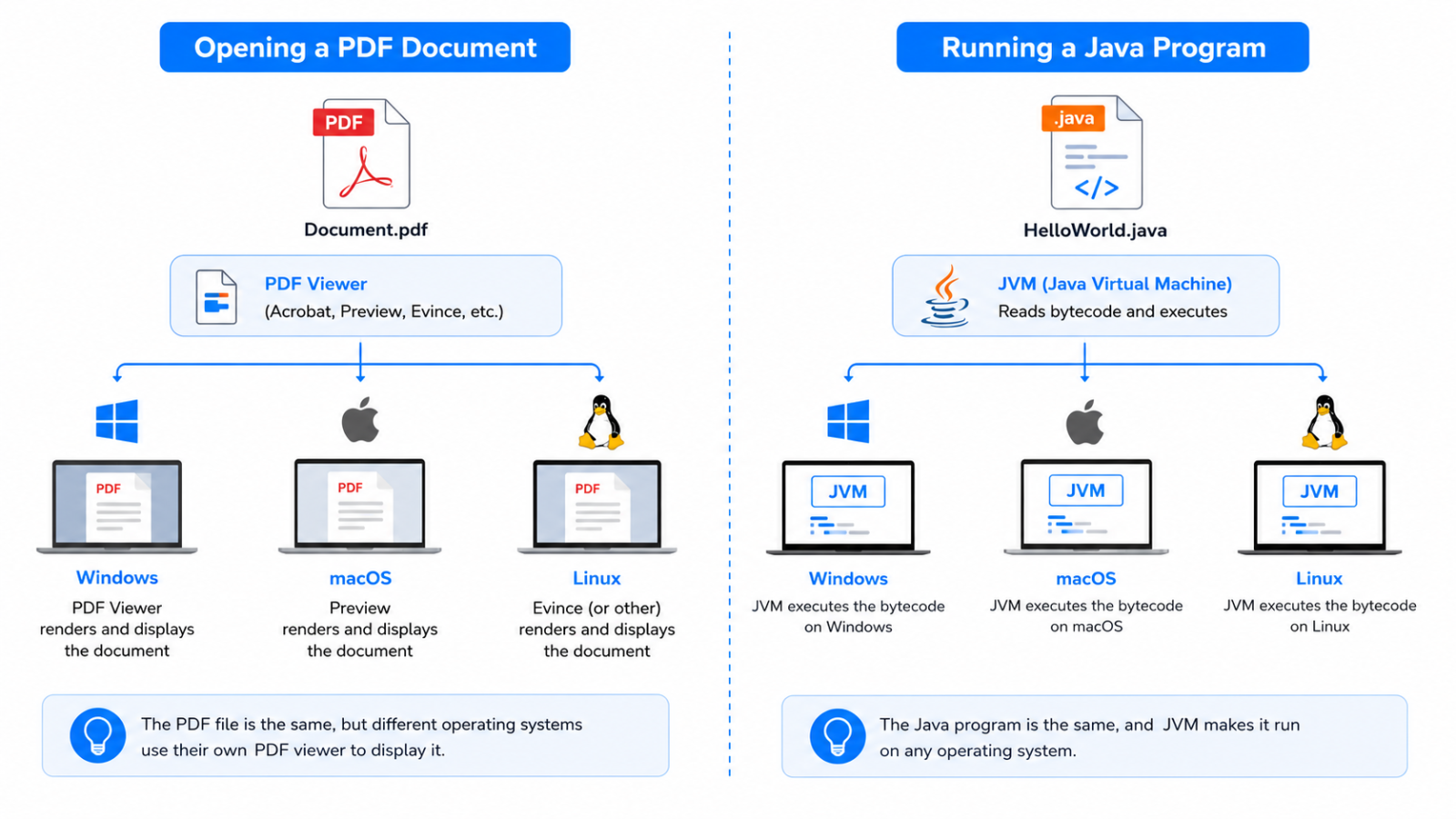
Comparing a PDF document opening on Windows, macOS, and Linux with a Java
Why Should You Learn Java?
Java is over 30 years old.
So why are companies still using it?
Because it is:
Reliable
Secure
Fast
Scalable
Easy to maintain
Thousands of companies depend on Java every day.
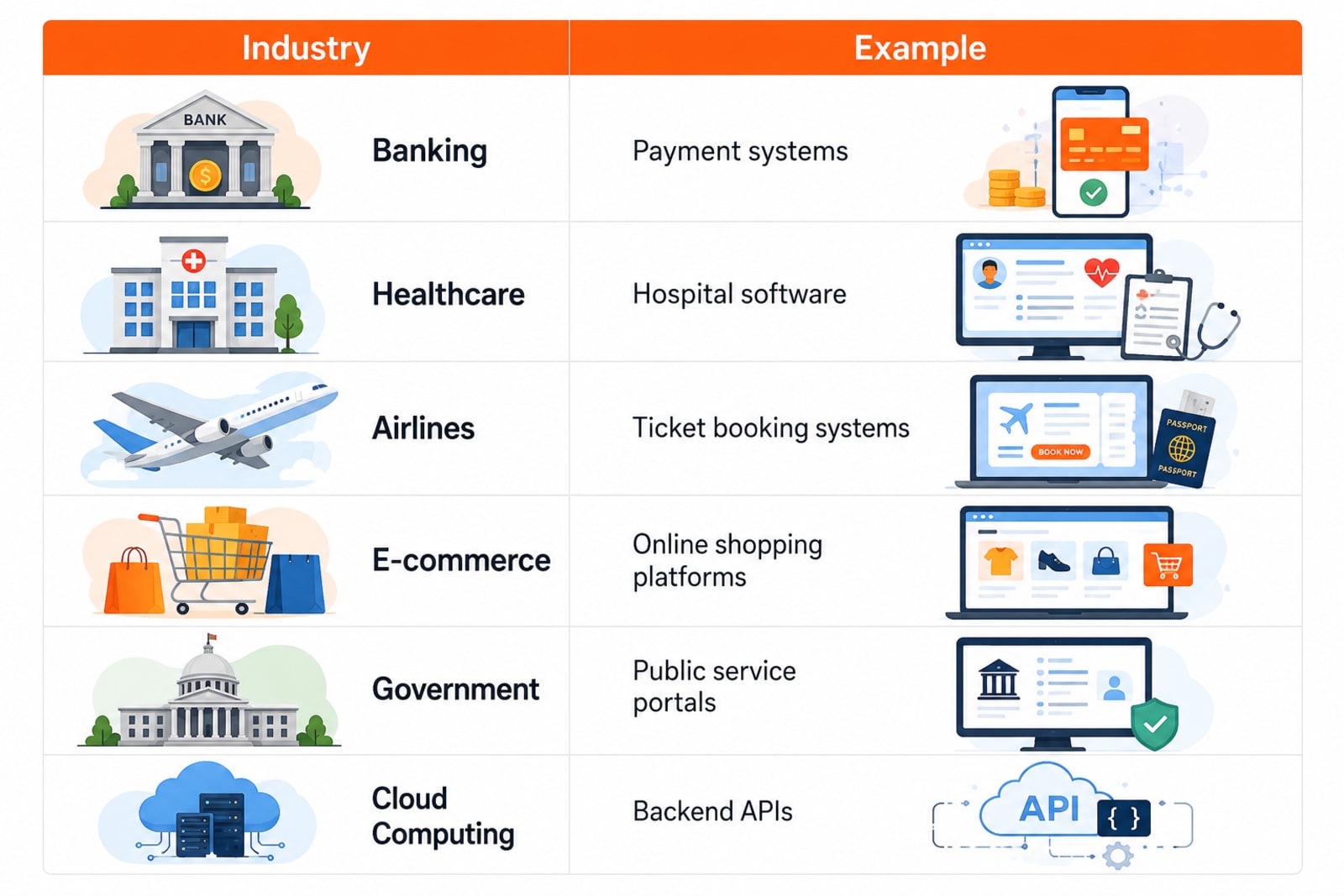
Java is Everywhere
Fun Fact 💡
Did you know?
Over 3 billion devices have run Java at some point.
That's one reason Java remains one of the world's most influential programming languages.
Try It Yourself
Replace the text inside println().
System.out.println("I am learning Java!");Run the program again.
What changed?
Experimenting with small changes is one of the fastest ways to learn.
Common Beginner Mistakes
❌ Forgetting a semicolon
System.out.println("Hello")✔ Correct
System.out.println("Hello");❌ Wrong class name
public class DemoSaved as
Main.javaJava will show an error because the public class name and the file name must match.
Interview Question
Why is Java called platform-independent?
Answer:
Because Java code is compiled into Bytecode, which runs on the Java Virtual Machine (JVM). Since a JVM is available for different operating systems, the same Java program can run on Windows, macOS, and Linux without changing the source code.
Key Takeaways
Java is a high-level, object-oriented programming language.
It follows the Write Once, Run Anywhere (WORA) principle.
Java programs run on the Java Virtual Machine (JVM), making them platform-independent.
Java is widely used in banking, healthcare, e-commerce, cloud computing, and enterprise applications.
Learning Java builds a strong foundation for backend development, Android, and modern software engineering.
What's Next?
Now that you understand what Java is and why it's one of the most popular programming languages, it's time to learn how Java evolved over the years.
In the next tutorial, you'll discover how Java was created, who developed it, why it became so popular, and the major milestones that shaped the language we use today.
Continue Learning
Explore more beginner-friendly Java tutorials:
Java Program Structure
Have a Question?
If something isn't clear or you get stuck while learning Java, leave a comment below. We'll do our best to explain it with practical examples and simple language.
Happy Coding! ☕
Follow TheTechLane
Want more developer tutorials, programming tips, and tech updates?
Follow TheTechLane on LinkedIn, X, Instagram, Threads, and Pinterest to stay connected and catch new tutorials when they go live.
Learn. Build. Share.
— TheTechLane