Features of Java: A Simple Developer Guide
Java is a general-purpose, class-based, object-oriented programming language designed to be portable, secure, strongly typed, and suitable for building production applications.
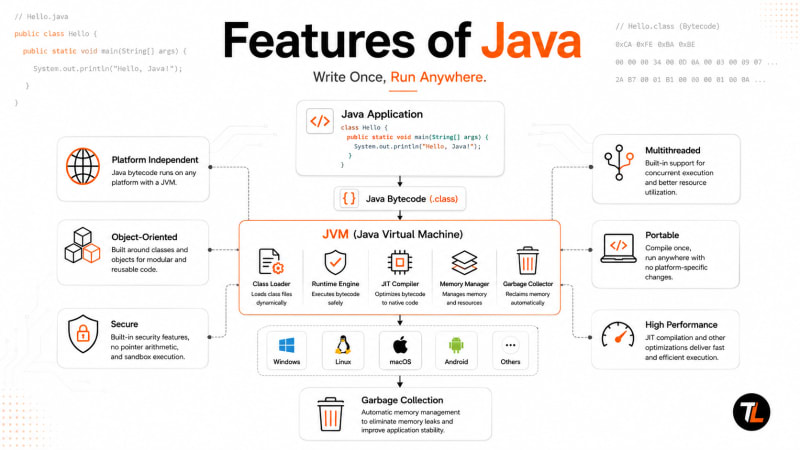
Java is a general-purpose, class-based, object-oriented programming language designed to be portable, secure, strongly typed, and suitable for building production applications.
If you're learning Java, don't memorize its features just for interviews.
Understanding these features helps you understand why Java works the way it does.
The main features of Java are:
Simple
Object-oriented
Platform independent
Portable
Secure
Robust
Multithreaded
Architecture neutral
High performance with JIT compilation
Automatic memory management
Dynamic
Rich standard library
We'll understand each one with small examples.
Quick Answer: What Are the Features of Java?

Here's the important part:
Java Source Code
      ↓
Java Compiler
      ↓
Bytecode
      ↓
JVM
      ↓
Operating System
      ↓
Hardware
A lot of Java's features come from this architecture.
1. Java Is Simple
Java was designed to make application development easier than lower-level languages.
For example, Java doesn't expose normal application developers to pointer arithmetic.
You also don't manually free every object you create.
A basic Java program looks like this:
public class HelloJava {

    public static void main(String[] args) {
        String message = "Hello, Java!";
        System.out.println(message);
    }
}
Compile it:
javac HelloJava.java
Run it:
java HelloJava
Output:
Hello, Java!
There's no manual memory cleanup here.
Java handles many low-level details through the JVM.
Why does this matter?
In languages with explicit memory management, developers have more control, but they also have more responsibility.
Java trades some of that low-level control for a managed runtime.
That makes it a good fit for large applications where maintainability and reliability matter.

2. Java Is Object-Oriented
Java is built heavily around classes and objects.
A class describes what something contains and what it can do.
Here's a simple example:
class Car {

    String brand;

    void start() {
        System.out.println(brand + " is starting");
    }
}
Now create an object:
public class Main {

    public static void main(String[] args) {

        Car car = new Car();

        car.brand = "Toyota";
        car.start();
    }
}
Output:
Toyota is starting
Here:
Car
is the class.
And:
car
is an object created from that class.
Core OOP Concepts in Java
Java supports four concepts you'll see throughout real projects:

For example:
interface PaymentService {

    void pay(double amount);
}
Different payment systems can implement it:
class CardPayment implements PaymentService {

    @Override
    public void pay(double amount) {
        System.out.println("Paid $" + amount + " using card");
    }
}
And:
class UpiPayment implements PaymentService {

    @Override
    public void pay(double amount) {
        System.out.println("Paid $" + amount + " using UPI");
    }
}
Your application can work with:
PaymentService paymentService;
without depending directly on one payment implementation.
This kind of abstraction is extremely common in backend development.
3. Java Is Platform Independent
This is one of Java's most important features.
Java follows the idea:
Write Once, Run Anywhere.
But what does that actually mean?
Suppose you write:
public class Main {

    public static void main(String[] args) {
        System.out.println("Hello Java");
    }
}
When you run:
javac Main.java
Java doesn't normally produce a Windows .exe.
Instead, it produces:
Main.class
This file contains Java bytecode.
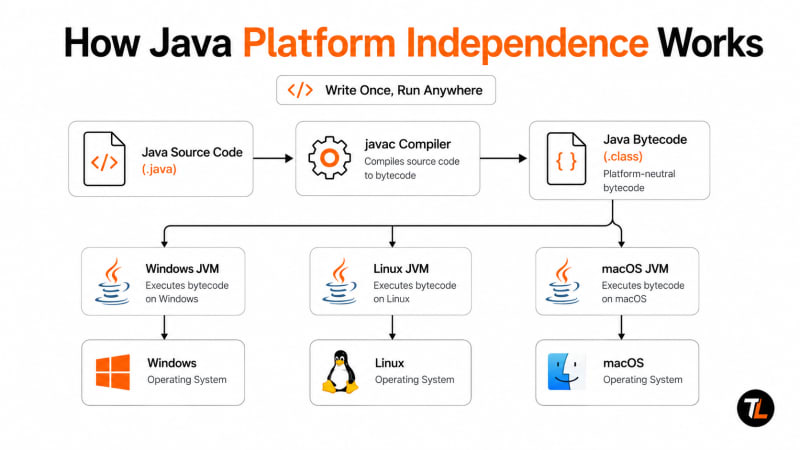
The flow looks like this:
Main.java
    │
    ▼
javac Compiler
    │
    ▼
Main.class
    │
    ▼
Java Bytecode
    │
    ▼
   JVM
    │
    ▼
Operating System
The JVM handles the platform-specific execution.
How the Same Java Program Runs on Different Systems
                    Main.class
                   Java Bytecode
                        │
          ┌─────────────┼─────────────┐
          │             │             │
          ▼             ▼             ▼
     Windows JVM    Linux JVM     macOS JVM
          │             │             │
          ▼             ▼             ▼
       Windows         Linux         macOS
The bytecode can stay the same.
The JVM implementation handles the operating system underneath.
Important distinction
People sometimes say:
Java is platform independent.
A more technically useful way to understand it is:
Java bytecode is designed to be platform independent, while the JVM implementation must support the target platform.
That distinction matters.
4. Java Is Portable
Platform independence and portability are closely related, but they're not exactly the same idea.
Platform independence focuses on executing Java bytecode through a compatible JVM.
Portability means Java is designed to behave consistently across supported environments.
For example:
int age = 25;
long population = 8_000_000_000L;
double price = 99.99;
Java defines its primitive types as part of the language specification.
You don't write one version of this code for Windows and another for Linux.
This makes Java applications easier to move between environments.
That's especially useful when an application moves through:
Developer Laptop
      ↓
Testing Server
      ↓
Docker Container
      ↓
Cloud Server
      ↓
Production
The environment may change.
Your application code often doesn't need to.
5. Java Is Strongly and Statically Typed
This is one of the features developers should understand early.
When you write:
String name = "Alex";
name is a String.
You can't later do:
name = 100;
The compiler rejects it.
Similarly:
int age = "twenty";
won't compile.
Why?
Because Java performs strong compile-time type checking.
This catches many mistakes before your application starts running.
For larger codebases, this becomes extremely useful.
Your IDE also understands those types, which improves:
Autocomplete
Refactoring
Navigation
Static analysis
Compile-time error detection
Type safety is one reason Java works well for large development teams.
6. Java Is Robust
Production software will eventually encounter something unexpected.
A file might not exist.
A database might be unavailable.
A user might send invalid data.
A network request might fail.
Java provides structured exception handling for these situations.
Example:
public class Main {

    public static void main(String[] args) {

        try {

            int result = 10 / 0;

            System.out.println(result);

        } catch (ArithmeticException e) {

            System.out.println("Cannot divide by zero");
        }
    }
}
Output:
Cannot divide by zero
Instead of ignoring the problem, Java gives you a structured way to handle it.
Real Backend Example
Imagine you're fetching a user:
public User findUser(Long id) {

    return userRepository.findById(id)
            .orElseThrow(
                () -> new UserNotFoundException(
                    "User not found: " + id
                )
            );
}
If the user doesn't exist, the application throws a meaningful exception.
A web framework can then convert that into an HTTP response such as:
404 Not Found
This is how Java's exception system becomes useful in real applications.
7. Java Is Secure
Calling Java "secure" doesn't mean every Java application is automatically secure.
Badly written Java code can absolutely be insecure.
The important point is that the Java platform provides mechanisms that help developers build safer applications.
Examples include:
Strong type checking
Bytecode verification
Access modifiers
Runtime checks
Managed memory
Cryptography APIs
Secure networking APIs
One basic example is encapsulation.
class BankAccount {

    private double balance;

    public void deposit(double amount) {

        if (amount > 0) {
            balance += amount;
        }
    }

    public double getBalance() {
        return balance;
    }
}
Because:
balanceis private, another class can't directly do this:
account.balance = -5000;The compiler prevents that access.
Instead, modifications go through controlled methods.
That's a simple example of how Java helps developers enforce boundaries.
8. Java Supports Multithreading
A thread is a path of execution inside a program.
Java has supported multithreaded programming since its early versions and provides extensive concurrency APIs.
Here's a simple example:
public class Main {

    public static void main(String[] args) {

        Thread worker = new Thread(() -> {
            System.out.println("Task running...");
        });

        worker.start();
    }
}
The task can execute independently from the main thread.
But in production code, developers usually work with higher-level concurrency APIs.
For example:
ExecutorService executor =
        Executors.newFixedThreadPool(4);

executor.submit(() -> {
    System.out.println("Processing request");
});

executor.shutdown();
This uses a thread pool instead of manually managing every thread.
Modern Java: Virtual Threads
Modern Java also supports virtual threads.
A basic example is:
Thread.startVirtualThread(() -> {
    System.out.println("Running in a virtual thread");
});
Virtual threads are lightweight threads managed by the Java runtime.
They're particularly useful for applications handling many concurrent tasks that spend significant time waiting for I/O.
For example:
HTTP Request
     ↓
Virtual Thread
     ↓
Database Query
     ↓
Wait for Response
Virtual threads are about scalability and throughput, not making individual operations magically execute faster.
That's an important distinction.

9. Java Uses Automatic Memory Management
Suppose you create an object:
User user = new User();The object exists in JVM-managed memory.
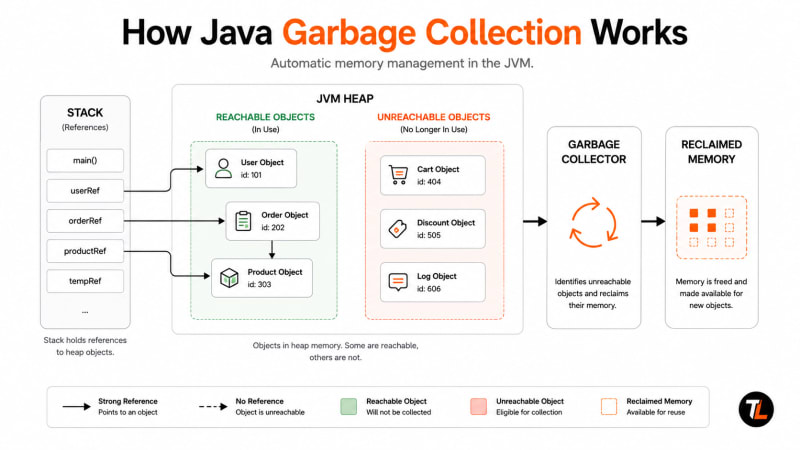
Later, if the application no longer has a reachable reference to that object, it may become eligible for garbage collection.
Conceptually:
Create Object
     ↓
Object Stored in Heap
     ↓
Application Uses Object
     ↓
Object Becomes Unreachable
     ↓
Eligible for Garbage Collection
You don't normally write:
free(user)or:
delete userThe JVM's garbage collector manages memory reclamation.
Does Garbage Collection Prevent Memory Leaks?
No.
This is a common misunderstanding.
Consider:
private static final List<User> USERS =
        new ArrayList<>();
Then continuously:
USERS.add(new User());If those objects remain reachable through USERS, the garbage collector can't simply remove them.
So Java can still have memory leaks.
Automatic memory management removes much of the manual memory-management work.
It doesn't remove the need to understand memory.
10. Java Is Architecture Neutral
Java bytecode isn't designed only for one processor architecture.
Your Java application isn't normally compiled directly into only:
x86 instructionsor:
ARM instructionsInstead:
Java Source
     ↓
Bytecode
     ↓
JVM
 ┌───┴────┐
 ↓        ↓
x86      ARM
The appropriate JVM handles the underlying architecture.
This contributes to Java's portability.
11. Java Can Deliver High Performance
Java runs through the JVM, so how can it still achieve strong performance?
One important reason is the Just-In-Time compiler, commonly called the JIT compiler.
The basic flow is:
Java Source
     ↓
javac
     ↓
Bytecode
     ↓
JVM
     ↓
JIT Compilation
     ↓
Optimized Native Code
The JVM can observe which code runs frequently.
Frequently executed code can be compiled into optimized native machine code.
This means Java combines:
Portable Bytecode
       +
Runtime Optimization
It's one reason long-running Java server applications can perform very well.
Important Performance Note
Don't assume:
Java = Slowor:
JIT = Everything Is FastReal application performance depends on many things:
Algorithms
Database queries
Network calls
Object allocation
Garbage collection
Threading
JVM configuration
Caching
Application architecture
I've seen developers spend time optimizing Java code when the actual bottleneck was an inefficient database query.
Measure first.
Optimize second.
12. Java Is Dynamic
Java can load and inspect classes while an application is running.
For example:
Class<?> clazz =
        Class.forName("com.example.UserService");
Java also provides reflection.
Method[] methods =
        clazz.getDeclaredMethods();
This allows applications and frameworks to inspect classes dynamically.
You may not use reflection much when you're starting Java.
Frameworks do.
For example, dependency injection frameworks can inspect your classes and create objects automatically.
That's one reason code like this is possible in frameworks:
@Service
public class UserService {
}
The framework can discover and manage that class at runtime.
13. Java Has a Rich Standard Library
A feature that's sometimes missing from beginner lists is Java's standard library.
Java gives developers APIs for common programming tasks.
Collections
List<String> languages =
        List.of("Java", "Python", "Go");
Maps
Map<String, Integer> scores =
        new HashMap<>();
File Handling
String content =
        Files.readString(Path.of("data.txt"));
HTTP Requests
HttpClient client =
        HttpClient.newHttpClient();
Concurrency
ExecutorService executor =
        Executors.newFixedThreadPool(4);
Date and Time
LocalDate today =
        LocalDate.now();
You don't need an external library for every basic programming task.
How Java Features Work Together
This is the architecture worth remembering:
              Java Application
                     │
                     ▼
               Java Compiler
                  (javac)
                     │
                     ▼
                  Bytecode
                     │
                     ▼
        ┌───────────────────────┐
        │          JVM          │
        │                       │
        │   Class Loading       │
        │   Runtime Checks      │
        │   Memory Management   │
        │   Garbage Collector   │
        │   JIT Compilation     │
        │   Thread Management   │
        └───────────┬───────────┘
                    │
                    ▼
             Operating System
                    │
                    ▼
                 Hardware
Now the features start connecting together.
This is much more useful than memorizing twelve definitions.

Real-World Example: Java Backend Application
Suppose you're building an API.
@RestController
@RequestMapping("/users")
public class UserController {

    private final UserService userService;

    public UserController(UserService userService) {
        this.userService = userService;
    }

    @GetMapping("/{id}")
    public User getUser(@PathVariable Long id) {
        return userService.findById(id);
    }
}
This small controller already benefits from several Java features.
Object-Oriented
UserController
UserService
User
are classes and objects.
Strongly Typed
Long idmust follow its declared type.
Robust
Exceptions can represent failures such as:
UserNotFoundExceptionMultithreaded
A web server can process multiple requests concurrently.
Automatic Memory Management
Temporary request and response objects are managed by the JVM.
Platform Independent
The compiled application can run on compatible JVM environments across development and production systems.
That's the important lesson.
Java's features aren't theoretical definitions.
You're using them every time you build a real Java application.
Common Beginner Mistakes
Mistake 1: Saying Java and JVM Are the Same Thing
They're not.
Java is the programming language.
JVM is the virtual machine that executes Java bytecode.
Mistake 2: Saying Java Source Code Runs Everywhere
Not exactly.
Your source:
Main.javais compiled into:
Main.classThe .class file contains bytecode.
That bytecode is what a compatible JVM executes.
Mistake 3: Thinking Garbage Collection Means No Memory Problems
Java applications can still have:
Memory leaks
Excessive allocations
Heap exhaustion
Long GC pauses
Poor memory configuration
Garbage collection manages memory.
It doesn't mean developers can ignore memory.
Mistake 4: Thinking Multithreading Always Makes Code Faster
More threads don't automatically mean better performance.
For CPU-intensive work, adding too many threads can increase scheduling overhead.
Virtual threads are especially useful for large numbers of tasks that spend significant time waiting for I/O.
Understand the workload before choosing the concurrency model.
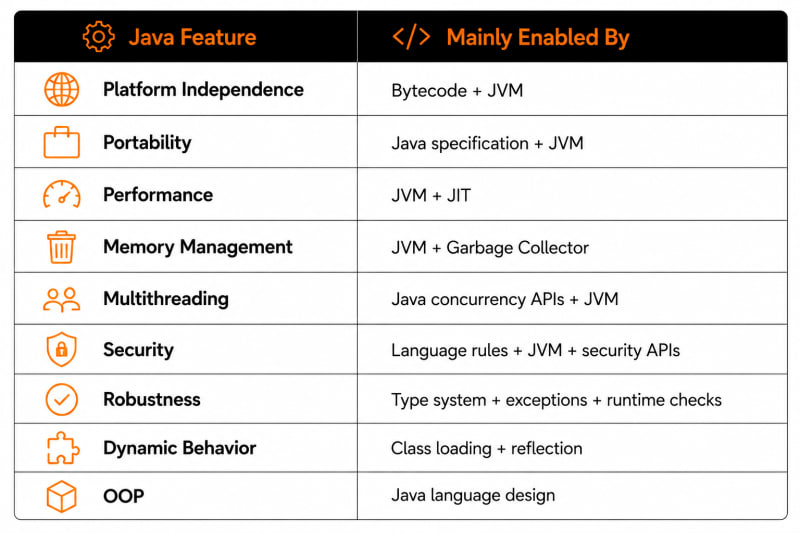
Java Features Cheat Sheet
Simple
   ↓
Less low-level complexity

Object-Oriented
   ↓
Classes + Objects + Interfaces

Platform Independent
   ↓
Bytecode + JVM

Portable
   ↓
Consistent Java platform behavior

Strongly Typed
   ↓
Compile-time type checking

Robust
   ↓
Exceptions + Runtime Checks

Secure
   ↓
Type Safety + Access Control + JVM

Multithreaded
   ↓
Thread + java.util.concurrent

Automatic Memory Management
   ↓
Garbage Collector

High Performance
   ↓
JIT + JVM Optimization

Dynamic
   ↓
Class Loading + Reflection

Rich Standard Library
   ↓
Collections + Files + HTTP + Concurrency + More
If you understand those relationships, you understand the features of Java much better than someone who simply memorized the list.
Official Java Documentation
When you're learning Java, tutorials are useful for understanding a topic.
But when you need exact behavior, API details, or language rules, go to the official documentation.
Java SE Documentation
Use Oracle's official Java documentation as your main reference for JDK guides, APIs, JVM documentation, tools, security, troubleshooting, and language updates.
Official documentation:
Oracle Java SE Documentation
Java API Documentation
When you need to understand a class such as:
String
ArrayList
HashMap
Thread
Files
HttpClient
check the official Java API documentation.
For example, if you're using:
Thread.startVirtualThread(...)
the Thread API documentation tells you exactly what the method does and how the class behaves.
Java Language Specification
When you want the exact rules of the Java language, use the Java Language Specification (JLS).
The JLS is the authoritative technical specification for things such as:
Types
Variables
Classes
Interfaces
Methods
Expressions
Statements
Generics
Exceptions
Threads and memory-model language rules
You don't need to read the entire JLS as a beginner.
Use it when you need the exact answer to a language question.
JVM Specification
For deeper JVM topics, use the Java Virtual Machine Specification (JVMS).
It documents concepts such as:
.class files
Bytecode
JVM data types
Heap
JVM stacks
Frames
Method areas
Class loading
Instructions
This is especially useful once you move into JVM internals and performance engineering.
Java Virtual Threads Documentation
If you're building modern concurrent applications, Oracle also provides dedicated documentation for virtual threads.
Use it when you're working with high-throughput server applications or blocking I/O.
A good developer learns where to find the correct answer.
Interview Questions
1. What are the main features of Java?
Java is object-oriented, platform independent, portable, strongly typed, robust, secure, multithreaded, architecture neutral, dynamic, and provides automatic memory management and runtime optimization through the JVM.
2. Why is Java platform independent?
Java source code is normally compiled into bytecode. A compatible JVM can execute that bytecode on different supported operating systems and architectures.
3. What is bytecode?
Bytecode is the intermediate instruction format produced when Java source code is compiled.
For example:
Main.java
   ↓
javac
   ↓
Main.class
Main.class contains JVM bytecode.
4. Why is Java robust?
Java provides strong typing, structured exception handling, runtime checks, managed memory, and mature debugging and monitoring tools.
5. Why is Java secure?
Java provides features such as type safety, access control, runtime verification, managed memory, cryptography APIs, and other security mechanisms.
Java itself doesn't automatically make an application secure.
6. What is garbage collection?
Garbage collection is the JVM's automatic memory-management mechanism for reclaiming memory from objects that are no longer reachable.
7. What is JIT compilation?
Just-In-Time compilation allows the JVM to compile frequently executed bytecode into optimized native machine code while an application runs.
8. What is the difference between platform and virtual threads?
Platform threads are closely associated with operating-system threads.
Virtual threads are lightweight Java threads scheduled by the Java runtime and are particularly useful for large numbers of concurrent I/O-heavy tasks.
Frequently Asked Questions
What are the most important features of Java?
The most important Java features are object-oriented programming, platform independence, portability, strong typing, robustness, security, multithreading, automatic memory management, and JVM runtime optimization.
Why is Java called platform independent?
Because Java normally compiles source code into platform-neutral JVM bytecode rather than directly into one operating system's executable format.
Is Java completely object-oriented?
Java heavily supports object-oriented programming, but it also has primitive types such as int, boolean, char, and double. For that reason, it's commonly not described as a purely object-oriented language.
Is Java compiled or interpreted?
Java uses a combination of compilation and runtime execution.
Java source code is compiled into bytecode, and the JVM executes that bytecode. Modern JVM implementations can also use JIT compilation to produce optimized native machine code.
Does Java support pointers?
Java uses references to objects but doesn't expose general pointer arithmetic like C and C++.
Does Java have automatic memory management?
Yes. JVM implementations provide garbage collection to automatically reclaim memory from unreachable objects.
Is Java still useful for backend development?
Yes. Java remains heavily used for backend APIs, enterprise applications, distributed systems, financial platforms, cloud services, and microservices.
Are virtual threads faster than normal threads?
Not in the sense of making an individual task execute faster. Their main benefit is allowing high-throughput applications to handle large numbers of concurrent tasks efficiently.
Key Takeaways
Don't memorize Java features as:
Simple
Portable
Secure
Robust
Multithreaded
...
Understand the architecture behind them:
Java Source
     ↓
javac Compiler
     ↓
Bytecode
     ↓
JVM
 ┌────┼─────────────┐
 ↓    ↓             ↓
JIT   Garbage       Threads
      Collector
 ↓    ↓             ↓
Performance      Concurrency
     Memory
   Management
Remember these relationships:
Bytecode + JVM → Platform Independence
Classes + Objects + Interfaces → Object-Oriented Programming
Strong Typing + Exceptions → Reliability
Garbage Collector → Automatic Memory Management
Threads + Concurrency APIs → Multithreading
JIT + JVM → Runtime Optimization
Once you understand those connections, later topics such as Spring Boot, concurrency, JVM memory, garbage collection, microservices, and performance tuning become much easier to understand.
Previous Lesson
← History of Java: From Oak to Modern Java
Before learning Java's features, we explored how Java started as the Oak project, why it was created, and how it evolved into one of the world's most widely used programming languages.
If you missed it, read the History of Java tutorial first.
What's Next?
Now that you understand the most important features of Java—including platform independence, object-oriented programming, security, robustness, multithreading, and automatic memory management—it's time to understand the different Java editions.
In the next tutorial, you'll learn about Java SE, Java EE (Jakarta EE), and Java ME, what each edition is designed for, their key differences, and where they're used in real-world development.
Next Lesson → Java Editions (SE, EE & ME)
Continue Learning
Explore more beginner-friendly Java tutorials:
Java Program Structure
Have a Question?
If something isn't clear or you get stuck while learning Java, leave a comment below.
We'll do our best to explain it with simple words, practical examples, and code you can actually understand.
Happy Coding! ☕
Follow TheTechLane
Want more developer tutorials, programming tips, and tech updates?
Follow TheTechLane on LinkedIn, X, Instagram, Threads, and Pinterest to stay connected and catch new tutorials when they go live.
Learn. Build. Share.
— TheTechLane