Tool, Resource or Prompt: Which Does Your AI Need? (MCP Part 2)
MCP Part 2: master tools with structured output, resource templates and prompts with arguments in the TypeScript SDK v2, with tested code and real output.
Your first MCP server works. The model can call a tool and read a doc.
Then the real questions show up.
Should a list of notes be a tool or a resource? How does the model know a tool is safe to retry? What happens when your handler throws?
Get these wrong and your server still runs. It just behaves badly in every client that connects to it.
Today you'll fix that, one primitive at a time.
This is Part 2 of TheTechLane's MCP from Zero to Production series.
One practical step per part, from your first local server to a secure, observable, deployed MCP service.
In this part, you'll learn:
How to return typed, validated results with
outputSchemaandstructuredContentWhat tool annotations tell a client, and what they don't
The difference between a tool error (
isError) and a protocol errorHow resource templates turn one handler into many URIs, with autocompletion
How to build prompts with arguments using
registerPromptHow
list_changednotifications keep clients in sync
Prerequisites
You need:
Node.js 20 or newer (tested on Node.js 24.22.1)
The finished server from Part 1: Can You Build a Working MCP Server in 15 Minutes?
Basic TypeScript:
async/await, objects and generics at a reading level
Package versions used in this part (installed on 12 November 2026):
@modelcontextprotocol/server2.4.0 and@modelcontextprotocol/client2.4.0 (TypeScript SDK v2)zod4.6.7,typescript7.0.2,@types/node26.6.6
You still don't need an API key or an AI client. We'll connect Claude Desktop and Cursor in Part 4.
The Three Primitives in 5 Minutes
An MCP server exposes three primitives: tools the model calls, resources the app reads and prompts the user picks.
The key word is who's in control:
Tools      → model-controlled        "do something"     tools/call
Resources  → application-controlled  "here's context"   resources/read
Prompts    → user-controlled         "start this task"  prompts/get
That split comes straight from the MCP server concepts guide.
A tool can have side effects. A resource is data the host decides to load. A prompt is a template a person picks from a menu, often as a slash command.
Our scripted client in this part negotiates protocol version 2025-11-25, so we'll cite that version of the spec: Tools, Resources and Prompts.
Want the gentle version first? Read MCP Tools Explained: Build and Expose Your Own Tools and MCP Resources Explained with Real Examples.
Step 1: Set Up the Part 2 Project
Start from a copy of your Part 1 folder:
cp -r tl-mcp-starter tl-mcp-part2 && cd tl-mcp-part2
Reinstall to get the exact versions:
npm install @modelcontextprotocol/server@2.4.0 @modelcontextprotocol/client@2.4.0 zod@4.6.7
Keep the Part 1 tsconfig.json. It already has "module": "NodeNext" and "types": ["node"], which TypeScript 7 needs.
We're turning the starter into a small notes server. Replace the top of src/server.ts with imports and an in-memory store:
import { McpServer, ResourceNotFoundError, ResourceTemplate, completable } from "@modelcontextprotocol/server";
import { serveStdio } from "@modelcontextprotocol/server/stdio";
import * as z from "zod/v4";

// In-memory notes store (Part 8 swaps this for a real database)
type Note = { id: string; title: string; body: string };
const notes = new Map<string, Note>([
  ["mcp-basics", { id: "mcp-basics", title: "MCP basics", body: "Tools act, resources inform, prompts guide." }],
  ["stdio-rules", { id: "stdio-rules", title: "stdio rules", body: "stdout is for JSON-RPC only. Log to stderr." }],
]);
Everything else goes inside createServer(), just like Part 1.
Step 2: Tools With Structured Output and Annotations
In Part 1, convert_units returned a sentence. That's fine for a model, but hard for code.
Structured output fixes it. You declare an outputSchema, and the result carries a typed structuredContent object.
Declare the output schema
Here's the upgraded tool:
const factors: Record<string, number> = {
  "km-mi": 0.621371, "mi-km": 1.609344, "kg-lb": 2.204623, "lb-kg": 0.453592,
};
const Unit = z.enum(["km", "mi", "kg", "lb", "C", "F"]);

server.registerTool(
  "convert_units",
  {
    title: "Unit Converter",
    description: "Convert a value between km and mi, kg and lb, or C and F",
    inputSchema: z.object({ value: z.number(), from: Unit, to: Unit }),
    outputSchema: z.object({
      value: z.number(),
      from: Unit,
      to: Unit,
      result: z.number(),
    }),
    annotations: { readOnlyHint: true, idempotentHint: true, openWorldHint: false },
  },
  async ({ value, from, to }) => {
    let result: number | undefined;
    if (from === "C" && to === "F") result = (value * 9) / 5 + 32;
    else if (from === "F" && to === "C") result = ((value - 32) * 5) / 9;
    else if (factors[`${from}-${to}`]) result = value * factors[`${from}-${to}`];

    if (result === undefined) {
      // A tool execution error: the model sees it and can try again
      return {
        content: [{ type: "text", text: `Can't convert ${from} to ${to}. Try km/mi, kg/lb or C/F.` }],
        isError: true,
      };
    }
    const output = { value, from, to, result: Number(result.toFixed(2)) };
    return {
      content: [{ type: "text", text: JSON.stringify(output) }],
      structuredContent: output,
    };
  }
);
Notice the result has both fields.
The spec says a tool returning structured content SHOULD also return the serialised JSON in a text block, for older clients. So you send both.
Here's the raw JSON-RPC response for 100 C to F, piped straight from the server:
{"result":{"content":[{"type":"text","text":"{\"value\":100,\"from\":\"C\",\"to\":\"F\",\"result\":212}"}],"structuredContent":{"value":100,"from":"C","to":"F","result":212}},"jsonrpc":"2.0","id":3}
One schema, three jobs: the client sees it in tools/list, the SDK validates your result against it, and the client can parse structuredContent without guessing.
What annotations really do
Annotations are hints about behaviour:
readOnlyHint: the tool doesn't change anythingdestructiveHint: it may delete or overwrite data (only meaningful when not read-only)idempotentHint: calling it twice with the same input has no extra effectopenWorldHint: it talks to the outside world, like the web
A client can use them to skip a confirmation for read-only tools, or to warn before a destructive one.
But read the fine print. The tools specification says clients MUST treat annotations as untrusted unless they come from a trusted server.
They're labels, not security. Part 6 covers what to do about that.
What happens when the output is wrong?
I tested a broken tool that declares total: z.number() and returns { total: "three" }:
broken -> {"content":[{"type":"text","text":"Output validation error: Invalid structured content for tool broken: total: Invalid input: expected number, received string"}],"isError":true}
The SDK catches it on the server and turns it into a tool error. Your schema is a contract, and the SDK enforces it.
Step 3: Tool Errors vs Protocol Errors
MCP has two kinds of failure, and mixing them up is the most common Part 2 bug.
A tool execution error is a normal result with isError: true. The model reads it and can correct itself.
A protocol error is a JSON-RPC error response. It means the request itself was wrong, like an unknown tool name.
Here's what the SDK does in each case, from my test run:
bad pair: {"isError":true,"content":[{"type":"text","text":"Can't convert km to kg. Try km/mi, kg/lb or C/F."}]}
invalid args: {"isError":true,"content":[{"type":"text","text":"Input validation error: Invalid arguments for tool convert_units: value: Invalid input: expected number, recei
throws -> {"content":[{"type":"text","text":"database is down"}],"isError":true}
unknown tool threw -> -32602 Tool no_such_tool not found
Three lessons:
Bad arguments become
isErrorresults, so the model gets a readable reasonA thrown exception inside a tool also becomes
isError, with your error message as the textOnly an unknown tool name is a protocol error (
-32602)
That second point matters. Whatever you throw goes to the model, so never put secrets or stack traces in error messages.
Write error text for a model, not a log file: say what went wrong and what to try instead.
Step 4: Resources and Resource Templates
A static resource has one fixed URI. You built one in Part 1, docs://units-guide, and it stays.
But notes are dynamic. You don't want to register a resource per note.
That's what a resource template is for: a URI pattern, written in the URI template syntax of RFC 6570, with one read handler.
Register the template
Add this inside createServer():
server.registerResource(
  "note",
  new ResourceTemplate("notes://{id}", {
    list: async () => ({
      resources: [...notes.values()].map((n) => ({ uri: `notes://${n.id}`, name: n.id, title: n.title, mimeType: "text/markdown" })),
    }),
    complete: { id: (value) => [...notes.keys()].filter((k) => k.startsWith(value)) },
  }),
  { title: "Note", description: "A saved note, by id", mimeType: "text/markdown" },
  async (uri, { id }) => {
    const note = notes.get(String(id));
    if (!note) throw new ResourceNotFoundError(uri.href, `No note with id '${id}'`);
    return { contents: [{ uri: uri.href, mimeType: "text/markdown", text: `# ${note.title}\n\n${note.body}` }] };
  }
);
Three pieces do the work:
listmakes every note show up inresources/list, so clients can browse themcompletesuggests values for{id}while a user typesThe read handler gets the parsed variables, here
{ id }
The list callback is required in the constructor, even if you pass undefined. The SDK's types force you to decide whether a template is browsable.
Not found is a protocol error
Resources work differently from tools. There's no isError on a read result.
My first version threw a plain Error, and the client got this:
read missing note -> -32603 No note with id 'nope'
That's -32603, an internal error. Wrong signal: the server didn't crash, the note just doesn't exist.
With ResourceNotFoundError, the same read returns:
read missing note -> -32602 No note with id 'nope'
The SDK uses -32602, which is what the 2026-07-28 resources spec requires. Older protocol versions used -32002, and the spec asks clients to accept both.
Step 5: A Write Tool and list_changed Notifications
Now let the model add notes. Here's a write tool:
server.registerTool(
  "save_note",
  {
    title: "Save Note",
    description: "Save a short note under a new lowercase id like 'release-plan'",
    inputSchema: z.object({
      id: z.string().regex(/^[a-z0-9-]+$/).describe("Lowercase id, letters, digits and dashes"),
      title: z.string().min(1),
      body: z.string().min(1).max(500),
    }),
    outputSchema: z.object({ id: z.string(), uri: z.string(), total: z.number() }),
    annotations: { readOnlyHint: false, destructiveHint: false, idempotentHint: false, openWorldHint: false },
  },
  async ({ id, title, body }) => {
    if (notes.has(id)) {
      return { content: [{ type: "text", text: `Note '${id}' already exists. Pick another id.` }], isError: true };
    }
    notes.set(id, { id, title, body });
    server.sendResourceListChanged(); // tell clients notes:// changed
    const output = { id, uri: `notes://${id}`, total: notes.size };
    return { content: [{ type: "text", text: JSON.stringify(output) }], structuredContent: output };
  }
);
The annotations are honest: it writes, but it never overwrites, because duplicates return isError.
The important line is server.sendResourceListChanged().
It sends notifications/resources/list_changed, so a connected client knows to fetch the list again. The SDK has matching sendToolListChanged() and sendPromptListChanged() methods.
You don't have to declare the capability yourself. The server's initialize result already advertises it:
Capabilities: {"completions":{},"prompts":{"listChanged":true},"resources":{"listChanged":true},"tools":{"listChanged":true}}
Step 6: Prompts With Arguments
Prompts are the most overlooked primitive.
A prompt is a reusable message template. The user picks it, fills in arguments, and the host sends the result to the model.
Here's one that summarises a note:
server.registerPrompt(
  "summarize_note",
  {
    title: "Summarize a Note",
    description: "Ask the model to summarise one saved note",
    argsSchema: z.object({
      id: completable(z.string().describe("Note id"), (value) =>
        [...notes.keys()].filter((k) => k.startsWith(value))
      ),
      style: z.enum(["bullets", "tweet", "eli5"]).describe("Summary style"),
    }),
  },
  ({ id, style }) => {
    const note = notes.get(id);
    return {
      description: `Summarise note ${id} as ${style}`,
      messages: [
        {
          role: "user",
          content: {
            type: "text",
            text: note
              ? `Summarise this note as ${style}:\n\n${note.title}\n${note.body}`
              : `Tell the user that note '${id}' doesn't exist.`,
          },
        },
      ],
    };
  }
);
Two details are worth knowing.
First, completable() wraps a schema with a suggestion callback. Clients call completion/complete to get values as the user types, as described in the completion spec.
Second, prompt arguments are validated too. Leave out style and you get a protocol error, not a half-built prompt:
missing prompt arg -> -32602 Invalid arguments for prompt summarize_note: style: Invalid option: expected one of "bullets"|"tweet"|"eli5"
The SDK prompts guide has more patterns, like prompts that embed resources.
How the Three Primitives Flow on the Wire
Here's one session that touches all three:
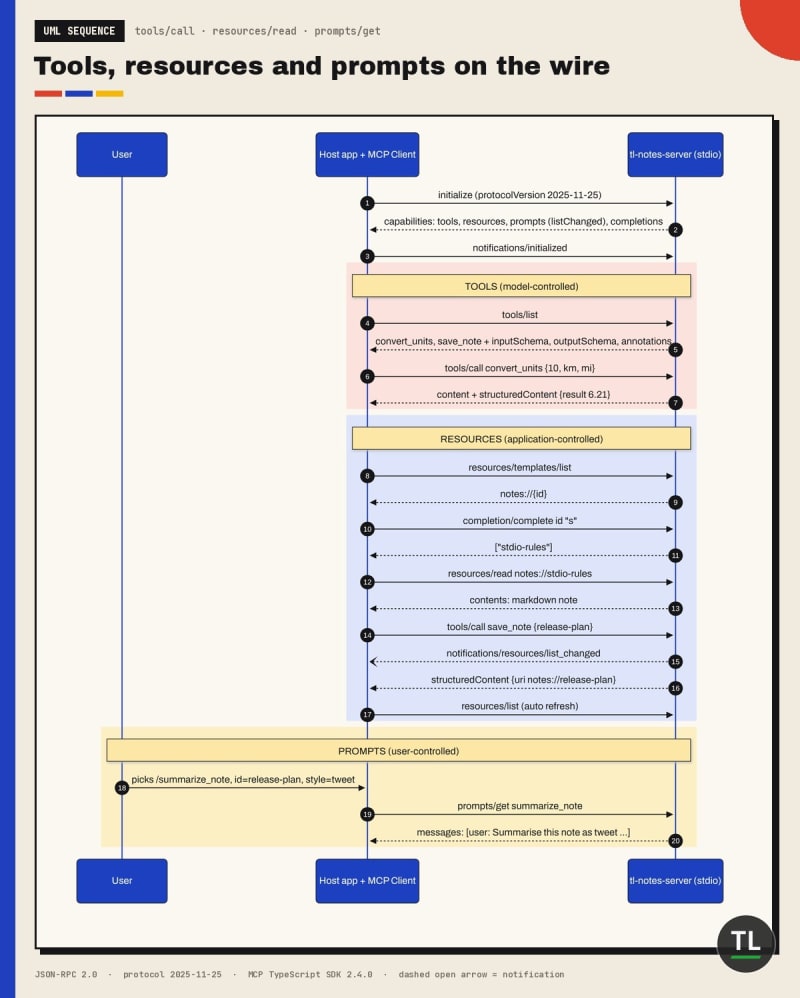
One session, three primitives: tools/call, resources/read and prompts/get on the wire
Every arrow is a JSON-RPC message. Requests get responses. notifications/resources/list_changed doesn't, it's fire-and-forget.
Here's the raw template listing, so you can see the exact shape:
{"result":{"resourceTemplates":[{"name":"note","uriTemplate":"notes://{id}","title":"Note","description":"A saved note, by id","mimeType":"text/markdown"}]},"jsonrpc":"2.0","id":2}
Templates live in their own list, resources/templates/list. Concrete URIs from your list callback show up in resources/list.
Step 7: Test Everything With a Scripted Client
Create src/client.ts. The listChanged option subscribes to list updates:
import { Client } from "@modelcontextprotocol/client";
import { StdioClientTransport } from "@modelcontextprotocol/client/stdio";

const transport = new StdioClientTransport({ command: "node", args: ["build/server.js"] });

const client = new Client(
  { name: "tl-part2-client", version: "1.0.0" },
  {
    listChanged: {
      resources: {
        debounceMs: 0,
        onChanged: (err, items) => console.log("[list_changed] resources now:", items?.map((r) => r.uri).join(", ")),
      },
    },
  }
);

await client.connect(transport);
console.log("Capabilities:", JSON.stringify(client.getServerCapabilities()));

// 1. Tools: schemas, annotations, structured output
const { tools } = await client.listTools();
for (const t of tools) {
  console.log(`Tool ${t.name}: annotations=${JSON.stringify(t.annotations)} output=${Object.keys(t.outputSchema?.properties ?? {}).join(",")}`);
}
const conv = await client.callTool({ name: "convert_units", arguments: { value: 10, from: "km", to: "mi" } });
console.log("convert_units structuredContent:", JSON.stringify(conv.structuredContent));

const bad = await client.callTool({ name: "convert_units", arguments: { value: 10, from: "km", to: "kg" } });
console.log("bad pair:", JSON.stringify({ isError: bad.isError, content: bad.content }));

const invalid = await client.callTool({ name: "convert_units", arguments: { value: "ten", from: "km", to: "mi" } });
console.log("invalid args:", JSON.stringify({ isError: invalid.isError, content: invalid.content }).slice(0, 160));

// 2. Resources: static list, templates, read
const { resources } = await client.listResources();
console.log("Resources:", resources.map((r) => r.uri).join(", "));
const { resourceTemplates } = await client.listResourceTemplates();
console.log("Templates:", resourceTemplates.map((t) => t.uriTemplate).join(", "));
const note = await client.readResource({ uri: "notes://stdio-rules" });
const c0 = note.contents[0];
console.log("notes://stdio-rules ->", JSON.stringify("text" in c0 ? c0.text : "(binary)"));

const done = await client.complete({ ref: { type: "ref/resource", uri: "notes://{id}" }, argument: { name: "id", value: "s" } });
console.log("complete notes://{id} 's' ->", done.completion.values);

// 3. A write tool that fires notifications/resources/list_changed
const saved = await client.callTool({ name: "save_note", arguments: { id: "release-plan", title: "Release plan", body: "Ship Part 2 on Thursday at 9 AM IST." } });
console.log("save_note structuredContent:", JSON.stringify(saved.structuredContent));
await new Promise((r) => setTimeout(r, 200));
const dup = await client.callTool({ name: "save_note", arguments: { id: "release-plan", title: "x", body: "y" } });
console.log("duplicate save isError:", dup.isError);

// 4. Prompts: list, complete an argument, get
const { prompts } = await client.listPrompts();
for (const p of prompts) console.log(`Prompt ${p.name}: args=${JSON.stringify(p.arguments)}`);
const comp = await client.complete({ ref: { type: "ref/prompt", name: "summarize_note" }, argument: { name: "id", value: "r" } });
console.log("complete summarize_note.id 'r' ->", comp.completion.values);
const prompt = await client.getPrompt({ name: "summarize_note", arguments: { id: "release-plan", style: "tweet" } });
console.log("getPrompt messages:", JSON.stringify(prompt.messages));

await client.close();
Build and run it:
npx tsc && node build/client.js
Here's the real output:
Capabilities: {"completions":{},"prompts":{"listChanged":true},"resources":{"listChanged":true},"tools":{"listChanged":true}}
Tool convert_units: annotations={"readOnlyHint":true,"idempotentHint":true,"openWorldHint":false} output=value,from,to,result
Tool save_note: annotations={"readOnlyHint":false,"destructiveHint":false,"idempotentHint":false,"openWorldHint":false} output=id,uri,total
convert_units structuredContent: {"value":10,"from":"km","to":"mi","result":6.21}
bad pair: {"isError":true,"content":[{"type":"text","text":"Can't convert km to kg. Try km/mi, kg/lb or C/F."}]}
invalid args: {"isError":true,"content":[{"type":"text","text":"Input validation error: Invalid arguments for tool convert_units: value: Invalid input: expected number, recei
Resources: docs://units-guide, notes://mcp-basics, notes://stdio-rules
Templates: notes://{id}
notes://stdio-rules -> "# stdio rules\n\nstdout is for JSON-RPC only. Log to stderr."
complete notes://{id} 's' -> [ 'stdio-rules' ]
save_note structuredContent: {"id":"release-plan","uri":"notes://release-plan","total":3}
[list_changed] resources now: docs://units-guide, notes://mcp-basics, notes://stdio-rules, notes://release-plan
duplicate save isError: true
Prompt summarize_note: args=[{"name":"id","description":"Note id","required":true},{"name":"style","description":"Summary style","required":true}]
complete summarize_note.id 'r' -> [ 'release-plan' ]
getPrompt messages: [{"role":"user","content":{"type":"text","text":"Summarise this note as tweet:\n\nRelease plan\nShip Part 2 on Thursday at 9 AM IST."}}]
Read it top to bottom. The [list_changed] line fired by itself, right after save_note, with the new note already in the refreshed list.
That's the client SDK doing the re-fetch for you.
Explore it in MCP Inspector
For clicking around, run the official MCP Inspector (2.15.0 on npm today):
npx @modelcontextprotocol/inspector node build/server.js
Then check each tab:
Tools: run
convert_unitsand look for the structured result next to the textResources: open Resource Templates, type
notes://and try the{id}completionPrompts: pick
summarize_note, fillidandstyle, and view the messagesRun
save_note, then refresh Resources to see the new note
Tool, Resource or Prompt? A Decision Guide
Most design mistakes come from picking the wrong primitive. Use this flow:
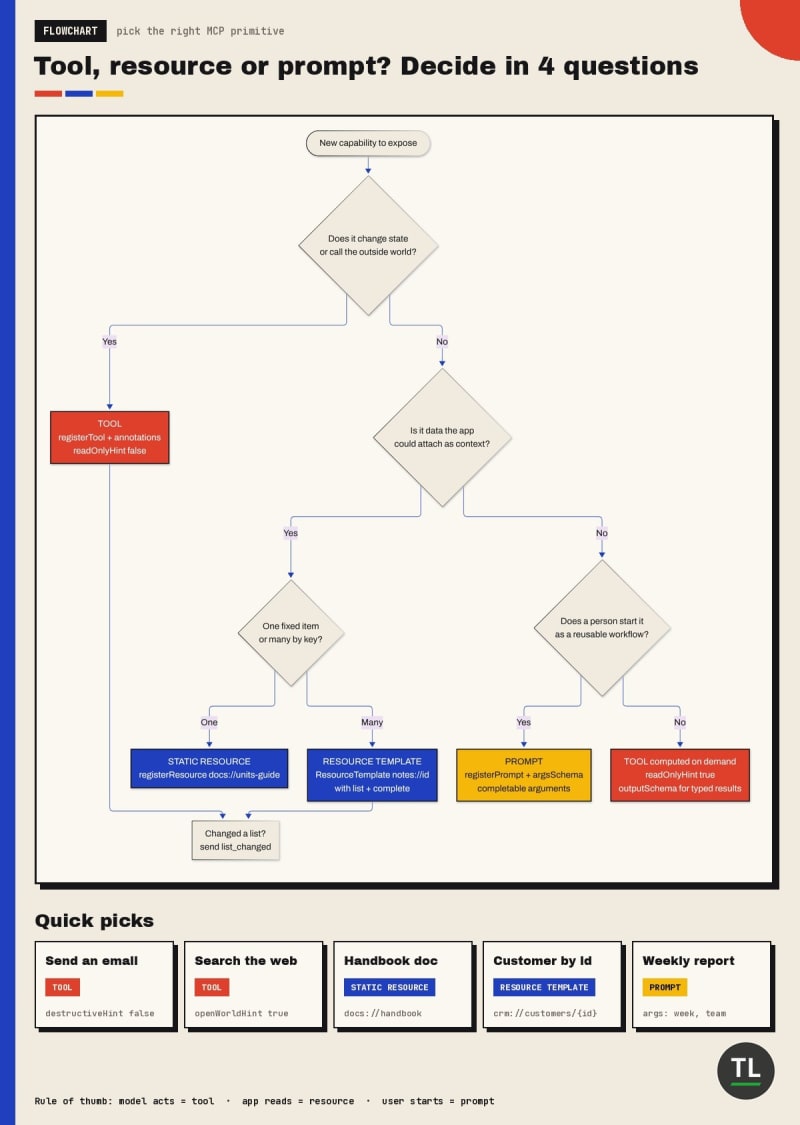
Tool, resource or prompt? Four questions pick the right primitive
The short version:
If it changes something or computes on demand, make it a tool
If it's data the app might attach as context, make it a resource
If it's a workflow a person starts on purpose, make it a prompt
Some things deserve two faces. Our notes are resources for reading and a tool for writing. That's normal.
Common Mistakes
1. Returning structuredContent without outputSchema
Clients can't trust a shape you never declared. Add an outputSchema and the SDK validates every result for you.
2. Throwing secrets in tool errors
A thrown error inside a tool becomes isError text the model reads. Return a short, safe message instead.
3. Using plain Error for missing resources
You get -32603, which looks like a crash. Throw ResourceNotFoundError(uri) for a proper -32602.
4. Trusting annotations from any server
readOnlyHint: true is a claim, not a guarantee. Clients should still confirm risky calls from servers they don't trust.
5. Forgetting list_changed after a write
If save_note didn't call sendResourceListChanged(), clients would show a stale list until reconnect.
6. Making everything a tool
A static doc as a tool forces the model to call it. As a resource, the app can just attach it.
Quick Recap
Tools are model-controlled, resources are app-controlled, prompts are user-controlled
outputSchemaplusstructuredContentgives clients typed, validated resultsAnnotations are hints for UX, never a security boundary
Tool failures should be
isErrorresults, while unknown names and missing resources are protocol errorsResourceTemplatemaps one handler to many URIs, withlistandcompletecallbacksregisterPromptwithcompletable()builds argument-driven, autocompleted promptssendResourceListChanged()and the client'slistChangedoption keep everyone in sync
Exercises
1. Add a delete_note tool
Mark it destructiveHint: true and idempotentHint: true, and fire list_changed after deleting.
2. Add a second template
Expose notes://{id}/words that returns the word count, reusing Part 1's word_count logic.
3. Return a resource link from save_note
Add a resource_link content block pointing at the new notes:// URI, and print it in the client.
4. Build a multi-message prompt
Make review_note return a user message plus an embedded notes:// resource, then inspect it in Inspector.
Continue Learning
You're currently at Part 2 of the MCP from Zero to Production series.
Previous
Part 1: Can You Build a Working MCP Server in 15 Minutes?, where you built and tested the starter server.
Next
Part 3: Building an MCP Server in Python (coming next)
Related reading:
Need the concepts behind today's code? MCP Tools Explained: Build and Expose Your Own Tools and MCP Resources Explained with Real Examples cover the why.
Resources are a natural fit for retrieval. See how indexes feed context in Is LlamaIndex the Easiest Way to Build RAG? (RAG Part 10) before Part 9.
Get New Guides in Your Inbox
Want Part 3 the moment it's published?
Subscribe to the free TheTechLane newsletter for new MCP parts, tutorials and developer guides.
Sources
Have a Question?
Stuck on a template URI or a prompt argument? Leave a comment below with your code and the error you see.
Happy Coding! 🚀
Follow TheTechLane
Keep learning AI, development, and modern developer technologies with TheTechLane.
Learn • Build • Share
Follow @thetechlanehq for more developer guides, tutorials, and practical technology content.