MCP Tools Explained: Build and Expose Your Own Tools
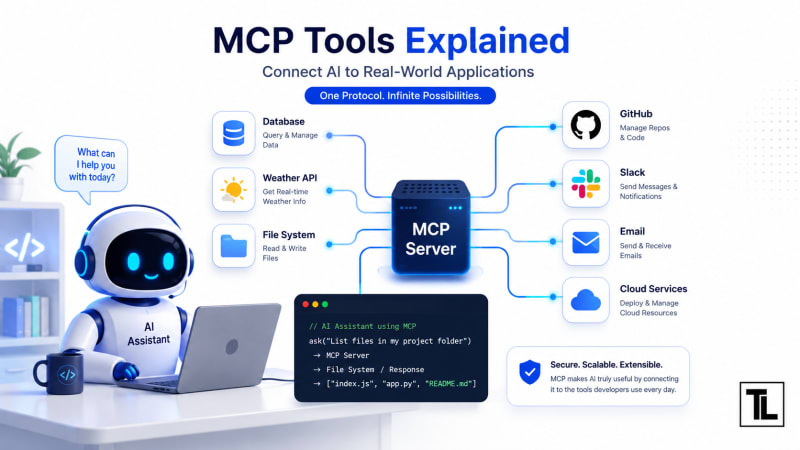
MCP tools allow an AI model like ChatGPT or Claude to perform real actions instead of just generating text.
What Are MCP Tools?
An MCP Tool is a function exposed by an MCP server that an AI assistant can call whenever it needs to perform a task.
Think of it like this:
User
   │
   ▼
AI Assistant
   │
Calls Tool
   │
   ▼
MCP Server
   │
Runs Function
   │
   ▼
Returns Result
The AI doesn't directly access your application.
Instead, it sends a request to the MCP server, which safely executes the tool and returns the response.
Why Do We Need Tools?
Without tools, an AI can only generate text based on what it already knows.
For example:
Without Tools
User:
What's the weather today?
AI:
I don't have live weather data.
With Tools
User:
What's the weather today?
AI:
Calls Weather Tool
Weather API responds
AI answers using fresh data
That's the power of MCP tools.
How MCP Tools Work
Here's the complete flow.
User
   │
   ▼
AI Assistant
   │
Determines a tool is needed
   │
   ▼
MCP Client
   │
Sends Tool Request
   │
   ▼
MCP Server
   │
Executes Tool
   │
   ▼
Returns JSON
   │
   ▼
AI Generates Final Response
The AI decides when to use a tool.
The MCP server decides how to execute it.
Anatomy of an MCP Tool
Every tool has four important parts.
1. Name
A unique identifier.
Example:
get_weather2. Description
Explains what the tool does.
Example:
Returns the current weather for a city.The AI reads this description to decide whether it should use the tool.
3. Input Schema
Defines the parameters.
Example:
{
  "city": "string"
}
4. Function
The actual code that runs.
City → Weather API → ResultBuilding Your First Tool
Let's create a simple greeting tool.
function greet(name) {
    return `Hello ${name}!`;
}
Very simple.
Now let's expose it through an MCP server.
server.tool(
    "greet",
    "Returns a greeting message",
    {
        name: z.string()
    },
    async ({ name }) => {
        return {
            content: [
                {
                    type: "text",
                    text: `Hello ${name}!`
                }
            ]
        };
    }
);
Now the AI can call this tool whenever someone asks for a greeting.
Understanding the Code
Let's break it down.
Tool Name
"greet"This is what the AI uses internally.
Description
"Returns a greeting message"Descriptions should clearly explain the tool's purpose.
Avoid vague descriptions.
Input
{
    name: z.string()
}
The tool expects one string parameter.
{
   "name":"Alice"
}
Function
async ({ name }) => {

}
The tool receives the parameters.
Inside this function, you can:
Call APIs
Query databases
Read files
Execute business logic
Tool Registration
When the MCP server starts, it registers all available tools.
Example:
Server Starts

↓

Register Tool

↓

AI Discovers Tool

↓

Ready to Use
The client automatically knows what tools are available.
Example: Calculator Tool
Let's create something more useful.
server.tool(
    "add",
    "Adds two numbers",
    {
        a: z.number(),
        b: z.number()
    },
    async ({ a, b }) => ({
        content: [
            {
                type: "text",
                text: String(a + b)
            }
        ]
    })
);
User asks :
Add 25 and 17AI calls :
{
    "a":25,
    "b":17
}
Response:
42Example: Weather Tool
User

↓

Weather Tool

↓

Weather API

↓

Temperature

↓

AI Response
The tool may call an external API.
Example :
const weather = await fetchWeather(city);The AI doesn't know how the weather API works.
It only knows that the tool returns weather information.
Example: Database Tool
Suppose you have a customer database.
The tool can execute:
SELECT *
FROM users
WHERE id = 25;
The result is sent back to the AI.
The AI converts it into natural language.
Example: File Reader Tool
Another common tool reads local files.
User

↓

Read File Tool

↓

Filesystem

↓

Contents

↓

AI
Example :
fs.readFile("notes.txt");This lets the AI answer questions about your documents.
Tool Response Format
Most MCP tools return structured content.
Example:
{
  "content": [
    {
      "type":"text",
      "text":"Hello World"
    }
  ]
}
The AI reads this response and uses it to generate its final answer.
Real-World MCP Tools
Some common tools include:
ToolPurposeSearchSearch documentationWeatherCurrent weatherDatabaseQuery SQL databasesFilesystemRead and write filesGitHubManage repositoriesSlackSend messagesEmailSend emailsCalendarCreate eventsBrowserOpen webpagesNotesRead documentation
Best Practices
Keep Tools Focused
One tool should perform one job.
Good :
get_weather()Avoid :
do_everything()Write Good Descriptions
The AI relies heavily on descriptions.
Instead of :
Gets stuffWrite :
Returns today's weather for a specified city.Validate Inputs
Always validate incoming data.
city: z.string()Never trust user input directly.
Return Clear Results
Good :
{
  "temperature":30
}
Better than returning a long block of text.
Handle Errors
Instead of crashing:
Server ErrorReturn meaningful messages.
Example:
City not found.Common Mistakes
Making one tool do everything
Create smaller, reusable tools instead.
Poor descriptions
If the description isn't clear, the AI may never call the tool.
Returning inconsistent data
Always return data in the same format.
Skipping validation
Invalid inputs can cause runtime errors.
Ignoring security
Never expose sensitive operations without authentication and authorization.
Real Project Example
Imagine you're building a banking assistant.
Instead of giving the AI direct database access, you expose tools like:
getAccountBalance()listTransactions()transferMoney()The AI can only perform actions through these approved tools.
This makes your application much safer than allowing unrestricted access.
Interview Questions
What is an MCP Tool?
A function exposed by an MCP server that an AI model can invoke to perform real-world tasks.
Why are tool descriptions important?
The AI uses descriptions to decide which tool is appropriate for a user's request.
Can one MCP server expose multiple tools?
Yes. An MCP server can register many tools, each handling a specific task.
Can MCP tools call external APIs?
Yes. They commonly integrate with REST APIs, databases, file systems, and third-party services.
Should tools return plain text?
Not necessarily. Structured responses are often easier for AI models to interpret and use effectively.
Frequently Asked Questions
Can one MCP server have multiple tools?
Yes. A single server can expose dozens or even hundreds of tools.
Can tools access databases?
Yes, provided you implement the necessary database logic securely.
Are tools synchronous?
They can be synchronous or asynchronous, though asynchronous tools are common because many tasks involve I/O operations.
Can tools call REST APIs?
Absolutely. This is one of the most common use cases for MCP.
Can tools modify data?
Yes. Depending on permissions, they can create, update, or delete records, send emails, or perform other actions.
Key Takeaways
MCP tools allow AI assistants to perform real actions beyond text generation.
Each tool has a name, description, input schema, and implementation.
The AI chooses when to use a tool, while the MCP server handles how it runs.
Good descriptions and input validation make tools more reliable.
Real-world tools often interact with databases, APIs, files, and business systems.
Keeping tools small, focused, and secure makes them easier to maintain and safer to expose.
Previous Lesson
MCP Servers Explained: Build Your First MCP Server
Learn how MCP servers host and expose tools that AI assistants can discover and use.
What's Next
MCP Resources Explained: Sharing Data with AI
Discover how MCP resources expose documents, files, and structured data that AI models can read without executing actions.
Have a Question?
If you have any questions about DSA or programming, leave a comment below. We'll be happy to help.
Follow TheTechLane
Want more Java tutorials, programming tips, and developer resources?
Follow TheTechLane on LinkedIn, X, Instagram, Threads, and Pinterest to stay updated whenever a new tutorial is published.
Learn. Build. Share.
— TheTechLane