Is LlamaIndex the Easiest Way to Build RAG? (RAG Part 10)
Learn LlamaIndex RAG in Python: load files into nodes, build and save a vector index, then query, chat and run an agent over your own documents.
Your company docs already have the answers.
Your LLM just can't see them.
LlamaIndex exists to close that gap, and it says so in the name: it helps an LLM index your data and answer questions about it.
Today we rebuild the same document Q&A app from the last three articles, this time with LlamaIndex and code re-tested on 10 Nov 2026.
Same documents, same questions, different framework.
RAG Series · Article 10 of TheTechLane's RAG series
One practical step towards production RAG per article, in plain English with code you can run. Last time: we rebuilt the app with LangChain. Today: the same app with LlamaIndex, plus a chat engine and an agent.
In this article, you'll learn:
How to configure LlamaIndex once with
SettingsHow to load a folder with
SimpleDirectoryReaderand split it into NodesHow to build a
VectorStoreIndexand save it to diskHow a query engine retrieves, filters and streams an answer with sources
How a chat engine handles follow-up questions
How to hand the same search to a
FunctionAgentas a toolWhich old LlamaIndex imports and install habits break today
Here's the series so far.
Build a Simple RAG Application Using Python built RAG by hand with NumPy.
Article 8 made the OpenAI generation side production-ready.
LangChain for RAG: A Beginner's Guide rebuilt the app with LangChain.
If RAG itself is new to you, read What Is RAG? Retrieval-Augmented Generation Explained first.
We won't repeat the theory here.
Quick Answer
To build RAG with LlamaIndex, load your files with SimpleDirectoryReader, build a VectorStoreIndex from them, and call index.as_query_engine().query("your question"). LlamaIndex splits, embeds, retrieves and prompts the LLM for you.
The workflow looks like this:
Your Files
    ↓
SimpleDirectoryReader → Documents
    ↓
SentenceSplitter → Nodes (chunks)
    ↓
OpenAIEmbedding → VectorStoreIndex
    ↓
Query engine: retrieve top-k Nodes
    ↓
Response synthesizer: prompt + LLM → answer with sources
The shortest version is five lines:
from llama_index.core import SimpleDirectoryReader, VectorStoreIndex
documents = SimpleDirectoryReader("docs").load_data()
index = VectorStoreIndex.from_documents(documents)
query_engine = index.as_query_engine()
print(query_engine.query("Can I get a refund after 30 days?"))
That's the whole RAG pipeline.
The rest of this tutorial is about controlling each step.
What Is LlamaIndex?
LlamaIndex is an open-source Python framework for connecting LLMs to your own data. It handles loading, chunking, embedding, indexing and retrieval, and gives you ready-made engines for asking questions over the result.
It started life as GPT Index, and it's still data-first.
LangChain is a general toolkit for chains, tools and agents.
LlamaIndex starts from the other end: your documents.
LlamaIndex Core Concepts
You'll meet these names throughout the tutorial:
Document          a whole file, plus metadata
Node              one chunk of a Document
Index             Nodes + embeddings, ready to search (VectorStoreIndex)
Retriever         finds the most relevant Nodes for a query
Query engine      retriever + LLM → one answer per question
Chat engine       query engine + memory → a conversation
Agent             an LLM that decides when to call tools, like a query engine
Settings          global defaults: LLM, embedding model, text splitter
The LlamaIndex high-level concepts guide describes each one.
You don't need to memorize them.
Each one maps to a function we'll write.
What We're Building
We'll add one new file to the Article 7 project:
llamaindex_rag.py
It has three commands.
Build the index:
python llamaindex_rag.py index docs/
Ask a question:
python llamaindex_rag.py ask "Can I get a refund after 30 days?"
Start a conversation:
python llamaindex_rag.py chat
Add --show-sources to ask to print the retrieved chunks, or --agent to let an AI agent decide when to search.
Architecture
Like every RAG app, it has two phases.
INDEXING (run once)

docs/*.md
    │
    ▼
SimpleDirectoryReader → Documents
    │
    ▼
SentenceSplitter → Nodes
    │
    ▼
OpenAIEmbedding ──► VectorStoreIndex ──► storage/

ANSWERING (every question)

User question
    │
    ├── ask ──────► query engine ──► retrieve → prompt → LLM (streamed)
    │
    ├── chat ─────► chat engine ───► condense question → retrieve → LLM
    │
    └── --agent ──► FunctionAgent ─► calls search_docs when needed
    │
    ▼
Answer with cited sources
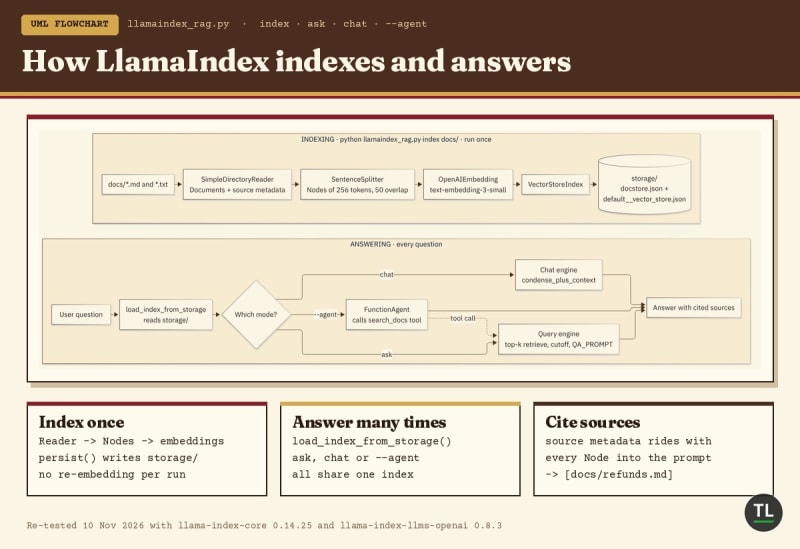
How the LlamaIndex RAG app indexes your docs once and answers every question from storage
Each box is one LlamaIndex component.
Each component replaces one function you wrote by hand in Article 7.
1. Prerequisites
You'll need:
Python 3.10 or newer, which
llama-indexrequires according to its PyPI pageAn OpenAI API key, from the OpenAI developer quickstart
The
docs/folder from Article 7, or any folder of.mdand.txtfiles
We'll use the same two models as the earlier articles.
Embedding model
text-embedding-3-small, described in the OpenAI embeddings guide
Chat model
gpt-6-luna
Both can be changed with the EMBED_MODEL and CHAT_MODEL environment variables.
You don't need a vector database account.
LlamaIndex ships with a simple in-memory vector store that saves to plain files.
2. Install LlamaIndex
Move into your Article 7 project:
cd simple-rag
Activate the virtual environment on macOS or Linux:
source .venv/bin/activate
On Windows:
.venv\Scripts\activate
Install LlamaIndex core plus the two OpenAI integrations:
pip install -U llama-index-core llama-index-llms-openai llama-index-embeddings-openai
Why not just pip install llama-index?
The LlamaIndex installation guide describes llama-index as a starter bundle, and it still works for older models.
But when I re-checked on 10 Nov 2026, the llama-index 0.14.25 package on PyPI pinned llama-index-llms-openai below 0.8 and llama-index-embeddings-openai below 0.7.
That older OpenAI LLM class doesn't know gpt-6-luna, so every question failed with ValueError: Unknown model 'gpt-6-luna'.
Installing the three packages directly gave me the current versions with no dependency conflicts.
Here's what each one does:
llama-index-core
The framework itself: documents, nodes, indexes, query engines, chat engines and agents.
Every import from llama_index.core comes from here, and it also pulls in NLTK, which SentenceSplitter uses to find sentence boundaries.
llama-index-llms-openai
The OpenAI LLM class, imported from llama_index.llms.openai.
llama-index-embeddings-openai
The OpenAI embedding class, imported from llama_index.embeddings.openai.
Every other integration is its own package.
Need PDFs or Word files? Add llama-index-readers-file.
Our .md and .txt files load without it.
Want Chroma, Qdrant or a local model through Ollama?
Install that one package, like llama-index-vector-stores-chroma or llama-index-llms-ollama.
This tutorial was re-tested on 10 Nov 2026 with llama-index-core 0.14.25, llama-index-llms-openai 0.8.3 and llama-index-embeddings-openai 0.7.0 on Python 3.13.
Check yours:
python -c "import llama_index.core; print(llama_index.core.__version__)"
Make sure your API key is set:
export OPENAI_API_KEY="sk-..."
Your project now looks like this:
simple-rag/
├── .venv/
├── docs/
│   ├── refunds.md
│   └── shipping.md
├── rag.py
├── openai_rag.py
├── langchain_rag.py
└── llamaindex_rag.py
We'll build llamaindex_rag.py piece by piece.
The complete file is in Final Code.
3. Configure LlamaIndex With Settings
Add the imports and settings:
import argparse
import asyncio
import logging
import os
from pathlib import Path

import openai
from llama_index.core import (
    PromptTemplate,
    Settings,
    SimpleDirectoryReader,
    StorageContext,
    VectorStoreIndex,
    load_index_from_storage,
)
from llama_index.core.agent.workflow import FunctionAgent
from llama_index.core.node_parser import SentenceSplitter
from llama_index.core.postprocessor import SimilarityPostprocessor
from llama_index.embeddings.openai import OpenAIEmbedding
from llama_index.llms.openai import OpenAI

EMBED_MODEL = os.getenv("EMBED_MODEL", "text-embedding-3-small")
CHAT_MODEL = os.getenv("CHAT_MODEL", "gpt-6-luna")
STORAGE_DIR = "storage"
NO_ANSWER = "I don't know based on the provided documents."

logging.getLogger("httpx").setLevel(logging.WARNING)  # hide per-request log lines
Now the most important three lines in the file:
Settings.llm = OpenAI(model=CHAT_MODEL)
Settings.embed_model = OpenAIEmbedding(model=EMBED_MODEL)
Settings.text_splitter = SentenceSplitter(chunk_size=256, chunk_overlap=50)
Settings is LlamaIndex's global configuration.
The Settings guide describes it as a singleton that supplies a default whenever a component isn't given one explicitly.
Set it once, and every index, query engine and chat engine below uses these models.
Why set the models explicitly?
If you don't, LlamaIndex falls back to its own OpenAI defaults.
The official docs list those as gpt-3.5-turbo for text and text-embedding-ada-002 for embeddings, and recommend passing text-embedding-3-small explicitly for new projects.
Explicit is better.
You always know which models you're paying for.
What about the logging line?
When SimpleDirectoryReader loads its file readers, it can turn on Python's root logger.
Then every HTTP request to OpenAI prints an INFO line.
The httpx line keeps your output clean.
Where did ServiceContext go?
Older tutorials configure LlamaIndex with ServiceContext.
It's gone.
In current versions, creating one raises a ValueError that tells you to use Settings instead.
The ServiceContext migration guide shows the mapping.
4. Load Documents With SimpleDirectoryReader
LlamaIndex represents every file as a Document.
A Document holds the text and a metadata dictionary.
Add this:
def source_metadata(path: str) -> dict:
    return {"source": Path(os.path.relpath(path)).as_posix()}


def load_documents(folder: str):
    reader = SimpleDirectoryReader(
        folder,
        required_exts=[".md", ".txt"],
        recursive=True,
        file_metadata=source_metadata,
    )
    return reader.load_data()
Three arguments do the work:
required_exts=[".md", ".txt"]
Only load these file types.
Without it, SimpleDirectoryReader tries every file it finds.
recursive=True
Read subfolders too.
By default, it only reads the top level of the folder.
file_metadata=source_metadata
Replace the default metadata with our own.
By default, each Document gets file_path, file_name, file_type, file_size and dates.
The file_path is absolute, like /home/you/simple-rag/docs/refunds.md.
That's ugly in a citation.
Our function stores a short relative path instead:
{"source": "docs/refunds.md"}
This matches the citations from Articles 7 to 9.
The SimpleDirectoryReader guide covers every option.
Metadata is part of the context
Here's a detail most tutorials skip.
By default, LlamaIndex adds a Node's metadata to the text it embeds and to the text it sends to the LLM.
So the model actually sees this:
source: docs/refunds.md

Refund policy

Customers can request a full refund within 30 days of purchase by emailing support.
...
That's why it can cite [docs/refunds.md] without any extra formatting code.
It's also why noisy metadata can hurt.
Keep it short and useful.
5. Split Documents Into Nodes With SentenceSplitter
LlamaIndex calls a chunk a Node.
The Documents and Nodes guide defines a Node as a chunk of a source Document, and every Node inherits its Document's metadata.
So every chunk knows its source.
We already configured the splitter:
Settings.text_splitter = SentenceSplitter(chunk_size=256, chunk_overlap=50)
SentenceSplitter tries to keep sentences and paragraphs whole.
Look at this argument:
chunk_size=256
This is the biggest difference from Articles 7 and 9.
LlamaIndex measures chunks in tokens, not characters.
The default is 1,024 tokens with 200 tokens of overlap.
That's several times bigger than the 1,000-character chunks we've used so far.
256 tokens is roughly 1,000 characters of English text, so this keeps our chunks comparable.
If you want to tune chunk sizes, read How Document Chunking Works in RAG.
The node parser modules page lists the other splitters, including semantic and Markdown-aware ones.
6. Build and Persist a VectorStoreIndex
Now we split, embed and store, all in one call.
Add this:
def build_index(folder: str) -> None:
    docs = load_documents(folder)
    index = VectorStoreIndex.from_documents(docs)
    index.storage_context.persist(persist_dir=STORAGE_DIR)
    print(f"Indexed {len(index.docstore.docs)} chunks from {len(docs)} files into {STORAGE_DIR}/")
Look at this line:
index = VectorStoreIndex.from_documents(docs)
It does three things:
Settings.text_splitter   splits each Document into Nodes
Settings.embed_model     embeds every Node in batches
VectorStoreIndex         stores the Nodes and vectors in memory
That's the whole indexing half of Article 7 in one line.
Persisting the index
The index lives in memory.
Without persist(), it disappears when the script ends, and you'd pay to re-embed everything on every run.
persist() writes a few JSON files:
storage/
├── default__vector_store.json
├── docstore.json
├── graph_store.json
├── image__vector_store.json
└── index_store.json
docstore.json holds the Nodes.
default__vector_store.json holds the embeddings.
Loading it back takes two lines:
def load_index() -> VectorStoreIndex:
    storage_context = StorageContext.from_defaults(persist_dir=STORAGE_DIR)
    return load_index_from_storage(storage_context)
This is the pattern from the LlamaIndex persisting guide.
If the folder doesn't exist, StorageContext.from_defaults() raises FileNotFoundError.
We'll catch that in the CLI.
Why the default vector store?
It needs no server and no account.
That makes it perfect for learning.
When you outgrow it, you swap in a vector store integration like Chroma, Qdrant or pgvector through the StorageContext.
Your query code stays the same.
Article 3 of this series, Vector Databases Explained, covers how those stores search embeddings at scale.
7. Query Your Data With a LlamaIndex Query Engine
Now the answering half.
In LlamaIndex, a query engine takes a question and returns an answer, along with the chunks it used.
The query engine guide calls it a generic interface for asking questions over your data.
Inside, it does two jobs:
Retriever               question → embed → top-k Nodes
Response synthesizer    Nodes + question → prompt → LLM → answer
The prompt
First, our own prompt:
QA_PROMPT = PromptTemplate(
    "You are a support assistant for our company documents.\n"
    "Answer using ONLY the context below.\n"
    "Cite the sources you used in square brackets, like [docs/refunds.md].\n"
    "If the context does not contain the answer, reply exactly: {no_answer}\n\n"
    "Context:\n{context_str}\n\n"
    "Question: {query_str}\n"
    "Answer: "
).partial_format(no_answer=NO_ANSWER)
LlamaIndex fills two placeholders on every query:
{context_str}   the retrieved Nodes, with their metadata
{query_str}     the user's question
.partial_format() fills {no_answer} once, up front.
These are the same three rules from Article 7: only the context, cite sources, and a clear way to say "I don't know".
The query engine
Now build the engine:
def make_query_engine(index: VectorStoreIndex, k: int = 4, min_score: float = 0.2, streaming: bool = True):
    return index.as_query_engine(
        similarity_top_k=k,
        node_postprocessors=[SimilarityPostprocessor(similarity_cutoff=min_score)],
        text_qa_template=QA_PROMPT,
        streaming=streaming,
    )
Each argument replaces a piece of Article 7:
similarity_top_k=k
How many Nodes to retrieve.
The LlamaIndex default is 2.
We use 4, like the earlier articles.
node_postprocessors=[SimilarityPostprocessor(...)]
A node postprocessor runs on the retrieved Nodes before they reach the LLM.
SimilarityPostprocessor drops every Node that scores below similarity_cutoff.
That's our min_score rule from Article 7.
The node postprocessors guide lists others, including rerankers.
text_qa_template=QA_PROMPT
Use our prompt instead of the built-in one.
streaming=True
Return a StreamingResponse that yields text as the model writes it.
Ask a question
Now the function that ties it together:
def ask(question: str, k: int = 4, show_sources: bool = False) -> None:
    query_engine = make_query_engine(load_index(), k=k)
    response = query_engine.query(question)
    if not response.source_nodes:
        print(NO_ANSWER)
        return
    if show_sources:
        for node in response.source_nodes:
            print(f"source: {node.metadata['source']} (score {node.score:.2f})")
    for text in response.response_gen:
        print(text, end="", flush=True)
    print()
Look at this line:
if not response.source_nodes:
response.source_nodes holds the Nodes that survived retrieval and the cutoff, each with a score.
If every Node scored too low, the list is empty.
In that case, the query engine doesn't call the LLM at all.
Without a streaming response, it would quietly return the text Empty Response.
We print our own "I don't know" message instead.
Then we stream:
for text in response.response_gen:
Each item is a plain string.
We print it as it arrives, exactly as the LlamaIndex streaming guide shows.
Here's the whole trip one question takes through the query engine:
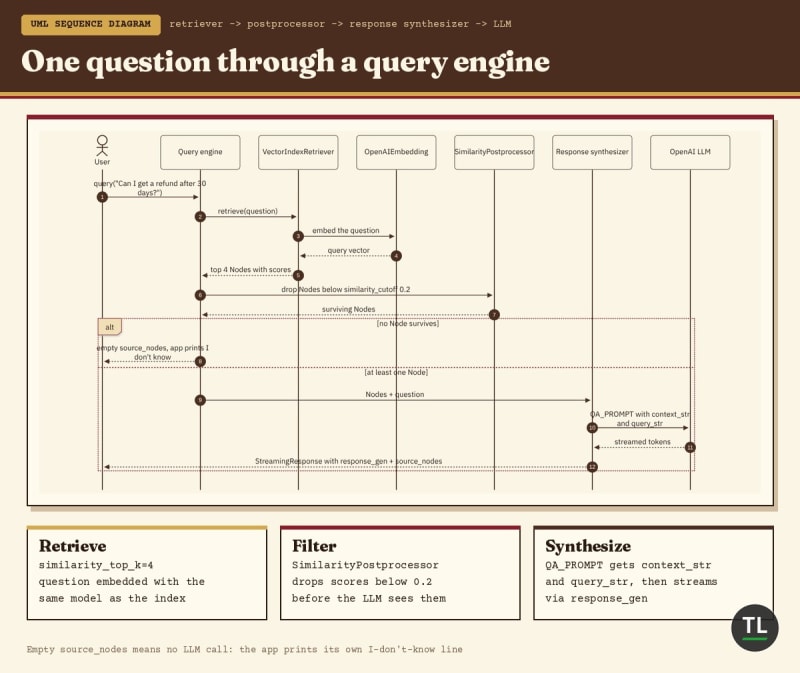
One question through a query engine: retrieve, filter weak matches, then prompt the LLM
Notice that the LLM only sees what survives the postprocessor.
That's why a good cutoff matters as much as a good prompt.
The scores are cosine similarities, the same meaning-based scores from Article 4, Semantic Search vs Keyword Search.
8. Add a LlamaIndex Chat Engine
A query engine answers one question at a time.
It has no memory.
Ask "What about express shipping?" after a refund question, and it has no idea what "what about" refers to.
That's what a chat engine is for.
Add this:
def chat(k: int = 4) -> None:
    chat_engine = load_index().as_chat_engine(
        chat_mode="condense_plus_context",
        similarity_top_k=k,
        node_postprocessors=[SimilarityPostprocessor(similarity_cutoff=0.2)],
        system_prompt="You are a support assistant for our company documents.",
        context_prompt=(
            "Relevant documents:\n{context_str}\n\n"
            "Answer using ONLY these documents and cite sources like [docs/refunds.md]. "
            f"If they don't contain the answer, reply exactly: {NO_ANSWER}"
        ),
    )
    print("Chat with your documents. Press Enter on an empty line to quit.")
    while question := input("\nYou: ").strip():
        response = chat_engine.stream_chat(question)
        print("Bot: ", end="")
        for token in response.response_gen:
            print(token, end="", flush=True)
        print()
Look at this argument:
chat_mode="condense_plus_context",
The chat engine usage guide describes this mode in two steps.
First, it rewrites your latest message into a standalone question using the chat history.
Then it retrieves Nodes for that question and puts them into the system prompt.
So a follow-up turns into a real search:
History:    "Can I get a refund after 30 days?"
You type:   "What about express shipping?"
Condensed:  something like "How long does express shipping take?"
Retrieved:  docs/shipping.md
That's the same query rewriting we built by hand in Article 8.
Here, it's one argument.
stream_chat() vs streaming=True
Notice the inconsistency.
Query engines stream with streaming=True.
Chat engines stream by calling stream_chat() instead of chat().
The official docs admit this is inconsistent.
Just remember which is which.
Other chat modes
context retrieves on every message without rewriting it.
condense_question rewrites the message and sends it to a query engine.
simple skips retrieval and talks to the LLM directly.
For document Q&A with follow-ups, condense_plus_context is a solid default.
9. Turn the Query Engine Into an Agent Tool
There's a third way to use your index.
Give it to an agent as a tool, and let the model decide when to search.
That's agentic RAG, the same idea we tried with LangChain in Article 9.
Add this:
async def ask_agent(question: str, k: int = 4) -> None:
    query_engine = make_query_engine(load_index(), k=k, streaming=False)

    async def search_docs(query: str) -> str:
        """Search the company support documents about refunds, shipping and policies."""
        response = await query_engine.aquery(query)
        return str(response) if response.source_nodes else "No matching documents found."

    agent = FunctionAgent(
        tools=[search_docs],
        llm=Settings.llm,
        system_prompt=(
            "You answer questions about our company documents. "
            "Use search_docs before answering, and keep the sources it cites. "
            f"If the documents don't cover it, reply exactly: {NO_ANSWER}"
        ),
    )
    result = await agent.run(question)
    print(result)
Three things are new.
A plain function is a tool
FunctionAgent accepts normal Python functions as tools.
The docstring becomes the tool description.
The model reads it to decide when the tool is useful, so write it clearly.
This is the same pattern as the official LlamaIndex starter tutorial.
FunctionAgent
A tool-calling agent: call the model, run any tool it asks for, send the result back, and repeat until it has a final answer.
The LlamaIndex agents guide covers memory, multiple tools and multi-agent setups.
Everything is async
agent.run() must be awaited inside a running event loop.
That's why ask_agent() is async, and the CLI calls it with asyncio.run().
The tool uses aquery(), the async version of query().
Query engine vs agent
So which one should you use?
Query Engine
Best for: FAQ bots, support assistants, documentation search.
Pros: one retrieval and one LLM call per question. Fast, cheap and predictable.
Cons: it searches even for "hi", and it can't search twice for a complex question.
Agent
Best for: questions that need several searches, or apps with several tools.
Pros: the model can rephrase the search, search again, or skip it.
Cons: in our setup, a question costs at least three LLM calls: the agent's tool call, the query engine's answer, and the agent's final reply.
Start with the query engine.
Move to an agent when your questions actually need one.
10. What Actually Happened?
Here's the full lifecycle:
python llamaindex_rag.py index docs/
        ↓
SimpleDirectoryReader loads Documents with a short source path
        ↓
VectorStoreIndex.from_documents() splits them into Nodes
        ↓
OpenAIEmbedding embeds every Node
        ↓
storage_context.persist() saves storage/

python llamaindex_rag.py ask "..."
        ↓
load_index_from_storage() reads storage/
        ↓
the retriever finds the top-k Nodes
        ↓
SimilarityPostprocessor drops weak matches
        ↓
the response synthesizer fills QA_PROMPT and streams the LLM's answer
Here's how it maps to Article 7:
Article 7 (by hand)            LlamaIndex
load_documents() → dicts       SimpleDirectoryReader → Documents
chunk_text()                   SentenceSplitter → Nodes
embed() + normalize            OpenAIEmbedding
vectors.npy + chunks.json      VectorStoreIndex + persist()
retrieve() with NumPy          retriever (similarity_top_k)
min_score check                SimilarityPostprocessor
f-string prompt                PromptTemplate (text_qa_template)
client.responses.create()      response synthesizer + Settings.llm
And to Article 9:
LangChain                      LlamaIndex
Document                       Document
Document chunks                Node
RecursiveCharacterTextSplitter SentenceSplitter
InMemoryVectorStore + dump()   VectorStoreIndex + persist()
prompt | model | parser        query engine
create_agent + @tool           FunctionAgent + plain function
Same RAG.
Different names.
11. Final Code
Here's the complete llamaindex_rag.py:
"""llamaindex_rag.py - the Article 7 RAG app, rebuilt with LlamaIndex.

Load -> split -> embed -> index -> query engine, plus chat and agent modes.
"""
import argparse
import asyncio
import logging
import os
from pathlib import Path

import openai
from llama_index.core import (
    PromptTemplate,
    Settings,
    SimpleDirectoryReader,
    StorageContext,
    VectorStoreIndex,
    load_index_from_storage,
)
from llama_index.core.agent.workflow import FunctionAgent
from llama_index.core.node_parser import SentenceSplitter
from llama_index.core.postprocessor import SimilarityPostprocessor
from llama_index.embeddings.openai import OpenAIEmbedding
from llama_index.llms.openai import OpenAI

EMBED_MODEL = os.getenv("EMBED_MODEL", "text-embedding-3-small")
CHAT_MODEL = os.getenv("CHAT_MODEL", "gpt-6-luna")
STORAGE_DIR = "storage"
NO_ANSWER = "I don't know based on the provided documents."

logging.getLogger("httpx").setLevel(logging.WARNING)  # hide per-request log lines

# Global defaults for every LlamaIndex component
Settings.llm = OpenAI(model=CHAT_MODEL)
Settings.embed_model = OpenAIEmbedding(model=EMBED_MODEL)
Settings.text_splitter = SentenceSplitter(chunk_size=256, chunk_overlap=50)


# 1. Load -----------------------------------------------------------------
def source_metadata(path: str) -> dict:
    return {"source": Path(os.path.relpath(path)).as_posix()}


def load_documents(folder: str):
    reader = SimpleDirectoryReader(
        folder,
        required_exts=[".md", ".txt"],
        recursive=True,
        file_metadata=source_metadata,
    )
    return reader.load_data()


# 2-4. Split, embed and index ---------------------------------------------
def build_index(folder: str) -> None:
    docs = load_documents(folder)
    index = VectorStoreIndex.from_documents(docs)
    index.storage_context.persist(persist_dir=STORAGE_DIR)
    print(f"Indexed {len(index.docstore.docs)} chunks from {len(docs)} files into {STORAGE_DIR}/")


def load_index() -> VectorStoreIndex:
    storage_context = StorageContext.from_defaults(persist_dir=STORAGE_DIR)
    return load_index_from_storage(storage_context)


# 5. Query engine ---------------------------------------------------------
QA_PROMPT = PromptTemplate(
    "You are a support assistant for our company documents.\n"
    "Answer using ONLY the context below.\n"
    "Cite the sources you used in square brackets, like [docs/refunds.md].\n"
    "If the context does not contain the answer, reply exactly: {no_answer}\n\n"
    "Context:\n{context_str}\n\n"
    "Question: {query_str}\n"
    "Answer: "
).partial_format(no_answer=NO_ANSWER)


def make_query_engine(index: VectorStoreIndex, k: int = 4, min_score: float = 0.2, streaming: bool = True):
    return index.as_query_engine(
        similarity_top_k=k,
        node_postprocessors=[SimilarityPostprocessor(similarity_cutoff=min_score)],
        text_qa_template=QA_PROMPT,
        streaming=streaming,
    )


def ask(question: str, k: int = 4, show_sources: bool = False) -> None:
    query_engine = make_query_engine(load_index(), k=k)
    response = query_engine.query(question)
    if not response.source_nodes:
        print(NO_ANSWER)
        return
    if show_sources:
        for node in response.source_nodes:
            print(f"source: {node.metadata['source']} (score {node.score:.2f})")
    for text in response.response_gen:
        print(text, end="", flush=True)
    print()


# 6. Chat engine ----------------------------------------------------------
def chat(k: int = 4) -> None:
    chat_engine = load_index().as_chat_engine(
        chat_mode="condense_plus_context",
        similarity_top_k=k,
        node_postprocessors=[SimilarityPostprocessor(similarity_cutoff=0.2)],
        system_prompt="You are a support assistant for our company documents.",
        context_prompt=(
            "Relevant documents:\n{context_str}\n\n"
            "Answer using ONLY these documents and cite sources like [docs/refunds.md]. "
            f"If they don't contain the answer, reply exactly: {NO_ANSWER}"
        ),
    )
    print("Chat with your documents. Press Enter on an empty line to quit.")
    while question := input("\nYou: ").strip():
        response = chat_engine.stream_chat(question)
        print("Bot: ", end="")
        for token in response.response_gen:
            print(token, end="", flush=True)
        print()


# 7. Agent ----------------------------------------------------------------
async def ask_agent(question: str, k: int = 4) -> None:
    query_engine = make_query_engine(load_index(), k=k, streaming=False)

    async def search_docs(query: str) -> str:
        """Search the company support documents about refunds, shipping and policies."""
        response = await query_engine.aquery(query)
        return str(response) if response.source_nodes else "No matching documents found."

    agent = FunctionAgent(
        tools=[search_docs],
        llm=Settings.llm,
        system_prompt=(
            "You answer questions about our company documents. "
            "Use search_docs before answering, and keep the sources it cites. "
            f"If the documents don't cover it, reply exactly: {NO_ANSWER}"
        ),
    )
    result = await agent.run(question)
    print(result)


# CLI ---------------------------------------------------------------------
if __name__ == "__main__":
    parser = argparse.ArgumentParser(description="RAG with LlamaIndex")
    sub = parser.add_subparsers(dest="command", required=True)
    idx = sub.add_parser("index")
    idx.add_argument("folder")
    one = sub.add_parser("ask")
    one.add_argument("question")
    one.add_argument("-k", type=int, default=4)
    one.add_argument("--show-sources", action="store_true")
    one.add_argument("--agent", action="store_true", help="let an agent decide when to search")
    talk = sub.add_parser("chat")
    talk.add_argument("-k", type=int, default=4)
    args = parser.parse_args()

    try:
        if args.command == "index":
            build_index(args.folder)
        elif args.command == "chat":
            chat(k=args.k)
        elif args.agent:
            asyncio.run(ask_agent(args.question, k=args.k))
        else:
            ask(args.question, k=args.k, show_sources=args.show_sources)
    except openai.AuthenticationError:
        raise SystemExit("Authentication failed. Check OPENAI_API_KEY.")
    except openai.RateLimitError as e:
        raise SystemExit(f"Rate limited or out of quota: {e}")
    except FileNotFoundError:
        raise SystemExit("No index found. Run: python llamaindex_rag.py index docs/")
The core RAG part is short.
Loading, indexing and querying take about 40 lines, and most of that is our prompt and options.
The rest is the chat engine, the agent and the CLI.
The important pattern is:
Configure:  Settings.llm, Settings.embed_model, Settings.text_splitter
Index:      SimpleDirectoryReader → VectorStoreIndex.from_documents() → persist()
Query:      index.as_query_engine(similarity_top_k, postprocessors, prompt)
Converse:   index.as_chat_engine(chat_mode="condense_plus_context")
Extend:     wrap the query engine in a function → FunctionAgent
12. Run the LlamaIndex RAG App
Build the index:
python llamaindex_rag.py index docs/
Expected output:
Indexed 2 chunks from 2 files into storage/
Each sample file is shorter than 256 tokens, so each becomes one Node.
Ask a question with sources:
python llamaindex_rag.py ask "Can I get a refund after 30 days?" --show-sources
Output from my run (your scores and wording will differ):
source: docs/refunds.md (score ...)
After 30 days, refunds are issued as store credit only [docs/refunds.md].
You may also see docs/shipping.md listed if it scores above the cutoff.
Now chat:
python llamaindex_rag.py chat
An example conversation (your wording will differ):
Chat with your documents. Press Enter on an empty line to quit.

You: Can I get a refund after 30 days?
Bot: After 30 days, refunds are issued as store credit only [docs/refunds.md].

You: What about express shipping?
Bot: Express shipping takes 1 to 2 business days and costs extra [docs/shipping.md].
The second question only works because the chat engine rewrote it using the history.
Now try the agent:
python llamaindex_rag.py ask "Can I get a refund after 30 days?" --agent
Expected output:
After 30 days, refunds are issued as store credit only [docs/refunds.md].
Same answer.
But this time, the model chose to call search_docs first.
See inside with the simple handler
Want to see the exact prompt LlamaIndex sends?
Add these two lines at the top of the file, after the imports:
from llama_index.core import set_global_handler
set_global_handler("simple")
Now every LLM call prints its messages and the response.
You'll see source: docs/refunds.md above each chunk in the context, which is how the citations work.
The tracing and debugging guide covers full observability tools for production.
Remove the lines when you're done.
13. Common LlamaIndex Errors
ImportError: cannot import name 'VectorStoreIndex' from 'llama_index'
You're following a pre-0.10 tutorial.
The old from llama_index import VectorStoreIndex style no longer works.
Core classes now live in llama_index.core:
from llama_index.core import VectorStoreIndex
ValueError: ServiceContext is deprecated
Another old tutorial.
The full message in 0.14.25 is:
ValueError: ServiceContext is deprecated. Use llama_index.settings.Settings instead, or pass in modules to local functions/methods/interfaces.
Replace ServiceContext with Settings, or pass the LLM and embedding model directly to the index or engine.
ModuleNotFoundError: No module named 'llama_index.llms.openai'
You installed only llama-index-core.
The OpenAI classes are separate packages.
Install them:
pip install llama-index-llms-openai llama-index-embeddings-openai
ValueError: Unknown model 'gpt-6-luna'
This is the error I hit on 10 Nov 2026 after a plain pip install -U llama-index:
ValueError: Unknown model 'gpt-6-luna'. Please provide a valid OpenAI model name in: o1, o1-2024-12-17, ...
The OpenAI LLM class checks the model name against a list of models it knows, so it can work out the context window.
A brand-new model name fails until the package catches up, and the llama-index bundle can hold that package back.
Install the integration directly:
pip install -U llama-index-core llama-index-llms-openai
For an OpenAI-compatible server with its own model names, use the OpenAILike class from the llama-index-llms-openai-like package instead.
openai.OpenAIError: Missing credentials
OPENAI_API_KEY isn't set in this terminal.
Set it and run again:
export OPENAI_API_KEY="sk-..."
ValueError: No files found in docs/
SimpleDirectoryReader found no files with the extensions in required_exts.
Check the folder path and the file extensions.
No index found
You haven't built the index yet.
Run:
python llamaindex_rag.py index docs/
14. Common LlamaIndex RAG Mistakes
1. Copying Pre-0.10 Tutorials
Most LlamaIndex examples online still use from llama_index import ..., ServiceContext or GPTVectorStoreIndex.
Check the date and the imports before you copy anything.
2. Relying on Default Models
Without Settings.llm and Settings.embed_model, LlamaIndex picks its own defaults.
Set them explicitly, so you know what you're running and paying for.
3. Thinking Chunk Size Is in Characters
SentenceSplitter(chunk_size=1024) means 1,024 tokens, not characters.
That's far bigger than most people expect.
4. Re-Embedding on Every Run
VectorStoreIndex.from_documents() embeds everything again.
Build once, persist(), then load with load_index_from_storage().
5. Ignoring source_nodes
When answers are wrong, the cause is almost always retrieval, not the model.
Print response.source_nodes with their scores before you change the prompt.
6. Mixing Embedding Models
The index and the questions must use the same embedding model.
Change EMBED_MODEL, and rebuild the index.
LlamaIndex vs LangChain for RAG
You've now built the same app with both.
So which one should you use?
Use LlamaIndex When
Your app is mainly about questions over documents
You want strong defaults: one line from files to a query engine
You need data features like readers, node parsers and postprocessors
You want a chat engine with question rewriting built in
Use LangChain When
RAG is one part of a larger app with many tools and steps
You want to compose your own chains with the
|pipeYou're already using LangGraph or LangSmith
Use Plain Python When
You have one data source and one model
You want full control and no extra dependencies
You're learning how RAG works
You don't have to pick one forever.
The two can work together, and a common setup uses LlamaIndex for retrieval inside a larger agent.
A practical approach:
Learn RAG with plain Python
        ↓
Use a framework where it saves real work
        ↓
Keep the parts you need to control in your own code
Quick Recap
Settingssets the LLM, embedding model and text splitter for the whole app.SimpleDirectoryReaderturns a folder intoDocumentobjects with metadata, and that metadata reaches the prompt.A Node is a chunk, and
SentenceSplittermeasures chunks in tokens (default 1,024 with 200 overlap).VectorStoreIndex.from_documents()splits, embeds and stores in one call;persist()saves it andload_index_from_storage()loads it.A query engine is retriever plus postprocessors plus response synthesizer;
source_nodesshows what it used.A chat engine in
condense_plus_contextmode rewrites follow-ups into standalone questions.A plain async function becomes an agent tool for
FunctionAgent.Old
from llama_index import ...imports andServiceContextfail, and thellama-indexbundle can lag behind new OpenAI models.
The biggest lesson is simple:
LlamaIndex doesn't change how RAG works. It starts from your data and gives you ready-made engines for asking questions about it.
Exercises
Try these before Thursday's article.
1. Add chat --show-sources
When the flag is set, print the source of every retrieved Node after each answer.
Hint: the streaming chat response has a source_nodes list too, just like the query engine response.
2. Tune the cutoff
Run ask with --show-sources on a question your docs can't answer, like "Do you ship to Mars?".
Raise min_score until it prints the "I don't know" line instead of a weak match, and note the value.
3. Change the chunk size
Rebuild the index with chunk_size=128 and then 512.
Compare the chunk count printed by index and the scores printed by --show-sources.
4. Go fully local
Install llama-index-llms-ollama and llama-index-embeddings-huggingface, then change only the three Settings lines.
The official privacy and local models guide shows a fully local setup.
Remember to rebuild the index after changing the embedding model.
FAQs
Is LlamaIndex good for RAG?
Yes. RAG is what LlamaIndex was built for, and it goes from a folder of files to a working query engine in a few lines, with rerankers and other node postprocessors when the basics aren't enough.
Is LlamaIndex free?
The framework is open source under the MIT licence on GitHub. You still pay for the models you call, and LlamaParse, LlamaIndex's document-parsing service, is a separate commercial product.
Does LlamaIndex require OpenAI?
No. OpenAI is only the default. Install another provider's integration package and change Settings.llm and Settings.embed_model.
What is the difference between a query engine and a chat engine?
A query engine answers one question at a time with no memory. A chat engine keeps the history, so it can handle follow-ups like "What about express shipping?"
LlamaIndex vs LangChain: which is better for RAG?
Both build the same app. LlamaIndex is data-first and gets you a working query engine with less code, while LangChain is a broader toolkit for chains, tools and agents.
Conclusion
In Article 7, we built RAG from scratch.
In Article 8, we made the OpenAI calls production-ready.
In Article 9, we rebuilt the pipeline with LangChain.
Today, LlamaIndex did the same job from the data side.
One line turned a folder into an index.
One line turned the index into a query engine.
And one argument gave us a chat engine that understands follow-up questions.
Because you built every step by hand first, none of it is magic.
So far, our documents have been tidy Markdown files.
Next, we take on real PDFs, with page numbers, citations and a chat interface.
Continue Learning
You're currently at Article 10 of TheTechLane's RAG series.
Previous
LangChain for RAG: A Beginner's Guide
Article 9 rebuilt the same app with LangChain, so you can compare the two frameworks line by line.
Next
Article 11: Build a Chat with PDF App Using RAG (coming Thursday)
Real PDFs, page numbers and citations in a chat interface.
Related reading:
Build a Simple RAG Application Using Python, the by-hand version every LlamaIndex component replaces
How Document Chunking Works in RAG, before you tune
chunk_size
Get New RAG Articles in Your Inbox
Want Article 11 and every new RAG tutorial the day it goes live?
Subscribe to the TheTechLane newsletter for practical AI and developer guides, with no spam.
Sources
SimpleDirectoryReader, Documents and Nodes and node parser modules
Agents in LlamaIndex and the starter tutorial
llama-index on PyPI, llama-index-core on PyPI and llama-index-llms-openai on PyPI
Lewis et al. 2020, Retrieval-Augmented Generation for Knowledge-Intensive NLP Tasks
Have a Question?
If something isn't clear or your LlamaIndex RAG app isn't working as expected, leave a comment below with your llama-index-core version.
We'll do our best to explain it with simple words, practical examples, and code you can actually understand.
Happy Coding! 🚀
Follow TheTechLane
Keep learning AI, development, and modern developer technologies with TheTechLane.
Learn • Build • Share
Follow @thetechlanehq for more developer guides, tutorials, and practical technology content.