Can You Build a Working MCP Server in 15 Minutes? (MCP Part 1)
MCP in 5 minutes, then build and test your first MCP server in TypeScript: two tools, a resource, a scripted client and MCP Inspector, with real output.
Every AI app wants to call your code.
Your editor wants to read your files. Your chatbot wants to query your database. Your agent wants to hit your internal API.
Without a standard, you'd write a custom integration for every pair.
The Model Context Protocol (MCP) fixes that. You write one server, and any MCP-compatible app can use it.
In the next 15 minutes, you'll build one.
This is Part 1 of TheTechLane's MCP from Zero to Production series.
One practical step per part, from your first local server to a secure, observable, deployed MCP service.
In this part, you'll learn:
What MCP is, in five minutes, without the jargon
How a host, a client and a server talk to each other
How to build an MCP server in TypeScript with two tools and a resource
How to test it with a tiny scripted client and with MCP Inspector
The stdout mistake that breaks most first servers
Let's start with the big picture.
Prerequisites
You need three things:
Node.js 20 or newer (this guide was tested on Node.js 24)
A terminal and a code editor
Basic TypeScript or JavaScript: functions,
async/await, objects
You don't need an API key. You don't need Claude Desktop or Cursor yet.
We'll connect real AI clients in Part 4.
What Is MCP? The 5-Minute Version
MCP is an open protocol that lets AI applications discover and call external tools and data through one standard JSON-RPC interface.
The official MCP architecture overview describes three participants:
Host: the AI app the user sees, like Claude Desktop, Cursor or your own agent
Client: a connector inside the host that keeps one connection to one server
Server: your program, which exposes capabilities
Here's the flow in one picture:
Host (AI app)
    ↓ creates
MCP Client  ──JSON-RPC──▶  MCP Server (your code)
                               ↓
                     tools · resources · prompts
A server can offer three main kinds of capabilities:
Tools: functions the model can call, like
convert_unitsResources: read-only data the app can load as context, like a file or a doc
Prompts: reusable prompt templates the user can pick
Messages travel over a transport.
The MCP transports specification defines two standard ones: stdio, where the client launches your server as a child process, and Streamable HTTP, for remote servers.
Today you'll use stdio. It's the simplest way to start.
Want the full conceptual tour first? Read Model Context Protocol (MCP) Explained: The Complete Developer Guide.
Step 1: Create the Project
Make a folder and initialise it:
mkdir tl-mcp-starter && cd tl-mcp-starter
npm init -y
Install the official MCP TypeScript SDK server and client packages, plus Zod for input schemas:
npm install @modelcontextprotocol/server @modelcontextprotocol/client zod
Install TypeScript and Node.js types as dev dependencies:
npm install -D typescript @types/node
This tutorial uses @modelcontextprotocol/server 2.4.0, @modelcontextprotocol/client 2.4.0, zod 4.6.7 and TypeScript 7.0.2, the versions npm installed on 9 November 2026.
That's SDK v2, the current stable line.
You'll still see the older single @modelcontextprotocol/sdk package in many tutorials. It's now the v1 maintenance line, and v2 splits it into separate server and client packages. The v2 migration guide covers the differences.
Step 2: Configure TypeScript and ES Modules
The v2 SDK ships ES modules only, so mark your package as a module.
Replace the generated package.json with this:
{
  "name": "tl-mcp-starter",
  "version": "1.0.0",
  "type": "module",
  "scripts": {
    "build": "tsc",
    "start": "node build/server.js",
    "test:client": "node build/client.js"
  },
  "dependencies": {
    "@modelcontextprotocol/client": "^2.4.0",
    "@modelcontextprotocol/server": "^2.4.0",
    "zod": "^4.6.7"
  },
  "devDependencies": {
    "@types/node": "^26.6.6",
    "typescript": "^7.0.2"
  }
}
The "type": "module" line tells Node.js to treat .js files as ECMAScript modules.
Now create tsconfig.json:
{
  "compilerOptions": {
    "target": "ES2022",
    "module": "NodeNext",
    "moduleResolution": "NodeNext",
    "outDir": "./build",
    "rootDir": "./src",
    "strict": true,
    "esModuleInterop": true,
    "skipLibCheck": true,
    "types": ["node"]
  },
  "include": ["src/**/*.ts"]
}
Keep the "types": ["node"] line.
The server package README notes that TypeScript 6 and later no longer auto-include @types/* packages. Without that line, our first build failed with Cannot find name 'process'.
Step 3: Write Your First MCP Server
Create src/server.ts.
Start with the imports:
import { McpServer } from "@modelcontextprotocol/server";
import { serveStdio } from "@modelcontextprotocol/server/stdio";
import * as z from "zod/v4";
Then open a factory function that builds the server:
function createServer(): McpServer {
  const server = new McpServer({
    name: "tl-starter-server",
    version: "1.0.0",
  });
Everything in the next three snippets goes inside this function. Why a factory? Because serveStdio calls it to build the instance that serves each connection.
Add Tool 1: A Word Counter
Tools are registered with registerTool. You give it a name, a config with a description and an input schema, and a handler:
  server.registerTool(
    "word_count",
    {
      title: "Word Counter",
      description: "Count words and characters in a piece of text and estimate reading time",
      inputSchema: z.object({
        text: z.string().min(1).describe("The text to analyse"),
      }),
    },
    async ({ text }) => {
      const words = text.trim().split(/\s+/).length;
      const chars = text.length;
      const minutes = Math.max(1, Math.round(words / 200));
      return {
        content: [
          {
            type: "text",
            text: `${words} words, ${chars} characters, about ${minutes} min read`,
          },
        ],
      };
    }
  );
In v2, inputSchema is a full z.object(...), the only schema you write.
From it, the SDK derives the JSON Schema the model sees, validates arguments before your handler runs, and types the handler's arguments.
If you're coming from v1, registerTool replaces the old server.tool(...) helper.
Add Tool 2: A Unit Converter
This one shows how to report a tool error properly:
  const factors: Record<string, number> = {
    "km-mi": 0.621371,
    "mi-km": 1.609344,
    "kg-lb": 2.204623,
    "lb-kg": 0.453592,
  };

  server.registerTool(
    "convert_units",
    {
      title: "Unit Converter",
      description: "Convert a value between km and mi, or kg and lb, and C and F",
      inputSchema: z.object({
        value: z.number().describe("The number to convert"),
        from: z.enum(["km", "mi", "kg", "lb", "C", "F"]),
        to: z.enum(["km", "mi", "kg", "lb", "C", "F"]),
      }),
    },
    async ({ value, from, to }) => {
      let result: number | undefined;
      if (from === "C" && to === "F") result = (value * 9) / 5 + 32;
      else if (from === "F" && to === "C") result = ((value - 32) * 5) / 9;
      else if (factors[`${from}-${to}`]) result = value * factors[`${from}-${to}`];

      if (result === undefined) {
        return {
          content: [{ type: "text", text: `Can't convert ${from} to ${to}` }],
          isError: true,
        };
      }
      return {
        content: [
          { type: "text", text: `${value} ${from} = ${result.toFixed(2)} ${to}` },
        ],
      };
    }
  );
The isError: true flag matters.
The MCP tools specification separates protocol errors from tool execution errors. A bad unit pair is a tool error, so you return it in the result. The model can read it and try again.
Add a Resource
Resources are read-only context. Register one with a URI:
  server.registerResource(
    "units-guide",
    "docs://units-guide",
    {
      title: "Supported Units",
      description: "Which unit pairs convert_units supports",
      mimeType: "text/plain",
    },
    async (uri) => ({
      contents: [
        {
          uri: uri.href,
          text: "Supported pairs: km<->mi, kg<->lb, C<->F",
        },
      ],
    })
  );
The app decides when to load a resource. The MCP resources specification calls them application-driven, while tools are model-controlled.
Close the Factory and Serve It
Return the server, close the function, and hand the factory to serveStdio:
  return server;
}

// serveStdio reads requests on stdin and writes responses to stdout
serveStdio(createServer);
// Log to stderr: stdout is reserved for JSON-RPC messages
console.error("tl-starter-server running on stdio");
In v2, serveStdio replaces the old new StdioServerTransport() plus server.connect() wiring. The SDK stdio guide covers clean shutdown too.
That console.error isn't a typo.
On stdio, stdout carries the protocol. The transports spec says the server MUST NOT write anything to stdout that isn't a valid MCP message.
Logs belong on stderr, which clients may capture or show.
Build it:
npx tsc
No output means it compiled.
How a Client Talks to Your Server
Before you test, it helps to see the conversation.
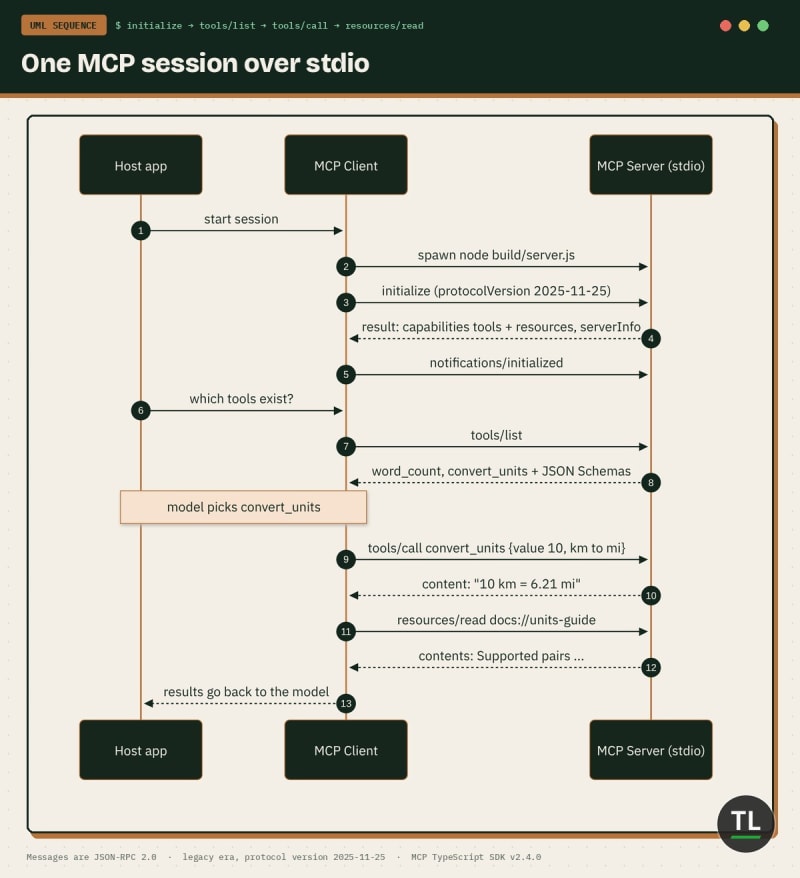
How an MCP client talks to your server: initialize, list, call, read
Every session follows the MCP lifecycle:
The client sends
initializewith its protocol version and capabilitiesThe server replies with its version, capabilities and info
The client sends
notifications/initializedNow the client can call
tools/list,tools/call,resources/listandresources/read
You can watch this happen by piping raw JSON-RPC into the server:
printf '%s\n' \
  '{"jsonrpc":"2.0","id":1,"method":"initialize","params":{"protocolVersion":"2025-11-25","capabilities":{},"clientInfo":{"name":"raw","version":"0.0.1"}}}' \
  '{"jsonrpc":"2.0","method":"notifications/initialized"}' \
  '{"jsonrpc":"2.0","id":2,"method":"tools/call","params":{"name":"convert_units","arguments":{"value":100,"from":"C","to":"F"}}}' \
  | node build/server.js 2>/dev/null
Here's the real output:
{"result":{"protocolVersion":"2025-11-25","capabilities":{"tools":{"listChanged":true},"resources":{"listChanged":true}},"serverInfo":{"name":"tl-starter-server","version":"1.0.0"}},"jsonrpc":"2.0","id":1}
{"result":{"content":[{"type":"text","text":"100 C = 212.00 F"}]},"jsonrpc":"2.0","id":2}
The server answered with protocol version 2025-11-25.
That's the classic initialize handshake, which the SDK calls the legacy era. The newer 2026-07-28 revision replaces initialize with a server/discover advertisement, and SDK v2 serves both from the same code.
It also advertised tools and resources capabilities automatically, because you registered both.
That's the whole protocol. Everything else is convenience.
Step 4: Test It With a Scripted Client
Raw JSON is fine once. For repeatable tests, use the SDK's own Client.
Create src/client.ts:
import { Client } from "@modelcontextprotocol/client";
import { StdioClientTransport } from "@modelcontextprotocol/client/stdio";

const transport = new StdioClientTransport({
  command: "node",
  args: ["build/server.js"],
});

const client = new Client({ name: "tl-test-client", version: "1.0.0" });

await client.connect(transport);
console.log("Connected to:", client.getServerVersion()?.name);

const { tools } = await client.listTools();
console.log("Tools:", tools.map((t) => t.name).join(", "));

const wc = await client.callTool({
  name: "word_count",
  arguments: { text: "MCP lets AI apps talk to your tools in one standard way" },
});
console.log("word_count ->", JSON.stringify(wc.content));

const conv = await client.callTool({
  name: "convert_units",
  arguments: { value: 10, from: "km", to: "mi" },
});
console.log("convert_units ->", JSON.stringify(conv.content));

const bad = await client.callTool({
  name: "convert_units",
  arguments: { value: 10, from: "km", to: "kg" },
});
console.log("bad pair isError:", bad.isError);

const { resources } = await client.listResources();
console.log("Resources:", resources.map((r) => r.uri).join(", "));

const doc = await client.readResource({ uri: "docs://units-guide" });
const first = doc.contents[0];
console.log("units-guide ->", "text" in first ? first.text : "(binary)");

await client.close();
StdioClientTransport launches your server as a child process. client.connect() runs the whole initialize handshake for you.
Build and run:
npx tsc && node build/client.js
Real output from our run:
tl-starter-server running on stdio
Connected to: tl-starter-server
Tools: word_count, convert_units
word_count -> [{"type":"text","text":"12 words, 55 characters, about 1 min read"}]
convert_units -> [{"type":"text","text":"10 km = 6.21 mi"}]
bad pair isError: true
Resources: docs://units-guide
units-guide -> Supported pairs: km<->mi, kg<->lb, C<->F
The first line is your server's stderr log, passed through to the terminal.
Both tools work, the bad pair comes back as a tool error, and the resource loads.
Now try an argument the schema forbids, like from: "m". We ran it, and the SDK rejected it before the handler ran:
{"content":[{"type":"text","text":"Input validation error: Invalid arguments for tool convert_units: from: Invalid option: expected one of \"km\"|\"mi\"|\"kg\"|\"lb\"|\"C\"|\"F\""}],"isError":true}
Curious about the newer protocol era? Pass { versionNegotiation: { mode: "auto" } } as the second Client argument. In our run, client.getProtocolEra() returned modern with version 2026-07-28, while the default client stayed on legacy.
The SDK protocol versions guide explains both eras.
You just built and tested a real MCP server.
Step 5: Explore It in MCP Inspector
Scripts are great for CI. For poking around, use the official MCP Inspector.
Run it against your built server:
npx @modelcontextprotocol/inspector node build/server.js
It opens a local web UI in your browser.
From there you can:
Click Connect and watch the initialize handshake
Open the Tools tab, pick
convert_units, fill the form and run itOpen the Resources tab and read
docs://units-guideUse the History pane to inspect each JSON-RPC request and response
The Inspector reads your Zod-generated schema, so every input field appears automatically.
Debugging Your First Server
Most first-server bugs fall into a few buckets.
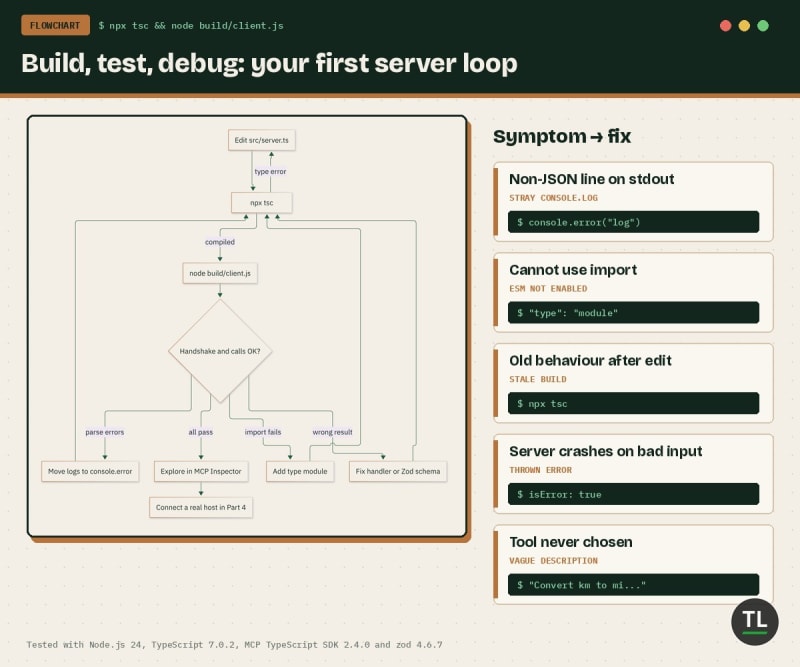
The first-server loop: build, test, fix, then explore in Inspector
1. Logging to stdout
A console.log in the server puts non-JSON text on the protocol channel.
We added console.log("hi") and sent an initialize request. Here's stdout, trimmed:
hi
{"result":{"protocolVersion":"2025-11-25","capabilities":{"tools":{"listChanged":true},"re
The channel now opens with a line no JSON-RPC parser accepts. Some clients skip it, others drop the connection. Use console.error for logs.
2. Forgetting to rebuild
node build/server.js runs compiled JavaScript. Edit src/server.ts, then run npx tsc again.
3. Missing "type": "module"
Without it, Node.js treats your build output as CommonJS and the import statements fail.
4. Throwing for bad input
If a tool can fail for normal reasons, return isError: true with a helpful message instead of crashing.
5. Vague descriptions
The model picks tools by reading their descriptions. "Convert a value between km and mi" beats "converter".
Quick Recap
MCP connects AI hosts to your code through clients and servers speaking JSON-RPC
A server exposes tools (model-controlled), resources (app-controlled) and prompts
SDK v2 uses
@modelcontextprotocol/serverand@modelcontextprotocol/client, withregisterTool,registerResourceandserveStdioZod shapes become JSON Schemas and validate inputs for you
stdio servers must log to stderr, never stdout
Test with the SDK
Clientfor repeatable checks and MCP Inspector for exploring
Exercises
Try these before Part 2:
1. Add a Third Tool
Add slugify, which turns "Hello MCP World" into hello-mcp-world. Call it from client.ts.
2. Add a Resource Template
Look up ResourceTemplate in the SDK resources guide and expose units://{pair} that describes one unit pair.
3. Break It on Purpose
Add console.log("hi") after serveStdio(createServer), rebuild, and pipe a raw initialize request into the server. Spot the bad line, then fix it.
4. Assert, Don't Print
Turn client.ts into a test that exits with code 1 if any output doesn't match what you expect.
Continue Learning
You're currently at Part 1 of the MCP from Zero to Production series.
Previous
Model Context Protocol (MCP) Explained: The Complete Developer Guide, the background explainer for this series.
Next
Part 2: MCP Tools, Resources and Prompts in Depth (coming next)
Related reading:
Prefer Python? Build Your First MCP Server: A Hands-On Tutorial builds a server with the Python SDK. Part 3 of this series goes deeper.
Want the other side of the wire? Build Your First MCP Client from Scratch walks through a client.
MCP plus retrieval arrives in Part 9. Get ready with What Is RAG? Retrieval-Augmented Generation Explained.
Get New Guides in Your Inbox
Want Part 2 the moment it's published?
Subscribe to the free TheTechLane newsletter for new MCP parts, tutorials and developer guides.
Sources
Have a Question?
If your server won't connect, leave a comment below with your error message and the command you ran.
Happy Coding! 🚀
Follow TheTechLane
Keep learning AI, development, and modern developer technologies with TheTechLane.
Learn • Build • Share
Follow @thetechlanehq for more developer guides, tutorials, and practical technology content.