MCP Resources Explained with Real Examples
Learn what MCP Resources are, how they work, and how to implement them with real-world examples. A beginner-friendly guide to Model Context Protocol Resources.
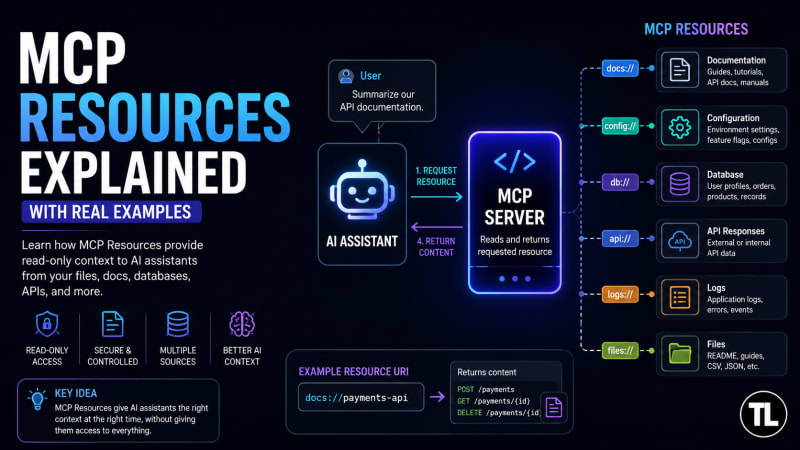
Introduction
Imagine asking an AI assistant to summarize your company's internal documentation, explain a configuration file, or answer questions about a project README. Instead of copying and pasting all that information into the chat, the AI can retrieve it directly through MCP Resources.
Resources are one of the core building blocks of the Model Context Protocol (MCP). They give AI models secure, read-only access to files, documents, databases, and other information without exposing an entire system. If Tools allow an AI to perform actions, Resources allow it to understand context.
In this article, you'll learn what MCP Resources are, how they work, and where they fit into real-world AI applications.
What Are MCP Resources?
An MCP Resource is a read-only source of information exposed by an MCP server. It represents data that an AI assistant can retrieve whenever it needs additional context to answer a user's question.
Unlike Tools, which execute operations such as sending an email or creating a ticket, Resources never change data. They simply return information.
A resource could represent:
A README file
API documentation
Company wiki pages
Database records
Configuration files
Application logs
Product catalogs
User manuals
The AI requests the resource, the MCP server retrieves it, and the information becomes part of the model's working context.
Why Are Resources Important?
Large language models are only as useful as the information available to them.
Imagine a developer asking:
"How do I configure authentication in our internal API?"
Without MCP Resources, the AI has no knowledge of your company's documentation unless someone manually pastes it into the conversation.
With Resources, the AI can retrieve the relevant documentation automatically and answer based on the latest version stored on the server.
This makes responses more accurate while keeping sensitive information inside your own infrastructure.
How MCP Resources Work
The workflow is surprisingly straightforward.
A user asks a question.
The AI determines that additional context is required.
The AI requests a specific resource from the MCP server.
The server reads the requested data.
The resource is returned to the AI.
The AI generates its final response using that information.
The AI never accesses your storage directly. Everything goes through the MCP server, which decides what can and cannot be shared.
Understanding Resource URIs
Every MCP Resource is identified using a unique URI. Think of it as an address that tells the server exactly which piece of information is being requested.
Some common examples include:
docs://installation

docs://authentication

config://production

logs://today

db://employees/101
These URIs don't have to point to actual files. They simply provide a consistent way for the server to identify resources.
When an AI requests docs://authentication, the server might return a Markdown document, a PDF, or even content generated from a database. The AI doesn't need to know where the information comes from—it only cares about the resource it receives.
Real-World Example
Suppose your company maintains internal documentation for a payment service.
A developer asks the AI:
"How do I create a payment?"
The AI requests:
docs://payments-apiThe MCP server returns documentation describing the available endpoints.
The AI now has enough information to explain how the API works, generate sample requests, or even help debug common integration issues.
Without Resources, that documentation would need to be pasted manually into every conversation.
Another Example: Reading Configuration Files
Imagine a production server with the following configuration.
database: PostgreSQL

cache: Redis

serverPort: 8080
Instead of uploading this configuration every time, you expose it as:
config://productionNow a user can simply ask:
"Which database does production use?"
The AI retrieves the configuration resource and correctly responds:
PostgreSQL.
No manual copying is required.
Dynamic Resources
Resources aren't limited to static documents.
They can also represent dynamic data.
For example:
db://users/1

db://users/2

db://users/3
Each resource returns different information depending on the requested URI.
If the AI requests :
db://users/42the server might return :
{
  "id": 42,
  "name": "Alice",
  "role": "Backend Developer"
}
This allows one resource definition to serve thousands of records without creating separate endpoints for each one.
Creating Your First MCP Resource
Using the official JavaScript MCP SDK, registering a resource is straightforward.
import { McpServer, ResourceTemplate } from "@modelcontextprotocol/sdk/server/mcp.js";

const server = new McpServer({
  name: "Demo Server",
  version: "1.0.0",
});

server.registerResource(
  "readme",
  new ResourceTemplate("docs://readme", { list: undefined }),
  {
    title: "Project README",
    description: "Returns project documentation",
  },
  async () => ({
    contents: [
      {
        uri: "docs://readme",
        text: "# Welcome to the project",
      },
    ],
  })
);
This example creates a resource called readme.
Whenever the AI requests docs://readme, the server returns the documentation stored in the text field.
From that point onward, the AI can answer questions about the project without needing the user to upload the README manually.
Resources vs Tools
A common mistake among beginners is confusing Resources with Tools.
A simple rule helps:
Resources provide information.
Tools perform actions.
If the AI needs to read a configuration file, documentation, or database record, use a Resource.
If the AI needs to create a ticket, restart a server, or send an email, use a Tool.
Keeping these responsibilities separate makes MCP applications easier to secure and maintain.
Best Practices
When building MCP Resources for production systems, follow a few simple guidelines.
Use descriptive URI names so they're easy to understand.
Only expose the information an AI genuinely needs.
Avoid returning massive datasets when a small subset will do.
Keep sensitive information such as passwords, API keys, and access tokens out of Resources unless proper authorization checks are in place.
Finally, design Resources to be read-only. Any operation that changes state should be implemented as a Tool instead.
Common Mistakes
One of the biggest mistakes developers make is exposing too much data through a single resource.
For example, returning an entire customer database when only one user's profile is needed wastes bandwidth and increases security risks.
Another common issue is poor URI naming. Generic identifiers such as resource1 or file123 quickly become difficult to manage. Clear names like docs://installation or config://production make Resources much easier to discover.
It's also important not to use Resources for operations like deleting users or updating records. Those belong in Tools.
Conclusion
MCP Resources are the knowledge layer of the Model Context Protocol. They give AI assistants secure, structured access to documentation, configuration files, databases, logs, and many other sources of information without allowing direct modification.
As AI applications become increasingly connected to enterprise systems, Resources provide a clean and standardized way to supply models with the context they need while keeping control firmly in the hands of the MCP server.
Mastering Resources is an essential step toward building production-ready MCP applications, and once you understand them, concepts like Tools and Prompts become much easier to learn.
Previous Lesson
MCP Tools Explained: Build and Expose Your Own Tools
Learn how MCP tools can be used and what does change they can make to this world.
What's Next
MCP Prompts Explained: Reusable Prompt Workflows
Discover how MCP prompts, how they can be resue and its workflow. In our next tutorial we will explain various prompts and how to use them.
Have a Question?
If you have any questions about DSA or programming, leave a comment below. We'll be happy to help.
Follow TheTechLane
Want more Java tutorials, programming tips, and developer resources?
Follow TheTechLane on LinkedIn, X, Instagram, Threads, and Pinterest to stay updated whenever a new tutorial is published.
Learn. Build. Share.
— TheTechLane