Is uv the Only Python Tool You Need? A Practical uv Guide
Learn uv, the fast Python package manager: install it, create projects, add deps, lock versions, manage Python, run tools with uvx, and migrate from pip.
You start a Python project and immediately juggle four tools.
pyenv for the Python version, venv for the environment, pip for packages, pip-tools or Poetry for a lockfile, and pipx for global CLIs.
Then a teammate clones the repo and it still breaks on their machine.
uv replaces that whole stack with one fast binary.
In this guide, you'll learn how to:
Install uv on Windows, macOS, and Linux
Create a project with
uv initand add dependencies withuv addRun code with
uv runand keep environments in sync withuv syncUnderstand the
uv.locklockfile and use it in CIInstall and pin Python versions with
uv pythonRun CLI tools with
uvxanduv tool installMigrate an existing pip or
requirements.txtproject
Every command and output below was run on a real Linux machine with uv 0.13.8.
Quick Answer
uv is a free, open-source Python package and project manager from Astral that installs Python, creates virtual environments, resolves and locks dependencies, and runs tools, all from one command.
The everyday workflow looks like this:
uv init my-app          (create pyproject.toml, .python-version, src/)
      ↓
uv add httpx            (resolve, write uv.lock, install into .venv)
      ↓
uv run my-app           (auto-sync the env, then run)
      ↓
git commit uv.lock      (teammates and CI run uv sync --locked)
That's the core idea.
What Is uv?
uv is a Python package and project manager written in Rust, built by Astral, the team behind the Ruff linter.
The uv GitHub README describes it as a single tool to replace pip, pip-tools, pipx, poetry, pyenv, twine, virtualenv, and more.
It's not a new package format.
uv installs ordinary packages from PyPI and reads the standard pyproject.toml file described in the Python Packaging User Guide.
So a uv project is still a normal Python project.
Anyone can install it with pip if they want to.
Why Use uv?
A few practical reasons:
Speed: Astral's own benchmarks claim 10-100x faster installs than pip, helped by a global cache
One tool: Python versions, environments, dependencies, scripts and CLIs in one binary
Reproducible builds: a cross-platform
uv.lockfile pins every versionNo bootstrap problem: uv doesn't need Python installed to run
Familiar escape hatch: a
uv pipinterface for existing pip workflows
On the demo below, adding httpx resolved 8 packages in 145ms with a warm cache.
Your numbers will vary with network and cache state.
How to Install uv
The uv installation docs offer a standalone installer plus most package managers.
Windows
Run the official installer in PowerShell:
powershell -ExecutionPolicy ByPass -c "irm https://astral.sh/uv/install.ps1 | iex"
Or use WinGet:
winget install --id=astral-sh.uv -e
macOS
Use the standalone installer:
curl -LsSf https://astral.sh/uv/install.sh | sh
Or Homebrew:
brew install uv
Linux
The same installer works on Linux:
curl -LsSf https://astral.sh/uv/install.sh | sh
If you'd rather inspect the script first, pipe it to less instead of sh.
Docker
The docs recommend copying the binary from the official image and pinning a version:
COPY --from=ghcr.io/astral-sh/uv:0.13.8 /uv /uvx /bin/
Verify the Install
Check the version:
uv --version
Expected output:
uv 0.13.8 (x86_64-unknown-linux-gnu)
If you used the standalone installer, uv self update upgrades uv later.
Step 1: Create a Project With uv init
Create a new project folder:
uv init repo-stats
cd repo-stats
Expected output:
Initialized project `repo-stats` at `/tmp/repo-stats`
In uv 0.13, the default layout is a package with a src/ folder, a Git repo, and a console entry point:
.git/ .gitignore .python-version README.md pyproject.toml src/repo_stats/__init__.py
The generated pyproject.toml contains the entry point:
[project.scripts]
repo-stats = "repo_stats:main"
Run it straight away:
uv run repo-stats
Expected output:
Using CPython 3.13.5 interpreter at: /usr/bin/python3.13
Creating virtual environment at: .venv
Installed 1 package in 1ms
Hello from repo-stats!
Notice what you didn't do: you never created or activated a virtual environment.
Step 2: Add Dependencies With uv add
Add a runtime dependency:
uv add httpx
Expected output (trimmed):
Resolved 8 packages in 145ms
Installed 8 packages in 2ms
 + anyio==4.16.0
 + certifi==2026.10.23
 + httpx==0.28.1
 ...
uv did three things in one step: added httpx>=0.28.1 to pyproject.toml, wrote uv.lock, and installed into .venv.
Add a development-only dependency:
uv add --dev pytest
Then see the dependency tree:
uv tree --depth 1
Expected output:
repo-stats v0.1.0
├── httpx v0.28.1
└── pytest v9.2.0 (group: dev)
The managing dependencies docs cover version constraints, Git sources and optional groups.
Step 3: Understand uv.lock and uv sync
pyproject.toml holds broad requirements like httpx>=0.28.1.
uv.lock holds the exact resolved versions, with hashes, for every platform.
The start of the file looks like this:
version = 1
revision = 5
requires-python = ">=3.13"

[[package]]
name = "anyio"
version = "4.16.0"
Commit it to Git, but never edit it by hand.
Before every uv run, uv checks that the lockfile matches pyproject.toml and the environment matches the lockfile, per the locking and syncing docs.
On a fresh clone or in CI, use:
uv sync --locked
--locked makes uv fail with an error instead of silently rewriting an out-of-date lockfile.
--frozen goes further and uses the lockfile without checking it at all.
To upgrade one package while keeping everything else pinned:
uv lock --upgrade-package httpx
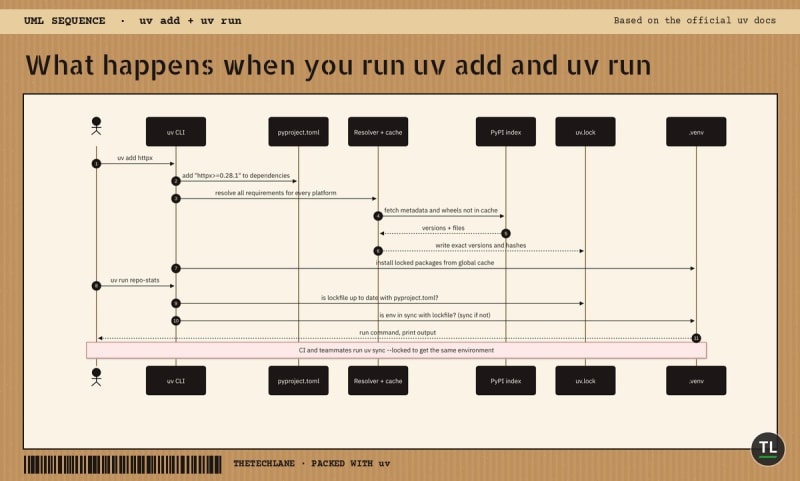
What happens when you run uv add and uv run
Step 4: Manage Python Versions With uv python
uv can download and manage Python builds for you, as explained in the Python versions docs.
Install a version:
uv python install 3.12
Expected output:
Installed Python 3.12.16 in 700ms
 + cpython-3.12.16-linux-x86_64-gnu (python3.12)
List installed and available versions:
uv python list
Pin the project's default version (this writes .python-version):
uv python pin 3.13
The pin must still satisfy requires-python in pyproject.toml, otherwise uv refuses to run (see the mistakes section).
Step 5: Run Tools With uvx and uv tool
Some Python packages are command-line tools, not libraries.
uvx (an alias for uv tool run) runs them in a temporary, cached environment:
uvx ruff check
Expected output:
All checks passed!
For tools you use every day, install them once on your PATH:
uv tool install ruff
Expected output:
 + ruff==0.17.5
Installed 1 executable: ruff
This replaces pipx.
The uv tools guide explains upgrading and running specific versions.
Step 6: Run Single-File Scripts With Inline Dependencies
Not everything needs a project.
uv supports the inline script metadata standard, so a single file can declare its own dependencies.
Create hello.py with one import of httpx, then run:
uv add --script hello.py httpx
uv writes this block at the top of the file:
# /// script
# requires-python = ">=3.12"
# dependencies = [
#     "httpx>=0.28.1",
# ]
# ///
Now uv run hello.py works anywhere uv is installed, with no manual venv.
See the uv scripts guide for more.
A Real uv Example
Let's make repo-stats do something useful: print the latest PyPI version of any package.
Replace src/repo_stats/__init__.py with:
import sys

import httpx


def latest_version(package: str) -> str:
    """Return the latest version of a package from the PyPI JSON API."""
    url = f"https://pypi.org/pypi/{package}/json"
    response = httpx.get(url, timeout=10)
    response.raise_for_status()
    return response.json()["info"]["version"]


def main() -> None:
    packages = sys.argv[1:] or ["httpx", "pytest", "ruff"]
    for name in packages:
        print(f"{name:<10} {latest_version(name)}")
Add a test in tests/test_repo_stats.py:
from repo_stats import latest_version


def test_latest_version_looks_like_a_version():
    version = latest_version("httpx")
    assert version[0].isdigit()
Run the app:
uv run repo-stats
Expected output on 14 Nov 2026 (versions will change over time):
httpx      0.28.1
pytest     9.2.0
ruff       0.17.5
Run the tests and the linter:
uv run pytest -q
uvx ruff check
Expected output:
1 passed in 0.12s
All checks passed!
That's a full project with a pinned lockfile, a dev dependency, tests and linting, and you never typed activate.
Which uv Workflow Should You Use?
uv has three modes, and picking the right one saves confusion:
Project mode (
uv init,uv add,uv run): for apps and libraries you'll maintain, with a committeduv.lockScript mode (
uv run --script, inline metadata): for one-file utilities and notebooks-turned-scriptspip mode (
uv venv,uv pip install): for legacy repos where you can't change the workflow yet
If you're migrating from requirements.txt, the pip-to-project migration guide shows the path:
uv init --bare
uv add -r requirements.txt
--bare creates only pyproject.toml, so it won't add a src/ folder to an existing repo.
For Poetry projects, move your dependencies into the standard [project] table, then run uv lock.
If you can't migrate yet, the uv pip interface is a faster drop-in:
uv venv
uv pip install -r requirements.txt
It isn't a perfect clone of pip, so check the pip compatibility notes for edge cases.
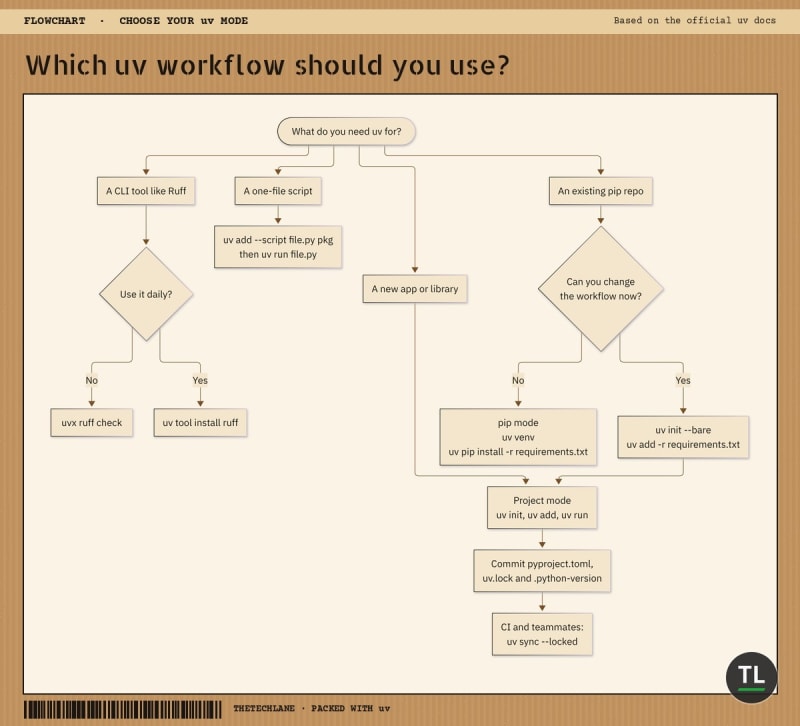
Which uv workflow should you use?
Useful uv Commands
uv remove
Removes a dependency from pyproject.toml, the lockfile and the environment.
uv remove httpx
uv lock --check
Checks that uv.lock matches pyproject.toml without changing it, ideal for CI.
uv lock --check
uv tree --outdated
Shows the dependency tree along with newer versions that are available.
uv tree --outdated
uv export
Writes a hashed requirements.txt for platforms that don't understand uv.lock.
uv export --format requirements.txt --no-dev
uv build
Builds a wheel and source distribution into dist/.
uv build
uv cache clean
Clears the global cache if it grows too large.
uv cache clean
The full list lives in the uv CLI reference.
Common uv Mistakes
1. Pinning a Python Older Than requires-python
uv init sets requires-python from the Python it finds, >=3.13 on our machine.
Running the project on 3.12 then fails:
error: The requested interpreter resolved to Python 3.12.16, which is incompatible with the project's Python requirement: `>=3.13` (from `project.requires-python`)
Fix: lower requires-python in pyproject.toml if you truly support older versions, or use a newer interpreter.
2. Not Committing uv.lock
Without the lockfile, every machine resolves fresh versions.
Fix: commit uv.lock and use uv sync --locked in CI.
3. Mixing pip install Into a uv Project
Running pip install inside .venv adds packages that pyproject.toml doesn't know about.
Fix: use uv add so the dependency is recorded and locked.
4. Editing uv.lock by Hand
Manual edits can produce a lockfile that doesn't match reality.
Fix: change pyproject.toml or use uv lock --upgrade-package, then let uv rewrite the file.
5. Using uvx for a Package's Different Command Name
uvx assumes the command matches the package name.
Fix: use uvx --from <package> <command> when they differ.
uv Best Practices
Commit
pyproject.toml,uv.lockand.python-versiontogetherUse
uv sync --locked(oruv run --locked) in CI so drift fails loudlyPin the uv version in Docker images and CI, as the Docker integration guide recommends
Put test and lint tools in the dev group with
uv add --devUse
uvxfor one-off tools instead of installing them into your projectFollow the GitHub Actions guide to cache uv in CI
Is uv Worth It?
For most new Python projects: yes.
It's fast, it follows Python packaging standards, and it removes the "which tool do I use for this?" decision.
You should use uv if:
You start new Python apps, APIs, scripts or AI experiments often
You want reproducible installs across laptops and CI
You're tired of managing pyenv, venv and pipx separately
You might wait if:
Your team relies on Conda for non-Python binaries (CUDA stacks, GIS libraries)
Your build depends on pip-specific behaviour that uv's compatibility notes flag
Company policy requires tools from a specific approved list
One honest limitation: uv is developed by a single company, Astral.
It's open source (MIT or Apache 2.0), and its projects use standard pyproject.toml, so the lock-in risk is low.
uv FAQ
Is uv free?
Yes.
uv is open source and free to use for personal and commercial projects.
Does uv replace pip completely?
For project work, yes: uv add, uv sync and uv run cover what you used pip and venv for.
For legacy workflows, uv pip gives you a pip-style interface with uv's resolver.
Do I still need to activate the virtual environment?
No, as long as you use uv run.
You can still activate .venv manually if your editor or workflow expects it.
Can I use uv with Poetry or Conda projects?
Poetry projects can move over by converting their dependencies to the standard [project] table.
Conda environments are a different system, and uv doesn't manage Conda packages.
Where does uv store Python versions and packages?
uv keeps managed Python builds and a global package cache in its own directories.
Run uv python dir, uv tool dir or uv cache dir to see the paths on your machine.
Key Takeaways
Here's what to remember:
uv init,uv addanduv runreplace venv, pip and activate for everyday project workuv.lockpins exact versions across platforms, so commit it and useuv sync --lockedin CIuv python installanduv python pinreplace pyenvuvxanduv tool installreplace pipx for CLIs like RuffInline script metadata makes single-file scripts self-contained
uv init --bareplusuv add -r requirements.txtmigrates an existing repo
One fast tool, standard files, reproducible environments: that's why uv is worth learning today.
You May Also Like
Can Your Laptop Run Its Own LLM? A Practical Ollama Guide: pair uv-managed Python scripts with local LLMs
Is LlamaIndex the Easiest Way to Build RAG? (RAG Part 10): a Python AI project that's a perfect first uv project
Bun vs Node.js vs Deno in 2026: Is Node Still the Safe Bet?: the same "fast all-in-one toolchain" story in JavaScript
Claude Code Tutorial: an AI coding agent that works nicely with
uv runcommands
Get New Guides in Your Inbox
Enjoyed this practical guide?
Subscribe to the free TheTechLane newsletter and get new tutorials on Python, AI, tools, and development as soon as they're published.
Sources
Have a Question?
Stuck on a migration or a resolver error? Leave a comment below with your OS and the output of uv --version.
Happy Coding! 🚀
Follow TheTechLane
Keep learning AI, development, and modern developer technologies with TheTechLane.
Learn • Build • Share
Follow @thetechlanehq for more developer guides, tutorials, and practical technology content.