Bun vs Node.js vs Deno in 2026: Is Node Still the Safe Bet?
Bun 1.4, Node.js 26 LTS or Deno 2.9? We compare speed, TypeScript, security, npm support and tooling, with real benchmarks run on one Linux box.

Two weeks ago, on 28 October, Node.js 26 became the new long-term support release.
That one event resets the question every JavaScript team asks once a year: do we stay on Node, or is it finally time to move?
Bun now belongs to Anthropic and powers Claude Code. Deno 2.9 runs most npm packages and still sandboxes everything by default.
All three run TypeScript. All three install npm packages. So what actually separates them in November 2026?
How this comparison works: we compared Node.js 26.13.0 LTS, Deno 2.9.8 and Bun 1.4.4, the latest stable releases on 11 November 2026, using their official docs and release notes. We also ran three small benchmarks on one Linux machine and show exactly how below. Treat those numbers as a sanity check, not a production verdict.
Quick Verdict
Node.js is still the safest default for production, Bun is the fastest all-in-one toolkit, and Deno is the best choice when security and zero-config TypeScript matter most.
Pick Node.js 26 if:
You run a production app that already works and you want support dates you can plan around.
You depend on native addons, unusual crypto or deep V8 diagnostics.
Your hiring pool and hosting provider assume Node.
Pick Bun 1.4 if:
You want one binary for runtime, package manager, test runner, bundler, linter and formatter.
Fast installs and instant script startup matter for your dev loop and CI.
You're starting fresh and can test your dependencies on Bun first.
Pick Deno 2.9 if:
You run scripts, CLIs or agents that touch untrusted code and you want least-privilege permissions.
You want TypeScript, formatting, linting and testing built in with no config.
You like the idea of deploying to Deno Deploy with a free tier.
Criterion            Node.js 26      Bun 1.4          Deno 2.9
Startup speed        slowest         fastest          fast
HTTP hello-world     good            very fast        very fast
Install speed        slow (npm)      fastest          fast
TypeScript           strip only      full transpile   built in + check
Security sandbox     opt-in          none             default on
npm compatibility    native          very high        high
Support lifecycle    published LTS   rolling          rolling
Meet the Contenders
Node.js 26 'Lithium'
Node.js is the original server-side JavaScript runtime, built on Google's V8 engine and hosted by the OpenJS Foundation.
Node.js 26.13.0 moved the 26.x line into long-term support on 28 October 2026, and it will get updates until the end of April 2029.
It's MIT-licensed and ships with npm as its package manager.
Bun 1.4
Bun is an all-in-one toolkit: runtime, package manager, test runner and bundler in a single executable, built on Apple's JavaScriptCore engine instead of V8, according to the Bun docs.
The latest release, Bun v1.4.4, landed on 22 October 2026 and added a built-in Prettier-compatible formatter called bun fmt.
Anthropic acquired Bun in December 2025. The Bun team says the project stays open source and MIT-licensed, and that Claude Code ships as a Bun executable.
Deno 2.9
Deno runs on V8 and treats security and TypeScript as first-class features.
Deno 2.9 arrived on 25 June 2026 with deno desktop, lockfile migration from npm, pnpm, Yarn and Bun, and a Node.js 26 compatibility target. The current patch is Deno 2.9.8 from 21 October 2026.
Performance: What We Measured on Our Machine
Speed is the reason most people look at Bun in the first place, so we measured it ourselves.
We ran these on 11 November 2026 on one Linux virtual machine with 8 vCPUs (Intel Xeon) and 15 GB of RAM, using the official Linux x64 binaries of each runtime.
Startup: hyperfine 1.19.0, 5 warm-up runs and 40 measured runs of a three-line
hello.tsand a one-linehello.mjs.HTTP: a JSON hello-world server (
node:httpfor Node,Bun.servefor Bun,Deno.servefor Deno), loaded with oha 1.16.0 at 50 connections for 10 seconds, three rounds each. The load generator ran on the same machine.Install: six dependencies (Express, Zod, React, React DOM, date-fns, Lodash; 74 packages in total) with a warm cache, five runs each, deleting
node_modulesand lockfiles before every run.
Startup, hello.ts (mean of 40 runs)
  Node.js 26.13.0   59.1 ms
  Deno 2.9.8        14.3 ms
  Bun 1.4.4          3.4 ms

Startup, hello.mjs (mean of 40 runs)
  Node.js 26.13.0   25.2 ms
  Deno 2.9.8        14.1 ms
  Bun 1.4.4          3.2 ms

HTTP JSON hello world, requests per second (median of 3 rounds)
  Node.js node:http   82,809 req/s   p99 about 1.1 ms
  Bun Bun.serve      147,070 req/s   p99 about 0.8 ms
  Deno Deno.serve    154,524 req/s   p99 about 0.5 ms

Install, warm cache (mean of 5 runs)
  npm 11.20.0       1.497 s
  deno install      0.099 s
  bun install       0.063 s
Node's number uses the classic node:http API, not a faster third-party server, so it shows the default experience rather than Node's ceiling.
Hello-world servers mostly measure the runtime's HTTP layer. Once your app talks to a database, the database usually becomes the bottleneck and these gaps shrink.
Bun's own docs claim Bun processes start 4x faster than Node.js and installs run "up to 30x faster than npm". On our box the startup gap was bigger for TypeScript files, because Node loads a WebAssembly type-stripping parser on every start.
Edge: Bun for startup and installs; Bun and Deno tie on simple HTTP throughput.
TypeScript Support
All three run .ts files directly in 2026, but they don't do the same thing with them.
Node.js
Runs TypeScript by stripping erasable types, which is stable and on by default.
It ignores
tsconfig.json, doesn't type-check, and throwsERR_UNSUPPORTED_TYPESCRIPT_SYNTAXfor features that need code generation, such asenum, namespaces with runtime code and parameter properties.Import extensions are mandatory and
.tsxisn't supported, so you still needtscor a tool liketsxfor full TypeScript.
Bun
Transpiles
.ts,.tsxand.jsxfiles before running them, so enums and JSX just work, per the Bun docs.bun checktype-checks a project across every CPU core.
Deno
TypeScript is built in, and
deno checktype-checks your code with the bundled compiler. Deno 2.9.8 reports TypeScript 6.0.3 on our box.Since Deno 2.8, Node's ambient types such as
Bufferandprocessresolve without extra setup.
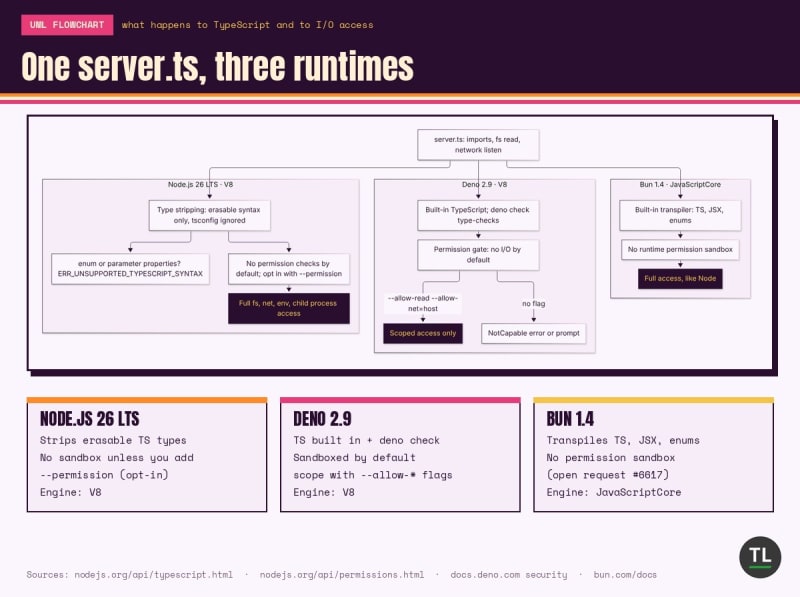
One server.ts, three runtimes: how each handles TypeScript and I/O access
Edge: Deno and Bun. Node's type stripping is great for scripts, but it isn't a full TypeScript toolchain.
Security and Permissions
This is where the three runtimes differ the most, and it matters more every month as AI agents run code on developer machines.
Node.js
The Permission Model is stable, but you have to opt in with
--permissionand then grant access with flags like--allow-fs-readand--allow-net.Node's docs call it a "seat belt" for trusted code: it "does not provide security guarantees in the presence of malicious code."
npm runs dependency lifecycle scripts such as
postinstallby default.
Bun
There's no runtime permission sandbox. Code can reach the file system, network and environment just as in Node. A request for sandboxing permissions is still open on GitHub.
On the install side, Bun is stricter than npm: it doesn't run lifecycle scripts unless a package is in
trustedDependenciesor Bun's curated default list.
Deno
Secure by default: no file, network, environment or subprocess access unless you grant it.
Grants can be scoped, for example
--allow-net=api.example.comor--allow-read=./data, and--deny-*flags override them.Deno doesn't run npm lifecycle scripts by default, and since 2.9 it skips package versions younger than 24 hours by default as a supply-chain guard, per its npm compatibility docs.
The docs warn that
--allow-runand--allow-ffieffectively escape the sandbox.
If secrets on your laptop worry you, our guide on stopping API key and secret leaks pairs well with Deno's scoped --allow-env.
Edge: Deno, clearly. Node is catching up with an opt-in model; Bun has none at runtime.
npm and Node.js Compatibility
The best runtime is useless if your dependencies break.
Node.js
It is the reference implementation. Every npm package targets it first, and native addons are built for it.
Bun
Bun says it runs thousands of tests from Node's own suite before every release and treats any package that works in Node but not in Bun as a bug, per its Node.js compatibility page.
The same page still lists gaps: parts of
node:cluster,node:v8,node:inspectorandnode:async_hooksare partial,node:seaisn't implemented, and BoringSSL lacks some ciphers and key types.
Deno
As of Deno 2.8, over 75% of Node's own test suite passes, and most pure-JavaScript npm packages work unchanged.
It reads
package.json, runs scripts withdeno task, and supports Node-API addons with a localnode_modulesfolder and--allow-ffi.Some tools that assume npm's exact
node_moduleslayout need the hoisted linker or manual mode.
Edge: Node, with Bun a close second for typical web apps.
Tooling and Developer Experience
Node.js
Ships npm, a built-in test runner and watch mode, but you still add a formatter, linter, bundler and TypeScript compiler yourself.
Bun
One binary covers the runtime,
bun install,bun test,bun build,bun check,bun lintand the newbun fmt, per the Bun docs.
Deno
Built-in
deno fmt,deno lint,deno test,deno compileand, since 2.9, snapshot testing, test sharding and the experimentaldeno desktop, per the Deno 2.9 release notes.
If you're building something like our TypeScript MCP server tutorial, Bun or Deno would let you drop several dev dependencies.
Edge: Bun and Deno tie; both replace a stack of separate tools.
Support Lifecycle
Node.js
The Node.js release schedule lists 26.x as Active LTS until 20 October 2027 and supported until 30 April 2029. Node 24 is in maintenance until April 2028.
From Node 27, every release line becomes LTS after a six-month Current phase.
Bun
Ships frequent point releases (1.4.4 came out on 22 October 2026), and you upgrade with
bun upgrade. We didn't find a published long-term support schedule.
Deno
Ships regular minor and patch releases (2.9.0 in June, 2.9.8 in October 2026), and you upgrade with
deno upgrade. We didn't find published end-of-life dates comparable to Node's.
Edge: Node. Published end-of-life dates are hard to beat for regulated teams.
Pricing and Licensing (as of 11 November 2026)
All three runtimes are free, MIT-licensed open source: Node.js, Deno and Bun.
The cost difference shows up in hosting:
Node.js runs on every host, from VPSs to serverless platforms.
Bun runs anywhere you can run a Linux binary or container; there's no first-party Bun hosting product.
Deno also has Deno Deploy: a Free plan with 1M requests and 20 GiB egress a month, and a Pro plan at $20 a month with 5M requests, then $2 per extra million.
Deno Deploy Pro example: 8M requests in a month
  $20 base (includes 5M requests)
  + 3M extra x $2 per million = $6
  = $26 before any egress, CPU or memory overage
Which Should You Choose?
If you're running a Node app in production
Stay on Node and upgrade to 26 LTS. If installs slow down your CI, try bun install or deno install as a package manager first; you get much of the speed without changing your runtime.
If you're starting a new API or side project
Bun is the most fun place to start: fast installs, instant startup and built-in tests. Keep one CI job on Node so you notice compatibility gaps early.
If you're writing scripts, CLIs or AI agent tools
Deno's scoped permissions are a real safety net when code you didn't write runs on your machine. Tools like Claude Code have made that a daily reality.
If you're a beginner learning backend JavaScript
Learn on Node. Most tutorials, courses and job descriptions assume it, and everything you learn transfers to Bun and Deno later.
If you work in an enterprise or regulated team
Node's published LTS dates and native addon support make it the easiest to approve.
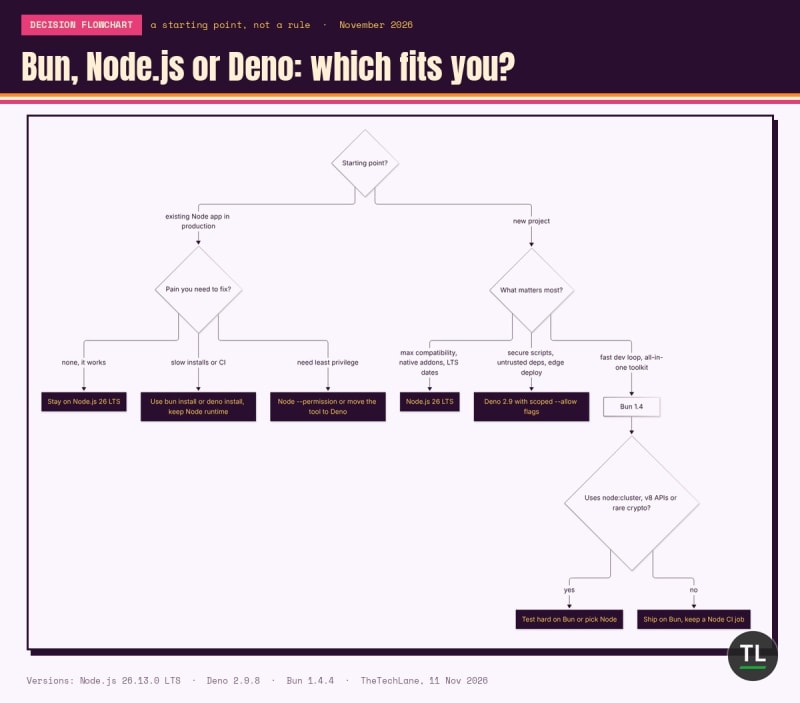
Bun, Node.js or Deno: a quick decision flowchart for your next project
Migration Tips
Run your test suite on the new runtime before changing anything else. Both Bun and Deno can run most
package.jsonscripts directly.Switch the package manager first and the runtime second. It's the lowest-risk speed win.
For Node type stripping, enable
erasableSyntaxOnlyandverbatimModuleSyntaxintsconfig.json, as the Node.js TypeScript docs recommend.On Bun, check the compatibility page for every
node:module your app imports.
FAQ
Is Bun production ready in 2026?
For many web apps, yes. Bun says Claude Code ships as a Bun executable to millions of users. Check the compatibility page for the modules you rely on, and test under real load before you switch.
Is Node.js dying?
No. Node.js 26 just became LTS with support until April 2029, and it is still the runtime every npm package targets first.
Can Deno run my existing Node project?
Often, yes. Run deno install to read your package.json, then deno task start. Native addons need a local node_modules folder and --allow-ffi.
Did TheTechLane test these runtimes?
Yes, but only the three small benchmarks above, on one 8-vCPU Linux virtual machine on 11 November 2026. We didn't run production workloads, and your results will vary with hardware and app design.
Key Takeaways
Remember these points:
Node.js 26 is the new LTS and the safest production default, with support until April 2029.
Bun 1.4 is the fastest at startup and installs, and bundles the most tools in one binary.
Deno 2.9 is the only one that sandboxes your code by default.
All three run TypeScript, but only Bun and Deno handle full TypeScript syntax out of the box.
Switching your package manager is the cheapest way to get Bun-like speed without a runtime migration.
Pick by your risk, not by benchmark charts: Node for stability, Bun for speed, Deno for safety.
You May Also Like
Is Your API Key Already Public? How to Stop Secret Leaks: practical habits that matter whichever runtime you choose.
Can You Build a Working MCP Server in 15 Minutes? (MCP Part 1): a hands-on TypeScript project you can run on Node, Bun or Deno.
Claude Code Tutorial: How to Install and Use Claude Code in 2026: the AI coding agent that ships as a Bun executable.
Java vs Python: Which Programming Language Should You Learn in 2026?: another head-to-head if you're still choosing your first backend language.
Get Smarter Developer Picks in Your Inbox
Subscribe to the free TheTechLane newsletter and get new comparisons, tutorials and developer news as soon as they're published.
Sources
Node.js 26.13.0 (LTS) release notes, Node.js, 28 Oct 2026
Node.js release schedule, Node.js Release Working Group
Node.js TypeScript docs, Node.js v26 documentation
Node.js Permissions docs, Node.js v26 documentation
Node.js test runner docs and CLI docs, Node.js v26 documentation
npm scripts docs, npm
Deno licence, denoland/deno on GitHub
Bun v1.4.4, Bun blog, 22 Oct 2026
Bun is joining Anthropic, Bun blog, 2 Dec 2025
Anthropic acquires Bun, Anthropic, 3 Dec 2025
Support sandboxing permissions, issue 6617, oven-sh/bun on GitHub
Deno 2.9, Deno blog, 25 Jun 2026
Deno v2.9.0 release notes and v2.9.8, denoland/deno on GitHub
Deno security and permissions, Deno docs
Deno Node and npm compatibility, Deno docs
Deno Deploy pricing, Deno
hyperfine and oha, benchmark tools used for our measurements
Have a Question?
Running Bun or Deno in production already? Tell us your stack and what broke (or didn't) in the comments below.
Follow TheTechLane
Keep learning AI, development, and modern developer technologies with TheTechLane.
Learn • Build • Share
Follow @thetechlanehq for more developer guides, tutorials, and practical technology content.