Why Can't You Change a String in Java or Python? (DSA Part 2)
Strings explained for beginners: immutability, Big-O of each operation, StringBuilder vs join, plus two pointer and sliding window patterns in Java and Python.
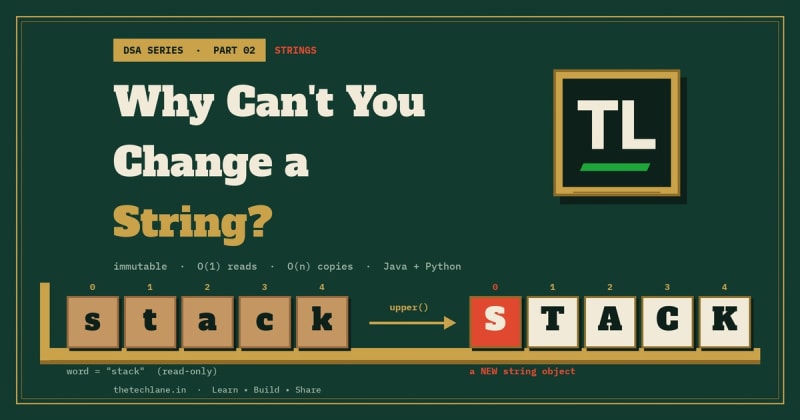
Try word[0] = "S" in Python and you get a TypeError.
Call word.toUpperCase() in Java and word doesn't change at all.
That isn't a bug.
Strings in both languages are immutable, and that one design choice decides how fast your string code runs.
It's also why a harmless-looking loop can quietly turn O(n) work into O(n²).
This is Part 2 of TheTechLane's DSA series.
One data structure or technique per part, explained from memory layout to interview patterns, with code in Java and Python.
In this part, you'll learn:
What a string really is in Java and Python
Why strings are immutable and what that costs you
The Big-O of indexing, slicing, searching, and concatenation
How
StringBuilderand''.join()fix slow string buildingTwo pointers, frequency counting, and sliding window on strings
Practice problems with full solutions, run for real
Let's start with the core idea.
Quick Answer
A string is an immutable sequence of characters, so every "change" actually builds a brand-new string and leaves the original untouched.
Here's what happens when you call word.toUpperCase() in Java:
word = "stack"
    ↓
toUpperCase() reads all 5 characters
    ↓
Allocates a NEW string "STACK"
    ↓
word still points to "stack"
Reading is cheap.
Changing means copying.
That's the whole trick.
What Is a String?
The NIST Dictionary of Algorithms and Data Structures defines a string as a list of characters, usually implemented as an array.
So a string is an array with rules on top.
In Java, the String Javadoc says it plainly: strings are constant, and their values can't be changed after they're created.
It also says a String represents text in UTF-16, and index values refer to char code units.
In Python, the text sequence type docs describe str as an immutable sequence of Unicode code points.
Same idea, slightly different unit of counting.
How a String Sits in Memory
Picture the string "stack" as a row of numbered characters:
index:     0     1     2     3     4
         ┌─────┬─────┬─────┬─────┬─────┐
char:    │  s  │  t  │  a  │  c  │  k  │
         └─────┴─────┴─────┴─────┴─────┘
word ──► (one object, read-only)
You can read any slot by index.
You can't write to any slot.
To get "Stack", the language builds a second row and points your variable at it.
Why Make Strings Immutable?
The Python Design FAQ gives two reasons: the storage size is fixed at creation time, and strings behave as "elemental" as numbers.
Java adds a third benefit.
Because String objects are immutable, the Javadoc notes they can be shared safely.
That sharing is what makes the string pool possible.
String Operations and Their Big-O
Let n be the length of the string.
Every cost below comes from one question: how many characters get read or copied?
Access by Index: O(1)
s.charAt(i) in Java and s[i] in Python jump straight to a slot, just like an array.
The official Python time-complexity page lists s[k] as O(1).
Length: O(1)
The length is stored in the object, so length() and len(s) don't count characters.
Substring or Slice: O(k)
s.substring(i, j) and s[i:j] copy the k = j - i characters into a new string.
Python's docs list a slice as O(j - i).
Search: O(n) for Typical Cases
indexOf, find, and in scan the string for a match.
Python's docs list substring search as O(n), and note that reverse searches like rfind can hit O(n × len(x)) in the worst case.
Concatenation: O(n + m)
s + t copies both strings into a new one, so it costs the combined length.
Comparison: O(n)
equals in Java and == in Python compare character by character until they find a difference.
Repeated Concatenation in a Loop: O(n²) in General
This is the one that bites.
Each += copies everything built so far, so the total work grows with the square of the final length.
The Python sequence docs say it directly: building a sequence by repeated concatenation has a quadratic runtime cost in the total sequence length.
Here's the cheat sheet:
s[i] / charAt(i)        O(1)    one jump
len / length()          O(1)    stored in the object
s[i:j] / substring      O(k)    copies k chars
find / indexOf / in     O(n)    scans
s + t                   O(n+m)  copies both
equals / ==             O(n)    compares char by char
+= in a loop            O(n²)   recopies the prefix every time
Strings in Java
Let's run real Java against the Oracle Java Tutorials on strings.
Every snippet below ran on JDK 25.
Read, Slice, and Search
Here's the basic toolkit:
String word = "stack";
System.out.println(word.length());
System.out.println(word.charAt(0));
System.out.println(word.substring(1, 4));
System.out.println(word.indexOf("ack"));
Output:
5
s
tac
2
Note that substring(1, 4) includes index 1 and stops before index 4.
Methods Return New Strings
Call a "changing" method and check the original:
String upper = word.toUpperCase();
System.out.println(word + " " + upper);
Output:
stack STACK
word is untouched.
You have to keep the returned value, or the work is thrown away.
The String Pool, == and equals
The Java Language Specification, section 3.10.5 says string literals are interned, so equal literals share one instance.
That's why this happens:
String a = "java";
String b = "java";
String c = new String("java");
System.out.println(a == b);
System.out.println(a == c);
System.out.println(a.equals(c));
System.out.println(a == c.intern());
Output:
true
false
true
true
== compares references.
equals compares characters.
Always use equals for text.
UTF-16 Code Units
length() counts char code units, not what you see on screen:
String rocket = "Go🚀";
System.out.println(rocket.length());
System.out.println(rocket.codePointCount(0, rocket.length()));
Output:
4
3
The rocket emoji is a supplementary character, so it takes two char positions.
StringBuilder: The Mutable Version
The StringBuilder Javadoc describes it as a mutable sequence of characters.
Build a string in a loop like this:
StringBuilder sb = new StringBuilder();
for (int i = 0; i < 5; i++) {
    sb.append(i).append(',');
}
sb.setLength(sb.length() - 1);
System.out.println(sb.toString());

StringBuilder rev = new StringBuilder("hello");
System.out.println(rev.reverse());

System.out.println(String.join("-", "a", "b", "c"));
Output:
0,1,2,3,4
olleh
a-b-c
append writes into a growable buffer instead of copying the whole string each time.
The JLS, section 15.18.1 says the result of + is a newly created String unless it's a constant expression, and lets compilers reduce intermediate objects.
Don't count on that inside loops.
Use StringBuilder when you build text step by step.
Strings in Python
Now the same ideas in Python 3.13.
Index, Slice, and Search
Python adds negative indexes and slicing:
word = "stack"
print(len(word))
print(word[0], word[-1])
print(word[1:4])
print(word.find("ack"))
Output:
5
s k
tac
2
Immutability in Action
Try to change one character:
try:
    word[0] = "S"
except TypeError as e:
    print("TypeError:", e)
Output:
TypeError: 'str' object does not support item assignment
Methods return new strings, just like Java:
shout = word.upper()
print(word, shout)
Output:
stack STACK
Code Points, Not UTF-16 Units
Python counts Unicode code points:
rocket = "Go🚀"
print(len(rocket))
print(rocket[::-1])
Output:
3
🚀oG
Same string, different length than Java.
That's worth remembering when you port code.
+= Creates a New Object
Watch what += does to the name:
s = "hi"
t = s
s += "!"
print(t, s, t is s)
Output:
hi hi! False
s now points to a new string, and t still holds the old one.
Build With join
The str.join docs describe joining an iterable of strings with a separator.
Collect pieces in a list, then join once:
parts = []
for i in range(5):
    parts.append(str(i))
print(",".join(parts))
Output:
0,1,2,3,4
One honest caveat.
CPython sometimes optimizes s += t in place, so a loop of += can look fast on your laptop.
PEP 8 says not to rely on it: the optimization is fragile even in CPython and absent in other implementations, and ''.join() guarantees linear time.
So write join.
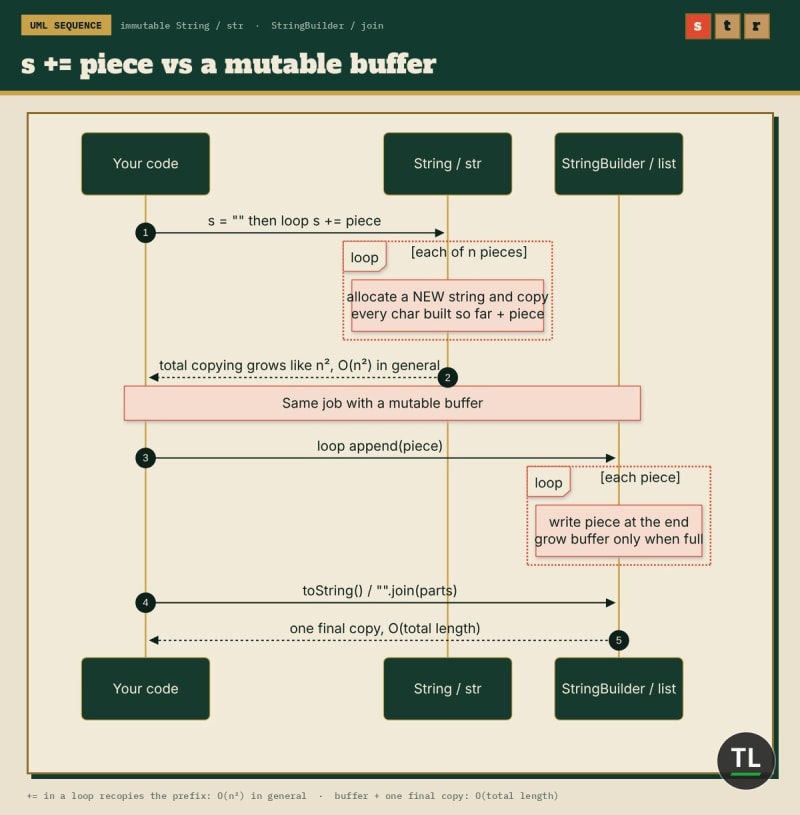
Every += copies the whole string; a buffer copies once at the end
Common String Patterns
Most string interview questions reuse four patterns.
Two Pointers: Palindromes and Reversal
Put one pointer at each end and walk inward:
static boolean isPalindrome(String s) {
    int left = 0, right = s.length() - 1;
    while (left < right) {
        if (s.charAt(left) != s.charAt(right)) return false;
        left++;
        right--;
    }
    return true;
}
Calling it with "racecar" and "rocket":
true
false
O(n) time, O(1) extra space.
No reversed copy needed.
Frequency Counting: Anagrams
Count characters with a hash map and compare counts:
from collections import Counter

def is_anagram(a, b):
    return len(a) == len(b) and Counter(a) == Counter(b)

print(is_anagram("listen", "silent"))
print(is_anagram("rat", "car"))
print(Counter("banana").most_common(2))
Output:
True
False
[('a', 3), ('n', 2)]
O(n) time instead of sorting both strings in O(n log n).
Sliding Window: Longest Substring Without Repeats
Grow a window on the right, and jump the left edge past any repeat:
static int longestUnique(String s) {
    Map<Character, Integer> last = new HashMap<>();
    int best = 0, start = 0;
    for (int end = 0; end < s.length(); end++) {
        char ch = s.charAt(end);
        if (last.containsKey(ch) && last.get(ch) >= start) {
            start = last.get(ch) + 1;
        }
        last.put(ch, end);
        best = Math.max(best, end - start + 1);
    }
    return best;
}
For "abcabcbb" and "pwwkew":
3
3
Each character enters the window once, so it's O(n).
Building Strings Efficiently
Whenever you produce output piece by piece, reach for a buffer:
Java:    StringBuilder.append(...)  then  toString()
Python:  list.append(...)           then  "".join(list)
Both keep the total work linear in the final length.
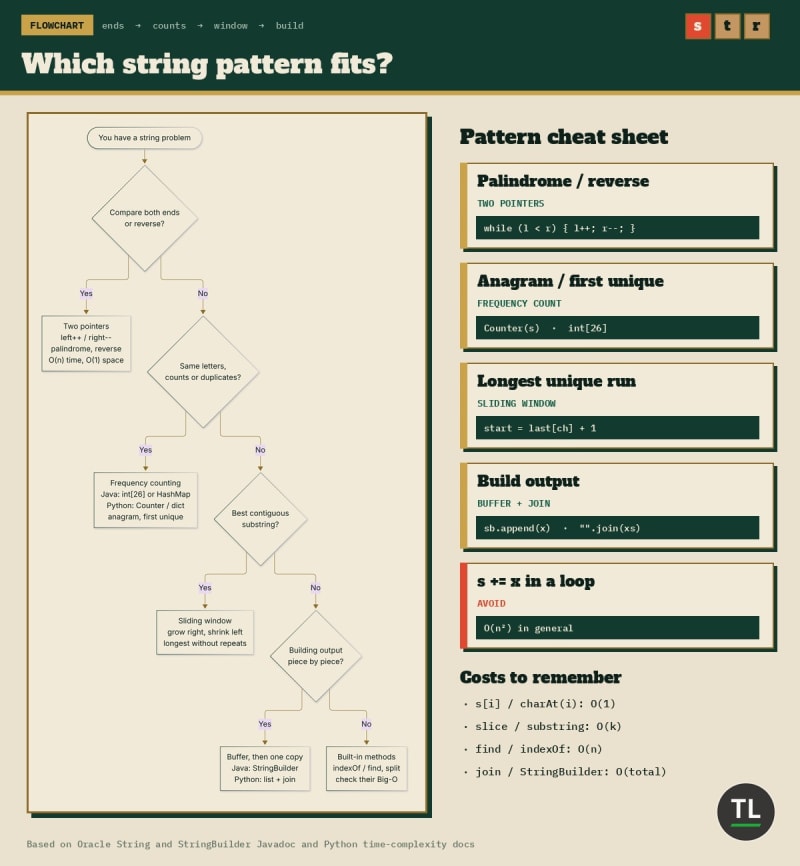
Which string pattern fits? Ends, counts, window, or build
Quick Recap
A string is an immutable sequence of characters
Index access and length are O(1); slices cost O(k)
Search and comparison scan, so they're O(n)
+=in a loop is O(n²) in general; useStringBuilderorjoinJava counts UTF-16 code units; Python counts code points
Use
equalsfor Java text, never==Two pointers, frequency counts, and sliding windows solve most string problems
Practice Problems
1. Reverse the Words in a Sentence
Reverse the word order and collapse extra spaces.
Input:  "  the sky   is blue "
Output: "blue is sky the"
Hint
split() with no argument drops empty pieces for you.
Solution
def reverse_words(sentence):
    return " ".join(reversed(sentence.split()))

print(reverse_words("  the sky   is blue "))
blue is sky the
O(n) time and O(n) space.
2. Valid Palindrome
Ignore case and anything that isn't a letter or digit.
Input:  "A man, a plan, a canal: Panama"   Output: true
Input:  "race a car"                       Output: false
Hint
Two pointers, skipping characters that don't count.
Solution
static boolean validPalindrome(String s) {
    int left = 0, right = s.length() - 1;
    while (left < right) {
        while (left < right && !Character.isLetterOrDigit(s.charAt(left))) left++;
        while (left < right && !Character.isLetterOrDigit(s.charAt(right))) right--;
        if (Character.toLowerCase(s.charAt(left)) != Character.toLowerCase(s.charAt(right))) {
            return false;
        }
        left++;
        right--;
    }
    return true;
}
true
false
O(n) time, O(1) extra space.
3. First Unique Character
Return the index of the first character that appears once, or -1.
Input: "leetcode"      Output: 0
Input: "loveleetcode"  Output: 2
Input: "aabb"          Output: -1
Hint
Count first, then scan again in order.
Solution
from collections import Counter

def first_unique(s):
    counts = Counter(s)
    for i, ch in enumerate(s):
        if counts[ch] == 1:
            return i
    return -1
0
2
-1
O(n) time, and the counter holds at most one entry per distinct character.
4. Basic String Compression
Turn runs into character plus count, but return the original if that isn't shorter.
Input: "aabcccccaaa"  Output: "a2b1c5a3"
Input: "abc"          Output: "abc"
Hint
Count each run and append to a StringBuilder.
Solution
static String compress(String s) {
    StringBuilder sb = new StringBuilder();
    int i = 0;
    while (i < s.length()) {
        char ch = s.charAt(i);
        int count = 0;
        while (i < s.length() && s.charAt(i) == ch) {
            i++;
            count++;
        }
        sb.append(ch).append(count);
    }
    return sb.length() < s.length() ? sb.toString() : s;
}
a2b1c5a3
abc
O(n) time, because append avoids recopying the result.
Common String Mistakes
1. Comparing Java Strings With ==
It works for some literals and fails for built strings.
Fix: use a.equals(b), or Objects.equals(a, b) when either side might be null.
2. Forgetting the Return Value
word.toUpperCase(); on its own line does nothing useful.
Fix: assign it, word = word.toUpperCase();.
3. Building Strings With += in a Loop
It's O(n²) in general.
Fix: StringBuilder in Java, a list plus "".join() in Python.
4. Assuming One Character Means One Unit
Emoji and some scripts take two char units in Java.
Fix: use code point methods like codePointCount when it matters.
Strings FAQ
Are Java and Python strings really immutable?
Yes. The Java String Javadoc and Python's str docs both describe strings that can't change after creation.
Is += always slow in Python?
Not always in CPython, thanks to an implementation detail. The docs still call repeated concatenation quadratic in general, so use join.
Why does slicing cost O(k)?
A slice creates a new string and copies the k selected characters into it.
Key Takeaways
Remember these points:
Strings are immutable in both Java and Python
Every "change" builds a new string, so copying is the hidden cost
Index and length are O(1); slice, search, and compare scale with length
Use
StringBuilderorjointo build strings in linear timeTwo pointers, frequency counting, and sliding window cover most string problems
Read freely, build with a buffer, and strings stop being slow.
Continue Learning
You're currently at Part 2 of the DSA series.
Previous
Why Do Interviewers Always Start With Arrays? (DSA Part 1): memory layout and O(1) indexing, the foundation strings build on.
Next
DSA Part 3: Searching: linear search, binary search, and why sorted data changes everything.
New to the series? Start with Data Structures and Algorithms (DSA) for Beginners: A Simple Guide.
Building AI apps? See DSA for AI Engineers: 10 Data Structures You Should Know.
Get New Guides in Your Inbox
Want Part 3 the moment it's published?
Subscribe to the free TheTechLane newsletter for new DSA parts, tutorials, and developer guides.
Sources
Java Language Specification (Java SE 25), 3.10.5 String Literals
Java Language Specification (Java SE 25), 15.18.1 String Concatenation Operator
Have a Question?
If a string problem is giving you trouble, leave a comment below with your code and the input that breaks it.
Happy Coding! 🚀
Follow TheTechLane
Keep learning AI, development, and modern developer technologies with TheTechLane.
Learn • Build • Share
Follow @thetechlanehq for more developer guides, tutorials, and practical technology content.