Why Do Interviewers Always Start With Arrays? (DSA Part 1)
Arrays explained for beginners: contiguous memory, O(1) index access, O(n) insert and delete, Java arrays vs ArrayList vs Python lists, plus practice problems.
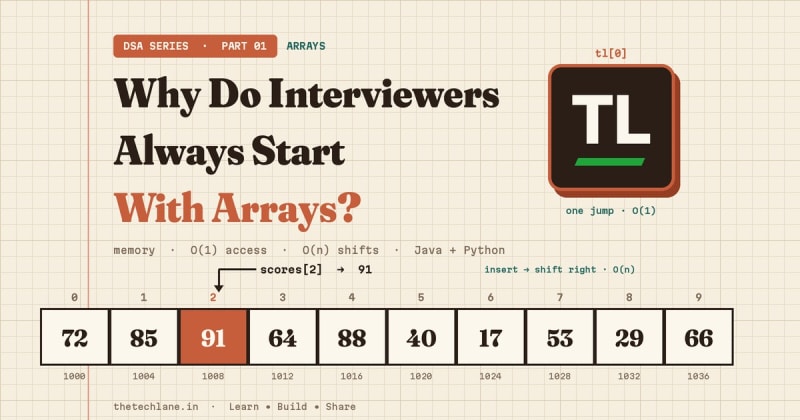
Open almost any coding interview and the first question touches an array.
Find the maximum. Reverse it. Move the zeroes. Return two numbers that add up to a target.
That isn't laziness.
Arrays are the simplest data structure that still forces you to think about memory, cost, and edge cases at the same time.
If you understand arrays properly, half of DSA stops feeling like magic.
This is Part 1 of TheTechLane's DSA series.
One data structure or technique per part, explained from memory layout to interview patterns, with code in Java and Python.
In this part, you'll learn:
What an array really is and why index access is instant
Why inserting or deleting in the middle costs O(n)
How Java arrays, Java
ArrayList, and PythonlistdifferWorking code in both Java and Python, with real output
Interview patterns and practice problems with full solutions
Let's start with the core idea.
Quick Answer
An array is an ordered collection of elements stored in numbered slots, so you can read or write any element directly by its index in constant time.
Here's what happens when you read scores[2]:
scores[2]
    ↓
Check: 0 <= 2 < length?
    ↓
Jump to slot 2 (start + 2 × slot size)
    ↓
Return the value: 91
No scanning. No searching.
That single jump is why interviewers love arrays.
What Is an Array?
The NIST Dictionary of Algorithms and Data Structures defines an array as items that are randomly accessible by an integer index.
The Oracle Java Tutorials put it in Java terms: an array is a container object that holds a fixed number of values of a single type, and its length is fixed once it's created.
Indexing starts at 0.
So an array of 5 elements has indexes 0 to 4.
How an Array Sits in Memory
The classic array model stores elements side by side in one block.
Picture five int values, each 4 bytes wide:
index:      0      1      2      3      4
          ┌──────┬──────┬──────┬──────┬──────┐
value:    │  72  │  85  │  91  │  64  │  88  │
          └──────┴──────┴──────┴──────┴──────┘
address:  1000   1004   1008   1012   1016
To find index 2, the machine doesn't walk from the start.
It calculates:
address = start + index × element size
        = 1000  + 2     × 4
        = 1008
That's why access costs the same whether the array holds 5 items or 5 million.
The addresses are illustrative: Java doesn't dictate physical layout.
The Java Language Specification, Chapter 10 guarantees what you rely on: a fixed length, int indexes from 0, and a bounds check on every access.
Array Operations and Their Big-O
Big-O describes how the work grows as the array grows.
If it's new to you, the Big O notation overview on Wikipedia is a solid primer.
Access by Index: O(1)
You compute the slot directly.
Reading a[i] or writing a[i] = x doesn't depend on the array's size.
Search for a Value: O(n)
If the array isn't sorted, you have no shortcut.
You check elements one by one until you find a match or run out.
If it is sorted, binary search drops this to O(log n), and that's Part 3 of this series.
Insert at the End: O(1) With Spare Room
If there's an empty slot after the last element, you just write into it.
Insert in the Middle: O(n)
This is where arrays hurt.
To insert at index k, every element from k onward must shift one slot right:
Insert 15 at index 1

before:  [10] [20] [30] [40] [  ]
              ↓ shift 40, then 30, then 20
after:   [10] [15] [20] [30] [40]
Inserting at index 0 moves everything.
That's O(n) in the worst case.
Delete From the Middle: O(n)
Remove index k and everything after it shifts one slot left to close the gap.
Traversal: O(n)
Visiting every element once takes time proportional to the number of elements.
Here's the cheat sheet:
Access a[i] / update a[i]      O(1)
Search (unsorted)              O(n)
Search (sorted, binary)        O(log n)
Append (with spare room)       O(1)
Insert / delete at index k     O(n - k), worst O(n)
Traverse all elements          O(n)
Resize (copy to a new block)   O(n)
You'll compare every future data structure against this list.
Arrays in Java
Java gives you two tools: fixed-size arrays and the resizable ArrayList.
Create, Read, and Update
Create:
ArrayBasics.java
Add this code:
import java.util.Arrays;

public class ArrayBasics {
    public static void main(String[] args) {
        int[] scores = {72, 85, 91, 64, 88};

        System.out.println(scores[2]);
        System.out.println(scores.length);

        scores[3] = 70;
        System.out.println(Arrays.toString(scores));

        int[] empty = new int[3];
        System.out.println(Arrays.toString(empty));
    }
}
Run it:
java ArrayBasics.java
Expected output:
91
5
[72, 85, 91, 70, 88]
[0, 0, 0]
Notice three things:
lengthis a field, not a method, as defined in the JLSnew int[3]fills the array with the default value0Arrays.toStringfrom java.util.Arrays prints the contents nicely
Going Out of Bounds
Try reading index 5 of a 5-element array:
System.out.println(scores[5]);
Expected output:
Exception in thread "main" java.lang.ArrayIndexOutOfBoundsException: Index 5 out of bounds for length 5
Java checks every access at runtime and throws an ArrayIndexOutOfBoundsException.
The last valid index is always length - 1.
Insert and Delete by Shifting
A fixed array can't grow, so you track a separate size and leave spare capacity.
Insert by shifting right:
static int insertAt(int[] arr, int size, int index, int value) {
    for (int i = size; i > index; i--) {
        arr[i] = arr[i - 1];
    }
    arr[index] = value;
    return size + 1;
}
Delete by shifting left:
static int deleteAt(int[] arr, int size, int index) {
    for (int i = index; i < size - 1; i++) {
        arr[i] = arr[i + 1];
    }
    arr[size - 1] = 0;
    return size - 1;
}
Starting from [10, 20, 30, 40, 0, 0] with size = 4, insert 15 at index 1, then delete index 0.
Expected output:
[10, 15, 20, 30, 40, 0] size=5
[15, 20, 30, 40, 0, 0] size=4
Those loops are the O(n) cost made visible.
ArrayList: The Resizable Version
Most real Java code uses ArrayList.
It's backed by an array and grows that array for you.
The Javadoc spells out the costs: size, get, set and iterator run in constant time, add runs in amortized constant time, and most other operations are linear.
Here's how it looks inside main, with java.util.ArrayList and java.util.List imported:
List<Integer> nums = new ArrayList<>();
nums.add(10);
nums.add(20);
nums.add(30);

nums.add(1, 15);
System.out.println(nums);

System.out.println(nums.get(2));

nums.remove(0);
System.out.println(nums + " size=" + nums.size());

nums.remove(Integer.valueOf(30));
System.out.println(nums);
Expected output:
[10, 15, 20, 30]
20
[15, 20, 30] size=3
[15, 20]
add(1, 15) and remove(0) still shift elements internally.
ArrayList hides the loop, not the cost.
Arrays in Python
In everyday Python, you use list.
But don't pretend a Python list is a C array.
The official Python Design FAQ explains that CPython lists are variable-length arrays that store a contiguous array of references to objects.
Indexing is constant time, but each slot points to an object elsewhere, and one list can mix types.
Create, Read, and Update
Create:
basics.py
Add this code:
scores = [72, 85, 91, 64, 88]

print(scores[2])
print(len(scores))
print(scores[-1])

scores[3] = 70
print(scores)
Run it:
python3 basics.py
Expected output:
91
5
88
[72, 85, 91, 70, 88]
Negative indexes count from the end, so scores[-1] is the last element.
An out-of-range index raises:
IndexError: list index out of range
Insert, Delete, and Append
The list methods in the Python tutorial give you insert, pop, and append:
scores.insert(1, 99)
print(scores)

removed = scores.pop(0)
print(removed, scores)

scores.append(50)
print(scores)
Expected output:
[72, 99, 85, 91, 70, 88]
72 [99, 85, 91, 70, 88]
[99, 85, 91, 70, 88, 50]
The official time complexity page for built-in types lists l[k] as O(1), append as amortized O(1), and both insert(k, x) and pop(k) as O(n - k).
That's the same shifting cost you saw in Java.
If you need truly compact, single-type storage, the array module stores basic values like integers and floats with a fixed type code.
How Index Access and Shifting Actually Work
Here's the full story of one read and one middle insert, step by step:
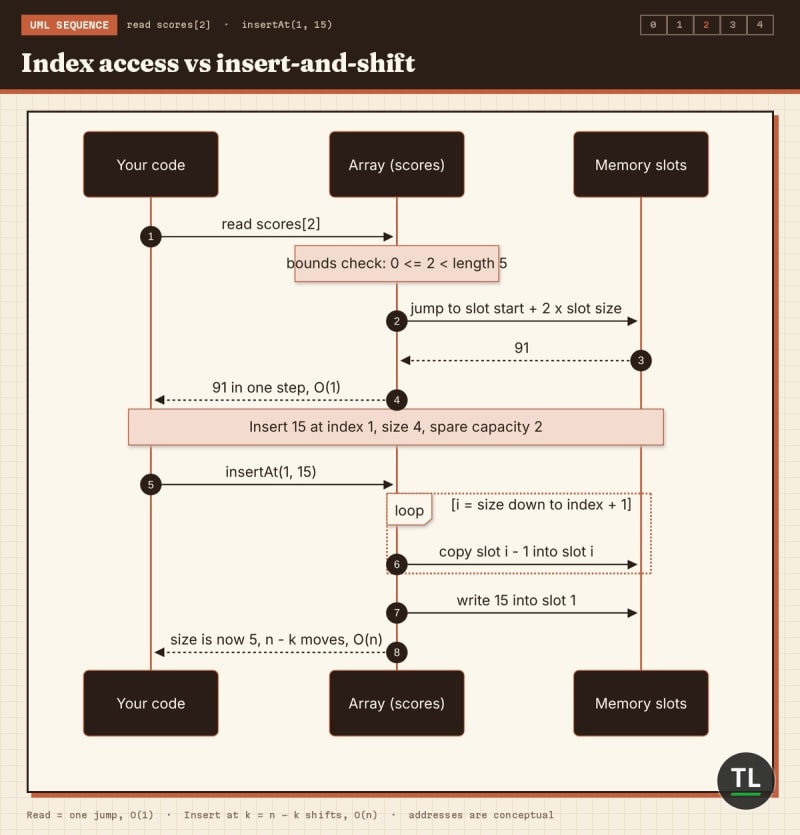
Index access is one jump; insert-and-shift moves every later element
Common Array Patterns
Indexing
Valid indexes run from 0 to length - 1.
Most bugs live at the edges: test an empty array, one element, and the last index.
Traversal
Finding the max, summing values, and counting matches are all one O(n) pass.
Insert and Delete Cost
Work at the end is cheap.
Work at the front or middle shifts elements and costs O(n).
If an algorithm inserts at the front inside a loop, it quietly becomes O(n²).
Fixed vs Dynamic
Fixed arrays are fast and predictable, but you must know the size.
Dynamic lists grow by allocating a bigger block and copying, which costs O(n) occasionally but averages out to amortized O(1) per append.
Two Pointers
Start one index at each end and move them toward each other.
It reverses arrays and solves many sorted-array problems in O(n) time and O(1) extra space.
Prefix Sums
Precompute running totals once.
Then any range sum becomes a subtraction instead of a loop.
Not sure which structure to reach for? Use this decision path:
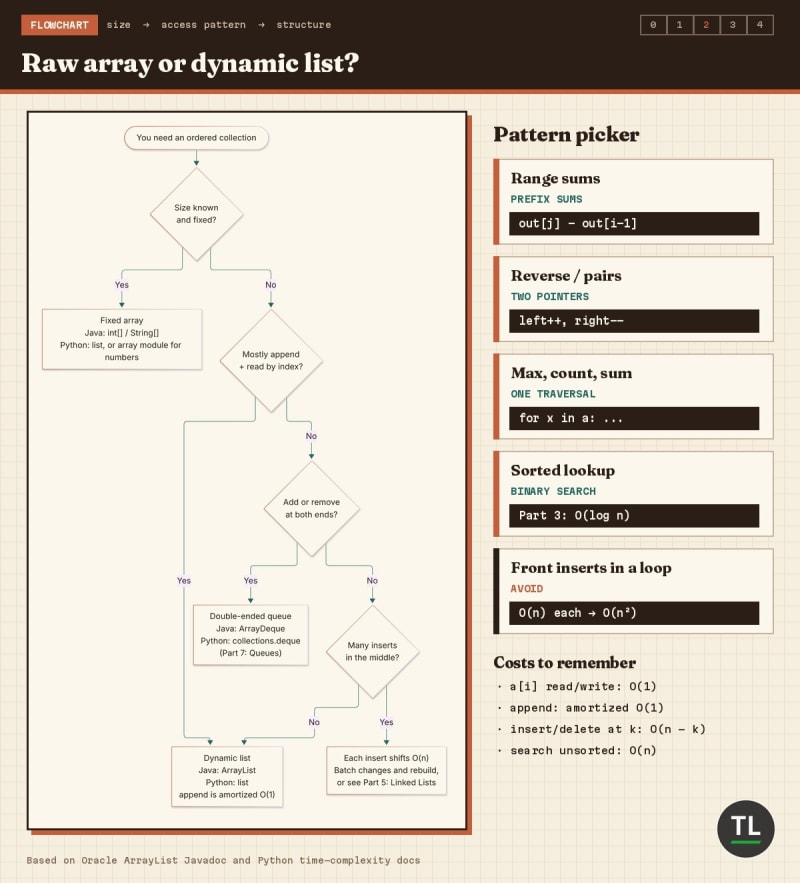
Raw array or dynamic list? Pick by size and access pattern
Quick Recap
Here's what to keep in your head:
An array maps an integer index to a slot, so access is O(1)
Searching an unsorted array is O(n)
Insert and delete in the middle shift elements: O(n)
Java arrays have a fixed
length;ArrayListresizes for youPython
listis a dynamic array of references with amortized O(1)appendTwo pointers and prefix sums turn many problems into a single pass
Practice Problems
1. Find the Maximum
Return the largest value in a non-empty array.
Input:  [4, 19, 7, 3]
Output: 19
Hint
Keep the best value seen so far and compare as you go.
Solution
def find_max(a):
    best = a[0]
    for x in a:
        if x > best:
            best = x
    return best
Time O(n), extra space O(1).
2. Reverse in Place
Reverse an array without creating a new one.
Input:  [1, 2, 3, 4, 5]
Output: [5, 4, 3, 2, 1]
Hint
Two pointers: swap the ends, then move inward.
Solution
static void reverse(int[] a) {
    int left = 0, right = a.length - 1;
    while (left < right) {
        int tmp = a[left];
        a[left] = a[right];
        a[right] = tmp;
        left++;
        right--;
    }
}
Time O(n), extra space O(1).
3. Running Sum
Return an array where each element is the sum of all elements up to that index.
Input:  [3, 1, 4, 1, 5]
Output: [3, 4, 8, 9, 14]
Hint
Carry a running total.
Solution
def prefix_sums(a):
    out, running = [], 0
    for x in a:
        running += x
        out.append(running)
    return out
Time O(n).
With this array, the sum of indexes i to j is out[j] - out[i - 1], and when i is 0 it is simply out[j] (in Python, out[-1] is the last element, not zero).
4. Move Zeroes to the End
Move all zeroes to the end while keeping the order of the other values.
Input:  [0, 1, 0, 3, 12]
Output: [1, 3, 12, 0, 0]
Hint
Use a write pointer for the next non-zero position.
Solution
static void moveZeroes(int[] a) {
    int write = 0;
    for (int x : a) {
        if (x != 0) a[write++] = x;
    }
    while (write < a.length) a[write++] = 0;
}
Time O(n), extra space O(1).
A naive version that deletes each zero and appends it shifts elements every time, which makes it O(n²).
Common Array Mistakes
1. Off-by-One Loops
Writing i <= a.length reads one slot too far.
Use i < a.length in Java and range(len(a)) in Python.
2. Printing a Java Array Directly
System.out.println(scores) prints a type-and-hash string, not the values.
Use Arrays.toString(scores).
3. Confusing remove(int) With remove(Object)
On a List<Integer>, nums.remove(1) removes index 1, not the value 1.
Use nums.remove(Integer.valueOf(1)) to remove by value.
4. Using a List as a Queue
pop(0) and insert(0, x) shift everything.
The Python tutorial recommends collections.deque for fast adds and removes at both ends.
Arrays FAQ
Is a Python list an array?
It's a dynamic array of references, per the official FAQ.
It behaves like an array for indexing cost, but it isn't a fixed-type block of raw values.
When should I use ArrayList instead of an array in Java?
Use ArrayList when the size changes; use a plain array for fixed sizes and primitives without boxing.
Are arrays still relevant in AI work?
Very.
Feature vectors and embeddings are arrays of numbers, which we cover in DSA for AI Engineers: 10 Data Structures You Should Know.
Key Takeaways
Remember these points:
Arrays give O(1) access because the index maps straight to a slot
Middle inserts and deletes shift elements and cost O(n)
Appends on
ArrayListand Pythonlistare amortized O(1)Always test empty, single-element, and last-index cases
Two pointers and prefix sums are your first two array patterns
Know what moves in memory, and you'll know what an operation costs.
Continue Learning
You're currently at Part 1 of the DSA series.
Previous
Data Structures and Algorithms (DSA) for Beginners: A Simple Guide: the roadmap and big picture behind this series.
Next
DSA Part 2: Strings: how strings build on arrays, immutability in Java and Python, and classic string interview problems.
Still choosing a language for DSA? Read Java vs Python : Which Programming Language Should You Learn in 2026?
New to Java syntax? Start with Java Variables, Data Types, Casting & Operators.
Get New Guides in Your Inbox
Want Part 2 the moment it's published?
Subscribe to the free TheTechLane newsletter for new DSA parts, tutorials, and developer guides.
Sources
Have a Question?
If an array problem is giving you trouble, leave a comment below with your code and the input that breaks it.
Happy Coding! 🚀
Follow TheTechLane
Keep learning AI, development, and modern developer technologies with TheTechLane.
Learn • Build • Share
Follow @thetechlanehq for more developer guides, tutorials, and practical technology content.