GitHub Student Developer Pack 2026: 80+ Free Developer Tools
GitHub Student Developer Pack 2026: 80+ Free Developer Tools
Introduction
If you're a student learning programming, you can get access to a large collection of developer tools without paying for each service separately.
The GitHub Student Developer Pack gives verified students access to GitHub benefits and offers from GitHub partners. The current Pack includes tools for coding, AI, cloud computing, learning, testing, domains, productivity, and more.
This guide walks you through the process step by step, from checking eligibility to applying, getting verified, and choosing the tools that are actually useful for you.

Quick Answer
The GitHub Student Developer Pack is a collection of developer benefits available to verified students aged 13 or older.
You need:
A personal GitHub account
Enrollment in an eligible educational program
Proof of current student status
Successful verification by GitHub Education
Once approved, you can access the benefits available through your GitHub Education account.
What Is the GitHub Student Developer Pack?
The GitHub Student Developer Pack is part of GitHub Education.
GitHub created it to give students access to real development tools while they're learning. The current Pack includes offers from GitHub and a wide range of partner companies.
Instead of spending money on separate developer subscriptions, students can use the available educational offers to build projects, learn new technologies, and gain practical experience.
The available benefits cover areas such as:
Software development
AI-assisted coding
Cloud computing
Web development
Databases
Testing
Monitoring
Domains
Productivity
Programming education
Interview preparation
The exact offers can change over time, so the official GitHub Education Pack should always be treated as the source of truth. Third-party partners can also have their own terms and conditions.
Why Should Students Get the GitHub Student Developer Pack?
Learning programming from tutorials is useful.
Building real software is better.
When you work on a real project, you eventually need more than a programming language. You need version control, development environments, databases, deployment, testing, monitoring, and documentation.
That's where the Student Developer Pack becomes useful.
For example, a student building a web application could use GitHub for source control, Codespaces for development, Azure for cloud services, a domain provider for a project website, and a monitoring service to track application errors.
You get to experiment with tools that are closer to a professional development workflow.
That experience can also make your GitHub profile more useful when you're applying for internships or entry-level developer positions.
Who Can Get the GitHub Student Developer Pack?
Before applying, check whether you meet GitHub's requirements.
GitHub currently says you qualify for GitHub Education if you:
Are enrolled in a degree or diploma granting program.
Have a personal GitHub account.
Can provide proof of your current student status.
Are at least 13 years old.
Eligible educational programs can include high schools, colleges, universities, and qualifying homeschool programs.
One important point is that being a student isn't enough by itself.
GitHub needs to verify your student status.
Do You Need a College Email Address?
Not always.
This is one of the biggest misconceptions about the Student Developer Pack.
GitHub's verification process can vary depending on your educational institution.
If GitHub requires an academic email for your school, you'll need to add and verify that email address on your GitHub account.
If your institution doesn't provide academic email addresses, GitHub says you can provide official documentation explaining the policy and then apply using the required student documentation.
So, don't assume that you can't apply simply because your college doesn't give students an academic email.
What Documents Do You Need?
GitHub needs evidence that you're currently enrolled.
According to GitHub's current documentation, examples of acceptable student proof include:
A school ID showing a current enrollment date
Class schedule
Transcript
Affiliation or enrollment verification letter
The document needs to make your current student status clear.
A common mistake is uploading an old student ID or a document that doesn't show enough information.
Before submitting your application, check the document carefully.
Make sure the important information is readable.
How to Get the GitHub Student Developer Pack
Now let's go through the actual process.
Step 1: Create a GitHub Account
First, you need a personal GitHub account.
If you already have one, use your existing account.
You don't need to create a new GitHub account just for the Student Developer Pack.
In fact, creating additional accounts to try to reset benefits is against GitHub's terms.
Step 2: Open GitHub Education
Go to GitHub's official Education page.
From there, you can start the student verification process.
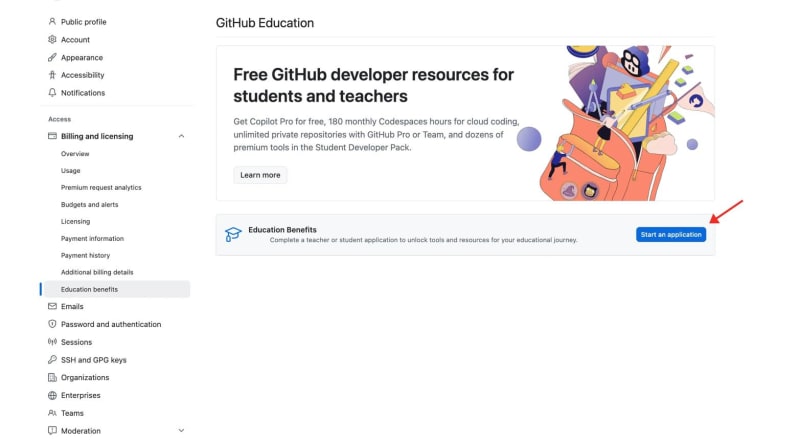
You can also access the application through your GitHub account's Education benefits settings. GitHub's current instructions say to open your Education benefits settings and select Start an application under GitHub Education.
Step 3: Start Your Application
After opening your Education benefits settings, look for the GitHub Education section.
Select:
Start an application
You'll then be asked to provide information about your educational institution and student status.
Take your time here.
The information should match your official student documents.
Step 4: Select Your School
Enter your educational institution when GitHub asks for it.
Make sure you select the correct institution.
If your school's information doesn't appear correctly, check the details before continuing.
For students using an academic email, GitHub may also ask you to verify that email address.
Step 5: Verify Your Student Status
This is the most important part of the application.
GitHub needs to confirm that you're currently a student.
Depending on your institution and the verification process, you may need to provide an academic email or upload documentation such as your student ID, class schedule, transcript, or enrollment letter.
Don't upload a random document just because it has your name on it.
The document should clearly demonstrate your current enrollment.
Step 6: Submit the Application
Review everything before submitting.
Check:
Your name
Institution
Student information
Email address
Uploaded documentation
Then submit your application.
GitHub will review your student status.
Step 7: Wait for Approval
Once your application is approved, you can access your GitHub Education benefits.
GitHub's documentation says approved students can go to their GitHub Education portal and use their available benefits, including professional developer tools.
If your application isn't approved, don't immediately create another account.
First, check whether GitHub needs additional information or better documentation.
What Happens After Approval?
This is where things get interesting.
Once you're verified, open the GitHub Student Developer Pack.
You'll see the current offers available to students.
The Pack currently includes benefits such as GitHub Pro, GitHub Copilot Student, GitHub Codespaces, Microsoft Azure, JetBrains, MongoDB, Heroku, BrowserStack, DataCamp, Sentry, Notion, domain offers, and many other tools and services.
You don't need to activate everything.
Choose the tools that match what you're learning.
Best GitHub Student Developer Pack Benefits
Let's look at some of the benefits that are especially useful for students.
GitHub Pro
GitHub currently offers free GitHub Pro while you're a student through the Student Developer Pack.
If you're building a serious GitHub portfolio, this is one of the first benefits worth checking.
Your GitHub profile can become more than a place where you store college assignments.
You can use it to showcase:
Java projects
Python projects
Web applications
APIs
Open source contributions
College projects
Hackathon projects
Your repositories can demonstrate what you can actually build.
GitHub Copilot Student
AI-assisted development is now part of many modern development workflows.
GitHub currently lists GitHub Copilot Student as an offer for verified students. The current student plan includes unlimited code completions and an allowance of GitHub AI Credits, along with limited chat and agent usage under the current plan conditions.
For students, Copilot can help with:
Code suggestions
Understanding unfamiliar code
Debugging
Writing tests
Exploring APIs
Refactoring
Learning programming syntax
But there's a right way to use it.
Don't ask AI to build your entire college project and submit the result.
Use it as a learning assistant.
If you're learning Java and don't understand an exception, ask Copilot to explain the exception.
If you don't understand a method, ask it to explain the logic.
Then try writing the solution yourself.
That's how you actually improve.
GitHub Codespaces
GitHub Codespaces gives you a cloud-based development environment.
The current Student Developer Pack includes free Pro-level access to Codespaces.
This is useful if:
Your laptop isn't powerful
You work from different computers
You want a consistent development environment
You're collaborating on a project
You want to experiment with a project without changing your local machine
For students, Codespaces is also a good way to learn how development environments work in the cloud.
Microsoft Azure
Cloud computing is another major part of modern software development.
The current Student Developer Pack lists Microsoft Azure with free access to selected Azure services plus $100 in Azure credit for students aged 18 and older.
You can use cloud services to experiment with:
Web applications
APIs
Databases
Virtual machines
Storage
Cloud infrastructure
Deployment
If you're learning cloud computing, this can be much more valuable than simply watching cloud tutorials.
Build something.
Deploy it.
Break it.
Fix it.
That's how you learn.
JetBrains Student Benefits
If you're learning Java, Kotlin, Python, or other programming languages, JetBrains products are worth checking.
The current Student Developer Pack lists a free student subscription that can be renewed annually.
For Java developers, this is particularly relevant because JetBrains provides IntelliJ IDEA.
If you're following TheTechLane's Java series, you can connect this naturally with your development setup:
Java JDK → IntelliJ IDEA → GitHub → GitHub Student Developer Pack
That creates a useful path from learning Java to building and managing real projects.
MongoDB
MongoDB is also included in the current Student Developer Pack.
The current offer includes $50 in MongoDB Atlas credits, along with access to MongoDB Compass and MongoDB University resources.
This can be useful if you're learning:
Backend development
REST APIs
Node.js
Java
Spring Boot
Full-stack developmentq
Instead of keeping your database only on your laptop, you can experiment with a cloud database and learn how applications interact with hosted data.
BrowserStack
Testing is another area where students often don't get enough practical experience.
The current Pack includes a BrowserStack offer for automated mobile testing.
Browser testing becomes important when your application needs to work across different browsers, devices, and screen sizes.
You don't want your application to work perfectly on your laptop and then break on someone else's phone.
Sentry
Once you've deployed an application, you'll eventually need to know when something goes wrong.
That's where monitoring tools such as Sentry become useful.
The current Student Developer Pack includes a student Sentry offer with usage limits and a one-year period that can be renewed under the current offer.
This gives students an opportunity to learn a part of software development that tutorials often skip:
What happens after the application goes live?
Learning Platforms
The Student Developer Pack isn't only about software.
It also includes learning resources.
Current offers include platforms such as Boot.dev, DataCamp, Codédex, Educative, Scrimba, and others.
These can be useful when you're trying to learn a new area without buying several courses separately.
For example:
Learning Java?
Focus on Java and backend development.
Learning web development?
Look for JavaScript, React, CSS, and frontend resources.
Learning data science?
Look at Python, data analysis, and machine learning resources.
Don't collect courses.
Finish them.
That's the part that actually matters.
Domain Benefits
The Pack also includes domain-related offers.
The current Pack lists offers from providers such as Namecheap, Name.com, and .TECH. For example, current listings include a free .TECH domain for one year and selected domain offers from other providers.
A domain can be useful for your:
Developer portfolio
Personal website
Project landing page
Resume website
Open source project
Instead of sending a recruiter a folder full of college assignments, you can send them a website showing your work.
How to Choose the Right Benefits
Don't activate every offer just because it's free.
Start with your current goal.
If you're learning Java
Start with:
GitHub
IntelliJ IDEA
GitHub Copilot
Codespaces
Database tools
If you're learning web development
Focus on:
GitHub
Codespaces
Browser testing
Domain services
Cloud deployment
If you're learning cloud computing
Look at:
Azure
Codespaces
Cloud development tools
Monitoring
Infrastructure tools
If you're preparing for interviews
Focus on:
Coding practice
Learning platforms
GitHub portfolio
Personal website
Open source projects
The Pack is large.
Your learning goal should determine what you use.
A Simple Student Developer Workflow
Here's a practical way to use the Pack.
Choose a Project
       ↓
Create GitHub Repository
       ↓
Set Up Development Environment
       ↓
Write Code
       ↓
Commit Changes
       ↓
Test the Application
       ↓
Deploy the Project
       ↓
Monitor the Application
       ↓
Document the Project
       ↓
Add It to Your Portfolio
This is much better than activating dozens of tools and never building anything.
Example: Build a Java Project
Let's say you're learning Java.
Start with a simple project such as a Student Management System.
Create a GitHub repository.
git init
git add .
git commit -m "Initial project"
git branch -M main
git remote add origin YOUR_REPOSITORY_URL
git push -u origin main
Now your project is stored in GitHub.
As the project grows, you can add a database, create a REST API, deploy the application, and monitor it.
This is where the Student Developer Pack becomes useful.
The tools aren't the goal.
The project is the goal.
The tools simply help you build it.
Common Mistakes to Avoid
Using outdated information
GitHub's partner offers change.
Don't publish an article saying a particular tool is available forever.
Check the official Pack before claiming current benefits.
Uploading poor documentation
If GitHub can't clearly verify your student status, your application can run into problems.
Use clear and current documentation.
Creating multiple GitHub accounts
Use your existing personal account.
Don't create additional accounts to try to reset or repeat benefits.
Claiming everything
Free doesn't mean useful.
Activate tools when you have a reason to use them.
Using AI without learning
Copilot can write code quickly.
It can't replace your understanding of programming.
If you're still learning the basics, use AI to explain and guide you instead of blindly copying its output.
Is GitHub Student Developer Pack Worth It?
For most eligible students who are serious about software development, yes.
The biggest advantage isn't simply getting free subscriptions.
It's the opportunity to work with real development tools while you're still learning.
You can build projects.
You can deploy applications.
You can experiment with cloud services.
You can test your websites.
You can learn Git workflows.
You can create a professional portfolio.
You can explore AI-assisted development.
And you can do all of that while you're still a student.
That's the real value.
Final Thoughts
The GitHub Student Developer Pack is one of the better resources students should know about before paying for developer software.
But don't make the mistake of treating it like a collection of free subscriptions.
Use it as a development environment for your learning.
Pick one project.
Choose the tools you need.
Build something.
Push it to GitHub.
Deploy it.
Improve it.
Then build the next project.
That's how the Student Developer Pack can actually help you become a better developer.
The current GitHub Education Pack includes a large selection of offers, and GitHub regularly changes partner benefits, so check the official page whenever you're ready to claim something.
Explore the GitHub Student Developer Pack
Key Takeaways
GitHub Student Developer Pack is available to verified students aged 13 and older.
You need a personal GitHub account.
You must prove your current student status.
A college email isn't always required.
GitHub Pro is currently available to eligible students.
GitHub Copilot Student is currently available to verified students under the current plan terms.
Codespaces provides a cloud development environment.
Azure currently provides a student offer that includes $100 in credit for eligible students aged 18 and older.
The Pack includes learning, cloud, testing, domain, productivity, and developer tools.
Partner offers can change, so always check the official GitHub Education page.
Frequently Asked Questions
Is GitHub Student Developer Pack free?
Yes. The Student Developer Pack itself is available to eligible verified students without a separate Pack subscription fee.
Can Indian students get GitHub Student Developer Pack?
Yes. Students in India can apply as long as they meet GitHub's eligibility and verification requirements.
Do I need a .edu email?
No, not necessarily. GitHub's verification process depends on your institution. If your school doesn't provide an academic email, GitHub provides an alternative documentation process.
How old do you have to be?
GitHub currently states that students must be at least 13 years old to receive the Student Developer Pack.
What documents can prove student status?
GitHub lists documents such as a current student ID, class schedule, transcript, or enrollment verification letter.
Is GitHub Copilot free for students?
GitHub currently lists a Copilot Student offer for verified students. The features and usage limits can change, so check the current official Pack listing.
Do students get GitHub Pro?
Yes. The current Pack lists free GitHub Pro while you're a student.
Can I use the Pack for college projects?
Yes. That's one of its intended uses. GitHub Education is designed to help students develop practical software development skills.
Can I use the benefits after graduation?
The availability of individual benefits depends on GitHub's current terms and the terms of each partner. Don't assume every offer continues after your student eligibility ends.
Where can I see the latest benefits?
Use the official GitHub Student Developer Pack page because partner offers can change.
View the current GitHub Student Developer Pack
Official Resources
Apply to GitHub Education as a Student
GitHub Student Developer Pack Terms
Next Part
Part 2: GitHub Student Developer Pack Benefits 2026
We'll go deeper into the most useful current offers, including GitHub Pro, Copilot, Codespaces, Azure, JetBrains, MongoDB, BrowserStack, domains, learning platforms, cloud tools, and more. The focus will be on what each benefit is actually useful for, rather than simply copying GitHub's partner list.
Have a Question?
If you run into any issues while writing or running your first Java program, leave a comment below.
We'll help you troubleshoot the problem with clear explanations and practical solutions so you can continue your Java learning journey with confidence.
Happy Coding! ☕
Follow TheTechLane
Want more Java tutorials, programming tips, and developer resources?
Follow TheTechLane on LinkedIn, X, Instagram, Threads, Facebook, Medium, and Pinterest to stay updated whenever a new tutorial is published.
Learn. Build. Share.
Related reading: Cursor AI review, Claude Code tutorial, IIT vs NIT, and DSA for beginners.