Can One GitHub Issue Hijack Your npm Release? Lock Down CI
A GitHub issue nearly reached OpenAI's npm release. Learn to harden GitHub Actions against prompt injection, pwn requests, hijacked tags and stolen tokens.
On 11 November 2026, the security firm Depi published a chain that started with an ordinary GitHub issue and ended at the publishing pipeline of the official @openai/codex npm package.
The entry point was not a memory bug. It was text, pasted into an AI agent's prompt by a GitHub Actions workflow that anyone could trigger.
This is the new shape of CI risk: your pipeline now runs agents that read issues, pull requests and comments, and every one of those is attacker-controlled input.
Supply-chain attacks on Actions were already real: in March 2025 the hijacked tj-actions/changed-files action hit over 23,000 repositories by repointing its version tags at a malicious commit.
In this guide, you'll learn how to:
Spot the workflow patterns that let a stranger steer your CI
Run AI coding agents in Actions without handing them your release keys
Lock down GITHUB_TOKEN, pin actions and keep caches out of release jobs
Publish to npm with OIDC trusted publishing instead of long-lived tokens
Respond fast if a workflow or package is compromised
Quick Answer
Threat in one line: Any workflow that feeds issue, PR or comment text into a shell command or an AI agent, while secrets or write tokens sit nearby, can be turned against you.
Fix in one line: Treat all event text as untrusted, give agents no tools and no secrets when they read it, scope every token to the minimum, pin dependencies and publish only through a protected OIDC release job.
Here are the defence layers, outside in:
Untrusted text (issue, PR, comment)
  -> trigger and author filters (who can start the job)
  -> no inline ${{ }} in run:, env vars only
  -> agent sandbox: tools off, read-only, structured output
  -> GITHUB_TOKEN: permissions {} by default
  -> pinned actions, no shared cache in release jobs
  -> release job: environment approval + npm trusted publishing (OIDC)
How the Attack (or Leak) Happens
Each vector below is documented by GitHub or seen in a real incident.
Prompt injection through an AI agent
Depi found that the openai/codex Issue Labeler workflow passed ${{ github.event.issue.title }} and ${{ github.event.issue.body }} straight into the Codex agent's prompt, with allow-users: "*", according to Depi's write-up.
A crafted issue could make the agent read the body as new instructions and run commands inside its sandbox.
The OWASP Top 10 for LLM Applications lists this class, prompt injection, as risk number one.
Sandbox escape and token theft
Depi's Bugcrowd disclosure summary says the team escaped a workspace-write sandbox through .NET debug pipes in /tmp/ and read GITHUB_TOKEN and ACTIONS_RUNTIME_TOKEN from runner memory.
The lesson is simple: an agent that reads untrusted text should never share a runner with credentials it could reach.
Cache poisoning into a privileged workflow
With the runtime token, an attacker can write a poisoned cache entry that a more privileged workflow later restores and executes.
Depi used this to pivot into rust-ci.yml, a workflow with write permissions, a technique first detailed in Adnan Khan's cache poisoning research.
Hijacked release identity through OIDC
The final step was a planted workflow with id-token: write that fires when a release is deleted, so a maintainer cleaning up a fake release would hand over a signed OIDC token that npm trusts for publishing.
OpenAI fixed the issue, and its public fix commit replaced the agent with a Responses API call that has tools disabled and a strict JSON schema; Depi reports an initial $1,000 bounty and no malicious release.
Script injection in run: steps
You don't need an AI agent to get owned.
GitHub's script injection guide shows how ${{ github.event.pull_request.title }} inside run: is pasted into the shell before it runs, so a title can become a command.
Pwn requests and moved tags
The pull_request_target and workflow_run triggers run with base-repo secrets; checking out untrusted PR code in them is the classic pwn request.
Mutable tags like @v4 are the other gap, which is exactly how tj-actions/changed-files leaked secrets into workflow logs.
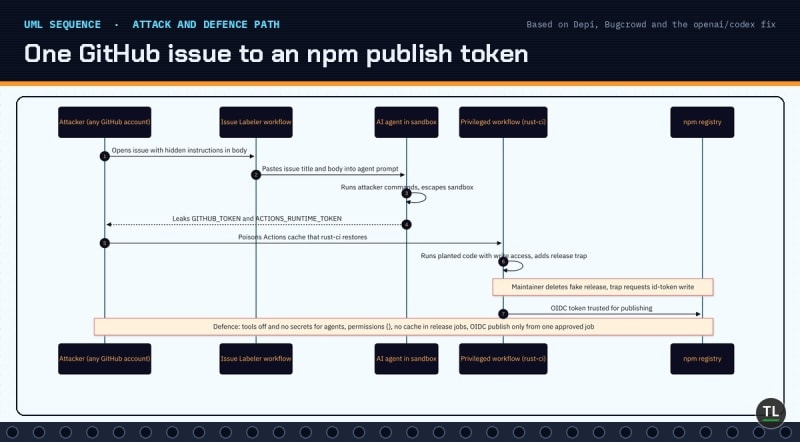
One GitHub issue to an npm publish token: the attack path and where to break it
Who Is at Risk?
You are in scope if any of these describe your setup:
Open source maintainers running AI triage, labelling or review bots on issues and PRs
Teams using
pull_request_targetorworkflow_runto comment on or label fork PRsnpm, PyPI or container publishers who release from GitHub Actions
Repos referencing third-party actions by tag or branch instead of commit SHA
Organisations whose default
GITHUB_TOKENstill has read and write accessDevelopers who auto-update CLI tools and agents the moment a release lands
A private repo is not safety: insiders, compromised contributor accounts and poisoned third-party actions all run inside it.
How to Detect It
Start with an audit of what you already run.
zizmor static analysis
zizmor is an open source static analyser for GitHub Actions that flags template injection, dangerous triggers, excessive permissions, unpinned actions and cache poisoning risks.
Run it against your workflow folder:
uvx zizmor .github/workflows/
Inline expressions in run: blocks
A quick search shows where event text is expanded directly.
Search your workflows:
grep -rn 'github.event' .github/workflows/
Any hit inside a run: block, or inside an agent prompt:, deserves a review.
Default token permissions
Check whether new workflows get read-only or read-write tokens by default, using the GITHUB_TOKEN permissions docs as reference.
Query the repository setting:
gh api repos/OWNER/REPO/actions/permissions/workflow
npm registry signatures and provenance
On the consumer side, npm can verify registry signatures and provenance attestations of installed packages, as described in npm's provenance docs.
Run it in a project after install:
npm audit signatures
How to Prevent It
Apply these in order; each one closes a link in the chain above.
1. Never expand event text inline
Follow GitHub's secure use reference and pass untrusted values through an intermediate environment variable.
Use this pattern:
- name: Check PR title
  env:
    TITLE: ${{ github.event.pull_request.title }}
  run: |
    if [[ "$TITLE" =~ ^octocat ]]; then echo "ok"; fi
2. Give agents text, not tools
If an AI agent reads untrusted input, run it with no shell, no network, no secrets beyond its own API key, and force structured output you validate, just as OpenAI's fix does.
For openai/codex-action, keep allow-users empty (write-access users only) and the default safety-strategy: drop-sudo or stricter; never use unsafe on public triggers.
3. Start every workflow at zero permissions
Set permissions: {} at the top of each workflow, then grant each job only what it needs.
Also switch the repository and organisation default to read-only.
4. Keep privileged triggers away from untrusted code
Read Securely using pull_request_target before using it, and never check out or build the PR head in that context.
Prefer plain pull_request, which gets a read-only token and no secrets for forks.
5. Pin every action to a full commit SHA
A full SHA can't be repointed like a tag; GitHub's docs now also describe workflow dependency lockfiles that pin actions, including transitive ones.
Let Dependabot raise pinned action updates so pins don't rot.
6. Keep caches out of release jobs
GitHub's dependency caching reference explains how caches are shared across workflows on a branch.
Build release artifacts from a clean checkout and never restore a cache in the job that publishes.
7. Publish with OIDC trusted publishing
npm trusted publishing swaps long-lived tokens for short-lived OIDC credentials and generates provenance automatically.
Bind it to one workflow file and a GitHub environment with required reviewers, so a stray id-token: write elsewhere can't publish.
8. Add a cooldown before auto-updates
Depi's own advice is a short delay before auto-updating agents and tooling, giving maintainers time to catch a bad release before it lands on your laptop.
Hands-On Setup: Harden an npm Release Workflow
This walkthrough audits a repo, locks the token default and moves publishing to trusted publishing.
1. Install zizmor
Install it as a uv tool (Homebrew, pipx and cargo also work, see the installation docs):
uv tool install zizmor
Expected result:
zizmor is installed and on your PATH; run zizmor --version and check for the latest release
2. Audit your workflows
Run it from the repository root:
zizmor .github/workflows/
Expected result:
Findings grouped by audit, for example error[template-injection] or unpinned-uses, each pointing at a file and line
3. Make the default token read-only
Set the repository default with the GitHub CLI (organisation admins can do this once for every repo in settings):
gh api --method PUT repos/OWNER/REPO/actions/permissions/workflow -f default_workflow_permissions=read
Expected result:
No output on success; re-run the GET from the detection step and default_workflow_permissions shows read
4. Rewrite the release workflow
This follows npm's trusted publishing example, with zero default permissions, one protected job and SHA pins (replace the placeholders with real 40-character SHAs).
Save it as .github/workflows/release.yml:
name: Release
on:
  push:
    tags: ['v*']
permissions: {}
jobs:
  publish:
    runs-on: ubuntu-latest
    environment: npm-release
    permissions:
      contents: read
      id-token: write
    steps:
      - uses: actions/checkout@<full-commit-sha> # v6
        with:
          persist-credentials: false
      - uses: actions/setup-node@<full-commit-sha> # v6
        with:
          node-version: '24'
          registry-url: 'https://registry.npmjs.org'
      - run: npm ci
      - run: npm test
      - run: npm publish
5. Register the trusted publisher
On npmjs.com, open your package Settings, add GitHub Actions as a trusted publisher with your owner, repository, release.yml and the npm-release environment.
Then select "Require two-factor authentication and disallow tokens" under Publishing access, as npm recommends, and revoke old automation tokens.
Expected result:
The next tag push publishes without NPM_TOKEN, and the npm package page shows a provenance badge
6. Keep pins fresh with Dependabot
Add the github-actions ecosystem to .github/dependabot.yml:
version: 2
updates:
  - package-ecosystem: "github-actions"
    directory: "/"
    schedule:
      interval: "weekly"
Expected result:
Dependabot opens PRs that bump each pinned SHA, with the version in the trailing comment
Incident Response Playbook
Assume a workflow ran attacker-controlled code; move in this order.
1. Contain the workflow
Disable the vulnerable workflow immediately:
gh workflow disable "Issue Labeler"
2. Revoke publishing credentials
List and revoke npm tokens, and rotate every secret the workflow or its repo could read:
npm token list
Revoke each suspicious entry with npm token revoke <id>, and remove extra trusted publisher configs you don't recognise.
3. Purge caches and rogue workflows
Delete the repository's Actions caches so no poisoned entry is restored:
gh cache delete --all
Review recent commits under .github/workflows/, unexpected releases and new deploy keys before deleting anything that could trigger a booby-trapped workflow; disable Actions first if unsure.
4. Audit what was published
Check every version released in the exposure window, and deprecate any bad one:
npm deprecate my-pkg@1.2.3 "Compromised build, upgrade to 1.2.4"
5. Prevent the repeat
Ship the fixes from How to Prevent It, re-run zizmor in CI on every PR, and write a short public advisory if users may have installed a bad version.
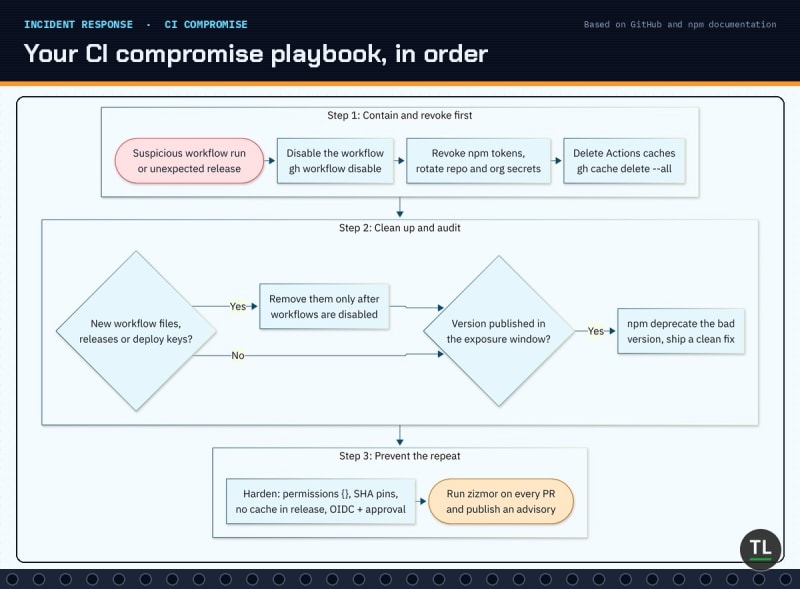
Your CI compromise playbook, in order
Common Mistakes
Mistake 1: Trusting the agent's guardrails
Depi bypassed guardrails with an encoded payload; design as if the agent will obey the attacker.
Mistake 2: allow-users set to everyone
A wildcard turns every GitHub account into a prompt author for your CI.
Mistake 3: Pinning by tag and calling it pinned
Tags can move, as tj-actions proved; only a full SHA or lockfile is immutable.
Mistake 4: id-token: write at workflow level
Granting OIDC to every job means any compromised job can mint a publishing identity.
Mistake 5: Deleting suspicious releases first
In the Codex chain, deleting the fake release was the trigger; contain workflows before cleaning up.
Security Checklist
permissions: {} at the top of every workflow
Org and repo default GITHUB_TOKEN set to read
No ${{ github.event.* }} inside run: or agent prompts without an env var
AI agents on public triggers run with tools off, no secrets and validated output
No pull_request_target that checks out PR code
Every third-party action pinned to a full SHA or lockfile, updated by Dependabot
No cache restore in release jobs
npm trusted publishing with an approval environment, tokens disallowed
zizmor running on every PR
Short cooldown before auto-updating CLI agents
Get Security Alerts in Your Inbox
Supply-chain incidents move fast, and the fix is usually one config line away.
Join the TheTechLane newsletter for practical security guides and patch alerts every week.
FAQ
Do I need to patch anything after the Codex disclosure?
No, Depi says OpenAI fixed the core bug and users have nothing to patch.
The real takeaway is to audit your own workflows for the same pattern.
Is pull_request_target always dangerous?
No, it is safe for labelling or commenting as long as it never checks out, builds or runs the PR's code.
Read GitHub's dedicated guide before using it.
Does OIDC trusted publishing stop all package hijacks?
It removes long-lived tokens, but anyone who can run code in the authorised workflow can still publish.
That is why the release job needs an approval environment, SHA pins and no caches.
Can I safely let an AI agent triage public issues?
Yes, if it only returns structured data such as labels, has no tools or secrets, and your workflow validates the output before applying it.
How is this different from leaking API keys?
Secret leaks expose credentials you already have; this attack makes your own pipeline mint or use them, covered in our separate secrets guide below.
Key Takeaways
Here is what to remember:
One GitHub issue was enough to start a chain toward OpenAI's npm release
Event text is untrusted, whether it reaches a shell or an AI agent
Least-privilege tokens, SHA pins and cache-free release jobs break the chain
npm trusted publishing plus an approval environment beats long-lived tokens
Your CI is production: give untrusted text zero power and your release job zero neighbours.
Related Reading on TheTechLane
Is Your API Key Already Public? How to Stop Secret Leaks: find, block and rotate leaked keys with gitleaks and push protection.
Did Cursor Push a Backdoored Claude Code Extension to Your Machine?: another AI developer tool supply-chain scare.
Did 'Don't Ask Again' Just Put Your Database Password on GitHub?: how agent permissions can leak secrets into repos.
Sources
Backdooring the next release of Codex through GitHub Action pipeline exploit chaining, Depi
Depi disclosure summary, Bugcrowd
Use the Responses API for issue label suggestions, openai/codex on GitHub
In Other News roundup, 13 November 2026, SecurityWeek
Secure use reference, GitHub Docs
Script injections, GitHub Docs
Securely using pull_request_target, GitHub Docs
OpenID Connect in GitHub Actions, GitHub Docs
Trusted publishing for npm packages, npm Docs
Generating provenance statements, npm Docs
tj-actions/changed-files advisory GHSA-mrrh-fwg8-r2c3, GitHub Advisory Database
Keeping your GitHub Actions secure: preventing pwn requests, GitHub Security Lab
LLM01 Prompt Injection, OWASP
Follow TheTechLane
Keep learning AI, development, and modern developer technologies with TheTechLane.
Learn • Build • Share
Follow @thetechlanehq for more developer guides, tutorials, and practical technology content.