Did Cursor Push a Backdoored Claude Code Extension to Your Machine?
A tampered Claude Code extension sat in Cursor's marketplace for 11 hours, planting an SSH key and persistence on up to 5,000 dev machines. Here's how to check.

A tampered copy of Anthropic's Claude Code extension sat in Cursor's extension marketplace for about 11 hours on October 29, quietly adding an attacker's SSH key to developer machines. Cursor says at most 5,000 users got it, and uninstalling the extension won't clean up what it left behind.
Here's what you need to know:
The malicious builds were Anthropic.claude-code versions 2.1.312 and 2.1.313, live in Cursor's marketplace from about 2:27am to 1:35pm PT on October 29 (roughly 2:57pm IST Oct 29 to 2:05am IST Oct 30).
The code tried to plant a persistent reverse SSH backdoor: an attacker key labelled
svc-telemetry, a LaunchAgent, cron job or scheduled task, and a tunnel that retries every 60 seconds.Anthropic says it didn't build or publish the tampered copy, and Microsoft says it never appeared on the Visual Studio Marketplace or npm.
A bug in the malware stopped the tunnel from working on most macOS and Windows hosts, but the key, the persistence and a host-details beacon still landed.
Quick check: run
grep svc-telemetry ~/.ssh/authorized_keys. If it matches, follow Cursor's cleanup steps and rotate your credentials.
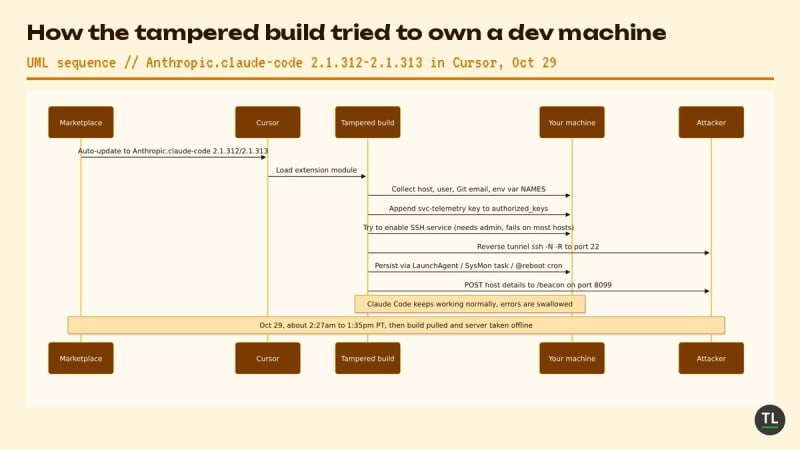
How the tampered Claude Code build tried to take over a developer machine
What Happened
Cursor disclosed the incident in a security notice on its blog on October 29. It says a "maliciously modified version of Anthropic's Claude Code extension" was available in the Cursor VS Code Extension Marketplace for roughly 11 hours, and that "these malicious versions of the extension were not developed by Anthropic."
The detection firm Phorion was first to spot it, after finding the extension on a customer's Mac, WIRED reports. Cursor told reporters the rogue build reached "at most 5,000 users." Because Cursor extensions auto-update by default, many people likely got it without clicking anything, Phorion's CTO Luke Roberts told Ars Technica.
According to Cursor, the payload:
Collected the hostname, username, OS, home directory, working directories, Git email, public IP and environment variable names.
Appended an attacker-controlled public key to
authorized_keysand tried to switch on the local SSH service.Opened a reverse SSH tunnel to the attacker's server and set up persistence through a macOS LaunchAgent named
com.apple.sysmond, a Windows scheduled task calledSysMon, or a Linux@rebootcron entry.
Microsoft's analysis adds detail. The injected JavaScript runs before the real extension code, swallows its own errors and lets Claude Code keep working normally so nothing looks off. It looked for environment variables with names containing KEY, TOKEN, SECRET, PASS, AWS or GCP, keeping up to 40. It sent the names, not the values, which Phorion said would let an attacker quickly see which machines hold cloud credentials worth chasing.
Cursor pulled the build, shut down the whole marketplace, rotated its keys, audited access and confirmed no other extensions were tampered with before bringing it back. It also worked with the hosting provider to take the attacker's server offline.
Anthropic says its own systems weren't breached. "A malicious actor used access to Cursor's marketplace to publish a tampered copy of the Claude Code extension, which we didn't build or publish," Anthropic's Felix Rieseberg posted on X, as quoted by WIRED.
Why It Matters
This is the nightmare version of a supply chain attack: a trusted name, an official-looking listing and silent auto-updates. Developers didn't have to download anything shady. Their editor did it for them.
The lucky break was the attacker's own bugs. Turning on the SSH server needs admin rights, which the extension didn't have on most Macs and Windows PCs, so the tunnel failed there. "Everyone was so lucky here, this was potentially a really dangerous foothold for an attacker," Phorion CEO Calum Hall told WIRED.
The biggest open question is how it got in. Cursor hasn't explained how an attacker could publish under the Claude Code listing, and Ars says neither company answered its questions on that. Until we know, every editor marketplace that mirrors or re-hosts extensions deserves a harder look. It's the same lesson as the AGENTS.md attack on Codex and Claude Code: AI coding tools run with your full permissions, so whatever reaches them reaches you.
What It Means for Developers
If you use Cursor with Claude Code installed, treat this as a checklist, not a headline:
Check for the key. On macOS or Linux, run
grep svc-telemetry ~/.ssh/authorized_keys. On Windows, Cursor's notice gives a PowerShell check that also coversC:\ProgramData\ssh\administrators_authorized_keys.Don't stop at uninstalling. The payload drops scripts outside the extension folder:
~/.config/.smtand~/.config/.smtk, thecom.apple.sysmondLaunchAgent, theSysMontask or thesysmon.cmdstartup file. Cursor'sremediate-macos.shandremediate-windows.ps1scripts remove them.Rotate secrets from a clean machine. Cursor says the limited env-var collection "does not rule out later credential access over the backdoor," so rotate API keys, cloud credentials and SSH keys that lived on an affected host.
Hunt across your fleet. Look for traffic to
134.209.82.225, especially on port 8099, plusssh -N -Rorautosshprocesses started from the editor.Slow down updates. Microsoft points to Cursor's hardening options: limit extensions to approved publishers and add an installation cooldown for brand-new versions, the same idea PHP's Composer adopted for packages.
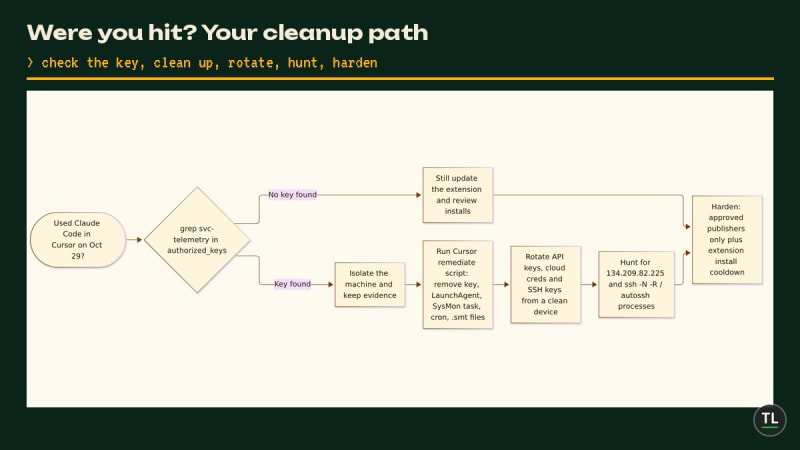
Were you hit? The cleanup path, step by step
What's Next
Watch for a root-cause write-up from Cursor explaining how the attacker got publishing access, and for whether other forks that re-host VS Code extensions add signing or publisher checks. Socket reports that Cursor is contacting affected users directly, and Cursor updated its indicators of compromise on October 30.
Security vendors are moving fast too. Microsoft has shipped Defender detections and hunting queries, and Sophos and Socket have published guidance for teams auditing their machines.
FAQ
Am I affected if I use Claude Code in the terminal or VS Code?
According to Microsoft and Anthropic, no. The tampered builds only appeared in Cursor's marketplace, not the Visual Studio Marketplace or Anthropic's npm package.
Is updating to the latest Claude Code extension enough?
No. Updating replaces the extension but leaves the SSH key, scripts and startup entries in place. Check for svc-telemetry and run Cursor's remediation script if you find it.
Could the attacker read my files?
On most machines the tunnel failed because the extension lacked admin rights, so remote login wasn't possible. The beacon did send host details and environment variable names, so rotate credentials if you were exposed.
Sources
Inside a malicious Claude Code-branded extension and its persistent SSH backdoor, Microsoft Security
A Supply Chain Attack Put Malicious Anthropic Claude Extensions on Thousands of Devices, WIRED
Anthropic VS Code extension on Cursor backdoored for nearly 12 hours, Ars Technica
Malicious Claude Code extension distributed through Cursor marketplace, Sophos
Cursor removes malicious Claude Code 2.1.313 extension from its marketplace, Socket
Follow TheTechLane
Keep learning AI, development, and modern developer technologies with TheTechLane.
Learn • Build • Share
Follow @thetechlanehq for more developer guides, tutorials, and practical technology content.