Did 'Don't Ask Again' Just Put Your Database Password on GitHub?
Apiiro found 1,122 public Claude Code settings files holding 1,379 secrets after Don't Ask Again saved full commands. Here's how to check and rotate.
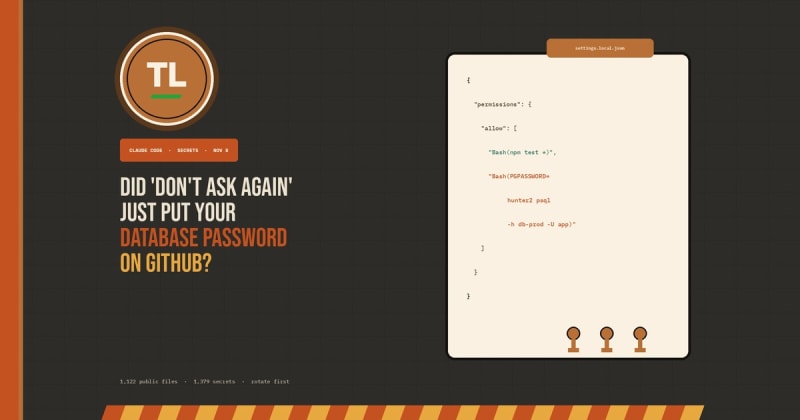
Click "Yes, and don't ask again" in Claude Code, and the tool can save the entire approved shell command—password included—into .claude/settings.local.json. Security company Apiiro says 1,122 public copies of that file on GitHub now hold at least one secret.
Here's what you need to know:
Apiiro scanned 104,185 public copies of
.claude/settings.local.jsonacross 103,617 repositories and found 1,122 files (about 1.1%) holding at least one secret—1,379 distinct values in total.The save is documented behaviour: picking "Yes, and don't ask again" writes an
allowrule into the project's local settings file. When the prompt stored an exact command, any password typed into it is stored too, in plain text.Claude Code's git protection adds the file to the user's global git excludes on that machine. It does not add the path to the repository's own
.gitignore, so already-committed copies, clones, and other laptops stay exposed.More than a third of the secrets open a database: 379 database passwords, plus 43 SSH logins for public servers, 42 GitHub, GitLab and npm tokens, and 23 AWS keys.
Counting older git history, shared
.claude/settings.json, and saved agent transcripts, Apiiro's broader total is 2,539 secrets across 1,994 repositories.The researchers did not try the credentials. One company they notified confirmed its exposed key had been live.
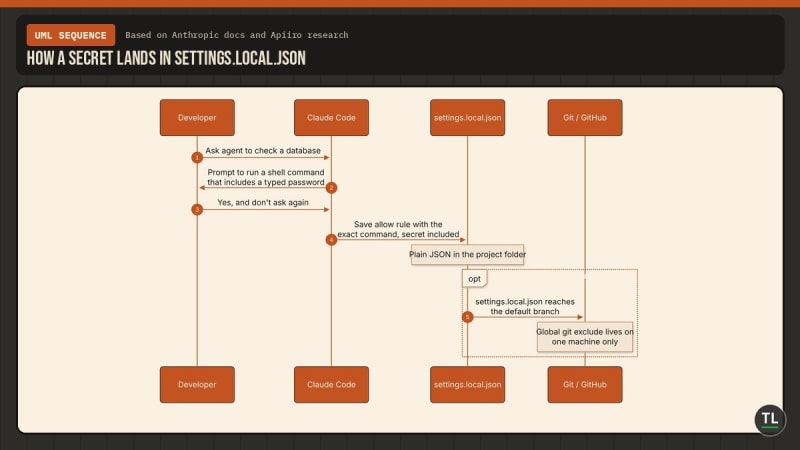
How a secret lands in settings.local.json
What Happened
Claude Code asks before it runs most shell commands. According to Anthropic's own permissions documentation, choosing "Yes, and don't ask again" for a Bash command saves a permanent allow rule in .claude/settings.local.json at the repository root. Matching commands then run without another prompt in later sessions anywhere in that repo.
The rule covers only what the prompt offered. Sometimes that is a pattern, such as npm test *. Sometimes it is one exact command. When it is the exact command, a password, token, or connection string typed on that line is saved word for word.
Anthropic's settings documentation is explicit about the file's purpose: it is a project-local override, "yours and not the repository's." The first time Claude Code writes the file in a git repository, it adds **/.claude/settings.local.json to the user's global git excludes file (core.excludesFile, or ~/.config/git/ignore). Git on that computer then ignores the file in every repository.
That guard is real, and it is easy to miss what it does not do. A global exclude belongs to one developer on one machine. It does not travel with the project the way a committed .gitignore entry does. Claude Code never adds the path to the repository's own ignore file. If you created the file by hand before Claude Code wrote to it, even that local exclude may never have been added. And Git's ignore rules do not untrack a file that is already committed.
Software security company Apiiro published the research on November 5, 2026, by researchers Shmulik Cohen and Matan Giladi. The Hacker News (Swati Khandelwal, November 7) and iTWire (David M Williams, November 7) both reported the findings in detail. Apiiro collected public GitHub data between November 1 and 3. A reprint of the researchers' own lead, carried by DataBreaches.net on November 7, describes the same totals and names strong cases including a database vendor's admin-level cloud key, a production Azure Postgres password, a Square production token, and the owner password of a medical-records database.
The researchers classified a value as a secret when it matched a known key format, or when a password or token sat beside the address of a public server, and an AI reviewer also had to agree. They filtered common false positives first. iTWire notes that this extra review was part of Apiiro's own process, not an independent replication, and that Apiiro sells application and agent security products.
Apiiro says it reproduced the save-the-full-command behaviour with the latest models available to them. The Hacker News names those models as Opus 5.5 and Fable 5.1. Of 16 coding agents whose documentation the researchers compared, they say Claude Code is the only one confirmed to save the full approved command in a project file by default.
In 539 of 1,105 repositories they traced, a commit listing Claude as a co-author changed the file. They take this to mean Claude often commits the file itself. That does not prove Claude introduced or pushed every exposed credential.
As of the Monday in their collection window, every file with a secret was still on its repository's default branch. In half of those repositories it had been there for at least 217 days. Older versions of the file contain 734 more secrets across 509 repositories that no longer show them in the current copy, usually because the file was deleted. Forks spread the exposure further: 211 forks of 74 repositories carry the same secrets as the originals.
Secrets also sit in 298 of 76,011 public copies of the shared .claude/settings.json file, which teams commit on purpose, mostly inside allow rules. Including those, the older versions, and saved agent chat logs, the total reaches 2,539 secrets across 1,994 repositories.
This is not a new surprise to everyone who uses the tool. The Hacker News reports that a bug report filed on August 11, 2025 already said approved commands with API keys and tokens were being stored word for word in settings.local.json. An automated bot closed that report as "not planned" on January 3 after 60 days without activity. As of The Hacker News's November 7 write-up, Apiiro said the four related reports it cited had all been closed by the same bot—the most recent the day before—and that none had received a reply from Anthropic. iTWire adds that security firm ironPeak described a similar finding in February 2026: a committed Claude settings file that held approved commands with database passwords and API keys.
The researchers notified affected organisations on November 2 and 3. They do not say whether anyone has used these secrets. One notified company confirmed its key had been live.
Why It Matters
This is not a hostile prompt tricking a model into stealing a password. It happens during ordinary, authorised work. You ask the agent to check a database or call an API. It proposes a command that carries the secret from your environment or config. You approve it so the agent can stop interrupting you. The approval itself becomes another copy of the secret.
The file looks local. Its name says local. Claude Code's docs say the tool keeps it out of git. That language is easy to trust, and it is true only in a narrow sense: one machine, after Claude Code has written the file, and only for copies that were never committed. A filename is not an access-control system.
Git history makes the cleanup worse than deleting a file. Removing .claude/settings.local.json from the current tree does not erase earlier commits, forks, or other people's clones. The same lesson showed up in our guide to stopping API key leaks: revoke first, clean up second.
Common secret scanners also miss many of these files. Apiiro ran gitleaks and TruffleHog over every copy, without the tools' verification step. Of the 1,122 files with a secret, gitleaks flagged 564 and TruffleHog 643. Neither flagged 215. Most misses are passwords typed inside commands. Scanners look for known key formats; a password after PGPASSWORD=, sshpass -p, or mysql -p looks like an ordinary word on an ordinary command line.
Copies that never reach GitHub still matter. The file is plain JSON in the project folder. It can travel inside an npm package, a Docker image, a zip archive, or a synced folder. Apiiro notes that malware has already hunted secrets on developer machines: in September 2025, the Shai-Hulud worm ran TruffleHog over infected computers, and the scanner flagged more than half of these files as secret.
The pattern sits next to other agent-side leaks TheTechLane has covered. Yesterday we reported that Claude Code had been putting account emails into User-Agent headers. The Trigger.dev environment-variable breach was about stored env vars an attacker could read. This story is about a permission file developers approve themselves.
Among the owners of the secret-bearing files are 63 organisations, mostly software companies of all sizes. For teams, that means the blast radius is not only a personal token. It can be a production database password, a cloud admin key, or a medical-records owner password sitting on a default branch for months.
What It Means for Developers
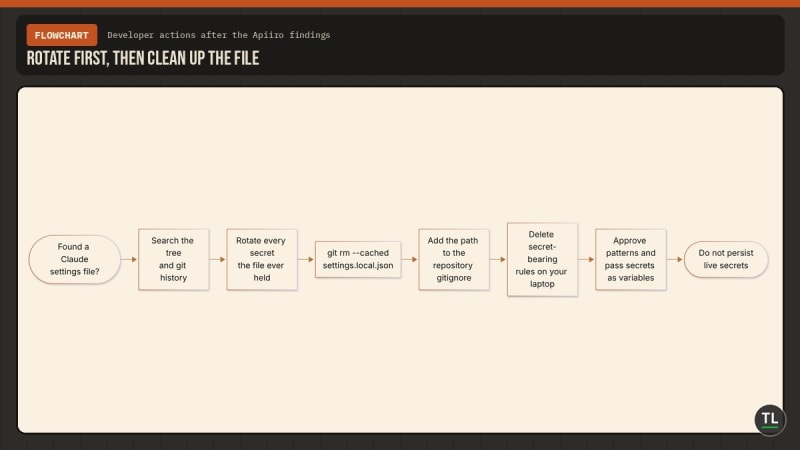
Rotate first, then clean up the file
If you use Claude Code—or review repositories that do—treat .claude/settings.local.json the way you already treat a .env file.
Search your GitHub organisation for
.claude/settings.local.jsonand.claude/settings.json. Check each repository's git history even where the files are gone from the current tree.Rotate first. Change every password, token, and key the files have ever held before you rewrite history or delete anything. Deleting the current file does not revoke a live credential.
Stop tracking the local file with
git rm --cached .claude/settings.local.json, and add it to the repository's own.gitignoreso the protection travels with the project.Open the file on your own computer, even if it was never committed, and delete every rule that contains a secret.
Keep secrets out of commands. Refer to them as variables from a secrets manager, such as
$DB_URL, so the saved rule holds the variable name and not the secret. Putting the password itself in an inline assignment likePGPASSWORD=...still places it in the command text the permission file stores.Approve patterns, not one-off commands. Prefer rules such as
Bash(npm run:*)over a single command that happened to include a credential. Anthropic's permissions docs explain theTool(specifier)syntax and warn that a rule matches the command text, not every way of invoking the same program.Widen the hunt for security teams. Treat agent folders such as
.claude/,.cursor/,.gemini/, and.specstory/, plus agent memory files, as secret-bearing—on laptops as well as in repositories. Add them to pre-commit and CI scanning, including git history, and make sure the scanner catches passwords inside commands, not only known key formats. Add.claude/settings.local.jsonto the organisation's.gitignoretemplates. Check credentials paired with a public server first, because those are the ones that give access.
A committed .claude/settings.json is a different file: teams are supposed to share it. Review its permissions.allow list the same way. If it contains a full command with a secret, that secret is in every clone on purpose.
For a fuller rotation playbook—gitleaks, push protection, and what to do after a key is public—see our developer guide to stopping secret leaks. And if you installed Claude Code through Cursor, it is still worth the quick check from our earlier report on a tampered Claude Code extension.
What's Next
Anthropic's documentation already describes both the save-to-local-settings behaviour and the machine-local git exclude. What it does not do, as of the reporting we reviewed, is warn that an approved command can freeze a secret into that file, or add the path to the project's own .gitignore by default.
As of November 7, The Hacker News said Apiiro had not received a reply from Anthropic on the bug reports it cited. We have not seen a public incident post or a product change announcement from Anthropic that addresses this specific research.
Open questions remain. Will Claude Code start writing the ignore rule into the repository itself? Will the prompt redact or refuse to save a command that looks like it contains a secret? Will standing approvals store a pattern instead of the exact line you typed? Until that changes, every "don't ask again" click is also a decision about what you are willing to persist in plaintext.
Watch Anthropic's settings and permissions docs, and search your own orgs before you assume the file never left your laptop.
Get Security Alerts in Your Inbox
When coding agents leave secrets in unexpected files, we break down what leaked and what to do next.
Subscribe to the free TheTechLane newsletter and get them before they hit your stack.
FAQ
If I delete settings.local.json, am I safe?
No. Deleting the current file does not revoke a credential that was ever committed, forked, or cloned, and it does not remove older versions from git history. Rotate every secret the file has held, then untrack it and add it to the project's .gitignore.
Does Claude Code publish secrets by default?
No. The documented behaviour is that Claude Code saves the approved command in a project-local file and, the first time it writes that file in a git repository, adds it to your machine's global git excludes. The exposure happens when that file is committed, copied, or packed another way—or when a secret sits in a shared .claude/settings.json that teams commit on purpose.
Should I rotate secrets if the file was never pushed to GitHub?
Yes, if the file ever held a live credential. Apiiro notes the same JSON can leave your machine inside an npm package, a Docker image, a zip archive, or a synced folder, and that malware has already scanned developer laptops for secrets. Opening the local file and removing any rule that contains a secret is still worth doing.
Sources
The Hacker News: Claude Code's "Don't Ask Again" file exposes passwords and keys, Swati Khandelwal, November 7, 2026
iTWire: Claude Code approval files found exposing company secrets, David M Williams, November 7, 2026
DataBreaches.net excerpt of Apiiro's research lead, November 7, 2026
Claude Code settings documentation, Anthropic
Claude Code permissions documentation, Anthropic
Follow TheTechLane
Keep learning AI, development, and modern developer technologies with TheTechLane.
Learn • Build • Share
Follow @thetechlanehq for more developer guides, tutorials, and practical technology content.