Model Context Protocol (MCP) Explained: The Complete Developer Guide
Learn what the Model Context Protocol (MCP) is, how MCP clients and servers work, and why it is becoming the standard for connecting AI models with external tools, APIs, databases, and applications.
Introduction
If you've used AI tools like Claude Desktop, Cursor, Windsurf, or VS Code AI extensions recently, you've probably heard about the Model Context Protocol (MCP). It's quickly becoming the standard way for AI assistants to interact with external applications, databases, APIs, and local files.
Before MCP, every AI application needed its own custom integration for every service. If you wanted an AI assistant to access GitHub, Slack, PostgreSQL, or your local filesystem, each AI platform required a separate implementation. This created duplicate work, inconsistent APIs, and unnecessary maintenance.
Model Context Protocol solves this problem by introducing a common standard for communication between AI models and external tools.
Instead of building multiple integrations, developers build a single MCP server that any compatible AI client can use.
In this guide, you'll learn what MCP is, why it matters, how it works internally, and why it's becoming an essential technology for AI-powered applications.
Who Should Read This Guide?
This guide is ideal for:
AI application developers
Backend developers
JavaScript and Python developers
Developers using Claude Desktop or Cursor
Anyone interested in AI tooling and automation
A basic understanding of APIs and client-server architecture is enough to follow along.
Quick Answer
Model Context Protocol (MCP) is an open standard that enables AI applications to communicate with external tools, databases, APIs, and services using a unified protocol. Instead of creating custom integrations for every AI assistant, developers expose capabilities through an MCP server, allowing any compatible AI client to discover and use them securely.
Think of MCP as USB-C for AI. Just as one USB-C cable can connect many devices, one MCP server can connect multiple AI clients to the same set of tools.
What Is Model Context Protocol (MCP)?
Model Context Protocol, commonly known as MCP, is an open protocol designed to standardize how AI models interact with external systems.
Large Language Models (LLMs) are excellent at generating text and reasoning, but they don't have direct access to your files, databases, or business applications. Without a standard interface, every AI platform needs its own custom integrations, making development slow and difficult to maintain.
MCP addresses this by defining a common communication layer between AI applications and external resources.
With MCP, developers expose functionality as tools, resources, and prompts through an MCP server. AI clients can then discover these capabilities automatically and use them when needed.
For example, instead of writing separate GitHub integrations for Claude, Cursor, and Windsurf, you create one GitHub MCP server. Any compatible client can connect to it without additional development.
Why Do We Need MCP?
Imagine you're building an AI assistant for your company.
It needs access to:
GitHub repositories
Jira issues
Slack messages
PostgreSQL databases
Local project files
Internal REST APIs
Without MCP, you would need to implement these integrations separately for every AI platform you want to support.
MCP eliminates these problems by providing a standardized protocol.
Instead of teaching every AI client how to communicate with every external service, you teach the service how to speak MCP once.
This separation keeps applications modular, easier to maintain, and future-proof as new AI clients emerge.
How Does MCP Work?
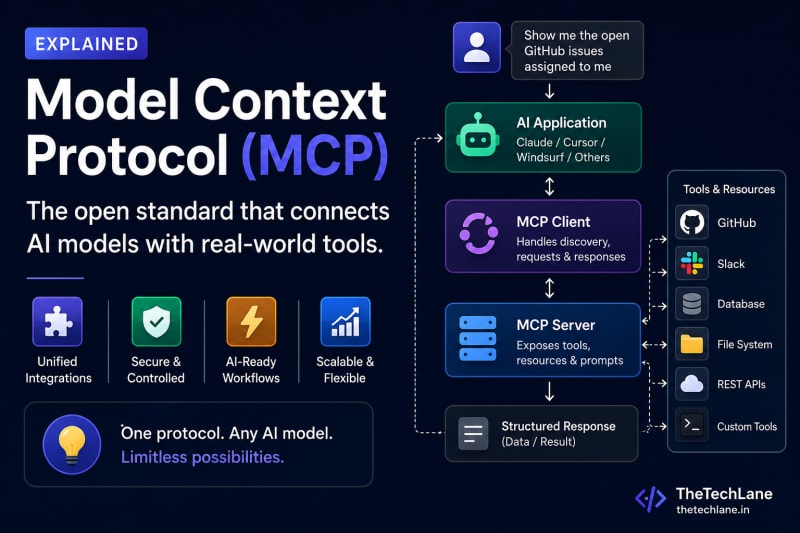
At a high level, MCP follows a client-server architecture.
A user interacts with an AI application such as Claude Desktop or Cursor. When the AI determines that it needs external information—such as reading a file or querying a database—it doesn't access those resources directly.
Instead, it sends a request through an MCP client.
The MCP client communicates with the appropriate MCP server, which executes the requested operation and returns the result. The AI model then uses that information to generate a helpful response for the user.
The communication flow looks like this:
User
   │
   ▼
AI Application
(Claude / Cursor)
   │
   ▼
MCP Client
   │
   ▼
MCP Server
   │
   ├── File System
   ├── Database
   ├── GitHub
   ├── Slack
   ├── REST API
   └── Custom Tools
This architecture separates the AI model from external systems, making integrations more secure and easier to manage.
MCP Architecture
Every MCP implementation consists of three primary components.
1. MCP Host
The host is the application the user interacts with. It manages conversations, loads MCP servers, and presents responses.
Examples include:
Claude Desktop
Cursor
Windsurf
Continue.dev
The host provides the user interface and orchestrates communication between the AI model and available MCP servers.
2. MCP Client
The MCP client acts as the communication layer between the AI application and MCP servers.
Its responsibilities include:
Discovering available tools
Sending requests
Receiving responses
Managing sessions
Handling authentication
Converting AI requests into MCP messages
The client ensures that every request follows the MCP specification, regardless of which server it's communicating with.
3. MCP Server
An MCP server exposes external capabilities that AI applications can use.
These capabilities may include:
Reading and writing local files
Executing shell commands
Querying databases
Accessing GitHub repositories
Calling REST APIs
Interacting with cloud services
Running custom business logic
Instead of exposing traditional REST endpoints, the server describes its capabilities in a way that AI clients can understand and invoke automatically.
Request Lifecycle
A typical MCP request follows these steps:
A user asks the AI a question.
The AI determines that external data is required.
The MCP client identifies the appropriate tool.
The MCP server executes the requested operation.
The server returns structured data.
The AI combines the result with its reasoning.
The user receives a final response.
For example, if you ask:
"Show me all open GitHub issues assigned to me."
The AI doesn't know this information by itself. Instead, it uses a GitHub MCP server to retrieve the latest issues and then summarizes them in natural language.
This makes AI assistants far more useful because they can work with live data instead of relying only on their training knowledge.
Building Your First MCP Server
One of the biggest advantages of MCP is that you don't need to build an entire AI application. You only need to expose your application's capabilities through an MCP server. Any compatible AI client—such as Claude Desktop, Cursor, or Windsurf—can then discover and use those capabilities automatically.
Let's build a simple MCP server that returns the current time.
Project Structure
mcp-time-server/
│
├── package.json
├── server.js
└── README.md
Install the required package:
npm init -y
npm install @modelcontextprotocol/sdk
Now create server.js.
import { Server } from "@modelcontextprotocol/sdk/server/index.js";

const server = new Server(
  {
    name: "time-server",
    version: "1.0.0"
  },
  {
    capabilities: {
      tools: {}
    }
  }
);

server.tool(
  "currentTime",
  "Returns the current system time",
  {},
  async () => {
    return {
      content: [
        {
          type: "text",
          text: new Date().toLocaleString()
        }
      ]
    };
  }
);

console.log("MCP Server Started");
This server exposes a single tool named currentTime.
When an AI client invokes this tool, the server returns the current system time as plain text.
Although this example is simple, the same approach can expose much more powerful capabilities, such as querying databases, interacting with GitHub, reading files, or calling internal APIs.
Tools, Resources, and Prompts
MCP organizes capabilities into three core concepts.
Tools
Tools allow AI models to perform actions.
Examples include:
Send an email
Execute SQL queries
Read files
Create GitHub issues
Deploy applications
Restart a server
Think of tools as functions the AI can call.
Resources
Resources provide data without performing actions.
Examples include:
Documentation
Configuration files
JSON data
Project source code
Markdown files
Instead of generating information from memory, the AI can retrieve the latest version of these resources directly from the MCP server.
Prompts
Prompts are reusable instructions provided by the server.
For example:
Code review checklist
Pull request template
Security audit prompt
API documentation assistant
These predefined prompts help AI clients deliver more consistent responses across different projects.
Real-World Use Cases
MCP isn't just a theoretical protocol—it's already being used to connect AI assistants with real-world tools and services.
GitHub Integration
An AI assistant can:
Read repositories
Create pull requests
Review code
Open issues
Merge branches
Developers no longer need to switch between the AI chat window and GitHub for routine tasks.
Database Assistant
Instead of manually writing SQL queries, you can ask:
"Show the top 10 customers by revenue this month."
The MCP server executes the SQL query, retrieves the data, and the AI presents the results in plain English.
File System Access
An MCP server can expose local project files.
For example:
"Find every TODO comment in this project."
The AI searches your codebase and summarizes the findings without requiring manual navigation.
DevOps Automation
Teams can expose deployment tools through MCP.
Examples include:
Restart Kubernetes pods
Trigger CI/CD pipelines
View Docker container logs
Monitor application health
Deploy production builds
Instead of memorizing complex CLI commands, developers can simply ask the AI to perform these tasks.
Common Misconceptions
"MCP is another AI model."
No.
MCP doesn't generate text or make decisions.
It is a communication protocol that enables AI models to interact with external systems.
"MCP replaces REST APIs."
Not exactly.
REST APIs still provide the underlying functionality.
An MCP server often acts as a wrapper around existing APIs, presenting them in a format that AI clients can understand.
"Only Claude supports MCP."
No.
Although Anthropic introduced MCP, it's an open standard.
Today, several AI development tools support MCP, and adoption continues to grow across the ecosystem.
"MCP is only for coding assistants."
Not at all.
MCP can be used in:
Healthcare systems
Customer support platforms
Financial applications
Enterprise automation
Data analytics
Internal business tools
Any application that benefits from AI interacting with external systems can use MCP.
Best Practices
When building an MCP server, keep these practices in mind:
Expose only the tools users actually need.
Validate all user input before executing actions.
Never expose sensitive credentials through tools.
Implement proper authentication and authorization.
Return structured, predictable responses.
Keep tools focused on a single responsibility.
Log requests for debugging and monitoring.
Use descriptive names and documentation for every tool.
A well-designed MCP server is easier for both developers and AI models to understand.
Key Takeaways
By now, you should understand that:
Model Context Protocol (MCP) is an open standard for connecting AI models with external tools.
MCP eliminates the need for custom integrations for every AI application.
The protocol is built around three main components: Host, Client, and Server.
AI models interact with tools, resources, and prompts through MCP servers.
MCP improves interoperability, scalability, and maintainability for AI-powered applications.
As AI adoption grows, MCP is becoming a foundational technology for building intelligent software.
Frequently Asked Questions
What is Model Context Protocol (MCP)?
MCP is an open protocol that standardizes communication between AI applications and external tools, APIs, databases, and services.
Who created MCP?
Anthropic introduced the Model Context Protocol as an open standard, allowing the broader AI community to adopt and extend it.
Is MCP open source?
Yes. MCP is an open standard, and SDKs are available for developers to build compatible servers and clients.
Which programming languages support MCP?
The official SDKs are available for JavaScript and Python, while community implementations exist for several other languages.
Can I build my own MCP server?
Absolutely. You can create an MCP server that exposes your own APIs, databases, business logic, or local tools. Once published, any compatible AI client can use it.
Is MCP secure?
MCP itself defines how communication happens, but security depends on how your server is implemented. Always use authentication, authorization, and input validation to protect sensitive resources.
Conclusion
Model Context Protocol is rapidly becoming the standard way to connect AI models with external systems. By providing a consistent interface for tools, resources, and prompts, MCP removes the complexity of building separate integrations for every AI platform.
Whether you're creating an AI coding assistant, an enterprise automation platform, or a custom internal tool, learning MCP now will help you build applications that are more interoperable, maintainable, and future-ready.
As the AI ecosystem continues to evolve, understanding MCP won't just be a useful skill it will likely become an essential one for developers building the next generation of intelligent applications.
What's Next?
Now that you understand how MCP works, the next step is to build a real project.
You will build and test your first MCP server, the next step is to connect MCP to something more useful than a calculator.
In the next tutorial, how to Build Your First MCP Server.
Continue Learning
Explore more MCP and AI development tutorials:
MCP Client vs Server: How MCP Works
How to Connect an MCP Server to Claude Desktop
Build a GitHub MCP Server with Python
MCP Security Best Practices
Have a Question?
If something isn't clear or your MCP server isn't working as expected, leave a comment below.
We'll do our best to explain it with simple words, practical examples, and code you can actually understand.
Happy Coding! 🚀
Follow TheTechLane
Want more developer tutorials, AI engineering guides, programming tips, and tech updates?
Follow TheTechLane on LinkedIn, X, Instagram, Threads, and Pinterest to stay connected and catch new tutorials when they go live.
Learn. Build. Share.
— TheTechLane