How Do Java Loops Know When to Stop? (Java Part 13)
Learn Java loops step by step: for, while, do-while, the enhanced for loop, break, continue and labeled break, with real Java 25 output and common mistakes.
Your UPI app shows you every transaction from the last month.
A cinema app scans every seat until it finds a free one.
A login screen keeps asking for the OTP until you type the right one.
None of them has a line of code per item: they repeat one small block and know exactly when to stop.
That repeating block is called a loop.
Java for Beginners · Part 13 of TheTechLane's Java series
One core Java idea per lesson, explained in plain English and tested on Java 25 LTS. Last time: if, else and switch. Today: loops, and how to stop them at the right moment.
In this lesson, you'll learn:
How the classic
forloop runs, step by stepWhen
whileis a better fit thanforWhy
do-whilealways runs at least onceHow the enhanced
forloop walks through every itemHow
break,continueand a labeledbreakchange the normal flowThe five loop mistakes beginners make most often, with the real errors
Before You Start
You need a JDK installed and a way to compile code.
Every example below was compiled and run with Eclipse Temurin 25.0.5, a free build of OpenJDK 25, the current long-term support (LTS) release.
You can download it from Adoptium.
Save each example with the class name as the file name, then run:
javac CountdownFor.java
java CountdownFor
Loops use the if conditions and comparison operators you met last time, so if i <= 5 or !booked looks strange, revisit If, Else or Switch: How Does Java Decide? (Java Part 12) first.
Loops in One Minute
A loop repeats a block of code while a boolean condition stays true, and stops the moment that condition becomes false (or when you jump out with break).
Here's the mental model:
      +--------------------------+
      v                          |
condition true? --yes--> run the body, then update
      |
      no
      v
  leave the loop and carry on
Each trip through the body is called an iteration (think of it as one lap around a running track).
Loop types differ in where the check happens and how the counter changes.
The official dev.java guide to control flow statements covers all of them, and Chapter 14 of the Java Language Specification (the JLS, Java's official rulebook) defines exactly how each one runs.
The Classic for Loop
Use a for loop when you know how many times you want to repeat something.
Here's a program that prints a bill reminder five times:
public class CountdownFor {
    public static void main(String[] args) {
        for (int i = 1; i <= 5; i++) {
            System.out.println("Reminder " + i + ": pay your electricity bill");
        }
        System.out.println("Loop finished");
    }
}
Output:
Reminder 1: pay your electricity bill
Reminder 2: pay your electricity bill
Reminder 3: pay your electricity bill
Reminder 4: pay your electricity bill
Reminder 5: pay your electricity bill
Loop finished
The header for (int i = 1; i <= 5; i++) has three parts separated by semicolons.
The init part, int i = 1, creates a counter variable and runs exactly once.
The condition, i <= 5, is checked before every iteration.
The update, i++, adds 1 to i after every iteration.
When i becomes 6, the check 6 <= 5 is false and the loop ends.
That's the whole rule.
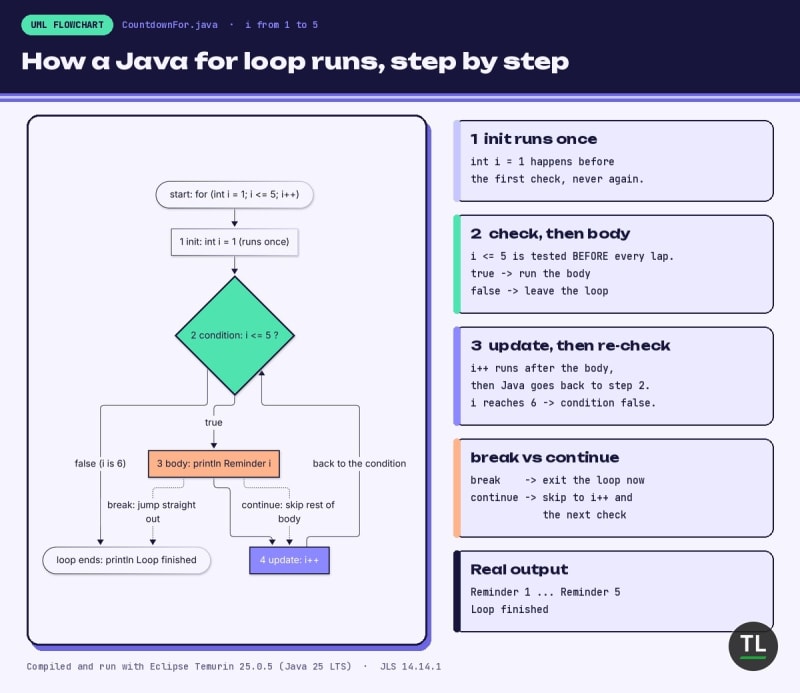
How a for loop runs: init once, then check, body and update on every lap
Doing Real Work Inside a for Loop
A loop body can hold any statements, including variables that build up a result.
Here's the multiplication table of 7, plus a running total:
public class TableOfSeven {
    public static void main(String[] args) {
        int total = 0;
        for (int i = 1; i <= 10; i++) {
            int product = 7 * i;
            total += product;
            System.out.println("7 x " + i + " = " + product);
        }
        System.out.println("Sum of the table: " + total);
    }
}
Output:
7 x 1 = 7
7 x 2 = 14
7 x 3 = 21
7 x 4 = 28
7 x 5 = 35
7 x 6 = 42
7 x 7 = 49
7 x 8 = 56
7 x 9 = 63
7 x 10 = 70
Sum of the table: 385
Notice that total is declared before the loop.
If you declared it inside the body, it would be reset to 0 on every lap.
This "accumulator" pattern (start at zero, add every lap) is everywhere in programming.
The while Loop
Use a while loop when you don't know the number of repetitions in advance, only the condition that should keep you going.
Say your wallet has Rs 500 and a movie ticket costs Rs 120:
public class WalletWhile {
    public static void main(String[] args) {
        int balance = 500;
        int ticket = 120;
        int tickets = 0;

        while (balance >= ticket) {
            balance -= ticket;
            tickets++;
            System.out.println("Booked ticket " + tickets + ", balance Rs " + balance);
        }
        System.out.println("Not enough for another ticket. Final balance: Rs " + balance);
    }
}
Output:
Booked ticket 1, balance Rs 380
Booked ticket 2, balance Rs 260
Booked ticket 3, balance Rs 140
Booked ticket 4, balance Rs 20
Not enough for another ticket. Final balance: Rs 20
A while loop has only a condition in its header.
Java checks balance >= ticket first, and runs the body only if it's true.
Inside the body, balance -= ticket moves the program towards the exit.
After four tickets, 20 >= 120 is false, so the loop stops.
The JLS section on the while statement describes exactly this: evaluate the condition, run the body if it's true, repeat.
Rule of thumb: counting means for, waiting for something to change means while.
The do-while Loop
A do-while loop checks its condition at the end of each iteration instead of the start.
That means the body always runs at least once.
It's perfect for "ask first, then check" situations, like reading an OTP:
public class DoWhileOtp {
    public static void main(String[] args) {
        int[] typedOtps = {4821, 1111, 7305};
        int correctOtp = 7305;
        int attempt = 0;
        int typed;

        do {
            typed = typedOtps[attempt];
            attempt++;
            System.out.println("Attempt " + attempt + ": you typed " + typed);
        } while (typed != correctOtp && attempt < 3);

        System.out.println(typed == correctOtp ? "OTP verified" : "Too many attempts");
    }
}
Output:
Attempt 1: you typed 4821
Attempt 2: you typed 1111
Attempt 3: you typed 7305
OTP verified
The typedOtps line simulates what a user types (you'll learn how these {...} lists, called arrays, work in the next lesson).
The condition typed != correctOtp && attempt < 3 keeps looping while the OTP is wrong and attempts are left.
Don't forget the semicolon after while (...): it's required in a do-while.
Seeing the Difference
Here's the same false condition used in both loop types:
public class WhileVsDoWhile {
    public static void main(String[] args) {
        int count = 10;

        while (count < 5) {
            System.out.println("while body ran");
        }

        do {
            System.out.println("do-while body ran once, count = " + count);
        } while (count < 5);
    }
}
Output:
do-while body ran once, count = 10
The while body never ran, because 10 < 5 was false before the first lap.
The do-while body ran once, then the check at the bottom stopped it.
The JLS section on the do statement spells out this "body first, check after" order.
The Enhanced for Loop (for-each)
Very often you don't care about a counter at all: you just want every item in a collection.
The enhanced for loop, also called for-each, was added in Java 5 for exactly this:
public class CartTotal {
    public static void main(String[] args) {
        int[] prices = {249, 99, 1299, 45};
        int total = 0;

        for (int price : prices) {
            total += price;
        }
        System.out.println("Items: " + prices.length + ", total: Rs " + total);

        String[] apps = {"GPay", "PhonePe", "Paytm"};
        for (String app : apps) {
            System.out.println("Pay with " + app);
        }
    }
}
Output:
Items: 4, total: Rs 1692
Pay with GPay
Pay with PhonePe
Pay with Paytm
Read for (int price : prices) as "for each price in prices".
On every lap, price holds the next item, from first to last.
There's no index, condition or update to get wrong.
It works on arrays and on any Iterable such as a List, which you'll meet in the collections lesson.
The rules are in JLS section 14.14.2.
The trade-off: you can't see the position of the item, and you can't skip ahead, so use a classic for when you need the index.
The Modern Touch: var and the Unnamed Variable
Two newer features make loop headers shorter:
public class ModernLoops {
    public static void main(String[] args) {
        String[] orders = {"chai", "samosa", "vada pav"};

        for (var i = 0; i < orders.length; i++) {
            System.out.println((i + 1) + ". " + orders[i]);
        }

        int count = 0;
        for (String _ : orders) {
            count++;
        }
        System.out.println("Orders counted: " + count);
    }
}
Output:
1. chai
2. samosa
3. vada pav
Orders counted: 3
var i = 0 lets the compiler infer that i is an int, thanks to JEP 286, standard since Java 10 (see Oracle's local variable type inference guide).
String _ is an unnamed variable: it says "I need to loop over every order, but I never use the item itself".
Unnamed variables became standard in Java 22 through JEP 456, which lists the enhanced for loop header as one place you can use _ (Oracle's unnamed variables guide covers the feature).
Both are fully standard in Java 25, so no extra flags are needed.
break: Leave the Loop Early
Sometimes you find what you need halfway through.
break exits the loop immediately, skipping all the remaining iterations:
public class FirstFreeSeat {
    public static void main(String[] args) {
        boolean[] booked = {true, true, false, true, false};
        int found = -1;

        for (int seat = 0; seat < booked.length; seat++) {
            System.out.println("Checking seat " + (seat + 1));
            if (!booked[seat]) {
                found = seat + 1;
                break;
            }
        }
        System.out.println("First free seat: " + found);
    }
}
Output:
Checking seat 1
Checking seat 2
Checking seat 3
First free seat: 3
Seat 3 was free, so the loop stopped there.
Seats 4 and 5 were never checked, which saves work on a big list.
If nothing is free, found stays -1, which tells you the search failed.
continue: Skip Just This Lap
continue doesn't leave the loop.
It skips the rest of the current iteration and jumps to the next one (in a for loop, that means straight to the update):
public class SkipSoldOut {
    public static void main(String[] args) {
        String[] shows = {"10:00 AM", "1:30 PM", "4:45 PM", "8:00 PM"};
        int[] seatsLeft = {12, 0, 3, 0};

        for (int i = 0; i < shows.length; i++) {
            if (seatsLeft[i] == 0) {
                continue;
            }
            System.out.println(shows[i] + " has " + seatsLeft[i] + " seats");
        }
    }
}
Output:
10:00 AM has 12 seats
4:45 PM has 3 seats
The sold-out 1:30 PM and 8:00 PM shows were skipped, but the loop kept going to the end.
A simple way to remember it: break means "I'm done with this loop", continue means "I'm done with this item".
The JLS covers both in section 14.15 (break) and section 14.16 (continue).
Nested Loops and the Labeled break
A loop inside another loop is called a nested loop.
Think of a cinema hall: the outer loop walks rows, the inner loop walks seats.
Here's the catch: a plain break only leaves the innermost loop:
public class PlainBreak {
    public static void main(String[] args) {
        String[] rows = {"A", "B", "C"};
        boolean[][] booked = {
            {true, true, true},
            {true, false, true},
            {false, false, false}
        };

        for (int r = 0; r < rows.length; r++) {
            for (int s = 0; s < 3; s++) {
                if (!booked[r][s]) {
                    System.out.println("Found free seat " + rows[r] + (s + 1));
                    break;
                }
            }
        }
    }
}
Output:
Found free seat B2
Found free seat C1
We wanted one seat, but we got two.
The break left the seat loop for row B, then the row loop happily moved on to row C.
The fix is a label: a name followed by a colon, placed right before the outer loop.
break search; then jumps out of the loop with that name:
public class SeatGrid {
    public static void main(String[] args) {
        String[] rows = {"A", "B", "C"};
        boolean[][] booked = {
            {true, true, true},
            {true, false, true},
            {false, false, false}
        };

        search:
        for (int r = 0; r < rows.length; r++) {
            for (int s = 0; s < 3; s++) {
                System.out.println("Checking " + rows[r] + (s + 1));
                if (!booked[r][s]) {
                    System.out.println("Found free seat " + rows[r] + (s + 1));
                    break search;
                }
            }
        }
        System.out.println("Search over");
    }
}
Output:
Checking A1
Checking A2
Checking A3
Checking B1
Checking B2
Found free seat B2
Search over
Now both loops stop at B2, and row C is never touched.
Labels are defined in JLS section 14.7, and continue accepts a label too (continue search; skips to the next row).
Use labels sparingly: needing many usually means the code belongs in a method (Part 15).
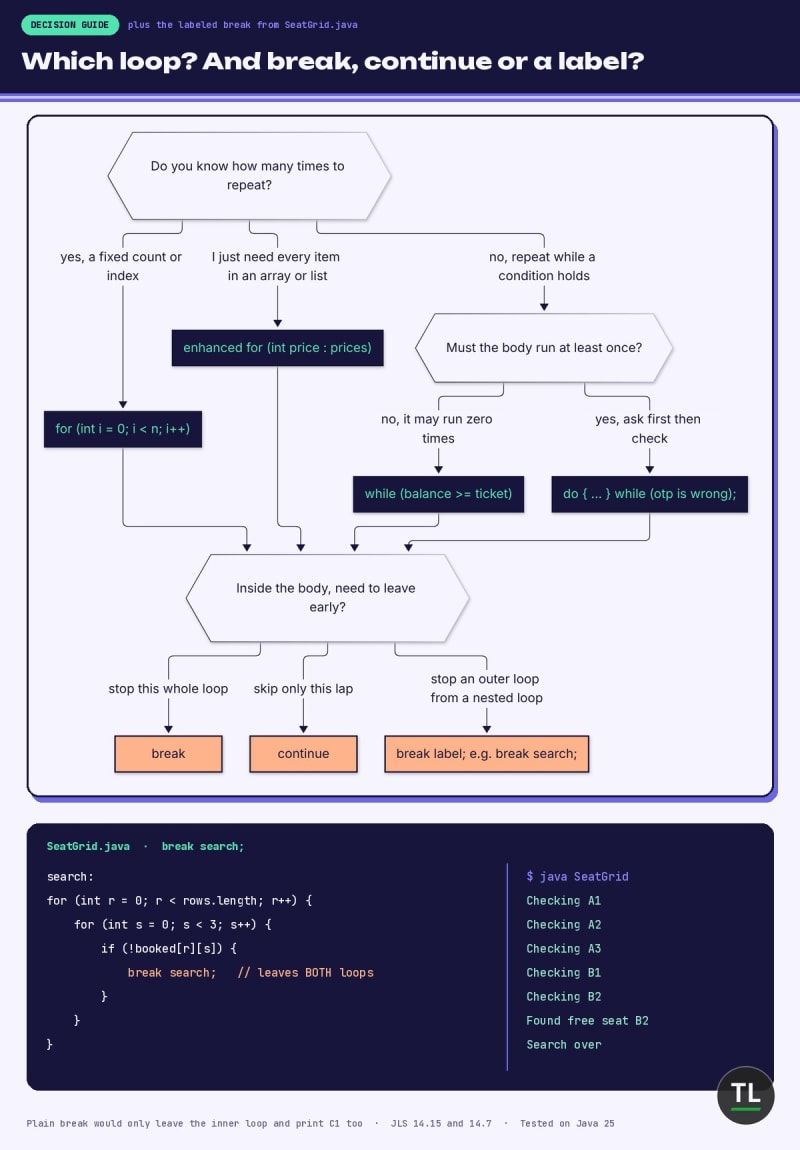
Which loop to pick, and when to use break, continue or a labeled break
Common Loop Mistakes
1. The Off-by-One Error
Using < when you meant <= (or the reverse) gives you one lap too few or too many:
public class OffByOne {
    public static void main(String[] args) {
        System.out.print("i < 5  prints:");
        for (int i = 1; i < 5; i++) {
            System.out.print(" " + i);
        }
        System.out.println();

        System.out.print("i <= 5 prints:");
        for (int i = 1; i <= 5; i++) {
            System.out.print(" " + i);
        }
        System.out.println();
    }
}
Output:
i < 5  prints: 1 2 3 4
i <= 5 prints: 1 2 3 4 5
With arrays, the mistake is worse: positions start at 0, so i <= prices.length reads one item past the end:
public class ArrayOverrun {
    public static void main(String[] args) {
        int[] prices = {249, 99, 1299};
        for (int i = 0; i <= prices.length; i++) {
            System.out.println("Price: " + prices[i]);
        }
    }
}
Output:
Price: 249
Price: 99
Price: 1299
Exception in thread "main" java.lang.ArrayIndexOutOfBoundsException: Index 3 out of bounds for length 3
    at ArrayOverrun.main(ArrayOverrun.java:5)
The fix is i < prices.length, or an enhanced for loop, which can't overrun at all.
The ArrayIndexOutOfBoundsException Javadoc explains the error.
2. The Infinite Loop
If nothing inside the body moves the condition towards false, the loop never ends:
public class NeverEnds {
    public static void main(String[] args) {
        int i = 1;
        while (i <= 3) {
            System.out.println("i is " + i);
        }
    }
}
Output (first four lines, stopped after one second with timeout):
i is 1
i is 1
i is 1
i is 1
It prints i is 1 forever, because i never changes.
Add i++; inside the body, and press Ctrl+C to stop a stuck program.
3. A Stray Semicolon After the Header
A semicolon right after for (...) becomes an empty loop body:
public class StraySemicolon {
    public static void main(String[] args) {
        for (int i = 1; i <= 3; i++); {
            System.out.println("i is " + i);
        }
    }
}
The compiler's response:
StraySemicolon.java:4: error: cannot find symbol
            System.out.println("i is " + i);
                                         ^
  symbol:   variable i
  location: class StraySemicolon
1 error
The loop ran three empty laps, and since i only exists inside the for statement, the block below can't see it.
Delete the semicolon and it prints three lines.
4. Code After a Loop That Can Never End
while (true) with no break can never finish, and the compiler knows it:
public class Unreachable {
    public static void main(String[] args) {
        int tries = 0;
        while (true) {
            tries++;
            System.out.println("Try " + tries);
        }
        System.out.println("Done");
    }
}
The compiler's response:
Unreachable.java:8: error: unreachable statement
        System.out.println("Done");
        ^
1 error
The rule lives in JLS section 14.22: a statement after a loop that can't complete normally is an error.
Add a break with a real exit condition inside the loop, and the error goes away.
5. Using != With Decimal Counters
Decimal numbers like 0.1 can't be stored exactly in a double, so x != 1.0 may never become false:
public class EqualsInLoop {
    public static void main(String[] args) {
        int sum = 0;
        for (double x = 0.0; x != 1.0; x += 0.1) {
            sum++;
            if (sum == 15) {
                System.out.println("Stopped after 15 steps, x = " + x);
                break;
            }
        }
    }
}
Output:
Stopped after 15 steps, x = 1.4000000000000001
The counter skipped past 1.0 without ever equalling it, so only our safety break stopped it.
Count with an int instead, or use < rather than != in the condition.
Quick Recap
A loop repeats its body while a boolean condition is true
foris best when you know the count: init runs once, the condition is checked before every lap, the update runs after every lapwhilechecks first and may run zero timesdo-whilechecks last, so its body always runs at least onceThe enhanced
forloop visits every item of an array orIterablewith no index to get wrongbreakleaves the loop,continueskips to the next iterationA labeled
breaksuch asbreak search;leaves an outer loop from inside a nested oneWatch for off-by-one errors, missing updates and stray semicolons
Exercises
Try these before Monday's lesson.
1. Countdown
Print 10 down to 1 using a for loop, then print Happy New Year!.
Hint: start at 10 and use i--.
2. Savings Goal
You save Rs 750 every month. Use a while loop to find how many months it takes to reach Rs 10,000.
Expected result: 14 months.
3. Menu Until Exit
Use a do-while loop to simulate a menu: loop over the choices {2, 1, 3, 0} and print You chose X for each, stopping after choice 0.
4. Skip the Odd Ones
Use a for loop and continue to print only the even numbers from 1 to 20.
Expected result: 2 4 6 8 10 12 14 16 18 20.
5. First Match in a Grid
Using two nested loops and a labeled break, find the first pair (a, b) with a and b from 1 to 9 where a * b == 24.
Expected result: 3 x 8.
Continue Learning
You're currently at Part 13 of TheTechLane's Java for Beginners series.
Previous
If, Else or Switch: How Does Java Decide? (Java Part 12): the conditions that every loop in this lesson depends on.
Next
Part 14: Arrays in Java (coming Monday)
Related reading:
Need a refresher on
++,+=and comparison operators? Java Variables, Data Types, Casting & Operators covers every operator used in today's loops.New to compiling and running Java? First Java Program in Java (Hello World) walks you through
javacandjava.
Get New Java Lessons in Your Inbox
Don't miss Part 14 on arrays, where today's loops really start to shine.
Subscribe to the free TheTechLane newsletter and get every new Java lesson, tutorial and developer guide as soon as it's published.
Sources
Java Language Specification SE 25, Chapter 14: Blocks, Statements, and Patterns
JLS SE 25, 14.15 and 14.16: The break and continue Statements
Have a Question?
Got a different result or a stubborn compiler error? Paste it in the comments below with your Java version.
Happy Coding! 🚀
Follow TheTechLane
Keep learning AI, development, and modern developer technologies with TheTechLane.
Learn • Build • Share
Follow @thetechlanehq for more developer guides, tutorials, and practical technology content.