If, Else or Switch: How Does Java Decide? (Java Part 12)
Learn Java control flow: if, else-if chains, logical operators, the ternary operator, classic switch, arrow switch expressions, yield and pattern matching.
Every program you've written so far runs the same way every time.
Line one, line two, line three, done.
Real software doesn't work like that: a login screen lets some people in and keeps others out, a shopping cart charges delivery only below a certain amount, and a game ends only when your lives hit zero.
That ability to choose is called control flow, and it's what turns a list of instructions into a program that thinks.
Java for Beginners · Part 12 of TheTechLane's Java series
One core Java idea per lesson, explained in plain English and tested on Java 25 LTS. Last time: variables, data types, casting and operators. Today: making decisions.
In this lesson, you'll learn:
How
if,else ifandelsepick exactly one pathWhy the order of your conditions changes the result
How
&&,||and!combine conditions safelyWhen the ternary operator
? :is cleaner than anifThe classic
switchstatement and its fall-through trapModern switch: arrow labels, switch expressions,
yieldand pattern matching
Before You Start
You need a JDK installed and a way to compile code.
If you followed How to Install IntelliJ IDEA for Java Development (2026 Guide), you're ready.
Every example below was compiled and run with Eclipse Temurin 25.0.5, a free build of OpenJDK 25, the current long-term support (LTS) release.
You can download it from Adoptium.
To run any example from a terminal, save it with the class name as the file name and run:
javac TicketPrice.java
java TicketPrice
If javac and java feel new, revisit First Java Program in Java (Hello World) first.
Control Flow in One Minute
Control flow is the order in which Java runs your statements, and decision statements let you skip or choose blocks of code based on a boolean condition.
Here's the mental model:
condition true?  --yes-->  run this block
       |
       no
       v
   skip it (or run the else block)
The key word is boolean.
Every condition you write must evaluate to exactly true or false.
That's why the relational and logical operators from the previous lesson matter so much: age < 18, marks >= 40 and isAdmin && failedAttempts < 3 all produce a boolean.
The official dev.java guide to control flow statements and Chapter 14 of the Java Language Specification define the rules we'll use today.
The if Statement and the else-if Chain
The simplest decision is a single if: run a block only when a condition is true.
Most real decisions have more than two outcomes, though.
Think of a cinema ticket price that depends on age.
Here's the full program:
public class TicketPrice {
    public static void main(String[] args) {
        int age = 67;
        int price;

        if (age < 5) {
            price = 0;
        } else if (age < 18) {
            price = 150;
        } else if (age >= 60) {
            price = 120;
        } else {
            price = 250;
        }

        System.out.println("Age " + age + " pays Rs " + price);
    }
}
Output:
Age 67 pays Rs 120
Java checks the conditions from top to bottom.
The first one that's true wins, its block runs, and every remaining branch is skipped.
If none is true, the final else runs.
Notice something nice: price is declared without a value, yet the compiler is happy.
That's because every possible path assigns it.
Remove the final else and javac will refuse to compile the println line, because price might not be assigned. Java's definite assignment rules catch that bug before your program ever runs.
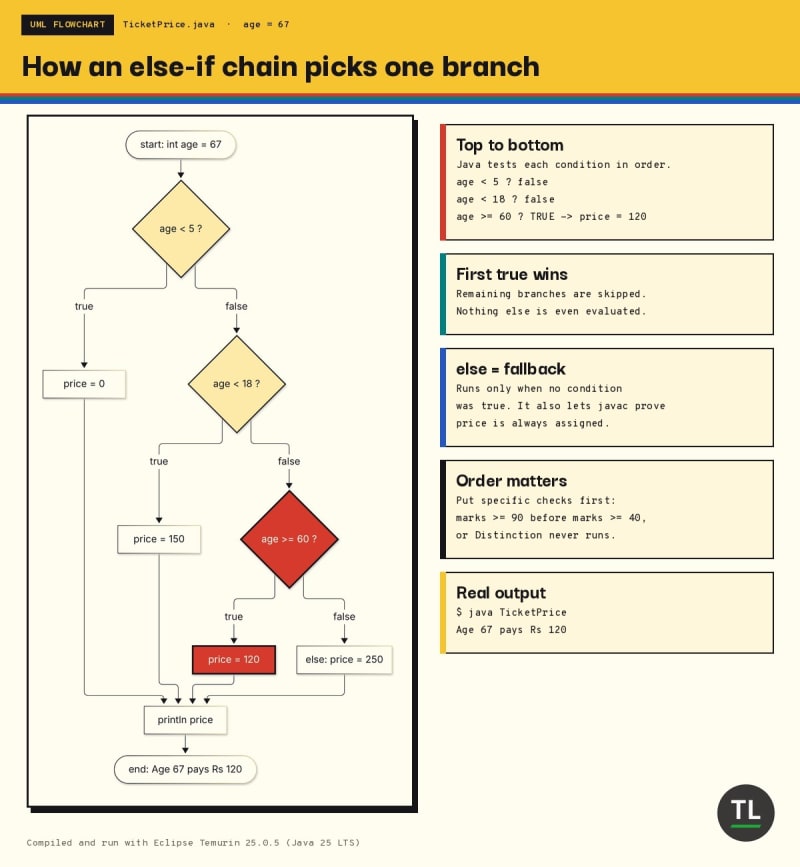
How an else-if chain picks exactly one branch: the first true condition wins
Why the Order of Conditions Matters
Because the first true branch wins, putting a broad condition before a narrow one silently hides the narrow one.
Look at this grading code:
public class OrderMatters {
    public static void main(String[] args) {
        int marks = 95;

        if (marks >= 40) {
            System.out.println("Grade: Pass");
        } else if (marks >= 90) {
            System.out.println("Grade: Distinction");
        }
    }
}
Output:
Grade: Pass
A student with 95 marks should get a Distinction, but marks >= 40 is checked first and is already true.
The Distinction branch can never run.
The fix: order conditions from the most specific to the most general (>= 90 first, then >= 40).
That's the whole rule.
Combining Conditions with &&, || and !
Often one comparison isn't enough.
You combine them with three logical operators:
&&(AND): true only when both sides are true||(OR): true when at least one side is true!(NOT): flips true to false and back
Here they are working together:
public class LoginCheck {
    public static void main(String[] args) {
        String user = null;
        boolean isAdmin = true;
        int failedAttempts = 2;

        if (user != null && user.length() > 0) {
            System.out.println("Hello, " + user);
        } else {
            System.out.println("Please sign in");
        }

        if (isAdmin && failedAttempts < 3) {
            System.out.println("Admin panel unlocked");
        }

        if (!isAdmin || failedAttempts >= 3) {
            System.out.println("Access denied");
        }
    }
}
Output:
Please sign in
Admin panel unlocked
The first if hides an important trick called short-circuit evaluation.
user is null, so user.length() would crash with a NullPointerException.
It never runs, because && stops as soon as the left side is false: there's no way the whole expression could become true.
|| does the opposite and stops as soon as the left side is true.
So always put the safety check (like user != null) on the left.
The Ternary Operator: A One-Line if-else
When you only need to pick between two values, a full if-else can feel heavy.
The conditional operator condition ? valueIfTrue : valueIfFalse does it in one expression:
public class Ternary {
    public static void main(String[] args) {
        int stock = 0;
        String label = (stock > 0) ? "In stock" : "Sold out";
        System.out.println(label);

        int items = 1;
        System.out.println("You have " + items + (items == 1 ? " item" : " items"));
    }
}
Output:
Sold out
You have 1 item
The ternary is an expression, so it produces a value you can store or print.
Use it for short, obvious choices like labels and plurals.
If you find yourself nesting one ternary inside another, switch back to if-else: your future self will thank you. The exact typing rules live in JLS section 15.25.
The Classic switch Statement
Long else if chains that compare one variable against fixed values get messy fast.
That's what switch is for.
Here's the classic form, which has worked since Java 1.0:
public class OldSwitch {
    public static void main(String[] args) {
        int day = 6;
        String type;

        switch (day) {
            case 1:
            case 2:
            case 3:
            case 4:
            case 5:
                type = "Weekday";
                break;
            case 6:
            case 7:
                type = "Weekend";
                break;
            default:
                type = "Invalid day";
        }

        System.out.println("Day " + day + " is a " + type);
    }
}
Output:
Day 6 is a Weekend
Java jumps straight to the matching case label and starts running from there.
default handles every value that no label matches.
The classic switch works with int, char, byte, short, their wrapper types, String (since Java 7) and enums (since Java 5).
The Fall-Through Trap
Here's the catch: in a classic switch, execution doesn't stop at the next label.
It keeps going until it hits a break or the end of the switch.
That's called fall-through, and forgetting a break is one of the most common Java bugs:
public class FallThroughBug {
    public static void main(String[] args) {
        String plan = "PRO";

        switch (plan) {
            case "FREE":
                System.out.println("5 projects");
            case "PRO":
                System.out.println("50 projects");
            case "TEAM":
                System.out.println("Unlimited projects");
            default:
                System.out.println("Contact sales");
        }
    }
}
Output:
50 projects
Unlimited projects
Contact sales
A PRO user just got three different answers.
The weekday example used fall-through on purpose to group labels, but here it's an accident.
Modern Java fixes this for good.
Modern switch: Arrow Labels
Since Java 14 (JEP 361), you can write case ... -> instead of case ...:.
An arrow label runs only the code on its right. No fall-through, no break needed:
public class ArrowSwitch {
    public static void main(String[] args) {
        String plan = "PRO";

        switch (plan) {
            case "FREE" -> System.out.println("5 projects");
            case "PRO" -> System.out.println("50 projects");
            case "TEAM", "ENTERPRISE" -> System.out.println("Unlimited projects");
            default -> System.out.println("Unknown plan");
        }
    }
}
Output:
50 projects
One correct answer.
To group several values, separate them with commas in one label, as "TEAM", "ENTERPRISE" shows.
You can't mix : and -> labels in the same switch, so pick one style per switch (and prefer arrows in new code).
Switch Expressions and yield
JEP 361 also made switch usable as an expression: it can return a value directly.
That removes the "declare a variable, assign it in every case, hope you didn't forget one" dance:
public class SwitchExpression {
    enum Day { MONDAY, TUESDAY, WEDNESDAY, THURSDAY, FRIDAY, SATURDAY, SUNDAY }

    public static void main(String[] args) {
        Day today = Day.SATURDAY;

        int workHours = switch (today) {
            case SATURDAY, SUNDAY -> 0;
            case FRIDAY -> 6;
            default -> 8;
        };
        System.out.println(today + ": " + workHours + " work hours");

        String plan = "team";
        int seats = switch (plan.toUpperCase()) {
            case "FREE" -> 1;
            case "PRO" -> 5;
            case "TEAM" -> {
                int base = 10;
                int bonus = 2;
                yield base + bonus;
            }
            default -> throw new IllegalArgumentException("Unknown plan: " + plan);
        };
        System.out.println("Seats for " + plan + ": " + seats);
    }
}
Output:
SATURDAY: 0 work hours
Seats for team: 12
Three details are worth slowing down for.
First, the switch expression ends with a semicolon, because the whole thing is part of an assignment statement.
Second, when a case needs more than one line, wrap it in braces and use yield to hand back the value. return would try to exit the whole method instead.
Third, a case can throw an exception instead of producing a value, which is perfect for "this should never happen" input.
Switch Expressions Must Be Exhaustive
A switch expression must produce a value for every possible input.
Watch what happens when we forget YELLOW:
public class NotExhaustive {
    enum Light { RED, YELLOW, GREEN }

    public static void main(String[] args) {
        Light light = Light.GREEN;

        String action = switch (light) {
            case RED -> "Stop";
            case GREEN -> "Go";
        };
        System.out.println(action);
    }
}
Real javac output:
NotExhaustive.java:7: error: the switch expression does not cover all possible input values
        String action = switch (light) {
                        ^
1 error
This is a feature, not a nuisance.
Add a new enum constant next year, and the compiler points to every switch expression that needs updating. Oracle's Switch Expressions and Statements guide covers the full rules.
Pattern Matching for switch
Java 21 took switch one big step further with JEP 441: you can switch on the type of an object, not just on a fixed value.
Each case can test a type, bind a variable, and add an extra condition with when.
Switching on Types with Guards
Here a method receives any Object:
public class ObjectSwitch {
    static String inspect(Object o) {
        return switch (o) {
            case null -> "Got null";
            case Integer i when i < 0 -> "Negative int " + i;
            case Integer i -> "Int " + i;
            case String s when s.isBlank() -> "Blank string";
            case String s -> "String of length " + s.length();
            default -> "Something else: " + o.getClass().getSimpleName();
        };
    }

    public static void main(String[] args) {
        System.out.println(inspect(-7));
        System.out.println(inspect(42));
        System.out.println(inspect("   "));
        System.out.println(inspect("Java 25"));
        System.out.println(inspect(3.14));
        System.out.println(inspect(null));
    }
}
Output:
Negative int -7
Int 42
Blank string
String of length 7
Something else: Double
Got null
case Integer i means "if o is an Integer, call it i and run this branch". No manual casting.
when i < 0 is a guard: the case matches only if the type matches and the guard is true.
Order matters again, just like with else if: the guarded case must come before the plain case Integer i, or the compiler reports that it's dominated and can never be reached.
And case null is new too. A classic switch on a null reference throws a NullPointerException; a pattern switch can handle it explicitly.
Sealed Types and Records: No default Needed
Pattern matching gets really powerful with records and sealed interfaces.
A sealed interface lists every class allowed to implement it, so the compiler knows all the possibilities (JEP 409).
Here's a tiny payment system:
public class PaymentSwitch {
    sealed interface Payment permits Card, Upi, Cash {}
    record Card(String last4, double amount) implements Payment {}
    record Upi(String vpa, double amount) implements Payment {}
    record Cash(double amount) implements Payment {}

    static String describe(Payment p) {
        return switch (p) {
            case Card c when c.amount() > 50000 -> "Card ending " + c.last4() + ": needs OTP";
            case Card c -> "Card ending " + c.last4() + ": approved";
            case Upi u -> "UPI to " + u.vpa() + ": approved";
            case Cash cash -> "Cash Rs " + cash.amount() + ": print receipt";
        };
    }

    public static void main(String[] args) {
        System.out.println(describe(new Card("4242", 72000)));
        System.out.println(describe(new Card("1881", 999)));
        System.out.println(describe(new Upi("priya@okbank", 450)));
        System.out.println(describe(new Cash(200)));
    }
}
Output:
Card ending 4242: needs OTP
Card ending 1881: approved
UPI to priya@okbank: approved
Cash Rs 200.0: print receipt
There's no default, and the code still compiles.
Because Payment is sealed, Java can prove that Card, Upi and Cash cover every case.
Add a fourth payment type later, and every switch like this one stops compiling until you handle it.
Don't worry if records and sealed interfaces look unfamiliar: we'll build them properly in the object-oriented lessons. For now, just remember that switch can now ask "what kind of thing is this?". Oracle's Pattern Matching for switch guide has more examples, and JEP 440 adds record patterns that unpack fields directly in the case label.
One more Java 25 note: JEP 507 (primitive types in patterns, instanceof and switch) is still a preview feature in Java 25, so it needs the --enable-preview flag. Stick to the standard features above for now.
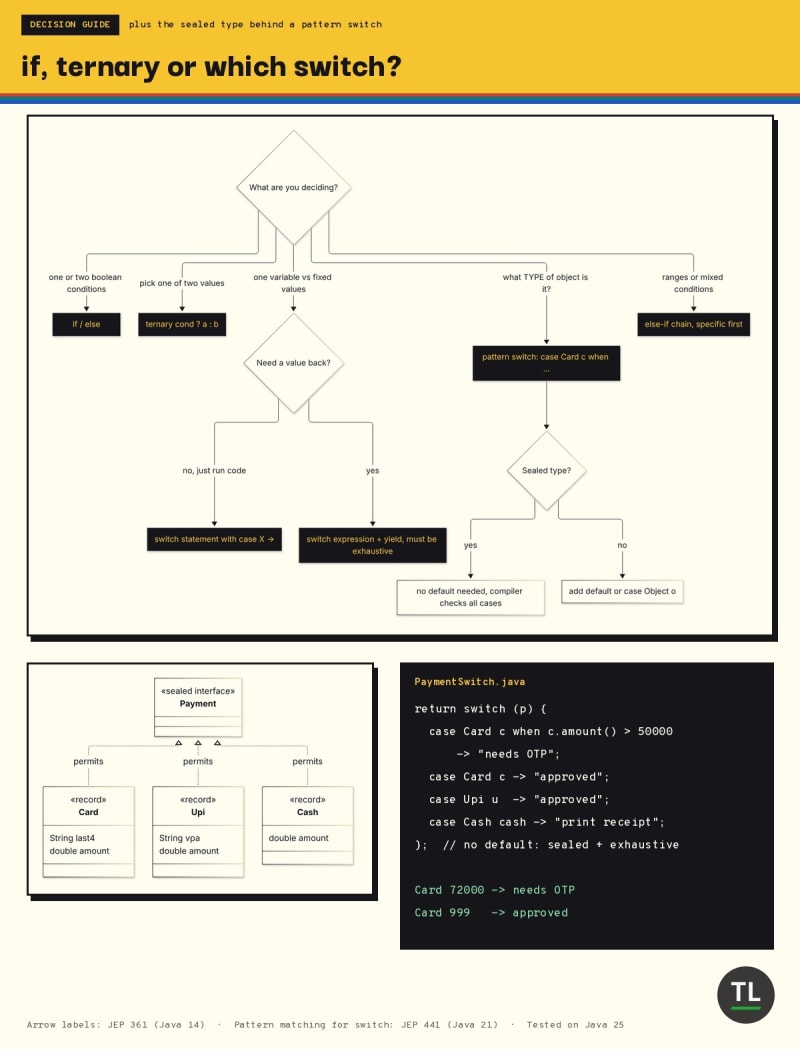
Which decision tool to use, and why a sealed type needs no default case
Common Control-Flow Mistakes
1. Using = Instead of == in a Condition
In C, if (x = 5) compiles and quietly assigns.
Java refuses, because the condition must be a boolean:
AssignInIf.java:4: error: incompatible types: int cannot be converted to boolean
        if (x = 5) {
              ^
1 error
Fix: use == to compare numbers.
2. Comparing Strings with ==
== checks whether two references point to the same object, not whether the text is the same:
public class StringCompare {
    public static void main(String[] args) {
        String a = "java";
        String b = new String("java");

        System.out.println(a == b);
        System.out.println(a.equals(b));
    }
}
Output:
false
true
Fix: compare text with equals() (or equalsIgnoreCase()). A switch on a String already compares with equals for you.
3. The Dangling else
Indentation lies; braces don't:
public class DanglingElse {
    public static void main(String[] args) {
        int balance = 500;
        boolean premium = false;

        if (balance > 1000)
            if (premium)
                System.out.println("Free upgrade");
        else
            System.out.println("Low balance");

        System.out.println("Done");
    }
}
Output:
Done
"Low balance" never prints, because an else always belongs to the nearest if, here if (premium), no matter how you indent it.
Fix: always use braces, even for one-line blocks.
4. Forgetting break in a Classic switch
You saw the fall-through bug above.
Fix: prefer arrow labels in new code, and if you must use colon labels, end each group with break.
Quick Recap
if/else if/elsechecks conditions top to bottom and runs only the first true branchOrder conditions from most specific to most general
&&and||short-circuit, so put null checks on the leftThe ternary
? :picks between two values in one expressionA classic
switchfalls through untilbreak; arrow labels->never fall throughSwitch expressions return a value, use
yieldin blocks, and must be exhaustivePattern matching for switch tests types, binds variables, supports
whenguards andcase null
Exercises
Try these before Wednesday's lesson. Every one can be solved with what you learned today.
1. Leap Year Checker
Write a program that prints whether a year is a leap year: divisible by 4, except centuries, unless divisible by 400.
Test it with 2024, 1900 and 2000 (expected: leap, not leap, leap).
2. Fix the Grade Calculator
Rewrite OrderMatters so 95 prints Distinction, 55 prints Pass and 30 prints Fail.
3. Days in a Month
Use a switch expression on a month number (1 to 12) to return the number of days, assuming a non-leap year.
Group months with commas and throw an IllegalArgumentException for anything else.
4. Shipping Calculator
Delivery is free for orders of Rs 499 or more; otherwise it's Rs 40.
Write it once with if-else and once with the ternary operator.
5. Shape Area with Pattern Matching
Create a sealed interface Shape with records Circle(double r) and Square(double side), then write a pattern switch with no default that returns each area.
Continue Learning
You're currently at Part 12 of TheTechLane's Java for Beginners series.
Previous
Java Variables, Data Types, Casting & Operators: the operators you used in every condition today.
Next
Part 13: Java Loops Explained: for, while, do-while, break and continue (coming Wednesday)
Related reading:
Curious what
javacdoes with yourifandswitch? Java Compilation Process Explained: From Source Code to Bytecode walks through it.
Get New Java Lessons in Your Inbox
Don't miss Part 13 on loops.
Subscribe to the free TheTechLane newsletter and get every new Java lesson, tutorial and developer guide as soon as it's published.
Sources
Java Language Specification SE 25, Chapter 14: Blocks, Statements, and Patterns
JEP 507: Primitive Types in Patterns, instanceof, and switch (Third Preview)
Have a Question?
If one of the examples gives you a different result or a compiler error you can't decode, paste it in the comments below with your Java version.
Happy Coding! 🚀
Follow TheTechLane
Keep learning AI, development, and modern developer technologies with TheTechLane.
Learn • Build • Share
Follow @thetechlanehq for more developer guides, tutorials, and practical technology content.