Is Apple's Touchscreen MacBook Pro Worth the Extra $400?
MacBook Pro with PROLED XDR Display review: tandem OLED, touch, a 3 lb 14-inch and a $400 premium. Who should buy it, and who should keep the mini-LED model.
Apple finally put a touchscreen on a Mac.
That's the headline everyone ran with.
But the reviews published on 5 November tell a different story: the touchscreen is the least important change in the MacBook Pro with PROLED XDR Display.
The real upgrades are a tandem OLED panel, a noticeably lighter body, and a price that sits $400 above the mini-LED MacBook Pro with the same chip.
So is it worth it? It depends on what you do all day.
How this review works: this review is based on Apple's published specifications and independent reviews published as of 8 November 2026. TheTechLane has not tested a review unit. Every hands-on observation below is credited to the publication that made it.
Below: a sourced spec summary, what reviewers found, where the $400 comes from, the developer angle, and who should buy.
Let's break it down.
Quick Verdict
The MacBook Pro with PROLED XDR Display earned strong reviews across the board, but it is a luxury upgrade, not a necessary one.
Published verdicts so far:
The Verge (David Pierce): called it "a winner" and said it's worth the premium, "touchscreen or no touchscreen"
Engadget (Devindra Hardawar): 8.8/10
WIRED (Luke Larsen): 8/10
TheTechLane verdict, synthesised from those reviews and Apple's specs (not from hands-on testing):
Display        ->  every reviewer's favourite change
Weight         ->  the change reviewers felt every day
Touch          ->  useful sometimes, never essential
Performance    ->  identical to the mini-LED M5 Pro / M5 Max
Price          ->  the biggest drawback
TheTechLane verdict
Worth buying if: your work lives on the screen (HDR video, photo, colour-critical design), or you carry a 16-inch laptop every day.
Stay with the mini-LED model if: you already own an M5 Pro or M5 Max MacBook Pro, or you mostly write code and text.
Best reason to buy: the tandem OLED display, which reviewers called the best laptop display they have seen.
Biggest drawback: you pay $400 more for the same chips, the same ports and the same performance.
TheTechLane rating: Excellent, with a price caveat. There's no numeric score here, because a number implies hands-on testing that didn't happen.
What Is the MacBook Pro with PROLED XDR Display?
It's a new, separate MacBook Pro line that Apple sells alongside the existing mini-LED MacBook Pro.
You can see both lines side by side on Apple's MacBook Pro with PROLED XDR Display page.
The PROLED models come in 14-inch and 16-inch sizes with M5 Pro or M5 Max chips only.
The standard models keep the mini-LED Liquid Retina XDR display and are sold with M6, M5 Pro or M5 Max chips, according to the same Apple page.
So the new M6 chip belongs to the cheaper mini-LED line, not to the PROLED models.
Apple's headline additions are the tandem OLED panel, touch, a Dynamic Island, redesigned thermals and speakers, and a lighter body.
Spec Summary From Apple
Every figure in this section comes from Apple's PROLED XDR tech specs and the support pages for the 14-inch model and the 16-inch model.
Display
14.2-inch tandem OLED, 3024 by 1986 pixels, 254 ppi
16.3-inch tandem OLED, 3472 by 2266 pixels, 254 ppi
10,000,000:1 contrast ratio
Up to 1000 nits sustained full-screen, 2000 nits peak for HDR content
SDR up to 1000 nits sustained, 2000 nits peak outdoors
ProMotion from 10Hz to 120Hz
P3 and Adobe RGB wide colour, True Tone
Multi-Touch, Dynamic Island, optional nano-texture glass
Chips and memory
M5 Pro: 15-core CPU with 16-core GPU, or 18-core CPU with 20-core GPU, 307GB/s memory bandwidth
M5 Max: 18-core CPU with 32-core GPU (460GB/s) or 40-core GPU (614GB/s)
M5 Pro memory: 24GB, 48GB or 64GB (64GB needs the 20-core GPU version)
M5 Max memory: 36GB on the 32-core GPU, or 48GB, 64GB or 128GB on the 40-core GPU
Storage: 1TB to 4TB on M5 Pro, 2TB to 16TB on M5 Max
Battery (Apple's claims)
14-inch M5 Pro: up to 22 hours video streaming, 14 hours wireless web, 72.6Wh battery
16-inch M5 Pro: up to 24 hours video streaming, 17 hours wireless web, 100Wh battery
Ports and connectivity
Three Thunderbolt 5 ports (up to 120Gb/s)
HDMI, SDXC card slot, MagSafe 3, 3.5 mm headphone jack
Up to three external displays on M5 Pro, four on M5 Max
Apple N1 chip with Wi-Fi 7, Bluetooth 6 and Thread
12MP Center Stage camera, six-speaker sound system
Size and weight
14-inch: 0.59 inch thick, 3.0 pounds (M5 Pro) or 3.1 pounds (M5 Max)
16-inch: 0.63 inch thick, 4.0 pounds (M5 Pro) or 4.1 pounds (M5 Max)
The PROLED XDR Display: What Reviewers Saw
This is the reason the machine exists.
Apple's product page describes PROLED XDR as two self-illuminating pixel layers, with each pixel switching on and off independently.
That means no backlight and no blooming halos around bright objects.
Reviewers agreed the result is excellent:
9to5Mac's Chance Miller called the display "stunning" and said colour, contrast and blacks are "miles better" than any laptop he has seen, including high-end Windows OLED machines, in his review
WIRED's Luke Larsen called it "the best laptop display ever made, bar none" in his review
The Verge's David Pierce said the slimmer bezels give it an iPad-like "magic pane of glass" feel in his review
There's an honest caveat, though.
Engadget's Devindra Hardawar wrote that, after hundreds of hours with the mini-LED MacBook Pros, he found the difference "a bit hard to see" in normal use, according to his review.
Dark films with sudden bright scenes are where it stood out for him.
Why the panel is different
TechRadar's Lance Ulanoff, writing after an Apple briefing, reported that the panel is less than a millimetre thick yet built from 50 layers, in his hands-on report.
He also compared it side by side with the tandem OLED Lenovo Yoga Pro 9i Aura Edition and found the MacBook Pro showed less reflection and better off-axis colour.
How bright is it, measured?
WIRED measured an HDR peak of 1,849 nits, short of Apple's 2,000-nit claim, and 1,025 nits with the full screen lit, per Larsen's review.
Larsen also wrote that this was only about 12 percent brighter than the mini-LED MacBook Pro he retested, but that OLED blacks make the HDR difference "very noticeable".
For context, Apple's compare page lists the mini-LED models at 1600 nits peak HDR.
Glare and reflections
9to5Mac reported that Apple quotes 1% reflectance for the glossy panel, and Miller, writing next to a bright window, found it came much closer to his old nano-texture MacBook Pro than he expected.
WIRED's standard-glass unit looked about as reflective as the non-OLED M6 MacBook Pro next to it, and Larsen recommends the $150 nano-texture option if you work outside.
What about burn-in?
Apple says its display engine monitors each pixel's usage to preserve image quality over time, on the product page.
Miller's position is the sensible one: you'll have to wait and see how that holds up over years.
Here's a simplified view of the panel and of what happens when you tap it:
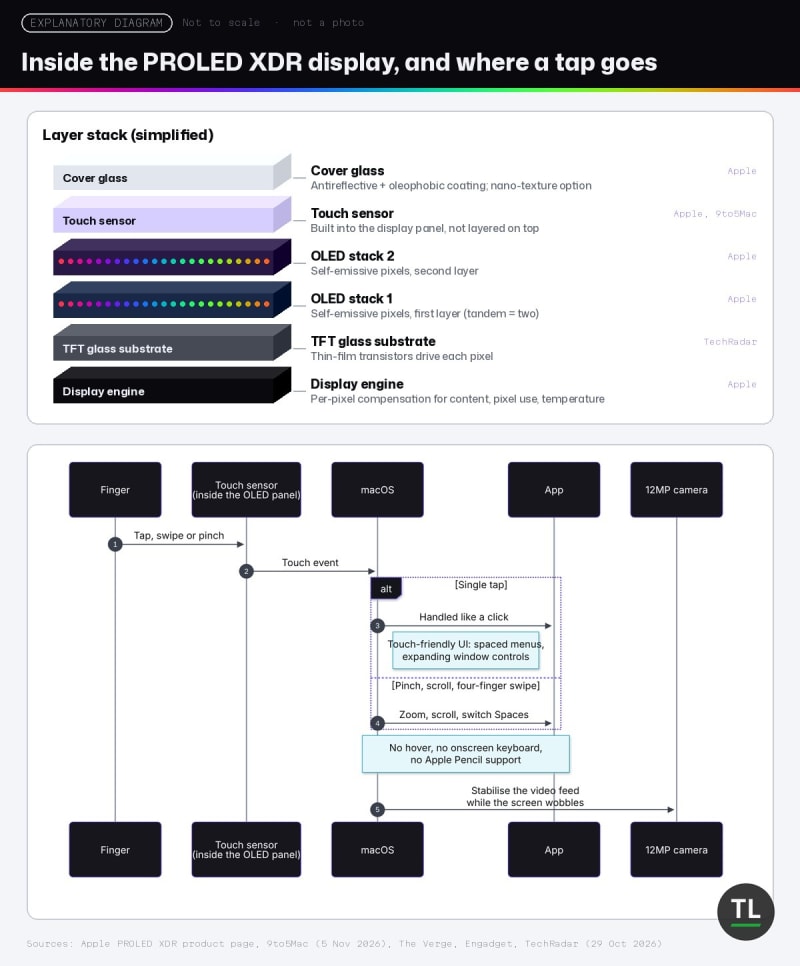
Inside the PROLED XDR display, and where a tap goes
Touch on a Mac: Useful, Not Transformative
The touchscreen is the feature everyone asked about, and the one reviewers were least excited by.
Apple says the touch sensor is built directly into the display panel rather than layered on top, which reduces latency, according to its product page.
Here's how the reviews describe it in daily use:
The Verge called it "a mouse emulator and nothing more": taps register as clicks, there's no hover, no onscreen keyboard and no copy/paste pop-up
Engadget noted there's no Apple Pencil support, and that the hinges are only a bit stiffer, with no tablet mode
9to5Mac found it a "nice-to-have" and said touch "hasn't fundamentally changed" how Miller uses the Mac
WIRED wrote that the implementation "feels half-baked" and that some Rosetta-translated apps miss touch features
There are real wins:
Pinch-to-zoom while editing photos, per The Verge
Two people sharing one screen without crowding the trackpad, per The Verge
The Xcode simulator and iPhone Mirroring, per 9to5Mac
iPhone Mirroring swipes, per Gizmodo's Kyle Barr as quoted by MacRumors
And if you hate it?
9to5Mac points out you can turn touch off completely in Accessibility settings.
Touch is a bonus on this machine, not a reason to buy it.
Lighter Design, Same Ports
Weight is the change reviewers kept coming back to.
Apple's specs list the 14-inch at 3.0 pounds and the 16-inch at 4.0 pounds with M5 Pro.
Apple markets the new design as "half a pound lighter" on its product page.
The 16-inch saving is bigger: Apple's compare page lists the mini-LED 16-inch at 4.7 pounds.
What reviewers said:
9to5Mac's Miller, a long-time 14-inch user, said the new 16-inch has him reconsidering, because it "feels less like a tank"
The Verge said the 14-inch at 3 pounds is closer to the 15-inch MacBook Air than to the old 14-inch Pro
Nothing was taken away to get there. Engadget and The Verge both confirm the same ports as the standard models, including three Thunderbolt 5 ports, HDMI, SD card slot, headphone jack and MagSafe.
The keyboard and trackpad are unchanged too.
Performance: Same M5 Pro and M5 Max
There's no new chip here.
The PROLED models use the same M5 Pro and M5 Max chips as the mini-LED models, and every review confirmed performance is the same.
The numbers reviewers published:
Engadget: a 14-inch M5 Pro with 48GB scored 4,217 in Geekbench 6 single-core, in line with the rest of the M5 family
WIRED: Cinebench 2026 and game results "very similar" to the previous-generation MacBook Pro
9to5Mac: Geekbench results "virtually the same" on a 16-inch M5 Pro with 48GB, and Miller never heard the fans during his light workload
The Verge: single-core results slightly behind many M6 devices, but stronger on GPU-heavy and local AI work
The thinner body didn't cost speed, which isn't always a given.
The Verge reported that Apple redesigned the thermals partly to direct heat away from the OLED panel, and Pierce noticed the fans come on early, which he reads as deliberate.
The M7 question
Both 9to5Mac and WIRED mention reports that Apple may skip M6 Pro and M6 Max and move straight to M7 for high-end chips.
That's a rumour, not an Apple announcement, but if raw speed matters more than the screen, waiting is reasonable.
Battery Life: Apple's Claims vs Reviewers' Runs
Apple's figures are in the spec summary above.
Reviewers' real-world results, each on their own workload:
Engadget, 14-inch: about 12 and a half hours on Hardawar's tabs, Slack, image editing and video-call routine
Engadget, 16-inch: 10 hours 15 minutes on a benchmark script that replicates real-world coding work
The Verge, 14-inch: through a heavy workday with a third or more of the battery left
9to5Mac, 16-inch: anecdotally on track for Apple's 17-hour web browsing claim, with no formal test
Apple also claims a fast charge to 50% in 30 minutes, measured with the 96W adapter on the 14-inch and the 140W adapter on the 16-inch, per its product page footnotes.
Check the box contents if you buy the base 14-inch: the 14-inch tech specs list a 70W adapter with the 15-core M5 Pro and a 96W adapter with the other chips.
Speakers, Dynamic Island and the Glowing Logo
Speakers
Apple claims 50 percent deeper bass from the redesigned six-speaker system.
Engadget, WIRED and 9to5Mac all liked the change.
The Verge found the sound "a bit bass-heavy", and Bloomberg's Chris Welch, quoted by MacRumors, said music and podcasts often sound "too boomy".
Dynamic Island
The notch is gone.
Spotlight, Siri AI, Now Playing and Live Activities now live in a Dynamic Island, as Apple describes on its product page.
9to5Mac and Six Colors' Jason Snell (quoted by MacRumors) were fans; The Verge's Pierce said he never actually taps it.
The glowing Apple logo
It's back, and 9to5Mac reports its brightness follows the display and the room's ambient light.
The Developer Angle
Here's what this machine means if you write software, based on the specs and reviews above.
Xcode and native development
Apple specifically pitches touch for testing iOS apps directly onscreen in Xcode.
9to5Mac confirmed touch is "legitimately useful" in the Xcode simulator.
For text-heavy work it matters less: Miller, whose job is mostly manipulating text, found touch less useful than others might, and WIRED's Larsen said it has no place in his workflows.
Memory for local LLMs, containers and VMs
Memory is the spec that matters most for local AI, not the screen.
Apple's own AI claims compare against an M1 Pro and M1 Max, using time to first token on a 14-billion-parameter 4-bit model in LM Studio, per the product page footnotes.
Those are Apple's lab numbers, and they apply equally to the mini-LED models with the same chips.
What to remember:
The M6 in the cheaper mini-LED model tops out at 32GB, per Engadget's M6 review
The M5 Pro tops out at 64GB, and only on the 20-core GPU version
128GB needs the M5 Max with the 40-core GPU
Memory bandwidth is 307GB/s on M5 Pro and up to 614GB/s on M5 Max
If you run local models with Ollama, plus Docker and an IDE at the same time, buy memory before you buy OLED.
The Verge's own conclusion matches: the M5 Pro and Max suit "anyone doing heavily graphical work or local AI development".
Ports and external displays
Three Thunderbolt 5 ports, HDMI and an SD slot remain.
M5 Pro drives up to three external displays and M5 Max up to four, per Apple's specs.
If you work docked to two monitors, you'll see far less of the PROLED panel.
Weight on a commute
This is where the PROLED model earns its money for developers: a 4-pound 16-inch is a different bag to carry than a 4.7-pound one.
Pricing: Where the $400 Comes From
The headline premium is real, but only when you compare the same chip.
On Apple's MacBook Pro store page, the mini-LED models start at:
14-inch with M6: $1,999
14-inch with M5 Pro (15-core CPU): $2,499
16-inch with M5 Pro: $2,999
The PROLED models start at:
14-inch: $2,899, per Apple's product page
So the math works out like this:
14-inch M5 Pro:  $2,499 -> $2,899   (+$400)
16-inch M5 Pro:  $2,999 -> $3,399   (+$400)
Cheapest 14-inch overall (M6): $1,999 -> $2,899   (+$900)
That last line is why Engadget calls the 14-inch "$900 more than the standard MacBook Pro" while 9to5Mac and The Verge talk about a $400 premium.
Both are correct; they're comparing different base models.
Engadget concluded the 16-inch is the better value, since its premium is only $400.
In his separate M6 review, Hardawar also argues that if you were already going to pay $2,499 for a mini-LED M5 Pro, you "might as well" spend a bit more on the $2,899 PROLED model.
Configurations climb fast: The Verge's 14-inch M5 Pro review unit with 48GB and 1TB cost $3,699.
India pricing
Apple India's PROLED XDR page lists the line from ₹3,49,900 (MRP, inclusive of all taxes), with availability from 9 November.
The same page lists the mini-LED MacBook Pro with M6 from ₹2,39,900.
Apple India's page shows only the "From" price, so check the store for the exact 16-inch figure.
What Reviewers Agreed and Disagreed On
They agreed on
The display is the best part, the weight drop matters, touch is optional, performance is unchanged, and the price hurts.
They disagreed on
The speakers: Engadget, WIRED and 9to5Mac liked the deeper bass; The Verge and Bloomberg found it too boomy
Visible display difference: WIRED found HDR "very noticeable"; Engadget found it hard to see in normal use
The verdict on the premium: The Verge thinks it's worth it, though Pierce adds you probably don't need to pay it right now if your laptop is recent; Engadget mainly recommends the 16-inch at today's prices; WIRED says owners of M5 Pro or M5 Max models will find it "very difficult to justify"
Should You Buy It?
If you're a video, photo or design professional
This is the strongest case.
P3 and Adobe RGB colour, industry reference modes and a 2000-nit HDR peak are built for you, according to Apple's specs, and reviewers called this the best laptop display they have seen.
If you're a developer
Buy the mini-LED M5 Pro or M5 Max and spend the $400 on memory, unless weight or touch-based iOS testing matters to you.
If you're a student
Neither line is cheap.
The 14-inch M6 mini-LED model at $1,999 is the more sensible MacBook Pro, and Engadget's separate M6 MacBook Pro review rated it 9/10.
If you already own an M5 Pro or M5 Max MacBook Pro
Keep it.
Same chips, same speed, and WIRED says the upgrade is "very difficult to justify".
If you're still on an M1-era MacBook Pro
The Verge says that if you want a laptop to last as long as your last one did, "the PROLED Pro is the one to get".
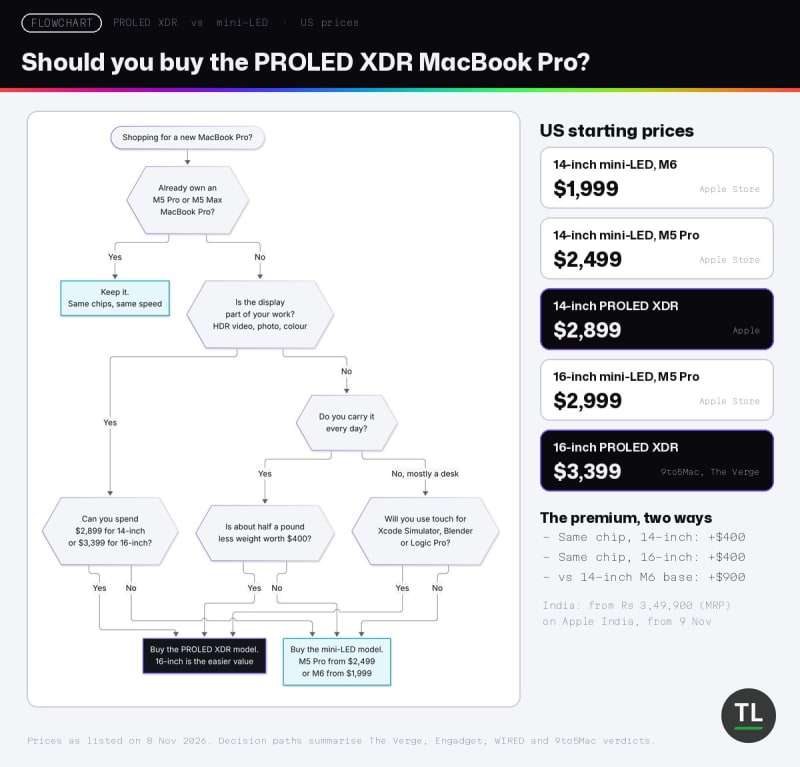
PROLED XDR or mini-LED: follow the path that matches your work
MacBook Pro with PROLED XDR Display Pros and Cons
Pros
Tandem OLED display reviewers rank as the best on a laptop (9to5Mac, WIRED, The Verge)
3.0 lb 14-inch and 4.0 lb 16-inch (Apple specs)
Same full port selection, including HDMI and SD (Apple specs, Engadget)
Up to 2000 nits peak HDR and outdoor SDR (Apple specs)
Dynamic Island replaces the notch (Apple, WIRED)
Touch is optional and can be switched off (9to5Mac)
Cons
$400 more than the same-chip mini-LED model (Apple Store prices, 9to5Mac)
No performance gain over the mini-LED M5 Pro and M5 Max (Engadget, WIRED, 9to5Mac)
Touch is basic: no hover, no onscreen keyboard, no Apple Pencil (The Verge, Engadget)
Speakers may be too bass-heavy for some ears (The Verge, Bloomberg via MacRumors)
Long-term OLED wear is still unknown (9to5Mac)
Final Verdict: A Better MacBook Pro, Not a Must-Have One
It isn't a touchscreen laptop; it's a lighter MacBook Pro with a spectacular screen that happens to accept touch.
If the screen is your work, or you carry the laptop every day, the reviews make a strong case that the $400 is well spent.
If you write code and keep it plugged into monitors, the mini-LED model with more memory is the smarter buy.
And if you own an M5 Pro or M5 Max already, there's nothing here you need.
The Verge expects every MacBook Pro to look like this within a year or two, and that's where things get interesting.
Frequently Asked Questions
Did TheTechLane test the MacBook Pro with PROLED XDR Display?
No.
This review is built from Apple's specifications and independent reviews by 9to5Mac, Engadget, The Verge, WIRED and others published by 8 November 2026.
Does the PROLED XDR MacBook Pro use the M6 chip?
No.
Apple sells the PROLED models with M5 Pro or M5 Max only; M6 is available in the mini-LED MacBook Pro.
Does it support the Apple Pencil?
No.
Both The Verge and Engadget confirmed there's no Apple Pencil support.
Is the PROLED model faster than the mini-LED MacBook Pro?
No.
It uses the same M5 Pro and M5 Max chips, and reviewers measured the same performance.
Can I turn the touchscreen off?
Yes.
9to5Mac reports you can disable touch in Accessibility settings.
Official Resources
Key Takeaways
Here's the short version:
The tandem OLED display is the real upgrade, and reviewers called it the best laptop display they have seen
Touch works like a mouse click and is optional; no reviewer found it essential
The 14-inch weighs 3.0 pounds and the 16-inch 4.0 pounds, with the same ports as before
Performance is identical to the mini-LED M5 Pro and M5 Max models
The premium is $400 against the same chip, or $900 against the cheapest M6 14-inch
Buy it for the screen and the weight, never for the touchscreen.
You May Also Like
Cursor AI Review 2026: TheTechLane's review of the AI code editor you'd probably run on this machine
Can Your Laptop Run Its Own LLM? A Practical Ollama Guide: how much memory local models really need
Claude Code Tutorial: set up an AI coding agent in your terminal
Get New Reviews in Your Inbox
New reviews, tutorials and developer news land in the TheTechLane newsletter first.
Subscribe to the TheTechLane newsletter and get them every week.
Sources
Apple's pages are listed under Official Resources above. Independent reviews and pricing:
9to5Mac: MacBook Pro with PROLED XDR Display review (Chance Miller, 5 Nov 2026)
Engadget: MacBook Pro with PROLED XDR Display review (Devindra Hardawar, 5 Nov 2026)
Engadget: MacBook Pro M6 review (Devindra Hardawar, 5 Nov 2026)
The Verge: The touchscreen MacBook Pro is a winner (David Pierce, 5 Nov 2026)
WIRED: Apple MacBook Pro OLED (2026) review (Luke Larsen, 5 Nov 2026)
MacRumors: MacBook Pro PROLED XDR reviews roundup (Joe Rossignol, 5 Nov 2026)
TechRadar: Inside the touchscreen MacBook Pro display (Lance Ulanoff, 29 Oct 2026)
Have a Question?
Weighing the PROLED model against the mini-LED one for your own setup?
Leave a comment below with what you build and how you work, and TheTechLane will help you think it through.
Follow TheTechLane
Keep learning AI, development, and modern developer technologies with TheTechLane.
Learn • Build • Share
Follow @thetechlanehq for more developer guides, tutorials, and practical technology content.