REST API Explained: A Beginner’s Guide With Examples
Learn what a REST API is, how HTTP methods and status codes work, and how to build and test REST APIs with practical examples and developer tools.
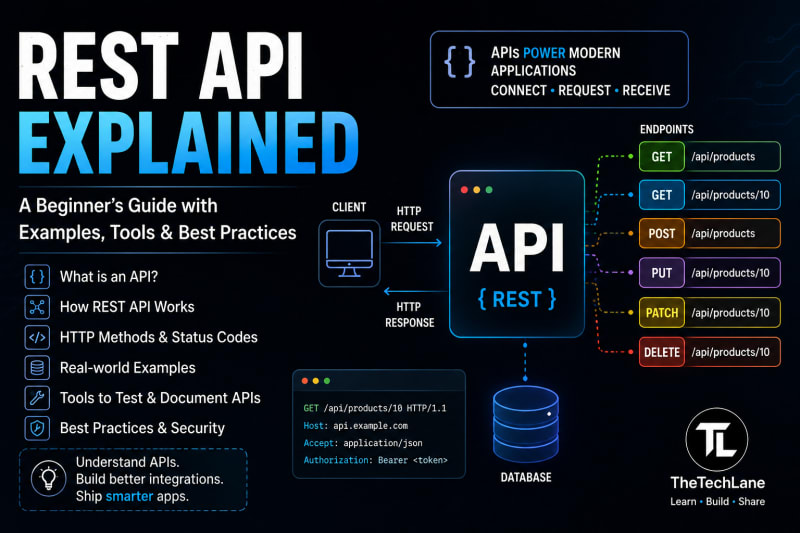
Introduction
If you've ever logged into an app, checked the weather, ordered food, made a payment, or loaded posts on a social platform, you've probably used an API.
An API (Application Programming Interface) is a way for one software application to communicate with another. A REST API is one of the most common ways to build these communication channels over HTTP.
For example, when a frontend needs a user's profile, it might send:
GET /api/users/42
The server processes the request and returns data, usually as JSON:
{
  "id": 42,
  "name": "Aarav",
  "email": "aarav@example.com"
}
That's the basic idea behind an API: a client sends a request, a server processes it, and the server sends back a response.
This guide explains APIs from the ground up, then moves into REST APIs, HTTP methods, status codes, JSON, authentication, CRUD operations, practical examples, API testing tools, common mistakes, and how REST APIs fit into real applications.
Quick Answer: What Is an API?
An API is a defined interface that allows two software systems to communicate with each other.
For web applications, APIs commonly use HTTP to exchange requests and responses.
A typical flow looks like this:
Client
  |
  | HTTP Request
  v
API Server
  |
  | Process request
  v
Database
  |
  | Data
  v
API Server
  |
  | HTTP Response
  v
Client
The client could be:
A web browser
React application
Android app
iOS app
Another backend service
A command-line application
An IoT device
The API acts as the communication boundary between these systems.
What Is an API?
API stands for Application Programming Interface.
Don't let the name make it sound more complicated than it is.
An API is essentially a contract between software components.
The contract defines things such as:
What requests are allowed
Where requests should be sent
What data can be provided
What response will be returned
What errors can occur
What authentication is required
For example, suppose an application exposes:
GET /api/products
The API documentation might say that this endpoint returns a list of products.
A client doesn't need to know how the server retrieves those products.
It only needs to know how to communicate with the API.
That's an important idea.
The client doesn't need to know how the server works internally. It only needs to know how to use the API.
A Simple Real-World API Example
Think about a food delivery application.
The mobile app needs to display nearby restaurants.
The app could request:
GET /api/restaurants?city=pune
The server might:
Receive the request.
Validate the city.
Query the database.
Find matching restaurants.
Convert the data into JSON.
Return an HTTP response.
The application receives something like:
{
  "restaurants": [
    {
      "id": 101,
      "name": "Pizza House",
      "rating": 4.5
    },
    {
      "id": 102,
      "name": "Spice Kitchen",
      "rating": 4.3
    }
  ]
}
The mobile application doesn't care whether the backend uses Java, Node.js, Python, Go, or .NET.
It only cares about the API contract.
How Does an API Work?
A typical web API follows a request-response model.
┌──────────────┐
│    Client    │
│ React / App  │
└──────┬───────┘
       │
       │ HTTP Request
       ▼
┌──────────────┐
│   REST API   │
│   Server     │
└──────┬───────┘
       │
       │ Database Query
       ▼
┌──────────────┐
│   Database   │
└──────┬───────┘
       │
       │ Result
       ▼
┌──────────────┐
│   REST API   │
└──────┬───────┘
       │
       │ JSON Response
       ▼
┌──────────────┐
│    Client    │
└──────────────┘
For example:
GET /api/users/10
The server might return:
HTTP/1.1 200 OK
Content-Type: application/json
{
  "id": 10,
  "name": "Rahul",
  "role": "Developer"
}
The important parts are:
Request → Processing → Response
What Is a REST API?
REST stands for Representational State Transfer.
REST is an architectural style for designing networked applications.
REST APIs commonly use:
HTTP
URLs
HTTP methods
Status codes
JSON
Stateless communication
A REST API exposes resources through URLs.
For example:
/users
/products
/orders
/payments
/articles
/comments
A client then uses HTTP methods to interact with those resources.
For example:
GET /users
POST /users
GET /users/10
PUT /users/10
DELETE /users/10
This is where REST becomes useful.
Instead of creating completely different URLs for every action, you model the application around resources.
REST API Example
Suppose we're building an e-commerce application.
Our resource is:
productsWe might design the API like this:
REST API Product Operations
Get all products
GET /api/productsGet one product
GET /api/products/10Create a product
POST /api/productsUpdate a product
PUT /api/products/10Partially update a product
PATCH /api/products/10Delete a product
DELETE /api/products/10Notice something interesting.
The URL doesn't change much.
The HTTP method tells the server what operation the client wants to perform.
HTTP Methods Explained
HTTP methods are one of the most important concepts when learning REST APIs.
GET
Used to retrieve data.
GET /api/products
Response:
[
  {
    "id": 1,
    "name": "Laptop"
  },
  {
    "id": 2,
    "name": "Keyboard"
  }
]
A GET request normally shouldn't modify server data.
POST
Used to create a new resource.
POST /api/products
Request body:
{
  "name": "Mechanical Keyboard",
  "price": 4999
}
Possible response:
{
  "id": 25,
  "name": "Mechanical Keyboard",
  "price": 4999
}
PUT
Usually used to replace an existing resource.
PUT /api/products/25
Request:
{
  "name": "Mechanical Keyboard Pro",
  "price": 5999
}
PATCH
Used for a partial update.
For example, if you only want to change the price:
PATCH /api/products/25
{
  "price": 5499
}
DELETE
Used to remove a resource.
DELETE /api/products/25
A successful response might be:
204 No Content
HTTP Status Codes
An API doesn't communicate only through JSON.
It also uses HTTP status codes.
Some of the most important ones are:
200 → Success
201 → Resource Created
204 → Success, No Content
400 → Bad Request
401 → Authentication Required/Invalid
403 → Access Forbidden
404 → Resource Not Found
409 → Conflict
422 → Validation Error
429 → Too Many Requests
500 → Server Error
503 → Service Unavailable
For example:
GET /api/users/999
If user 999 doesn't exist:
HTTP/1.1 404 Not Found
The API might return:
{
  "message": "User not found"
}
This is much better than returning:
200 OK
for every situation.
The status code itself communicates important information to the client.
What Is JSON?
JSON stands for JavaScript Object Notation.
It's one of the most common formats used by REST APIs.
Example:
{
  "id": 101,
  "name": "Aarav",
  "email": "aarav@example.com",
  "active": true
}
JSON supports common data types such as:
Strings
Numbers
Booleans
Arrays
Objects
null
For example:
{
  "name": "Laptop",
  "price": 75000,
  "available": true,
  "tags": ["electronics", "computer"]
}
JSON became extremely popular for APIs because it's relatively compact, human-readable, and supported by practically every modern programming language.
API Endpoints
An endpoint is a specific URL through which an API exposes functionality or a resource.
For example:
GET /api/users
is an endpoint.
Another:
GET /api/users/42
retrieves a specific user.
A practical API might contain:
/api/users
/api/products
/api/orders
/api/payments
/api/auth/login
/api/auth/register
Good endpoint names usually represent resources rather than actions.
Prefer:
GET /api/users/42
over something like:
GET /api/getUserById?id=42
The first design fits the resource-oriented style of REST better.
Path Parameters vs Query Parameters
This is a common source of confusion when you're starting out.
Path Parameter
A path parameter identifies a specific resource.
GET /api/users/42
Here:
42
is the user ID.
Another example:
GET /api/products/100
Query Parameter
Query parameters usually modify or filter a request.
GET /api/products?category=laptops
Multiple parameters:
GET /api/products?category=laptops&page=2&limit=20
Here:
category=laptops
page=2
limit=20
are query parameters.
A simple rule:
Path parameter → Which resource?

Query parameter → How should I filter or modify the result?
HTTP Headers
Headers carry additional information about an HTTP request or response.
For example:
Content-Type: application/json
This tells the server that the request body contains JSON.
Authentication might use:
Authorization: Bearer eyJhbGciOi...
A request can contain several headers:
Content-Type: application/json
Accept: application/json
Authorization: Bearer <token>
Headers are especially important when working with authentication, caching, content negotiation, and security.
Request Body
A request body contains data sent to the server.
For example:
POST /api/users
Content-Type: application/json
{
  "name": "Aarav",
  "email": "aarav@example.com",
  "password": "secret123"
}
The server receives this data, validates it, and performs the requested operation.
You generally see request bodies with methods such as:
POST
PUT
PATCH
REST API Authentication
Many APIs aren't public.
The server needs to know who is making a request.
Common authentication approaches include:
API keys
Session cookies
OAuth 2.0
JWT
Basic authentication
Mutual TLS in some specialized systems
A common modern pattern is a bearer token.
GET /api/profile
Authorization: Bearer <access-token>
The server validates the token before returning protected information.
For example:
Client
  │
  │ Login credentials
  ▼
Auth API
  │
  │ Access Token
  ▼
Client
  │
  │ Authorization: Bearer token
  ▼
Protected API
  │
  │ Validate token
  ▼
Response
Authentication and authorization aren't the same thing.
Authentication asks:
Who are you?
Authorization asks:
What are you allowed to do?
That's an important distinction when you start building production APIs.
Building a REST API With Spring Boot
If you're learning Java backend development, Spring Boot is one of the most useful frameworks to practice REST APIs with.
Suppose we want an endpoint that returns users.
A simple controller could look like this:
@RestController
@RequestMapping("/api/users")
public class UserController {

    @GetMapping
    public List<User> getUsers() {
        return List.of(
            new User(1L, "Aarav"),
            new User(2L, "Priya")
        );
    }
}
A request to:
GET /api/users
could return:
[
  {
    "id": 1,
    "name": "Aarav"
  },
  {
    "id": 2,
    "name": "Priya"
  }
]
The important annotations are:
@RestController
This tells Spring that the class handles HTTP requests and that returned objects should generally be written to the response body.
@RequestMapping("/api/users")
Defines the base URL.
@GetMapping
Maps GET requests to the method.
If you're following TheTechLane's Java series, this is where the earlier Java fundamentals start becoming practical. Understanding how Java programs are compiled and executed also makes the backend stack much easier to reason about.
You can continue with:
The connection is straightforward:
Java
  ↓
Spring Boot
  ↓
REST Controller
  ↓
Business Logic
  ↓
Database
  ↓
JSON Response
REST API CRUD Example
CRUD stands for:
Create
Read
Update
Delete
These four operations appear everywhere in backend development.
Suppose we have:
/api/articles
Our API could look like this:
POST   /api/articles
GET    /api/articles
GET    /api/articles/10
PUT    /api/articles/10
PATCH  /api/articles/10
DELETE /api/articles/10
The application might follow this architecture:
                 ┌───────────────┐
                 │ React / Mobile│
                 │    Client     │
                 └───────┬───────┘
                         │
                    HTTP / JSON
                         │
                         ▼
                 ┌───────────────┐
                 │ REST Controller│
                 └───────┬───────┘
                         │
                         ▼
                 ┌───────────────┐
                 │    Service    │
                 │    Layer      │
                 └───────┬───────┘
                         │
                         ▼
                 ┌───────────────┐
                 │  Repository   │
                 └───────┬───────┘
                         │
                         ▼
                 ┌───────────────┐
                 │   PostgreSQL  │
                 └───────────────┘
This separation is useful because the controller shouldn't contain every piece of business logic.
A typical Spring Boot project might look like:
src/main/java
└── com.example.app
    ├── controller
    │   └── UserController.java
    ├── service
    │   └── UserService.java
    ├── repository
    │   └── UserRepository.java
    ├── entity
    │   └── User.java
    └── dto
        └── UserResponse.java
This is much easier to maintain as the application grows.
How to Test a REST API
You don't need a frontend to test an API.
That's one of the nice things about backend development.
You can test an API directly.
For example:
curl https://api.example.com/users
Or:
curl -X POST https://api.example.com/users \
  -H "Content-Type: application/json" \
  -d '{"name":"Aarav","email":"aarav@example.com"}'
But manually writing curl commands isn't always convenient.
That's where API testing tools become useful.
Useful API Tools Developers Actually Use
1. Postman
Postman is one of the most popular API development and testing tools.
You can:
Send GET requests
Send POST/PUT/PATCH requests
Add headers
Add authentication
Send JSON request bodies
Save collections
Write API tests
Manage environments
Inspect responses
For example:
Method: POST

URL:
http://localhost:8080/api/users

Body:
{
  "name": "Aarav",
  "email": "aarav@example.com"
}
If you're learning Spring Boot, I'd strongly recommend using Postman while building your first REST API.
You can immediately see what your backend actually returns instead of guessing from the frontend.
2. Insomnia
Insomnia is another API client.
It's particularly useful if you prefer a simpler interface for working with HTTP APIs.
You can use it for:
REST APIs
GraphQL
Authentication
Environment variables
API requests
Debugging
Postman and Insomnia solve many of the same problems.
You don't need both when you're starting.
Pick one and become comfortable with it.
3. Swagger / OpenAPI
OpenAPI Initiative provides the OpenAPI specification for describing HTTP APIs.
Swagger tooling is commonly used to document and interact with APIs.
A documented API might show:
GET /api/users

200 OK
Returns a list of users
and:
POST /api/users

Request Body:
{
  "name": "string",
  "email": "string"
}
This is especially useful when multiple developers work on the same backend.
Instead of asking:
What endpoint should I call?
you can look at the API documentation.
For Spring Boot projects, Springdoc OpenAPI is a popular option for generating OpenAPI documentation.
4. curl
curl documentation is a command-line tool for transferring data over network protocols, including HTTP.
It's available on most developer machines and is extremely useful for quick API testing.
Example:
curl -X GET http://localhost:8080/api/users
POST:
curl -X POST http://localhost:8080/api/users \
  -H "Content-Type: application/json" \
  -d '{"name":"Aarav"}'
You don't need a graphical application for every API request.
Sometimes a single curl command is faster.
5. Browser DevTools
Your browser is already an excellent API debugging tool.
Open:
Chrome → Developer Tools → Network
Then reload a webpage.
You'll see requests such as:
GET /api/articles
GET /api/user/profile
POST /api/login
Click one and inspect:
Request URL
Method
Status code
Request headers
Response headers
Request payload
Response body
Timing
This is one of the first debugging techniques I'd recommend learning.
When a frontend isn't displaying data, don't immediately assume the React code is broken.
Open the Network tab.
The API might be returning:
401 Unauthorized
or:
500 Internal Server Error
That changes the debugging direction completely.
API Documentation You Should Bookmark
When learning APIs, don't rely only on tutorials.
Official documentation is where you should eventually go for exact behavior.
Useful references include:
MDN HTTP documentation — excellent for understanding HTTP requests, responses, headers, methods, and status codes.
HTTP Semantics — RFC 9110 — the formal HTTP specification.
OpenAPI Specification — useful for describing and documenting APIs.
Spring REST documentation — useful when building REST APIs with Spring.
Postman Learning Center — practical API testing and development guidance.
curl documentation — command-line HTTP tooling and reference.
A good learning pattern is:
Tutorial
   ↓
Build something
   ↓
Break something
   ↓
Read official documentation
   ↓
Fix it
   ↓
Build again
That's much more useful than memorizing definitions.
REST API vs SOAP
REST and SOAP are both used for communication between systems, but they're different approaches.
REST
Type → Architectural style
Common format → JSON
Transport → Commonly HTTP
Complexity → Generally simpler
Browser/mobile APIs → Very common
Contract → Often OpenAPI
Typical use → Modern web and mobile APIs
SOAP
Type → Protocol
Common format → XML
Transport → HTTP and other protocols
Complexity → More formal
Browser/mobile APIs → Less common
Contract → WSDL
Typical use → Enterprise and legacy systems
REST is often the first approach developers learn for modern web APIs.
That doesn't mean SOAP is useless.
You'll still encounter SOAP in some enterprise systems, banking integrations, government systems, and older applications.
What Makes a REST API "RESTful"?
REST isn't simply:
"An API that returns JSON."
That's an oversimplification.
REST is an architectural style with several constraints.
Some important ideas include:
Client-Server
The client and server have separate responsibilities.
Client → UI and user interaction

Server → Data and business logic
Statelessness
Each request should contain the information necessary for the server to process it.
The server shouldn't depend on hidden client session state between requests in the REST model.
Cacheability
Responses can indicate whether they may be cached.
Uniform Interface
Resources should be exposed through consistent interfaces.
For example:
GET    /users
POST   /users
GET    /users/10
PUT    /users/10
DELETE /users/10
These constraints are part of what makes REST different from simply creating HTTP endpoints.
API Versioning
APIs change.
Suppose you initially have:
/api/users
Later, you make a breaking change.
One approach is:
/api/v2/users
For example:
GET /api/v1/products
and:
GET /api/v2/products
Versioning helps clients migrate without immediately breaking existing integrations.
But don't add versions automatically just because you can.
A good API design considers backward compatibility before introducing a new version.
Pagination
Imagine your database contains 10 million users.
You probably don't want this:
GET /api/users
to return all 10 million records.
Instead, use pagination.
GET /api/users?page=1&limit=20
Response:
{
  "data": [
    {
      "id": 1,
      "name": "Aarav"
    }
  ],
  "page": 1,
  "limit": 20,
  "total": 5000
}
Pagination reduces the amount of data transferred and makes APIs easier for clients to consume.
For large datasets, cursor-based pagination can be more appropriate than traditional page-number pagination.
API Error Handling
A good API doesn't just say:
{
  "error": "Something went wrong"
}
A consistent error format is much easier for frontend developers and other API consumers.
For example:
{
  "timestamp": "2026-08-10T10:30:00Z",
  "status": 400,
  "error": "Bad Request",
  "message": "Email address is invalid",
  "path": "/api/users"
}
The exact structure is a design decision, but consistency matters.
If every endpoint returns errors differently, clients become unnecessarily complicated.
REST API Security Best Practices
Never treat API security as an afterthought.
Some important practices include:
Use HTTPS
Don't send sensitive information over plain HTTP.
Use:
https://api.example.com
instead of:
http://api.example.com
for production traffic.
Validate Input
Never trust data coming from the client.
For example:
{
  "age": -500
}
Your backend should validate it.
Authenticate Protected Endpoints
Sensitive endpoints should require appropriate authentication.
Authorize Actions
A logged-in user shouldn't automatically have permission to perform every operation.
Don't Expose Secrets
Never put things such as:
DATABASE_PASSWORD
JWT_SECRET
API_SECRET
inside frontend code or public repositories.
Rate Limit Sensitive Endpoints
Login, password reset, OTP, and other sensitive endpoints may need rate limiting to reduce abuse.
REST API Best Practices
Here are practices worth following when designing APIs.
1. Use nouns for resources
Prefer:
/api/users
instead of:
/api/getUsers
2. Use HTTP methods correctly
GET    → Read
POST   → Create
PUT    → Replace
PATCH  → Partial update
DELETE → Delete
3. Return meaningful status codes
Don't return 200 OK for every situation.
4. Keep response formats consistent
If one endpoint returns:
{
  "data": []
}
and another returns:
{
  "results": []
}
without a good reason, the API becomes harder to consume.
5. Validate input
Never assume the client sends valid data.
6. Document the API
Use OpenAPI/Swagger or another clear documentation system.
7. Version carefully
Breaking changes need a migration strategy.
8. Don't expose internal implementation details
The API should expose a stable contract rather than your database structure.
Common REST API Mistakes
One mistake I see often is treating the API as nothing more than a collection of URLs.
It's more than that.
The API is a contract.
Here are some common problems.
Mistake 1: Using GET to modify data
Bad:
GET /api/deleteUser?id=10
Better:
DELETE /api/users/10
Mistake 2: Returning 200 for errors
Bad:
HTTP/1.1 200 OK
{
  "error": "User not found"
}
Better:
HTTP/1.1 404 Not Found
Mistake 3: Returning huge datasets
Use pagination, filtering, and limits.
Mistake 4: Ignoring authentication
Never assume that hiding an endpoint URL makes it secure.
Mistake 5: Putting business logic in controllers
A controller should generally coordinate HTTP concerns rather than contain the entire application.
A cleaner architecture is:
Controller
    ↓
Service
    ↓
Repository
    ↓
Database
Mistake 6: Not testing APIs independently
Test your backend before debugging the frontend.
Postman, curl, Swagger UI, and browser DevTools make this much easier.
REST API in a Real Application
Let's put everything together.
Imagine an online learning platform.
The frontend might call:
POST /api/auth/login
Then:
GET /api/courses
Then:
GET /api/courses/42
Then:
POST /api/courses/42/enroll
The architecture could look like:
                    ┌───────────────┐
                    │ Web / Mobile  │
                    │    Client     │
                    └───────┬───────┘
                            │
                       HTTPS / JSON
                            │
                            ▼
                 ┌────────────────────┐
                 │     API Gateway    │
                 └─────────┬──────────┘
                           │
              ┌────────────┼────────────┐
              ▼            ▼            ▼
        ┌──────────┐ ┌──────────┐ ┌──────────┐
        │  Auth    │ │ Courses  │ │ Payments │
        │ Service  │ │ Service  │ │ Service  │
        └────┬─────┘ └────┬─────┘ └────┬─────┘
             │             │            │
             ▼             ▼            ▼
        ┌─────────┐   ┌─────────┐  ┌─────────┐
        │  DB     │   │  DB     │  │  DB     │
        └─────────┘   └─────────┘  └─────────┘
This is where REST APIs become especially important in backend development.
The frontend doesn't need to know how the database works.
The payment service doesn't need to know how the frontend is rendered.
Each component communicates through defined interfaces.
REST API vs GraphQL
You may also encounter GraphQL when working with APIs.
Rest API
REST
↓
Multiple Endpoints
↓
Server Defines Response
↓
Usually Simpler
↓
Great for Resource-Oriented APIs
GraphQL
GraphQL
↓
Often One Endpoint
↓
Client Defines Required Fields
↓
More Flexible Queries
↓
Great for Complex Data Requirements
Neither is universally better.
The right choice depends on the application.
For learning backend development, REST is a very good place to start because it teaches the fundamentals of HTTP, resources, requests, responses, status codes, authentication, and API design.
A Practical API Learning Stack
If you're learning APIs today, you don't need dozens of tools.
A simple stack is enough:
Useful API Development Tools
Browser DevTools
→ Inspect real API requests and responses directly from the browser.
Postman
→ Build, send, test, and organize API requests.
curl
→ Test APIs quickly from the terminal.
Swagger / OpenAPI
→ Document APIs and provide an interactive way to explore endpoints.
Spring Boot
→ Build Java-based REST APIs and backend applications.
PostgreSQL
→ Store and manage application data used by your APIs.
Git
→ Track changes and collaborate on API and backend code.
For a Java backend learner, a very practical progression is:
Java
 ↓
HTTP Fundamentals
 ↓
REST API
 ↓
Spring Boot
 ↓
Spring Data JPA
 ↓
PostgreSQL
 ↓
Spring Security
 ↓
JWT / OAuth
 ↓
Docker
 ↓
Microservices
Once these pieces start connecting, backend development becomes much easier to understand.
Try It Yourself
Here's a small exercise.
Build a simple Book API.
Create these endpoints:
GET    /api/books
GET    /api/books/{id}
POST   /api/books
PUT    /api/books/{id}
DELETE /api/books/{id}
A book could look like:
{
  "title": "Clean Code",
  "author": "Robert C. Martin",
  "price": 799
}
Then test every endpoint using Postman.
Your goal isn't to build a huge application.
Your goal is to understand the complete cycle:
HTTP Request
     ↓
Controller
     ↓
Service
     ↓
Repository
     ↓
Database
     ↓
JSON Response
Once you understand that cycle, you have the foundation for much larger backend applications.
API Interview Questions
If you're preparing for backend or software engineering interviews, know these questions.
1. What is an API?
An API is an interface that allows software components to communicate using defined rules and contracts.
2. What is REST?
REST is an architectural style for designing distributed systems, commonly used with HTTP APIs.
3. What is a REST API?
A REST API is an HTTP-based API designed around resources and REST principles.
4. What is the difference between PUT and PATCH?
PUT generally replaces a resource, while PATCH applies a partial modification.
5. What is the difference between 401 and 403?
401 Unauthorized generally means authentication is required or invalid.
403 Forbidden means the request is understood but the authenticated client isn't permitted to perform the operation.
6. What is idempotency?
An operation is idempotent when repeating it has the same intended effect as performing it once.
For example, replacing a resource with the same PUT request should result in the same resource state.
7. What is an API endpoint?
An endpoint is a specific network location and HTTP operation through which a client interacts with an API.
8. What is JSON?
JSON is a lightweight text format commonly used for exchanging structured data.
9. What is statelessness in REST?
Each request should contain the information required to process it without relying on hidden server-side client state from previous requests.
10. How do you test an API?
You can use tools such as Postman, curl, Swagger UI, automated test frameworks, and browser DevTools.
Frequently Asked Questions
Is an API the same as a REST API?
No.
API is the broader concept. REST is one architectural approach for building APIs.
Other approaches include GraphQL, SOAP, gRPC, and WebSockets.
Is REST API always JSON?
No.
REST APIs can technically exchange different representations.
JSON is simply extremely common for modern web APIs.
Is HTTP required for REST?
REST itself isn't synonymous with HTTP, but HTTP is by far the most common protocol used to implement RESTful web APIs.
Is Postman an API?
No.
Postman is a tool used to develop, test, document, and work with APIs.
Can a frontend call an API directly?
Yes.
A React application, mobile application, or browser can make HTTP requests to an API, assuming the API permits the request and the necessary security policies are satisfied.
Can one API call another API?
Yes.
This is common in backend systems.
For example:
Frontend
   ↓
Order API
   ↓
Payment API
   ↓
Payment Provider
What language is used to create REST APIs?
Almost any modern backend language can create REST APIs.
Examples include:
Java
JavaScript/Node.js
Python
Go
C#
PHP
Ruby
Kotlin
Rust
The API consumer doesn't normally need to know which language powers the server.
What should I learn before REST APIs?
You should understand basic programming and have a basic idea of HTTP.
For Java developers, learning Java first and then moving into Spring Boot is a practical path.
Is REST API difficult to learn?
The basic concepts aren't difficult.
The challenging part comes later: authentication, authorization, validation, database design, caching, rate limiting, observability, versioning, distributed systems, and API security.
Start with CRUD and HTTP first.
Is REST still used in 2026?
Yes. REST remains a major approach for web APIs and backend integrations.
Modern systems may also use GraphQL, gRPC, event-driven messaging, WebSockets and other communication patterns alongside REST.
Key Takeaways
An API is a communication interface between software systems.
REST is an architectural style commonly used to build web APIs.
The fundamentals you should remember are:
API
 ↓
HTTP
 ↓
Endpoint
 ↓
Request
 ↓
Server Processing
 ↓
Response
The most important HTTP methods are:
GET     → Read
POST    → Create
PUT     → Replace
PATCH   → Partial Update
DELETE  → Delete
And common status codes include:
200 → Success
201 → Created
204 → No Content
400 → Bad Request
401 → Unauthorized
403 → Forbidden
404 → Not Found
500 → Server Error
If you're learning backend development, don't stop at memorizing these definitions.
Build an API.
Send requests.
Break it.
Read the response.
Open DevTools.
Test it with Postman.
Then read the official documentation to understand why it behaves that way.
That's when REST APIs actually start making sense.
Previous Lesson
If you're following TheTechLane's Java learning path, this topic fits naturally after understanding how Java applications are built and executed.
You can revisit:
and:
You can also start from the environment setup:
These topics aren't directly required to understand REST, but they build the Java foundation you'll need when you start creating REST APIs with Spring Boot.
What's Next?
Once you understand REST APIs, the next logical step is to build one.
A good progression is:
REST API Fundamentals
        ↓
Spring Boot REST API
        ↓
Controller + Service + Repository
        ↓
Spring Data JPA
        ↓
PostgreSQL
        ↓
Validation + Exception Handling
        ↓
Spring Security
        ↓
JWT Authentication
        ↓
Docker
        ↓
Microservices
That's where the theory turns into actual backend engineering.
Continue Learning
For API development, keep these tools close:
Postman for testing requests
Swagger/OpenAPI for API documentation
curl for command-line testing
Browser DevTools for debugging frontend-to-backend communication
Spring Boot for building Java REST APIs
PostgreSQL for persistent data
And don't underestimate the official documentation. Tutorials teach you the path; documentation tells you exactly how the technology behaves.
Have a Question?
If you run into any issues while writing or running your first Java program, leave a comment below.
We'll help you troubleshoot the problem with clear explanations and practical solutions so you can continue your Java learning journey with confidence.
Happy Coding! ☕
Follow TheTechLane
Want more Java tutorials, programming tips, and developer resources?
Follow TheTechLane on LinkedIn, X, Instagram, Threads, Facebook, Medium, and Pinterest to stay updated whenever a new tutorial is published.
Learn. Build. Share.
— TheTechLane