How Do You Chat With a PDF Using RAG? (RAG Part 11)
Learn to chat with a PDF using RAG in Python: extract pages with pypdf, embed chunks with OpenAI, and stream cited answers in a Streamlit chat app.
Most of the documents people actually want to ask questions about are PDFs.
Handbooks, contracts, manuals, research papers: answers are buried on page 37, and nobody wants to scroll for them.
A "chat with PDF" app fixes that, and it's the most popular first RAG project for a reason.
It's also smaller than you think: two Python files, four packages, no framework.
Today we build one that answers from your PDF and cites the exact page, with code re-tested on 12 Nov 2026.
RAG Series · Article 11 of TheTechLane's RAG series
One practical step towards production RAG per article, in plain English with code you can run. Last time: we rebuilt our document Q&A app with LlamaIndex. Today: real PDFs, page-numbered citations and a Streamlit chat window.
In this article, you'll learn:
How to extract text from a PDF page by page with
pypdfHow to clean PDF text so it chunks and embeds well
How to chunk pages without losing their page numbers
How to retrieve chunks and cite them like
[store-policies.pdf p.2]How to write a strict prompt that says "I don't know" instead of guessing
How to handle follow-up questions with chat history
How to build a chat UI with
st.file_uploader,st.chat_messageandst.chat_inputWhich PDF errors you'll hit first, with the real messages
Here's the series so far.
What Is RAG? Retrieval-Augmented Generation Explained covered the idea: retrieve first, then generate.
Build a Simple RAG Application Using Python built the pipeline by hand with OpenAI embeddings and NumPy.
Article 8 made the OpenAI side production-ready with streaming, retries and chat history.
Article 9 rebuilt the app with LangChain, and Is LlamaIndex the Easiest Way to Build RAG? rebuilt it with LlamaIndex.
Today we go back to plain Python, because a PDF chatbot needs one thing the frameworks tend to hide: control over page numbers.
Quick Answer
To chat with a PDF using RAG, extract the text of each page, split it into chunks that remember their page number, and embed the chunks. For every chat message, embed the question, retrieve the closest chunks, and ask the LLM to answer only from them, citing the pages.
The workflow looks like this:
Upload PDF
    ↓
pypdf: extract text page by page
    ↓
Clean + chunk (each chunk keeps its page number)
    ↓
Embed chunks → NumPy matrix
    ↓
Question → embed → top-k chunks
    ↓
LLM answers from those chunks → [store-policies.pdf p.2]
It's the Article 7 pipeline with two changes.
The loader reads PDFs, and every chunk carries a page number.
That page number is what makes the answers checkable.
Here's the shortest working version, one chunk per page and no UI:
from openai import OpenAI
from pypdf import PdfReader
import numpy as np

client = OpenAI()
reader = PdfReader("store-policies.pdf")
pages = [(n, " ".join((p.extract_text() or "").split())) for n, p in enumerate(reader.pages, start=1)]

def embed(texts):
    data = client.embeddings.create(model="text-embedding-3-small", input=texts).data
    return np.array([d.embedding for d in data])

question = "Can I get a refund after 30 days?"
best = int(np.argmax(embed([t for _, t in pages]) @ embed([question])[0]))
page, text = pages[best]
answer = client.responses.create(
    model="gpt-6-luna",
    instructions="Answer only from the excerpt and cite its label.",
    input=f"[store-policies.pdf p.{page}]\n{text}\n\nQuestion: {question}",
)
print(answer.output_text)
Output against our sample PDF (your wording will differ):
After 30 days, refunds are issued as store credit only [store-policies.pdf p.2].
Everything below turns those 20 lines into a real app: chunking, multiple PDFs, follow-ups, "I don't know" and a chat window.
What Is a Chat with PDF App?
A chat with PDF app is a retrieval-augmented generation (RAG) app whose knowledge base is one or more PDFs: it finds the passages most related to your question and has an LLM answer only from them, with the page each fact came from.
The idea comes from the original RAG paper by Lewis et al. (2020): instead of trusting what a model memorised, you retrieve relevant text at question time and put it in the prompt.
For PDFs, five concepts do all the work:
Text layer      the selectable text stored inside the PDF (scans have none)
Page            our unit of citation: every chunk remembers its page number
Chunk           a ~1,000-character window of one page, the unit we embed and retrieve
Embedding       a vector of numbers that captures meaning, so similar text sits close together
Grounded prompt instructions that say: answer only from these labelled excerpts, cite them, or say I don't know
The first two are what make PDFs different from the Markdown files we used so far.
PDF is a page-description format, standardised as ISO 32000: it records where glyphs sit on a page, not paragraphs and sentences.
So extraction is never perfect, and pages are the only structure you can always rely on.
That's why this whole app is built around page numbers.
If you want a refresher on how embeddings turn text into vectors, the OpenAI embeddings guide is the official reference.
What We're Building
We'll write two files:
rag_pdf.py   extract, chunk, embed, retrieve, answer
app.py       the Streamlit chat interface
rag_pdf.py is plain Python with no UI code.
You can test it from the terminal:
python rag_pdf.py store-policies.pdf "Can I get a refund after 30 days?"
app.py wraps it in a chat app:
streamlit run app.py
Upload one or more PDFs in the sidebar, then ask questions.
Every answer cites its pages, and a Sources panel shows the exact chunks it used.
Architecture
Like every RAG app, it has two phases.
INDEXING (once per upload)

PDF upload (st.file_uploader)
    │
    ▼
PdfReader → page.extract_text() for each page
    │
    ▼
clean_text() → chunk_text() ──► {source, page, text}
    │
    ▼
embed() ──► vectors (NumPy) + records (list of dicts)
    │
    ▼
st.cache_data keeps the index for this upload

CHATTING (every message)

st.chat_input question + chat history
    │
    ▼
rewrite_question() → standalone search query
    │
    ▼
retrieve() → top-k chunks, each with a page number
    │
    ▼
stream_answer() → Responses API, strict prompt
    │
    ▼
st.write_stream → answer with [file.pdf p.N] + Sources panel
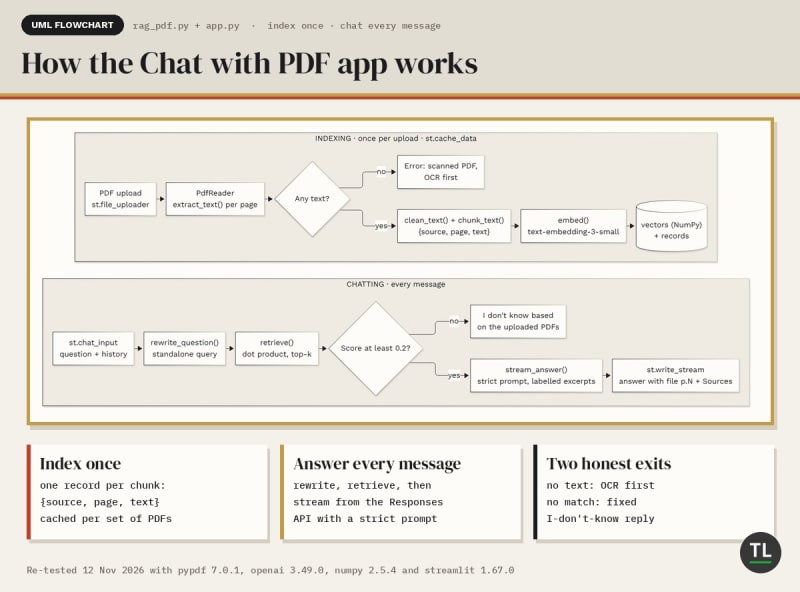
How the Chat with PDF app indexes each upload once and answers every message with page citations
The flowchart shows the same two phases as boxes, with the decision points that keep the app honest: no text means OCR first, and no good match means "I don't know".
The indexing half is Article 7 with a PDF loader.
The chatting half is the chat loop from Article 8, How to Use the OpenAI API in a RAG Pipeline.
1. Prerequisites
You'll need:
Python 3.12 or newer: Streamlit 1.67 needs 3.11+, and NumPy 2.5 needs 3.12+ (we tested on 3.13)
An OpenAI API key, created as shown in the OpenAI developer quickstart
A PDF with real text in it, or the sample PDF we'll create in Step 2
We'll use the same two models as the earlier articles.
Embedding model
text-embedding-3-small
Chat model
gpt-6-luna
Both can be changed with the EMBED_MODEL and CHAT_MODEL environment variables.
What "real text" means
pypdf reads the text layer stored inside a PDF.
PDFs exported from Word, Google Docs or a browser have one.
Scanned PDFs usually don't: each page is just a picture.
The pypdf docs are direct about it: pypdf is not OCR software.
We'll detect that case and show a clear error.
2. Set Up the Project
Create a project folder:
mkdir pdf-chat
Move into it:
cd pdf-chat
Create a virtual environment:
python -m venv .venv
Activate it on macOS or Linux:
source .venv/bin/activate
On Windows:
.venv\Scripts\activate
Install the four packages (re-tested on 12 Nov 2026, versions below):
pip install pypdf openai numpy streamlit
Here's what each one does:
pypdf
Reads PDFs and extracts their text: see pypdf on PyPI and the pypdf documentation.
It's pure Python, so there's nothing else to install.
Heads-up: pypdf 7.0 shipped on 6 Nov 2026 and 7.0.1 on 10 Nov, dropping Python 3.9 and old cryptography releases; the APIs we use here didn't change.
openai
Creates embeddings and generates answers, via the official OpenAI Python SDK.
numpy
Runs the similarity search, exactly like Article 7.
streamlit
Turns a Python script into a web app, with chat widgets built in (Streamlit docs).
Re-tested on 12 Nov 2026 with pypdf 7.0.1, openai 3.49.0, numpy 2.5.4 and streamlit 1.67.0 (latest on PyPI that day), on Python 3.13.
Set your API key on macOS or Linux:
export OPENAI_API_KEY="sk-..."
On Windows PowerShell:
$env:OPENAI_API_KEY="sk-..."
Create a sample PDF
Need a PDF to test with?
We'll turn the refund and shipping documents from Article 7 into a three-page PDF.
Install fpdf2, a small PDF writer (2.9.0 at the time of testing):
pip install fpdf2
Create:
make_sample_pdf.py
Add this:
"""make_sample_pdf.py - create a 3-page sample PDF to chat with."""
from fpdf import FPDF

PAGES = [
    ("Store Policies", "This handbook explains our refund and shipping policies. "
     "Refunds are on page 2. Shipping is on page 3."),
    ("Refund policy", "Customers can request a full refund within 30 days of purchase by emailing support. "
     "After 30 days, refunds are issued as store credit only."),
    ("Shipping", "Standard shipping takes 3 to 5 business days within India. "
     "Express shipping takes 1 to 2 business days and costs extra."),
]

pdf = FPDF()
for title, body in PAGES:
    pdf.add_page()
    pdf.set_font("Helvetica", "B", 20)
    pdf.cell(0, 12, title, new_x="LMARGIN", new_y="NEXT")
    pdf.set_font("Helvetica", size=12)
    pdf.multi_cell(0, 8, body)
pdf.output("store-policies.pdf")
print("Wrote store-policies.pdf")
Run it:
python make_sample_pdf.py
Output (from our 12 Nov run):
Wrote store-policies.pdf
Page 2 covers refunds.
Page 3 covers shipping.
That makes the citations easy to check.
Your project now looks like this:
pdf-chat/
├── .venv/
├── make_sample_pdf.py
├── store-policies.pdf
├── rag_pdf.py
└── app.py
We'll build rag_pdf.py and app.py piece by piece.
The complete files are in Final Code.
3. Extract Text From a PDF With pypdf
Create rag_pdf.py and add the imports and settings:
import io
import os
import sys

import numpy as np
from openai import OpenAI
from pypdf import PdfReader

EMBED_MODEL = os.getenv("EMBED_MODEL", "text-embedding-3-small")
CHAT_MODEL = os.getenv("CHAT_MODEL", "gpt-6-luna")
NO_ANSWER = "I don't know based on the uploaded PDFs."

client = OpenAI(max_retries=3, timeout=60.0)  # reads OPENAI_API_KEY
max_retries=3 retries rate limits and timeouts automatically, as we set up in Article 8.
OpenAI() reads OPENAI_API_KEY from the environment, and also OPENAI_BASE_URL, which is how we pointed these same files at a local test server.
Now the extractor:
def extract_pages(data: bytes, filename: str) -> list[dict]:
    reader = PdfReader(io.BytesIO(data))
    pages = []
    for number, page in enumerate(reader.pages, start=1):
        text = clean_text(page.extract_text() or "")
        if text:  # skip blank or image-only pages
            pages.append({"source": filename, "page": number, "text": text})
    return pages
Three lines do the real work.
PdfReader(io.BytesIO(data))
Streamlit hands us the uploaded file as bytes.
PdfReader accepts a file path or any binary file-like object, so we wrap the bytes in io.BytesIO.
No temporary files.
enumerate(reader.pages, start=1)
reader.pages is a list, so it starts at 0.
People count pages from 1.
Starting at 1 gives us page numbers that match a PDF viewer's page counter.
One catch: these are physical page positions.
If the document prints its own numbers, like "iv" or a cover page without a number, they can differ.
page.extract_text() or ""
extract_text() returns the page's text layer as one string, as described in the pypdf text extraction guide.
On an image-only page, there's little or nothing to return.
We skip empty pages, so they never become empty chunks.
Why one page at a time?
Because the page is our citation.
If we joined the whole PDF into one string, like Article 7 does with each file, we'd lose track of where every sentence came from.
4. Clean and Chunk Pages With Page Numbers
Here's what pypdf extracts from page 2 of our sample PDF:
'Refund policy\nCustomers can request a full refund within 30 days of purchase by emailing support. After 30 days,\nrefunds are issued as store credit only.'
See the \n in "After 30 days,\nrefunds"?
PDFs store text line by line, exactly as it's laid out on the page.
Those line breaks are about layout, not meaning.
So we clean the text first:
def clean_text(text: str) -> str:
    text = text.replace("-\n", "")  # re-join words hyphenated across lines
    return " ".join(text.split())   # PDF line breaks are layout, not meaning
Two fixes:
"-\n"re-joins words that were hyphenated at a line break" ".join(text.split())turns every run of whitespace, including line breaks, into one space
Result:
Refund policy Customers can request a full refund within 30 days of purchase by emailing support. After 30 days, refunds are issued as store credit only.
The chunker
Article 7 split text on blank lines.
That doesn't work here, because cleaned PDF text has no blank lines left.
Instead, we cut windows of about 1,000 characters that end on a space, with 200 characters of overlap:
def chunk_text(text: str, max_chars: int = 1000, overlap: int = 200) -> list[str]:
    """Split text into ~max_chars windows that end on a space, with overlap."""
    chunks, start = [], 0
    while start + max_chars < len(text):
        end = text.rfind(" ", start + overlap + 1, start + max_chars)
        end = end if end != -1 else start + max_chars  # no space: hard cut
        chunks.append(text[start:end])
        space = text.find(" ", end - overlap, end)
        start = space + 1 if space != -1 else end - overlap
    chunks.append(text[start:])
    return chunks
rfind(" ") moves each cut back to the last space, so a word is never split in half.
The next chunk starts about 200 characters earlier, also on a space.
So a sentence near a boundary appears in both chunks.
A short page, like the ones in our sample, becomes a single chunk.
These are the same 1,000 and 200 sizes we used in Articles 7 and 9.
If you want to tune them, read How Document Chunking Works in RAG.
Attach the page number
Now the important part:
def chunk_pages(pages: list[dict]) -> list[dict]:
    return [
        {"source": p["source"], "page": p["page"], "text": chunk}
        for p in pages
        for chunk in chunk_text(p["text"])
    ]
Every chunk becomes a small record:
{"source": "store-policies.pdf", "page": 2, "text": "Refund policy Customers can ..."}
We chunk within a page, never across pages.
So every chunk has exactly one page number.
The trade-off: a sentence that runs over a page break gets split in two.
For most documents, a clean citation is worth it.
5. Embed and Index the Chunks
The embedding code is Article 7's, almost unchanged:
def embed(texts: list[str], batch_size: int = 100) -> np.ndarray:
    vectors = []
    for i in range(0, len(texts), batch_size):
        response = client.embeddings.create(model=EMBED_MODEL, input=texts[i : i + batch_size])
        vectors.extend(item.embedding for item in response.data)
    matrix = np.array(vectors, dtype=np.float32)
    return matrix / np.linalg.norm(matrix, axis=1, keepdims=True)
We send up to 100 chunks per request with client.embeddings.create() (see the OpenAI API reference), then normalize every vector to length 1.
After that, cosine similarity is a plain dot product.
If that's new, Article 2 of this series, What Are Embeddings?, explains it from scratch.
Now tie extraction, chunking and embedding together:
def build_index(files: list[tuple[str, bytes]]) -> tuple[np.ndarray, list[dict]]:
    pages = [page for name, data in files for page in extract_pages(data, name)]
    records = chunk_pages(pages)
    if not records:
        raise ValueError("No text found in these PDFs. Scanned PDFs need OCR first.")
    return embed([r["text"] for r in records]), records
It takes a list of (filename, bytes) pairs, so the same function handles one PDF or ten.
It returns two things:
vectors   NumPy matrix, one row per chunk
records   list of dicts: source, page, text
Row i of vectors belongs to records[i].
That's our whole vector store.
If no page had any text, we raise a clear error instead of embedding nothing.
That's how a scanned PDF shows up.
Why not save to disk?
Article 7 saved vectors.npy and chunks.json.
Here, people upload PDFs in a browser, so we keep the index in memory and let Streamlit cache it in Step 8.
You can still save it with np.save() the same way.
In Article 12, we'll move it into PostgreSQL with pgvector.
6. Retrieve Chunks With Page Citations
First, a tiny helper that turns a record into a citation label:
def cite(hit: dict) -> str:
    return f"{hit['source']} p.{hit['page']}"
So {"source": "store-policies.pdf", "page": 2} becomes:
store-policies.pdf p.2
Now retrieval:
def retrieve(query: str, vectors: np.ndarray, records: list[dict],
             k: int = 4, min_score: float = 0.2) -> list[dict]:
    scores = vectors @ embed([query])[0]  # cosine similarity
    top = np.argsort(scores)[::-1][:k]
    return [{**records[i], "score": float(scores[i])} for i in top if scores[i] >= min_score]
It's Article 7's retrieve(), except the index is passed in instead of loaded from disk.
Embed the query, score every chunk with one matrix multiplication, keep the top k.
min_score=0.2 drops weak matches.
If nothing passes, the list is empty, and we skip the LLM entirely.
Every hit keeps its source and page, plus a score.
That's what makes page citations possible.
Article 4, Semantic Search vs Keyword Search, explains why these scores capture meaning rather than matching words.
7. Generate Grounded Answers
Now the prompt.
This is where a PDF chatbot earns trust or loses it.
INSTRUCTIONS = f"""You answer questions about the user's uploaded PDFs.
Use ONLY the PDF excerpts in the latest user message.
After every fact, cite its page in square brackets exactly as labelled, like [handbook.pdf p.3].
If the excerpts do not contain the answer, reply exactly: {NO_ANSWER}
Keep answers under 150 words."""
Four rules:
Use only the PDF excerpts, not the model's general knowledge
Cite after every fact, using the exact labels we provide
Use one exact "I don't know" sentence when the answer isn't there
Keep it short
Then we label every excerpt with its citation:
def build_input(question: str, hits: list[dict], history: list[dict]) -> list[dict]:
    context = "\n\n---\n\n".join(f"[{cite(h)}]\n{h['text']}" for h in hits)
    turn = {"role": "user", "content": f"PDF excerpts:\n{context}\n\nQuestion: {question}"}
    return history + [turn]
The model sees this:
PDF excerpts:
[store-policies.pdf p.2]
Refund policy Customers can request a full refund within 30 days ...

---

[store-policies.pdf p.3]
Shipping Standard shipping takes 3 to 5 business days within India. ...

Question: Can I get a refund after 30 days?
The label sits right above the text, so the model can copy it into its answer.
Streaming the answer
Nobody likes staring at a blank chat bubble.
So we stream:
def stream_answer(question: str, hits: list[dict], history: list[dict]):
    stream = client.responses.create(
        model=CHAT_MODEL,
        instructions=INSTRUCTIONS,
        input=build_input(question, hits, history),
        reasoning={"effort": "low"},
        max_output_tokens=1000,
        stream=True,
    )
    for event in stream:
        if event.type == "response.output_text.delta":
            yield event.delta
This is the Responses API streaming pattern from Article 8.
With stream=True, client.responses.create() returns a stream of events.
We only need response.output_text.delta, which carries the next piece of text.
The OpenAI streaming guide lists the other event types, and the OpenAI text generation guide covers instructions, input and output_text.
Notice the yield.
stream_answer() is a generator, and Streamlit can display a generator as it runs.
Follow-up questions
Chat users ask follow-ups:
"What about express shipping?"
Embed that on its own, and the search has very little to go on.
So before retrieving, we rewrite it into a standalone query, as in Article 8:
REWRITE = """Rewrite the user's latest message as one standalone search query.
Use the chat history to replace words like "it", "that" or "there".
Return only the query."""


def rewrite_question(question: str, history: list[dict]) -> str:
    if not history:
        return question
    response = client.responses.create(
        model=CHAT_MODEL,
        instructions=REWRITE,
        input=history + [{"role": "user", "content": question}],
        reasoning={"effort": "low"},
        max_output_tokens=300,
    )
    return response.output_text.strip() or question
On the first message, there's no history, so we skip the extra call.
Now look at what goes into history: the questions and answers only.
Old PDF excerpts are never resent.
That keeps each request small, and every turn retrieves fresh context for its own question.
Here is one chat message travelling through those functions, from the question to the cited answer:
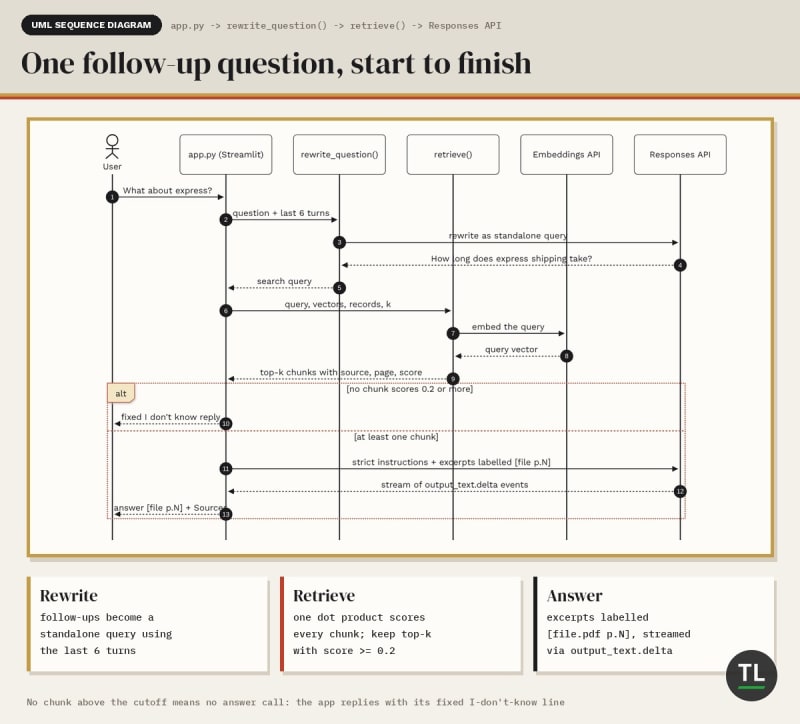
One follow-up question: rewrite it, retrieve page-labelled chunks, then stream a cited answer
Notice the two exits: no good chunks means a fixed "I don't know" without calling the LLM, and good chunks mean a streamed answer with page labels.
Test it from the terminal
The bottom of rag_pdf.py has a small test command:
if __name__ == "__main__":
    path, question = sys.argv[1], sys.argv[2]
    with open(path, "rb") as f:
        vectors, records = build_index([(os.path.basename(path), f.read())])
    print(f"Indexed {len(records)} chunks from {path}")
    hits = retrieve(question, vectors, records)
    for h in hits:
        print(f"  {cite(h)} (score {h['score']:.2f})")
    if not hits:
        raise SystemExit(NO_ANSWER)
    for text in stream_answer(question, hits, history=[]):
        print(text, end="", flush=True)
    print()
Run it:
python rag_pdf.py store-policies.pdf "Can I get a refund after 30 days?"
Output from our test run against a local OpenAI-compatible mock (your scores and wording will differ):
Indexed 3 chunks from store-policies.pdf
  store-policies.pdf p.2 (score 0.57)
  store-policies.pdf p.3 (score 0.22)
After 30 days, refunds are issued as store credit only [store-policies.pdf p.2].
The refund page wins clearly, and the answer cites p.2, exactly the page we put the refund policy on.
Get this working before you touch the UI.
If the terminal answer is wrong, the chat app will be wrong too.
8. Build the Streamlit Chat UI
Now the fun part.
Create:
app.py
Imports and page setup
Add this:
import openai
import streamlit as st
from pypdf.errors import DependencyError, PyPdfError

from rag_pdf import NO_ANSWER, build_index, cite, retrieve, rewrite_question, stream_answer

MAX_HISTORY = 6  # turns of chat history sent to the model

st.set_page_config(page_title="Chat with PDF")
st.title("Chat with PDF")
One idea shapes the rest of this file.
Streamlit runs your whole script from top to bottom on every interaction: every upload, every click, every message.
That's called a rerun.
The Streamlit main concepts guide calls this its data flow.
Cache the index
Add this:
@st.cache_data(show_spinner="Reading and indexing your PDFs...")
def index_pdfs(files: tuple[tuple[str, bytes], ...]):
    return build_index(list(files))
Without caching, every rerun would re-extract and re-embed the PDF.
You'd pay for embeddings on every single message.
@st.cache_data stores the result, keyed on the function's arguments.
Our argument is the files' names and bytes, so the same PDFs are indexed once.
Upload a different PDF, and the cache misses and indexes it.
The Streamlit caching guide covers both cache decorators.
Show sources
def show_sources(hits: list[dict]) -> None:
    if hits:
        with st.expander(f"Sources ({len(hits)})"):
            for h in hits:
                st.markdown(f"**{cite(h)}** · score {h['score']:.2f}")
                st.text(h["text"][:300])
An expander under each answer lists the retrieved chunks, with page and score.
It's the quickest way to check an answer, and to debug retrieval.
We use st.text for the chunk itself, so PDF text is never rendered as Markdown.
Upload and index
with st.sidebar:
    uploads = st.file_uploader("Upload PDFs", type="pdf", accept_multiple_files=True)
    k = st.slider("Chunks to retrieve", min_value=1, max_value=8, value=4)
    if st.button("Clear chat"):
        st.session_state.messages = []

if not uploads:
    st.info("Upload a PDF in the sidebar to start chatting.")
    st.stop()

files = tuple((f.name, f.getvalue()) for f in uploads)
try:
    vectors, records = index_pdfs(files)
except (ValueError, PyPdfError, DependencyError) as e:
    st.error(f"Could not index these PDFs: {e}")
    st.stop()

pages = {(r["source"], r["page"]) for r in records}
st.caption(f"Indexed {len(records)} chunks from {len(pages)} pages in {len(files)} PDF(s).")
With accept_multiple_files=True, the st.file_uploader widget returns a list of uploaded files.
Each one has a name, and getvalue() returns its bytes.
st.stop() ends the run early, so nothing below it runs until there's a PDF.
If indexing fails, on a scanned or password-protected PDF for example, we show the error instead of a traceback.
Remember the conversation
names = [name for name, _ in files]
if st.session_state.get("pdfs") != names:
    st.session_state.pdfs = names
    st.session_state.messages = []

for msg in st.session_state.messages:
    with st.chat_message(msg["role"]):
        st.markdown(msg["content"])
        show_sources(msg.get("sources", []))
Because of reruns, normal variables reset on every message.
st.session_state is the exception: a dictionary that survives reruns, one per browser session.
We keep the chat in st.session_state.messages, a list of dicts with role, content and sources.
When the set of PDFs changes, we start a fresh conversation, so old answers don't point at pages in a different file.
Then we replay every message.
st.chat_message draws a chat bubble with a user or assistant avatar.
Answer the next question
if question := st.chat_input("Ask a question about your PDF"):
    history = [{"role": m["role"], "content": m["content"]} for m in st.session_state.messages]
    history = history[-MAX_HISTORY * 2:]
    st.session_state.messages.append({"role": "user", "content": question})
    with st.chat_message("user"):
        st.markdown(question)

    with st.chat_message("assistant"):
        try:
            query = rewrite_question(question, history)
            hits = retrieve(query, vectors, records, k=k)
            if hits:
                reply = st.write_stream(stream_answer(question, hits, history))
            else:
                reply = NO_ANSWER
                st.markdown(reply)
        except openai.AuthenticationError:
            st.error("Authentication failed. Check OPENAI_API_KEY.")
            st.stop()
        except openai.RateLimitError as e:
            st.error(f"Rate limited or out of quota: {e}")
            st.stop()
        show_sources(hits)
    st.session_state.messages.append({"role": "assistant", "content": reply, "sources": hits})
Read it top to bottom:
st.chat_input            returns the new message, or None
history                  the last 6 turns, without sources
st.chat_message("user")  shows the question
rewrite_question()       makes follow-ups searchable
retrieve()               finds the top-k chunks with page numbers
st.write_stream()        streams the answer and returns the full text
show_sources()           adds the Sources expander
st.session_state         saves both messages for the next rerun
Look at this line:
if question := st.chat_input("Ask a question about your PDF"):
st.chat_input draws a message box pinned to the bottom of the page.
It returns the text on the rerun right after the user presses Enter, and None otherwise.
The walrus operator := assigns and checks it in one step.
And this one:
reply = st.write_stream(stream_answer(question, hits, history))
st.write_stream prints each piece from our generator as it arrives, then returns the full text.
We save that text, so the answer is still there after the next rerun.
It's the same pattern as Streamlit's official Build a basic LLM chat app tutorial, with retrieval added.
9. What Actually Happened?
Let's trace what happened when you asked "Can I get a refund after 30 days?".
1. pypdf read 3 pages from the text layer          (Article 7 read Markdown files instead)
2. clean_text() turned layout line breaks into spaces
3. chunk_text() kept each short page as one chunk  (Article 5's overlap idea, inside a page)
4. embed() sent 3 chunks to the embeddings API once, normalised them into a 3 x N matrix
5. The question became one more vector; one dot product scored all chunks (Articles 2 and 4)
6. retrieve() kept the chunks above 0.2, best first: p.2, then p.3
7. build_input() labelled each excerpt [store-policies.pdf p.N]
8. The Responses API streamed an answer that copied the p.2 label
Map it to the frameworks from the last two articles:
Our code             LangChain (Art. 9)          LlamaIndex (Art. 10)
extract_pages()      PyPDFLoader                 SimpleDirectoryReader + PDF reader
chunk_pages()        RecursiveCharacterTextSplitter  SentenceSplitter -> Nodes
vectors + records    InMemoryVectorStore          VectorStoreIndex
retrieve()           retriever.invoke()           retriever / query engine
cite()               metadata["page"] (0-based)   node.metadata["page_label"]
Same RAG. Different names.
Here's everything you built, end to end:
PDF upload
    ↓
pypdf extracts text, one page at a time
    ↓
clean_text() removes layout line breaks
    ↓
chunk_text() splits each page, and every chunk keeps its page number
    ↓
embed() + st.cache_data index each PDF once
    ↓
rewrite_question() turns follow-ups into standalone queries
    ↓
retrieve() finds the top-k chunks
    ↓
a strict prompt answers only from them, citing [file.pdf p.N]
    ↓
Streamlit streams the answer and keeps the chat in session_state
10. Final Code
Here's the complete rag_pdf.py:
"""rag_pdf.py - the RAG core of our Chat with PDF app.

Extract -> clean -> chunk (with page numbers) -> embed -> retrieve -> answer.
Plain Python: pypdf + openai + numpy. app.py adds the Streamlit chat UI.
"""
import io
import os
import sys

import numpy as np
from openai import OpenAI
from pypdf import PdfReader

EMBED_MODEL = os.getenv("EMBED_MODEL", "text-embedding-3-small")
CHAT_MODEL = os.getenv("CHAT_MODEL", "gpt-6-luna")
NO_ANSWER = "I don't know based on the uploaded PDFs."

client = OpenAI(max_retries=3, timeout=60.0)  # reads OPENAI_API_KEY


# 1. Extract text, one page at a time ----------------------------------
def extract_pages(data: bytes, filename: str) -> list[dict]:
    reader = PdfReader(io.BytesIO(data))
    pages = []
    for number, page in enumerate(reader.pages, start=1):
        text = clean_text(page.extract_text() or "")
        if text:  # skip blank or image-only pages
            pages.append({"source": filename, "page": number, "text": text})
    return pages


def clean_text(text: str) -> str:
    text = text.replace("-\n", "")  # re-join words hyphenated across lines
    return " ".join(text.split())   # PDF line breaks are layout, not meaning


# 2. Chunk each page, keeping its page number ---------------------------
def chunk_text(text: str, max_chars: int = 1000, overlap: int = 200) -> list[str]:
    """Split text into ~max_chars windows that end on a space, with overlap."""
    chunks, start = [], 0
    while start + max_chars < len(text):
        end = text.rfind(" ", start + overlap + 1, start + max_chars)
        end = end if end != -1 else start + max_chars  # no space: hard cut
        chunks.append(text[start:end])
        space = text.find(" ", end - overlap, end)
        start = space + 1 if space != -1 else end - overlap
    chunks.append(text[start:])
    return chunks


def chunk_pages(pages: list[dict]) -> list[dict]:
    return [
        {"source": p["source"], "page": p["page"], "text": chunk}
        for p in pages
        for chunk in chunk_text(p["text"])
    ]


# 3. Embed and index ----------------------------------------------------
def embed(texts: list[str], batch_size: int = 100) -> np.ndarray:
    vectors = []
    for i in range(0, len(texts), batch_size):
        response = client.embeddings.create(model=EMBED_MODEL, input=texts[i : i + batch_size])
        vectors.extend(item.embedding for item in response.data)
    matrix = np.array(vectors, dtype=np.float32)
    return matrix / np.linalg.norm(matrix, axis=1, keepdims=True)


def build_index(files: list[tuple[str, bytes]]) -> tuple[np.ndarray, list[dict]]:
    pages = [page for name, data in files for page in extract_pages(data, name)]
    records = chunk_pages(pages)
    if not records:
        raise ValueError("No text found in these PDFs. Scanned PDFs need OCR first.")
    return embed([r["text"] for r in records]), records


# 4. Retrieve with citations --------------------------------------------
def cite(hit: dict) -> str:
    return f"{hit['source']} p.{hit['page']}"


def retrieve(query: str, vectors: np.ndarray, records: list[dict],
             k: int = 4, min_score: float = 0.2) -> list[dict]:
    scores = vectors @ embed([query])[0]  # cosine similarity
    top = np.argsort(scores)[::-1][:k]
    return [{**records[i], "score": float(scores[i])} for i in top if scores[i] >= min_score]


# 5. Generate a grounded answer -----------------------------------------
INSTRUCTIONS = f"""You answer questions about the user's uploaded PDFs.
Use ONLY the PDF excerpts in the latest user message.
After every fact, cite its page in square brackets exactly as labelled, like [handbook.pdf p.3].
If the excerpts do not contain the answer, reply exactly: {NO_ANSWER}
Keep answers under 150 words."""

REWRITE = """Rewrite the user's latest message as one standalone search query.
Use the chat history to replace words like "it", "that" or "there".
Return only the query."""


def rewrite_question(question: str, history: list[dict]) -> str:
    if not history:
        return question
    response = client.responses.create(
        model=CHAT_MODEL,
        instructions=REWRITE,
        input=history + [{"role": "user", "content": question}],
        reasoning={"effort": "low"},
        max_output_tokens=300,
    )
    return response.output_text.strip() or question


def build_input(question: str, hits: list[dict], history: list[dict]) -> list[dict]:
    context = "\n\n---\n\n".join(f"[{cite(h)}]\n{h['text']}" for h in hits)
    turn = {"role": "user", "content": f"PDF excerpts:\n{context}\n\nQuestion: {question}"}
    return history + [turn]


def stream_answer(question: str, hits: list[dict], history: list[dict]):
    stream = client.responses.create(
        model=CHAT_MODEL,
        instructions=INSTRUCTIONS,
        input=build_input(question, hits, history),
        reasoning={"effort": "low"},
        max_output_tokens=1000,
        stream=True,
    )
    for event in stream:
        if event.type == "response.output_text.delta":
            yield event.delta


# Quick test without the UI: python rag_pdf.py file.pdf "question" ------
if __name__ == "__main__":
    path, question = sys.argv[1], sys.argv[2]
    with open(path, "rb") as f:
        vectors, records = build_index([(os.path.basename(path), f.read())])
    print(f"Indexed {len(records)} chunks from {path}")
    hits = retrieve(question, vectors, records)
    for h in hits:
        print(f"  {cite(h)} (score {h['score']:.2f})")
    if not hits:
        raise SystemExit(NO_ANSWER)
    for text in stream_answer(question, hits, history=[]):
        print(text, end="", flush=True)
    print()
And the complete app.py:
"""app.py - Chat with PDF: a Streamlit chat UI on top of rag_pdf.py.

Run: streamlit run app.py
"""
import openai
import streamlit as st
from pypdf.errors import DependencyError, PyPdfError

from rag_pdf import NO_ANSWER, build_index, cite, retrieve, rewrite_question, stream_answer

MAX_HISTORY = 6  # turns of chat history sent to the model

st.set_page_config(page_title="Chat with PDF")
st.title("Chat with PDF")


@st.cache_data(show_spinner="Reading and indexing your PDFs...")
def index_pdfs(files: tuple[tuple[str, bytes], ...]):
    return build_index(list(files))


def show_sources(hits: list[dict]) -> None:
    if hits:
        with st.expander(f"Sources ({len(hits)})"):
            for h in hits:
                st.markdown(f"**{cite(h)}** · score {h['score']:.2f}")
                st.text(h["text"][:300])


# 1. Upload and index ---------------------------------------------------
with st.sidebar:
    uploads = st.file_uploader("Upload PDFs", type="pdf", accept_multiple_files=True)
    k = st.slider("Chunks to retrieve", min_value=1, max_value=8, value=4)
    if st.button("Clear chat"):
        st.session_state.messages = []

if not uploads:
    st.info("Upload a PDF in the sidebar to start chatting.")
    st.stop()

files = tuple((f.name, f.getvalue()) for f in uploads)
try:
    vectors, records = index_pdfs(files)
except (ValueError, PyPdfError, DependencyError) as e:
    st.error(f"Could not index these PDFs: {e}")
    st.stop()

pages = {(r["source"], r["page"]) for r in records}
st.caption(f"Indexed {len(records)} chunks from {len(pages)} pages in {len(files)} PDF(s).")

# New set of PDFs? Start a fresh conversation.
names = [name for name, _ in files]
if st.session_state.get("pdfs") != names:
    st.session_state.pdfs = names
    st.session_state.messages = []

# 2. Replay the conversation so far ----------------------------------
for msg in st.session_state.messages:
    with st.chat_message(msg["role"]):
        st.markdown(msg["content"])
        show_sources(msg.get("sources", []))

# 3. Answer the next question ------------------------------------------
if question := st.chat_input("Ask a question about your PDF"):
    history = [{"role": m["role"], "content": m["content"]} for m in st.session_state.messages]
    history = history[-MAX_HISTORY * 2:]
    st.session_state.messages.append({"role": "user", "content": question})
    with st.chat_message("user"):
        st.markdown(question)

    with st.chat_message("assistant"):
        try:
            query = rewrite_question(question, history)
            hits = retrieve(query, vectors, records, k=k)
            if hits:
                reply = st.write_stream(stream_answer(question, hits, history))
            else:
                reply = NO_ANSWER
                st.markdown(reply)
        except openai.AuthenticationError:
            st.error("Authentication failed. Check OPENAI_API_KEY.")
            st.stop()
        except openai.RateLimitError as e:
            st.error(f"Rate limited or out of quota: {e}")
            st.stop()
        show_sources(hits)
    st.session_state.messages.append({"role": "assistant", "content": reply, "sources": hits})
That's under 240 lines for both files, comments included.
The important pattern is:
Extract:   PdfReader → page.extract_text(), one page at a time
Chunk:     clean_text() → chunk_text() → {source, page, text}
Index:     embed() → NumPy matrix, cached with st.cache_data
Retrieve:  embed the question → dot product → top-k with page numbers
Answer:    strict prompt + labelled excerpts → [file.pdf p.N]
Chat:      st.session_state + st.chat_input + st.write_stream
These are byte-for-byte the files we ran on 12 Nov 2026, along with make_sample_pdf.py from Step 2.
11. Run the Chat with PDF App
Start the app:
streamlit run app.py
Output on our machine:
  You can now view your Streamlit app in your browser.
  Local URL: http://localhost:8501
Streamlit opens the app in your browser.
Upload store-policies.pdf in the sidebar.
The caption under the title should say:
Indexed 3 chunks from 3 pages in 1 PDF(s).
Now chat.
We drove the real app.py with Streamlit's AppTest framework and a stand-in upload, against a local OpenAI-compatible mock, so the wording below is canned; with a real model, your wording will differ, but the page numbers shouldn't:
You: How long does shipping take?
Assistant: Standard shipping takes 3 to 5 business days within India [store-policies.pdf p.3].
You: What about express?
Assistant: Express shipping takes 1 to 2 business days and costs extra [store-policies.pdf p.3].
The second answer only works because rewrite_question() turned "What about express?" into a complete search query first.
In our test log, that rewrite call happened once per follow-up, and never for the first message.
Open Sources under an answer to see the chunks and their scores; our run showed Sources (2) under the first answer and Sources (3) under the second.
Now ask something the PDF doesn't cover, from the terminal this time:
Indexed 3 chunks from store-policies.pdf
  store-policies.pdf p.3 (score 0.25)
I don't know based on the uploaded PDFs.
That's exactly the answer you want.
A PDF chatbot that guesses is worse than no chatbot.
Look closely, though: one weak chunk still scraped past min_score=0.2, so the LLM was called anyway.
Our mock simply returned the fixed sentence; with a real model, the strict prompt is the only thing standing between that weak chunk and a made-up answer.
With your own embeddings, print the scores for a few off-topic questions and raise min_score until they stop matching.
Next, try your own PDF: a product manual, an employee handbook, or a research paper.
12. Common Chat with PDF Errors
ModuleNotFoundError: No module named 'PyPDF2'
You copied an older tutorial.
The PyPDF2 project page says 3.0.x is its last version, and development continues as pypdf.
Install pypdf and change the import:
from pypdf import PdfReader
No text found in these PDFs. Scanned PDFs need OCR first.
This is our own ValueError from build_index(), and it's what we got for an image-only test PDF:
ValueError: No text found in these PDFs. Scanned PDFs need OCR first.
Every page came back empty.
Your PDF is almost certainly a scan.
Quick test: open it and try to select a sentence.
If you can't, there's no text layer, and you need OCR first.
File has not been decrypted
The full message:
pypdf.errors.FileNotDecryptedError: File has not been decrypted
The PDF needs a password to open.
pypdf tries an empty password automatically, which handles many "protected" PDFs, but it can't guess a real one.
Remove the password, or pass it in:
reader = PdfReader(io.BytesIO(data), password="your-password")
cryptography>=3.1 is required for AES algorithm
The full message, still worded this way in pypdf 7.0.1 even though pypdf 7 actually requires cryptography 43 or newer:
pypdf.errors.DependencyError: cryptography>=3.1 is required for AES algorithm
The PDF is encrypted with AES, even if it opens without a password.
According to the pypdf installation guide, AES needs an extra dependency:
pip install "pypdf[crypto]"
In app.py, both errors surface as a red "Could not index these PDFs" message instead of a traceback, because we catch PyPdfError and DependencyError.
openai.AuthenticationError: Error code: 401
Your key is set but wrong, revoked or from another project.
In the terminal you'll see:
openai.AuthenticationError: Error code: 401 - Incorrect API key provided: sk-bad. You can find your API key at https://platform.openai.com/account/api-keys.
In the chat app, app.py catches it and shows "Authentication failed. Check OPENAI_API_KEY." instead.
openai.OpenAIError: Missing credentials
The full message from openai 3.49.0:
openai.OpenAIError: Missing credentials. Please pass an `api_key`, `workload_identity`, `admin_api_key`, or set the `OPENAI_API_KEY` or `OPENAI_ADMIN_KEY` environment variable.
OPENAI_API_KEY isn't set in the terminal that ran streamlit run.
Set it, then restart Streamlit.
streamlit: command not found
bash: line 1: streamlit: command not found
Your virtual environment isn't active.
Activate it, or run Streamlit through Python:
python -m streamlit run app.py
Words run together or spacing looks wrong
Some PDFs position every character separately, so spaces have to be guessed.
Try pypdf's layout mode on that page:
text = page.extract_text(extraction_mode="layout")
It keeps text closer to its position on the rendered page.
A large PDF won't upload
Streamlit limits uploads to 200 MB per file by default.
Raise it with the max_upload_size parameter of st.file_uploader, or the server.maxUploadSize option in config.toml.
13. Common Chat with PDF Mistakes
1. Throwing Away Page Numbers
If you join the whole PDF into one string before chunking, citations become impossible.
Extract page by page, and keep page on every chunk.
2. Assuming Every PDF Has Text
Scanned PDFs return little or no text.
Check for empty pages and tell the user, instead of quietly answering "I don't know" to everything.
3. Re-Embedding on Every Rerun
Streamlit reruns your script on every message.
Without @st.cache_data, you pay to embed the same PDF again and again.
4. Trusting Citations Blindly
A model can still cite the wrong page.
Show the retrieved chunks in a Sources panel so users can check, and consider dropping any cited label that wasn't retrieved, like we did with structured outputs in Article 8.
The RAG paper itself frames retrieval as a way to make generations more checkable, so show the evidence.
5. Resending Old Context Every Turn
Chat history should carry questions and answers, not every excerpt you've ever retrieved.
Retrieve fresh context for each question.
6. Expecting Tables to Survive
PDF tables are just positioned text.
After extraction, rows and columns often turn into one long line, so answers about tables can be unreliable.
Test with your real documents before you promise anything.
Quick Recap
Extract PDFs one page at a time, because the page is your citation
Clean PDF text: line breaks in a PDF are layout, not meaning
Chunk within pages, and keep
sourceandpageon every chunkLabel every excerpt in the prompt, so the model can cite
[file.pdf p.N]Rewrite follow-up questions before retrieving
Cache the index, because Streamlit reruns your script on every message
pypdfis not OCR: scanned PDFs need OCR first
The biggest lesson: a chat with PDF app is ordinary RAG plus one piece of metadata, the page number. Keep it from extraction to answer, and every reply becomes checkable.
Exercises
Try these before Tuesday's article.
1. Search One PDF at a Time
Add an st.selectbox to the sidebar with "All PDFs" plus every uploaded file name, and limit the search to the chosen PDF.
Hint: build a NumPy boolean mask from each record's source, then pass only those rows of vectors and those records to retrieve().
2. Drop Citations That Weren't Retrieved
After the answer streams, find every [... p.N] label with a regular expression and warn if one isn't in the retrieved hits.
3. Tune min_score on Your Own PDF
Ask five questions your PDF can't answer, print the top score for each, and set min_score just above the highest one.
4. Bonus: OCR for Scanned Pages
When a page has no text, render it to an image and run it through OCR software such as Tesseract, as the pypdf docs suggest for image-only pages.
Keep the page number on the OCR text, and the rest of the app doesn't change.
FAQs
How do I chat with a PDF using RAG?
Extract the text from each PDF page, split it into chunks that keep their page number, and embed the chunks.
For each question, embed it, retrieve the most similar chunks, and send them to an LLM with instructions to answer only from that text and cite the pages.
Do I need LangChain to build a chat with PDF app?
No.
This tutorial uses plain Python with pypdf, openai, NumPy and Streamlit.
Frameworks work too: LangChain and LlamaIndex both ship PDF loaders, and Articles 9 and 10 show the same app built with each.
How do I cite PDF page numbers in RAG answers?
Store the page number with every chunk, and put a label like [file.pdf p.2] above each excerpt in the prompt.
Then tell the model to cite the labels it used, and show the retrieved chunks so users can verify them.
Can I chat with a scanned PDF?
Not with pypdf alone, because it extracts the text layer and doesn't do OCR.
Run the scanned pages through OCR software such as Tesseract first, then index the OCR text with the same page numbers.
Can I chat with multiple PDFs at once?
Yes.
Set accept_multiple_files=True on st.file_uploader, and index every file together.
Because each chunk stores its source file name, citations still point to the right PDF and page.
Is my PDF sent to OpenAI?
The extracted text is.
Every chunk is sent to the embeddings API once, and the retrieved chunks are sent with each question.
Don't upload documents you're not allowed to share with your API provider.
Conclusion
In Article 7, we built RAG from scratch.
In Articles 8 to 10, we made it production-ready and rebuilt it with LangChain and LlamaIndex.
In this article, we pointed it at real PDFs.
pypdf extracted the text page by page.
A few lines of cleaning made that text usable.
Page numbers turned into citations.
And Streamlit turned a script into a chat app you can share.
So far, though, our index lives in memory.
That's fine for a few PDFs.
It isn't for thousands.
Next, we'll move the vectors into PostgreSQL with pgvector.
That's where things get more interesting.
Continue Learning
You're currently at Article 11 of TheTechLane's RAG series.
Previous
Is LlamaIndex the Easiest Way to Build RAG? (RAG Part 10)
Article 10 rebuilt the same document Q&A app with LlamaIndex: documents, nodes, query engines, chat engines and an agent.
Next
Article 12: PostgreSQL and pgvector: Build a RAG System With Vector Search (coming Tuesday)
Move our in-memory index into a real database, with SQL you already know.
Related reading:
Build a Simple RAG Application Using Python, the from-scratch pipeline this PDF app extends
How Document Chunking Works in RAG, before you tune
max_charsandoverlap
Get New RAG Articles in Your Inbox
Want Article 12 and every new RAG tutorial the day it goes live?
Subscribe to the TheTechLane newsletter for practical AI and developer guides, with no spam.
Sources
pypdf documentation, its text extraction guide, installation guide and CHANGELOG
PyMuPDF documentation, a faster AGPL-licensed alternative for text and layout extraction
OpenAI Python SDK on PyPI, the text generation guide, the API reference, the embeddings guide and the streaming guide
Streamlit chat elements, caching and the LLM chat app tutorial
Lewis et al. 2020, Retrieval-Augmented Generation for Knowledge-Intensive NLP Tasks
Have a Question?
If something isn't clear or your chat with PDF app isn't working as expected, leave a comment below with your pypdf and streamlit versions.
We'll do our best to explain it with simple words, practical examples, and code you can actually understand.
Happy Coding! 🚀
Follow TheTechLane
Keep learning AI, development, and modern developer technologies with TheTechLane.
Learn • Build • Share
Follow @thetechlanehq for more developer guides, tutorials, and practical technology content.