AI Coding Agents in 2026 : How Agentic AI Is Changing Software Development
AI coding agents can now inspect repositories, modify files, run tests, fix bugs, and create pull requests. Here’s what developers need to know about agentic coding in 2026.
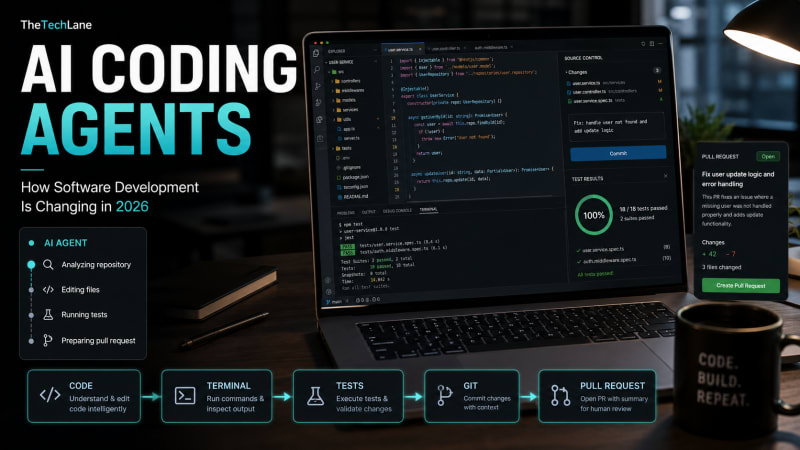
AI Coding Agents Are Moving Beyond Autocomplete
AI coding tools used to finish a line of code.
Now they're starting to finish entire engineering tasks.
That's why AI coding agents have become one of the biggest software-development trends of 2026.
Instead of simply suggesting code, an agent can inspect a repository, modify multiple files, run commands, execute tests, debug failures, and prepare changes for review.
OpenAI describes Codex as capable of handling tasks such as features, refactoring, migrations, and pull requests. GitHub is similarly moving Copilot toward asynchronous agents that can work on assigned development tasks and return code for review.
The developer's job isn't disappearing. The workflow is changing from writing every implementation manually to supervising and reviewing more AI-generated work.
What Is an AI Coding Agent?
A normal AI coding assistant works roughly like this:
Developer → Writes Code → AI Suggests CompletionAn AI coding agent works differently:
Developer
    ↓
Describe Task
    ↓
AI Agent
    ↓
Inspect Repository
    ↓
Plan Changes
    ↓
Modify Files
    ↓
Run Commands
    ↓
Execute Tests
    ↓
Fix Errors
    ↓
Developer Review
The important difference is action.
The model isn't only generating text anymore. It can interact with development tools and continue working through multiple steps.
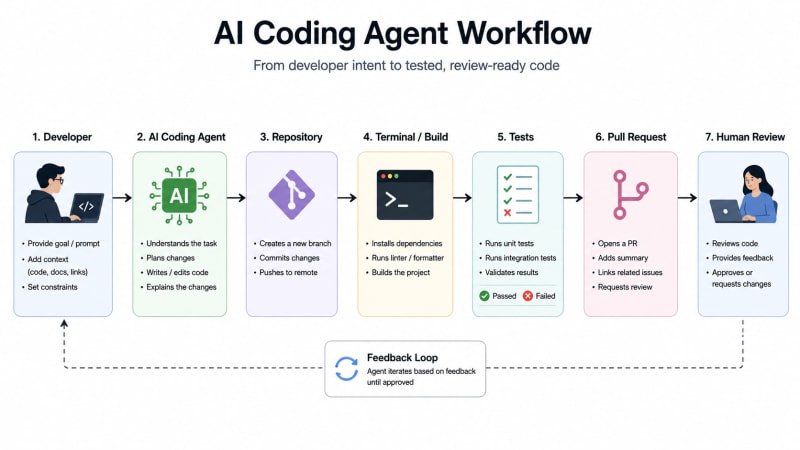
AI Coding Agent Example
Imagine an application contains this Express API:
app.get("/api/users/:id", async (req, res) => {
  const user = await getUser(req.params.id);
  res.json(user);
});
Instead of manually asking an AI how to improve it, you could give an agent a task:
Review the user API.

Add proper error handling for missing users,
create tests for the endpoint,
run the test suite,
and fix any failures.
A capable coding agent can inspect the surrounding project before deciding what needs to change.
It might produce something similar to:
app.get("/api/users/:id", async (req, res) => {
  try {
    const user = await getUser(req.params.id);

    if (!user) {
      return res.status(404).json({
        error: "User not found"
      });
    }

    return res.json(user);
  } catch (error) {
    return res.status(500).json({
      error: "Internal server error"
    });
  }
});
The bigger advantage isn't generating these few lines.
It's the surrounding workflow: finding the relevant files, understanding existing conventions, updating tests, running them, reading failures, and iterating.
The Terminal Is Becoming an AI Interface
One interesting part of this trend is how much AI development is moving into developer tooling rather than staying inside chat windows.
For example, Google's Gemini CLI brought an open-source AI agent directly into the terminal, while platforms such as GitHub are integrating multiple coding agents into repository workflows.
A developer workflow increasingly looks like:
git checkout -b fix/user-apiThen the agent receives a task such as:
Find the bug causing duplicate user creation.

Write a regression test first.
Fix the bug.
Run all related tests.
Explain what caused the issue.
This is much closer to delegating a Jira ticket than asking for autocomplete.
Why Developers Still Need to Review the Code
Giving an AI access to a repository, terminal, APIs, and deployment tooling also creates a much larger security boundary.
An agent may be able to:
Read source code
Modify files
Execute shell commands
Access development tools
Call external services
Create pull requests
That means permissions matter.
A practical production setup should look more like:
AI Agent
   ↓
Restricted Environment
   ↓
Code Changes
   ↓
Automated Tests
   ↓
Security Checks
   ↓
Human Review
   ↓
Merge
Avoid giving coding agents unrestricted access to production credentials or infrastructure.
The safest model remains simple:
AI executes. Tests verify. Developers approve.
What Developers Should Learn in 2026
Don't spend all your time learning how to write clever prompts.
Learn how to give agents good engineering context.
That means becoming stronger at:
system design
debugging
testing
Git and pull-request workflows
API design
security
architecture
code review
Anthropic's 2026 agentic coding report describes software development as increasingly shifting from developers writing every piece of code toward developers orchestrating agents, while emphasizing that human judgment remains necessary.
The developers who understand why a solution works will have a major advantage over developers who simply accept whatever an agent generates.
Key Takeaways
AI coding agents are one of the defining developer trends of 2026.
They can go far beyond autocomplete by inspecting projects, modifying multiple files, executing commands, running tests, and preparing changes for review.
But autonomy doesn't eliminate engineering fundamentals.
It makes architecture, testing, security, debugging, and code review even more important.
The interesting question is no longer:
"Can AI write code?"
It clearly can.
The better question is:
"How much of the software-development lifecycle should we safely delegate to it?"
Next Reading
Build Your First MCP Server
Agentic AI Architecture Explained
AI Skills Every Developer Should Learn in 2026
Enjoyed this guide?
Explore more developer tutorials, hands-on projects, AI engineering guides, and software architecture deep dives on TheTechLane.
TheTechLane — Learn. Build. Share